
Docs in Table Cells
Vincent Depassier · September 24, 2026
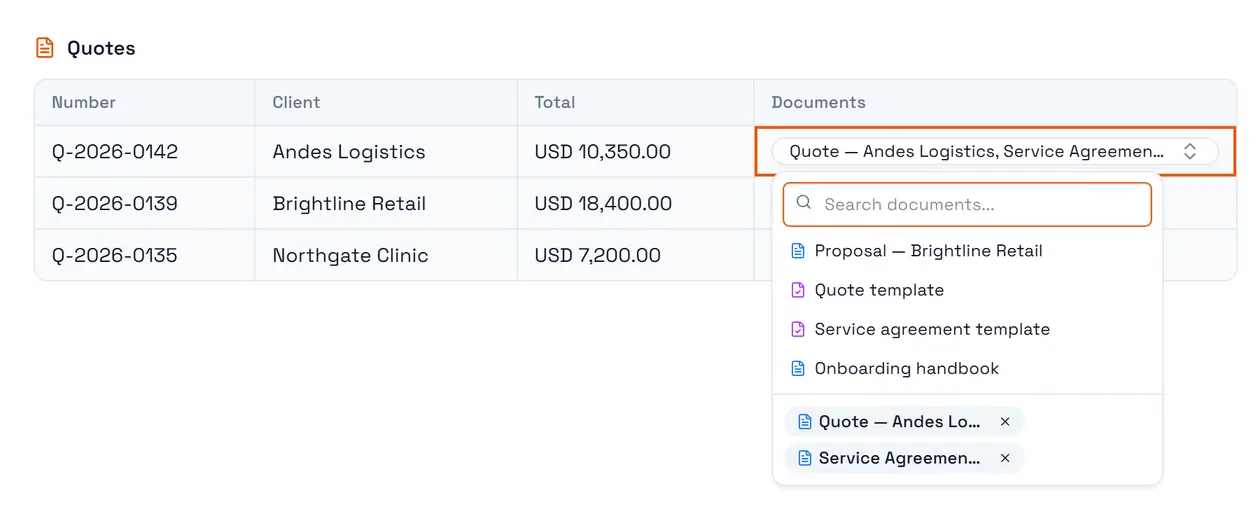
A Document column puts documents on table rows: the signed contract on a customer, the quote on a deal, the certificate on a participant. The cell holds a link to the document, not a copy of it, so the row always points at the document's current state.
The trap: a link in the data is not a link that opens. Read through the API, a Document column gives back each document's public address — but that address works only while the document is published. Unpublishing keeps the address and closes it. Every document in the response carries a Reachable flag that says whether its link opens right now. An app that shows the link without checking Reachable will send customers to This document may not be public or doesn't exist.
Adding the column
Add a column and choose the Document type. It can hold one document per cell, or several — a column set to allow multiple values, or on the "many" side of a relation, takes a list.
Filling a cell
Click the cell to open the picker. It lists the documents and templates in the workspace that you can see, with an icon for each kind, and filters them as you type. With multiple values allowed, pick as many as you need; the selection is saved when the picker closes.
The picker's text is in English in every language for now.
Automations fill the column the usual way — for example, Docs: Generate from Template followed by a row update that stores the new document's id.
What the API returns
A query through the gateway returns, for each document in the cell:
Field | What it is |
Id | The document's id |
Title | Its title |
Html | Its content, rendered as HTML |
Slug | The last part of its public address |
Url | Its public address |
Reachable |
|
Html lets an app show the document inline without a second request. Url and Reachable let it link to it instead. Use one or the other depending on whether the reader should stay in your app.