
Datatypes in Praxsuite
Camila Escobar · June 17, 2026
Two decisions matter when you add a column, and only one of them is easy to undo. The name you can change any time. The type you often cannot — once a column holds data, Praxsuite only allows the type changes where every existing value converts safely. Everything else requires emptying the column first.
So pick the type for what the field is, not for what is convenient to type today. A phone number stored as Short Text will never become a Phone column while it holds data.
Praxsuite has 38 datatypes, grouped into ten categories in the column picker. This page is the reference for all of them.
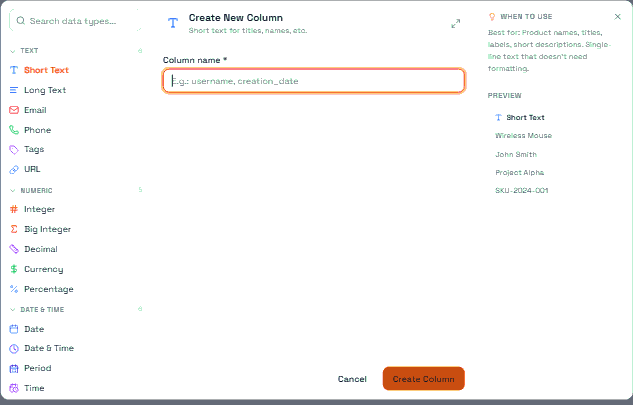
Text
Type | Holds | Limit |
Short Text | A single line of text | 255 characters |
Long Text | Multi-line prose | 100,000 characters |
One validated address | 320 characters | |
Phone | A phone number as typed | 20 characters |
Tags | A list of short labels | — |
URL | A link plus an optional display label | — |
Short Text is the default and the one to reach for on names, titles, codes and references. Long Text is for anything that reads like a paragraph.
Email really is validated. A value that is not a well-formed address is rejected on write, not silently stored. It is not a "contains an @" check — malformed addresses that happen to contain one are refused.
Phone is not validated. It accepts any string up to 20 characters. If you need a guaranteed format, validate it in a form or an automation before it reaches the table. The type gives you the right cell and the right keyboard, not a guarantee.
Tags are a list, not a comma-separated string. Each label is a separate value, which is what makes them filterable and groupable. Use Tags when you will filter by them; use Short Text when you will only read them.
URL stores the link and, optionally, the text to show instead of the raw address — so a cell can read "Contract" and still resolve to the full link.
The trap in Short Text
A key column — the column that identifies rows in a table — can never be widened past Short Text's 255 characters. If a field might one day hold a paragraph, do not make it the key. Add a Long Text sibling column and keep the key short.
Long Text does not convert back to Short Text while it holds data. The change is refused outright rather than truncating your text.
Numeric
Type | Holds |
Integer | Whole numbers |
Big Integer | Very large whole numbers |
Decimal | High-precision decimals |
Currency | A monetary amount, with its currency |
Percentage | A proportion |
There is a sixth numeric type, Number, which accepts both whole and decimal values. It is not offered in the column picker — it exists for data arriving through the API and for older tables. New columns should use Integer or Decimal.
Use Decimal, not Integer, wherever rounding would change an answer: currency conversion, rates, scientific measures. Integer is for things you count.
The trap in Percentage
The interface shows 15%. The API stores 0.15.
Percentage is stored as a fraction, not as a number out of 100. If you write to a Percentage column from an automation, an integration or an SDK, send 0.15 for fifteen percent. Sending 15 stores fifteen hundred percent, and the cell will read 1500%.
This catches people writing importers most often, because the source spreadsheet almost always holds 15.
Date & Time
Type | Holds |
Date | A calendar day, no time |
Date & Time | An exact instant |
Period | An interval between two instants |
Date Range | A start day and an end day |
Time | A time of day, no date |
Time Range | A start time and an end time |
Date and Date & Time are not interchangeable, and the difference is time zones. A Date column stores the calendar day exactly as given and never shifts it. A Date & Time column is converted to a common reference using your workspace's time zone, so the same instant reads correctly for everyone.
That is deliberate. A contract that starts on 1 January should say 1 January to every reader in every country — a Date. A payment that arrived at 14:02 happened at one single instant, which different readers see at different local clock times — a Date & Time.
Choosing Date & Time for something that is conceptually a day is the most common cause of "the date is off by one" reports.
Period, Date Range and Time Range each hold two values in a single cell rather than forcing you into two columns. Use Period when the ends are instants, Date Range when they are days, Time Range when they are clock times with no date attached.
Logic
Type | Holds |
Boolean | True or false |
Status | One option from a defined set |
Boolean is for a flag with no third answer. The moment you want "true, false, and not yet decided", you want a Status.
Status is the type that turns a table into a process. Its options come from a Status Group you define — the stages of a pipeline, the states of a ticket — and the column will only accept those options.
The trap in Status
A Status cell does not return its name. Read a row and the Status column comes back as the option's identifier, not the text you see in the interface. Comparing that value to "Approved" will never match.
This bites hardest inside automations, where a script that checks a status against a readable name fails silently — the comparison is simply false, every time, with no error. Compare against the option's identifier, or branch on it in a node that resolves the option for you.
Converting a Status column to text is the one case where the platform resolves the name for you: the stored option becomes its readable label, not its identifier.
Relations
Type | Points at |
Table | Rows in another table |
End User | Your customers |
System User | People in your workspace |
AI Agent | A configured AI agent |
These four are what make Praxsuite a database rather than a set of spreadsheets. A relation column stores a reference, not a copy — rename the target row and every cell pointing at it follows.
All four hold a list, not a single value. Even a relation you intend to be one-to-one is stored as a list with one entry. Code that reads a relation cell should expect a collection.
A Table column needs a target table, chosen when you create it, and it cannot point at its own table. It also carries a cardinality — one-to-one or one-to-many — which controls how the cell behaves when you pick values.
End User and System User are different populations, and the distinction is not cosmetic. System User is someone who signs into your workspace: an owner, an approver, an assignee. End User is a customer of the product you built — someone who authenticates against your app through the gateway, and who never sees your workspace. Assigning a ticket goes to a System User; recording who placed an order goes to an End User.
Media & Files
Type | Holds |
File | One or more stored files |
Document | A generated document |
A File column holds a list of files, so a single cell can carry a contract and its three annexes. Files live in the workspace's file storage and the cell holds references to them — detaching a file from a row does not delete the file itself.
Document links a row to a document generated from a template, so a row can carry its own quote, contract or report rather than a static attachment.
Identity
Type | Holds |
GUID | An external unique identifier |
Secret | An encrypted value |
Every row in Praxsuite already has its own permanent internal identifier. You do not need a GUID column to have one. Use GUID only to store an identifier that belongs to another system — a CRM record id, a payment provider's customer reference — so you can match records across the boundary.
Secret is for values that must never be readable in a listing: tokens, passwords, provider keys. The value is encrypted at rest and only surfaced to authorised readers and to the operations that need it. It is not a "hidden column" — hiding a column is a display choice, while Secret is storage.
Advanced
Type | Holds |
Formula | A computed value |
JSON | Arbitrary structured data |
A Formula column has no stored value. It carries an expression that is evaluated when the row is read, over the other columns in that row. Change a source value and the formula's result changes with it, with nothing to recalculate.
Because it is computed, a Formula column cannot be written to, imported into, or set by an automation — and it cannot be a key.
JSON is the escape hatch: a cell that holds a structure you define yourself. It is the right answer for a payload from an external system that you want to keep intact. It is the wrong answer for data you will filter or group by, because the platform cannot index the inside of it. If you find yourself filtering on a field inside JSON, that field wants to be its own column.
Visual
Type | Holds |
Color | A hex colour |
Country | A country |
Geo Point | A latitude and longitude |
Color accepts a hex value with optional transparency and gives the cell a picker instead of a text box. Country stores the standard two-letter country code and renders the flag and name, which keeps "USA", "U.S." and "United States" from becoming three different values in the same column.
Geo Point holds a coordinate pair as one value. Use it for anything you will place on a map; use two Decimal columns only if you need to compute on the parts separately.
Schedule
Type | Holds |
Day of Week | One or more weekdays |
Day Range | A continuous span of weekdays |
Month of Year | One or more months |
Month Range | A continuous span of months |
Duration | A length of time |
These exist because opening hours, shift patterns and seasonal availability are genuinely awkward in a generic date column. "Monday, Wednesday and Friday" is not a date, and storing it as text makes it unfilterable.
Day of Week and Month of Year each have a setting that decides whether the cell accepts one value or several. Set it when you create the column — it changes what the cell is.
Weeks start on Monday. Days are numbered 1 to 7 with 1 = Monday and 7 = Sunday, and a value outside that range is rejected. If you are importing from a system that numbers Sunday as 0, remap before writing.
Months are numbered 1 to 12 in the obvious way.
Duration is a length of time, not a moment — three hours, ninety minutes, forty-five seconds. The column has a display format setting that decides how that length is written in the cell.
Day Range and Month Range hold a from/to pair, which is the right shape for "Monday to Friday" or "March to November". They are a single value, not two columns.
What a type is not
A type is not a permission. Hiding a column, restricting it by role, and making a value secret are three different mechanisms, and only the last one is a datatype.
A type is not a required field. Every type accepts an empty cell unless the column is separately marked as required.
A type is not a uniqueness rule. Uniqueness is a rule you switch on over a column — and it is dropped whenever that column's type changes.
Next
Changing a Column's Type
Working with Data Types in Tables
Formula Datatypes in Prax Tables
How to Create States From Scratch
Table Components: Rows and Columns