
Changing a Column's Type
Vincent Depassier · September 1, 2026
Before you try to change a column's type, two things decide whether it will work at all:
Is the column a key or a system column? If so, the answer is no. Not "no, unless" — key columns and the built-in columns Praxsuite maintains for you can never change type.
Is the column empty? An empty column can become any type, because there is nothing to convert. A column with data can only become a type that every existing value converts into.
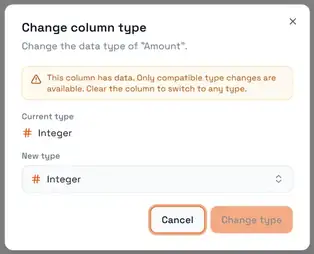
That second rule is the whole story, and the dialog says so out loud: a column with data offers only compatible changes, and clearing it unlocks every type. Praxsuite will not truncate your text, round your decimals or drop your relations to make a conversion fit. If a single value would not survive, the change is refused and your data is left exactly as it was.
What converts into what
From | Can become |
Any type except relations and Secret | Short Text |
Any type at all | Long Text |
Integer | Decimal, Big Integer, Number, Currency |
Decimal | Number, Big Integer, Currency, Percentage, Integer |
Number | Big Integer, Decimal, Currency, Percentage, Integer |
Big Integer | Decimal, Number |
Currency | Decimal, Number |
Percentage | Currency, Decimal, Number |
Date | Date & Time |
Date & Time | Date |
Email, Phone, Tags | Long Text |
Status | Short Text, Long Text |
Anything not on this list requires an empty column.
Three consequences are worth pulling out, because each one surprises somebody:
Long Text cannot become Short Text. The pair is one-way. Every type widens into Long Text, and nothing narrows back out of it while it holds data. If you widened a column by mistake and it is still empty, change it back now — after the first row is saved, the only path is a new column.
Nothing becomes a relation. Table, End User, System User, AI Agent, File, Status, Boolean and Secret can only be set on an empty column. There is no conversion from text into a relation, because the platform has no way to know which row your text was meant to point at. Build the relation column alongside, populate it, then delete the old one.
Relations and Secret cannot even become text. Every other type can be read out as Short Text; these cannot. A Secret is encrypted, and a relation holds references rather than readable values, so there is nothing meaningful to write into a text cell.
Status is the exception that proves the rule: converting a Status column to text gives you the option's readable name, not the identifier stored in the cell. It is the one conversion where the platform reaches into the status group on your behalf.
What a type change takes with it
Three things are dropped, and none of them are restored if you change the type back.
The uniqueness rule. A uniqueness rule is defined in terms of the old type, so it cannot survive the change. If the column was enforcing unique values, it stops. Re-enable it afterwards if you still want it — and note that re-enabling will fail if duplicates crept in while it was off.
Display settings, when the column was empty. Currency choice, date format, duration format: when an empty column switches to an unrelated type, its display settings are cleared rather than carried into a type they no longer describe.
The relation target, when leaving Table. Convert a Table column into something else and its target table is released, so nothing downstream keeps treating the column as a relation.
Turning a column into a relation
This is the one change that needs more than a type. A relation column is its target, so you must supply one:
A target table is required. Without it you would get a column that points nowhere, which reads as a silently broken relation rather than an error — so the platform refuses the request instead.
A table cannot point at itself. If you need a hierarchy within one table, that is a separate pattern, not a self-referencing type change.
Cardinality — one-to-one or one-to-many — is set at the same time and controls how the cell behaves when someone picks values.
The order things happen in
The structural change is applied first, and only if it succeeds is the column's definition updated. This matters when a change fails: a failed conversion leaves the column entirely untouched, still on its old type, with its data intact. You will not find a column that claims to be a Decimal while still holding text.
When conversion is refused
You have three options, in increasing order of effort:
Clear the column. If the data is disposable, empty it and the change becomes legal immediately — an empty column can take any type.
Go through Long Text. Every type converts into Long Text. If your goal is to get the values out into something you can reshape, that is the universal exit. It is a one-way door, so do it on a duplicate first if you are not sure.
Add a new column alongside. The safest route, and the only one available for relations. Create the column with the type you actually want, populate it from the old one, verify, then delete the original. Nothing is lost if you stop halfway.
Next
Datatypes in Praxsuite
Working with Data Types in Tables
Table Snapshots
Deleting Columns and Rows in a Table
Structuring Tables