
Permissions
Vincent Depassier · September 24, 2026
Who can open and change a document is decided in two layers. The workspace role decides what someone may do with Docs in general. A document's or folder's own access list can then narrow that down to specific people.
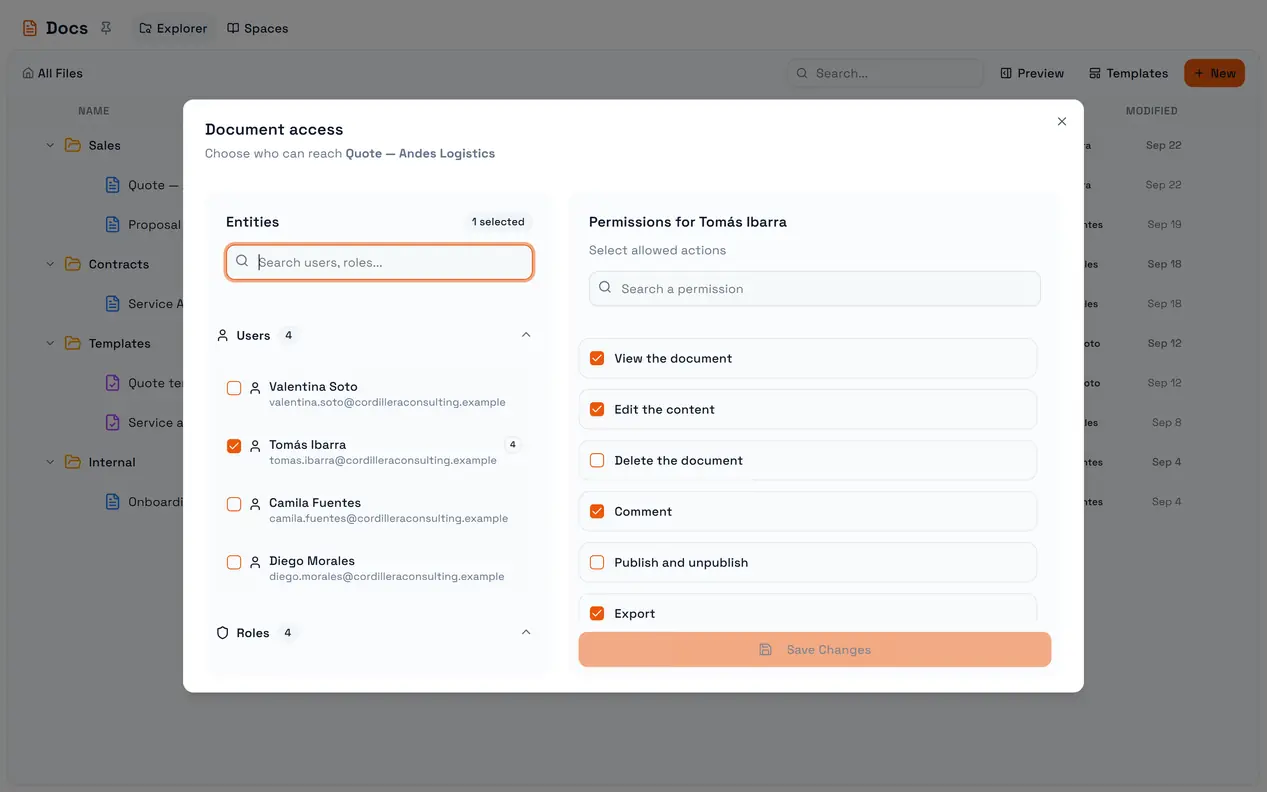
The trap: naming anyone takes everyone else out. A document with no access list follows the roles. The moment you add a single person to its access list, only the people and roles on that list can reach it — the workspace roles stop counting for that document. Adding a colleague "so they can also see it" removes everyone who could see it through their role. Add the roles that should keep access along with the person.
Layer 1: the role
Workspace roles carry a Doc permission — read, create, update, delete, manage — that applies to every document the access lists do not govern. It is also the only way to allow Create documents, which cannot be granted per document.
On a document with no access list, a role that can update documents can also publish them.
Layer 2: the access list
Open Permissions from a document's or folder's menu. You can grant to users, roles and agents, and choose what each may do.
On a document
Action | Allows |
View the document | Opening and reading it |
Edit the content | Editing and saving. Includes viewing |
Delete the document | Deleting it. Includes editing and viewing |
Publish and unpublish | Making it public at a link, or taking it back |
Export | Exporting it as a file through automations and the API |
Manage signatures | Sending it for signature and managing the process. Includes viewing, not editing |
Manage access | Everything, including changing this list |
Comment | Nothing yet — there is no commenting feature |
View, Edit and Delete build on each other. Publish and Export are separate: someone who may edit a document may not publish it unless they are also given Publish and unpublish. That is what lets an editor work on a quote without being able to put it in front of the client.
Printing from Export → Export as PDF in the portal only needs View: it prints what the person can already read.
On a folder
A folder offers the document actions — view, create, edit, delete, comment — and they apply to the documents inside it.
How the rules combine
A document with its own access list is governed by that list alone.
Otherwise it inherits from its folder. If that folder has no list, from the folder above it, and so on up.
The closest list wins. Lists are not merged: a document with its own list ignores its folder's list completely, and a subfolder with a list ignores its parent's.
If nothing up the chain has a list, the workspace roles decide.
Workspace owners can always reach everything.
Documents and folders you cannot reach are hidden from your Explorer, not shown locked.
Things that change access without touching a list
Moving a document changes the folder it inherits from.
Duplicating copies the source's access list to the copy.
Creating a document gives it no list of its own; it inherits from wherever you created it.
Renaming, moving and deleting a folder itself is governed by the role's Doc permission, not by the folder's own access list.
Access from outside the portal
API keys and AI connectors do not use these lists. They have their own Docs access setting, and they see no documents until you grant them some there. See Automations, AI and the API.