
Folders
Vincent Depassier · September 24, 2026
Folders organise documents in the Explorer, and they carry access rules: restrict a folder and every document inside it is restricted the same way, unless a document has rules of its own.
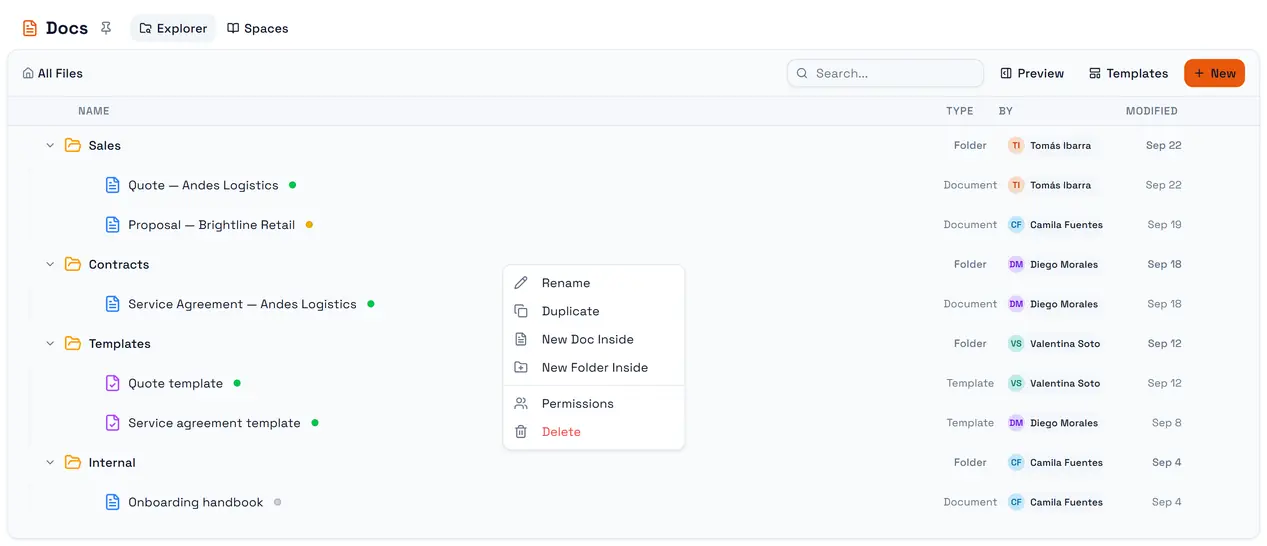
The trap: a folder can only be deleted when it is empty — including documents you cannot see. Deleting refuses a folder that still holds documents anywhere inside it, in any subfolder. If some of those documents are restricted and hidden from you, the Explorer can look empty and the delete still fails with This folder still contains documents you cannot see. Ask an administrator to move them first. It is deliberate: deleting a folder used to drop its documents at the top level, stripped of the folder's access rules.
Creating and nesting
New → New Folder creates a folder at the top level; New Folder Inside on a folder's menu creates one inside it.
A folder name can be up to 200 characters.
Folders nest up to 10 levels deep, counting the top-level folder. Creating or moving a folder past that depth is refused.
Moving
Drag a document or a folder onto a folder in the tree. Holding it over a closed folder for a moment opens that folder, so you can drop deeper.
You cannot move a folder into itself or into one of its own subfolders. A move that would take the deepest subfolder past 10 levels is refused.
Moving a document changes which folder's access rules it inherits. Moving it out of a restricted folder can open it up; moving it in can close it.
Duplicating a folder
Duplicate on a folder copies it with everything inside: subfolders and documents, including documents nested inside other documents.
What is copied | What is not |
The folder tree and every document's content | Version history — each copy starts over at version 1 |
Templates, still as templates | Published state — every copy is a draft |
Access rules on each copied folder and document | Signatures and signature processes |
| AI indexing — copies need to be indexed again |
A folder holding more than 500 items cannot be duplicated; the request fails with a message saying so. Split it and duplicate the parts.
Renaming
Renaming a folder changes its name only. Links to published documents inside it are not affected.
Deleting
You delete | What happens |
A document | It is removed with its version history, after a confirmation. There is no recycle bin |
An empty folder | It is removed with its empty subfolders, after the confirmation Delete the folder "…"? |
A folder with documents | Refused: This folder contains N item(s). Move or delete them before deleting the folder. |