Table Views
Vincent Depassier · September 1, 2026
A saved view is a table with the filtering, column choice and sort already made. One table, several views, each answering a different question.
Use them when the same table serves several audiences: Open tickets, My region, This quarter's invoices, Unassigned. Instead of everyone re-applying the same filters every morning, they open the view.
What a view stores
Part | Effect |
Filters | Which rows the view shows |
Visible columns | Which columns appear, and which are hidden |
Sort | The column and direction it opens on |
Row colouring | Rules that tint rows by their values |
Position | Where it sits in the list of views |
Default | Whether it is the one the table opens on |
Row colouring is the part people discover late and then use everywhere. A rule that turns overdue rows red does more for a daily operations table than any chart, because the exception finds the reader instead of the reader hunting for it.
Filters are enforced, not suggested
When data is read through a view, the view's filters are applied first, then anything the reader adds is merged on top.
That ordering matters: a reader can narrow a view further, but not widen it back out. Opening the My region view and clearing the search box does not reveal the other regions.
The trap
A view is a lens, not a permission.
It changes what is shown, not what the person is allowed to reach. Someone who can read the table can read the whole table — through a different view, through the table directly, or through the API. Hiding a column in a view does not protect it.
If a column must not be seen, that is a permissions job: restrict it by role, or keep it in a different table. Use views to make the right rows convenient, never to make the wrong rows secret.
Practical advice
Make the most-used view the default. The table's default view is the one people land on, and most tables have one obvious "what I care about today".
Name views for the question, not the filter. Needs invoicing is a better name than Status = Delivered AND Invoice is empty, because the name survives the filter changing.
Delete views nobody opens. A list of twenty views is as hard to navigate as an unfiltered table.
Next
Structuring Tables
Table Snapshots
Record Panels
Permissions in Praxsuite
Table Components: Rows and Columns
What it looks like
A view is created from one dialog. The name is the only required field; everything else is a tab, and the tabs are the four things a view can remember.
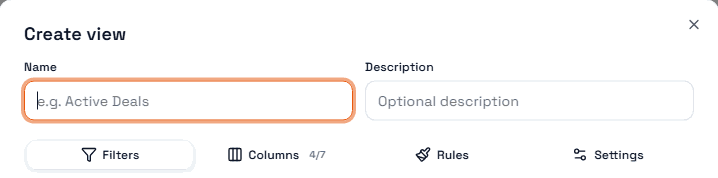
Note the count next to Columns — it reads 4/7 here, meaning the view shows four of the table's seven columns. That counter is the fastest way to tell whether a view is hiding something.
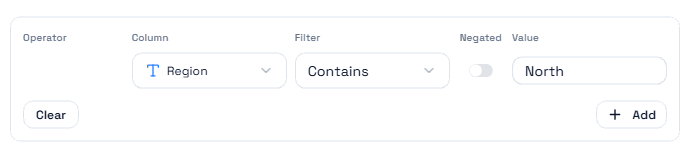
The Filters tab builds one condition per row: pick a column, pick an operator, give it a value. Negated inverts the condition, and Add starts another row.