
Bringing data into Praxsuite, Data Import Feature
Camila Escobar · June 17, 2026
Learn how data import in Praxsuite lets you seamlessly transfer Excel and CSV files into structured tables, helping teams start faster and turn existing data into a scalable operational system.
Data import allows you to bring existing information—such as Excel or CSV files—directly into Praxsuite in a fast, clean, and intuitive way. This feature is designed to help teams start working with real data immediately, without redoing past work or going through complex migration processes.
Instead of starting from scratch, Praxsuite lets you carry forward what you already have and turn it into a living, structured system.
Why data import matters
Most organizations already store critical information in spreadsheets: clients, inventories, contracts, operational logs, historical records, or reports. These files often represent years of accumulated work.
Data import solves a very common problem:
No more manual copy-paste
Fewer human errors
Faster initial setup
Immediate operational readiness
Rather than treating spreadsheets as a dead end, Praxsuite turns them into a starting point.
From static files to an operational system
Spreadsheets are static. They display information, but they do not scale well, enforce structure, or connect easily to processes.
When you import data into Praxsuite:
Each row becomes a structured record
Each column becomes a field with rules and validation
The data becomes part of Tables, Dashboards, and workflows
This transforms information from a passive list into something actionable and connected.
Fast and intuitive by design
The import experience is built to feel familiar and simple:
Columns are automatically recognized
Data types can be reviewed and adjusted
Large files can be imported in minutes
You don’t need to pre-format complex templates or understand database concepts. Praxsuite adapts to your data and guides you through the process.
Useful at every stage
Data import is valuable in multiple scenarios:
Getting started: migrate existing data to begin with real information
Scaling up: consolidate multiple spreadsheets into one system
Changing processes: turn operational files into structured workflows
Centralizing data: eliminate duplicated or inconsistent versions
It’s a frictionless way to evolve without disruption.
Control and reliability
During import, Praxsuite:
Respects the structure of your Tables
Applies data type validation
Maintains consistency across records
Allows review before final confirmation
This ensures imported data is reliable from day one and ready to be used across Dashboards, Forms, and operational processes.
Key idea
Data import is not just a shortcut.
It’s how existing information becomes part of an operational system.
With Praxsuite, spreadsheets stop being where data lives—and start being how your system begins.
What it looks like
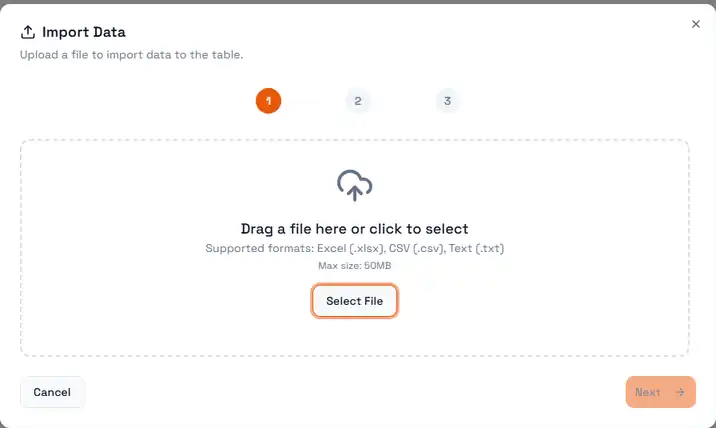
Import is a three-step wizard, and the numbered dots at the top are worth reading before you start: choosing the file is only the first of them. The two that follow are where the real decisions are made — matching the file's columns to the table's, and confirming what will be written. Nothing reaches the table until you finish the third step, so a file picked in error costs you a click, not a cleanup.
The drop zone states the two constraints up front, which is where most failed imports actually stop:
Accepted formats — Excel (
.xlsx), CSV (.csv) and plain text (.txt). Other spreadsheet formats, including.xlsand Numbers files, are not read; export them to one of these three first.Maximum size: 50 MB. A file over that is rejected at this step, before any parsing happens. Splitting a large export into several files and importing them in sequence is the normal way through — the table does not care that the rows arrived in batches.
Next stays disabled until a file is actually loaded, so a greyed-out button here means the file was never accepted, not that something later is missing.