
Record Panels
Vincent Depassier · September 1, 2026
A record panel is how one row looks when you open it. Instead of a list of every field in column order, you lay out a page: the important things large and first, the related records beside them, the rest tucked into sections.
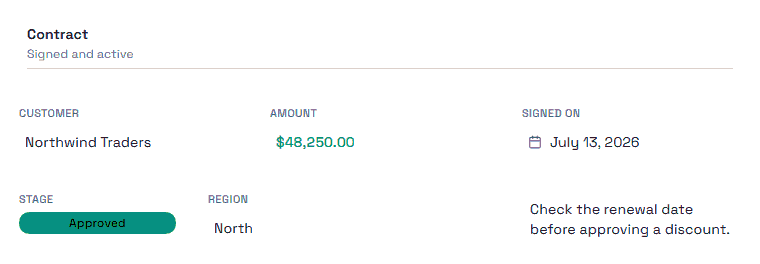
It is worth doing for any table people actually work in. A row with forty columns is unreadable as a form and perfectly readable as a designed panel.
Blocks
A panel is a grid you place blocks on. Each block has a position, a size, and its own configuration.
Block | Shows |
Field | One column's value, rendered for its type |
Field group | Several fields together |
Section | A titled container with an optional subtitle |
Rich text | A fixed block of plain text |
Related records | Rows from another table that point at this one |
Image | An image from the record or a fixed one |
A Field block renders according to the column's datatype, not as raw text — a Currency column arrives formatted as money, a Status as its coloured option. That is why panels are worth more than a generic form: the panel already knows what each value is.
Related records is the block that changes how a table feels. Opening a client and seeing their invoices, their visits and their contacts on the same page is the difference between a database and a workspace people want to use.
The Rich text block is plain text, despite the name. It does not interpret markdown — asterisks and hashes appear literally, exactly as typed. Write the note as a sentence, not as formatted markup.
Several panels per table
A table can have more than one panel template, and one of them is the default.
A panel can also be scoped to a saved view. That is the feature worth planning around: the same table can present a record one way in the Sales view and another way in the Support view, because the two teams care about different halves of the same row.
A panel with no view attached is the table's default — what people get when they open a record from anywhere else.
Practical advice
Put the identity at the top. Whatever a person uses to confirm they opened the right record — name, reference, status — belongs in the first block, at a size you can read without leaning in.
Group by when things are used, not by column order. The order columns were created in is an accident of history. The order someone reads them in is a design decision.
Use a note block for the instruction that would otherwise live in someone's head. What to check before approving. Who to call when a field is empty. The panel is where that belongs, next to the field it is about.
Do not put every field on the panel. A panel that shows all forty columns is the list you were trying to escape. Sections exist so the rare fields can be present without being in the way.
The trap
A panel is presentation, not permission. Leaving a field off a panel hides it from that layout, not from the person. They can still see it in the table, in another panel, or through the API.
Field-level protection is a permissions setting, and it is the only thing that actually protects a value.
Next
Table Views
Table Snapshots
Structuring Tables
Datatypes in Praxsuite
Permissions in Praxsuite