
Table Snapshots
Vincent Depassier · September 1, 2026
A snapshot is a checkpoint of a table: every row, plus the shape the table had at that moment. Restoring one puts the table back.
Two sentences before you use it:
Restore is a full replace, not a merge. The table is emptied and the snapshot's rows are written back. Anything added since the checkpoint is gone, and there is no partial or selective restore.
Retention is unlimited until you configure it. A table with no snapshot schedule keeps every checkpoint you ever took, forever.
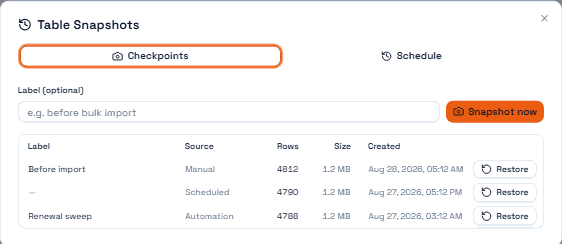
Taking a checkpoint
You can take one by hand before something risky — a bulk edit, an import, a migration, letting an automation loose on production data for the first time. Give it a label; six checkpoints called "checkpoint" are six checkpoints you cannot choose between.
Automations can take them too, which is the better habit: a checkpoint node at the top of any automation that rewrites rows means the undo already exists before you need it.
The list shows where each checkpoint came from — Manual, Scheduled or Automation — along with its row count and size, so you can read it without opening anything.
Scheduled checkpoints
A table can take its own checkpoints on a schedule, either at an interval or at a fixed time of day.
The schedule is also where retention lives:
Setting | Effect |
Keep last N | Prune to a number of checkpoints |
Keep N days | Prune by age |
Set one. Without a schedule there is no pruning at all, and a large table checkpointed regularly is a storage bill that grows quietly and forever.
Restoring
Restore takes a specific checkpoint, or the most recent one for the table. It requires an explicit confirmation — a restore without it fails and changes nothing, deliberately.
Permission to restore is gated at the same level as deleting rows. That is the right comparison to hold in your head: restoring is a delete of everything that came after.
The result tells you how many rows were restored and how many were there before. Compare them. A restore that reports far fewer rows than the table held is telling you something you want to know before people start working again.
The trap: columns are matched by identity, not by name
The restore matches the snapshot's columns to the live table's columns by their stable identifier — not by their name.
Two consequences, and they pull in opposite directions:
Renaming a column is safe. The identifier does not change, so the data comes back into the renamed column.
Deleting and recreating a column is not. A recreated column is a new column with a new identifier, even if you gave it exactly the same name. The snapshot's data for the old column has nowhere to go, and it is silently dropped.
Columns that exist in the snapshot but not in the table are skipped, and the restore reports that the schema did not match. If you see that flag, read it — it means the restore did not put everything back.
What a snapshot is not
It is not a backup of your workspace. It is one table.
It is not version history. There is no diff between checkpoints and no per-row rollback.
It is not free. Each checkpoint stores the table's rows.
Next
Table Views
Record Panels
Deleting Columns and Rows in a Table
Changing a Column's Type
Create your First Automation