
Data Export in Praxsuite
Camila Escobar · June 17, 2026
Learn how data export in Praxsuite lets you safely share information with external users and analyze data in tools like Excel, while keeping your Workspace secure and controlled.
Data export allows you to take information stored in Praxsuite and share it outside the platform in a controlled and practical way. Whether you need to collaborate with people who are not part of your Workspace or analyze data in external tools like Excel, exporting gives you flexibility without compromising the integrity of your system.
Instead of opening access to your Workspace, Praxsuite lets you export exactly what you need, when you need it.
Why data export is useful
Not everyone who needs information should be a Praxsuite user. External partners, clients, auditors, or stakeholders often need access to data, but not to the system itself.
Data export solves this by allowing you to:
Share information without granting platform access
Maintain security and permissions inside the Workspace
Deliver data in familiar formats
Control what data leaves the system
This keeps your operational system protected while still enabling collaboration.
Sharing data beyond the Workspace
Exported data can be shared with people who do not have accounts in Praxsuite.
Common scenarios include:
Sending reports to clients or partners
Providing data to auditors or consultants
Sharing snapshots of operational performance
Delivering data to finance or legal teams
Instead of screenshots or manual summaries, you can export structured data directly from the source.
Working safely outside the system
Exporting data allows teams to work in isolated environments such as Excel without affecting the live system.
This is especially useful when:
Performing exploratory analysis
Testing formulas or scenarios
Preparing presentations or reports
Reviewing data offline
Because the export is a copy, any changes made outside Praxsuite do not impact the original data. This keeps the system stable and trustworthy.
Familiar formats, predictable structure
Data exports are designed to be easy to work with in common tools.
When you export data:
Tables are converted into structured files
Columns and values are preserved
The format is ready for Excel, spreadsheets, or analysis tools
This minimizes cleanup work and allows users to focus on analysis rather than formatting.
Export as a controlled action
Exporting data is an intentional action governed by permissions.
This ensures that:
Only authorized users can export data
Sensitive information is protected
Data sharing remains auditable and deliberate
Export is a way to extend the value of your data, not to weaken its security.
Key idea
Data export gives you controlled freedom.
You keep Praxsuite as the single source of truth, while still allowing data to travel where it needs to go—whether that is a partner’s inbox or an analyst’s spreadsheet.
What it looks like
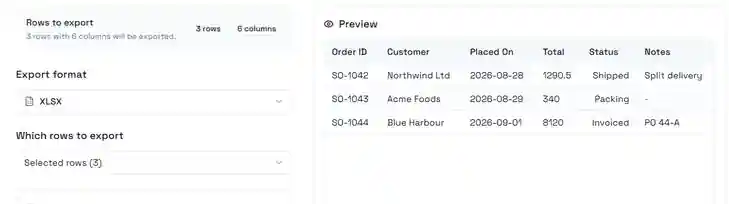
Two things on this screen decide what you get, and they are independent of each other.
Which rows to export is a choice, not a consequence of what is on screen. It offers all rows, the rows you selected, and the current page — so exporting a filtered view and exporting the whole table are the same dialog with a different setting. The count in the badge above is the answer: 3 rows with 6 columns will be exported is the file you are about to produce, before you produce it.
The preview is the file, not the table. It renders the actual rows and columns that will be written, with the export's own column selection and rules applied. If a column you expected is missing from the preview, it will be missing from the file — that is the moment to fix it, not after opening the download.
Below the format selector sits Filters inside export: conditions that apply to this file only, combined with whatever filters the table view already has. It is the mechanism for "the same table, but only this quarter's rows" without disturbing the view everyone else is looking at.
Large exports are sent by email
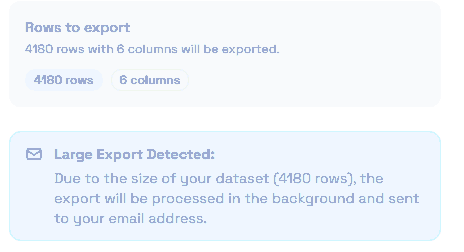
Past a certain size the dialog changes behaviour, and it tells you so before you commit: the export is processed in the background and sent to your email address instead of downloading in the browser. The primary button changes from Export to Send via email to match.
This is the part worth knowing in advance, because it changes what "done" looks like. Nothing lands in your downloads folder; the dialog closes and the file arrives separately. If you are scripting around an export, or standing over someone's shoulder waiting for a file, that difference matters — and a large export that "did nothing" has almost always gone to the inbox.