
Vincent Depassier · September 24, 2026
An Instagram channel brings the direct messages of an Instagram professional account into the Inbox and lets you answer them from there, with text and attachments.
The trap: photos and videos people send you do not arrive. Inbound media is not copied into the Inbox; the message shows only a placeholder such as [imagen] or [adjunto]. If a customer sends a screenshot of a problem, you have to open the conversation in Instagram to see it. Text arrives normally.
What you need
An Instagram professional account and its Instagram Business Account ID.
A Meta app that receives that account's messages, and the app's App Secret.
Connecting
Channels → Add Channel → Instagram (direct messages).
Fill in:
Field | Notes |
Instagram Business Account ID | The numeric id of the account |
Display Name | How the channel appears in the Inbox |
Instagram App Secret | From your Meta app. Used to verify that incoming messages really come from Meta |
Access Token (optional) | A token for this account. Without one, the workspace's Meta connection is used |
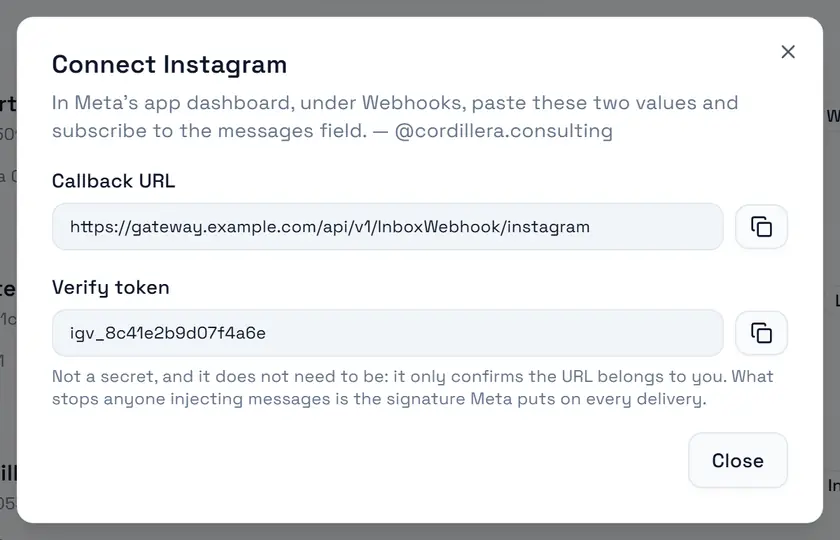
Create the channel. Connect Instagram shows the Callback URL and the Verify token to paste into the webhook settings of your Meta app, subscribed to messages.
When editing the channel, leave the secret and token fields empty to keep the current values.
One account, one channel. The same Instagram account cannot be connected to two active channels in a workspace.
When your Meta app already sends its webhooks somewhere else
A Meta app has one webhook address. If yours already points at another receiver in the workspace, open My Meta app already posts somewhere else and enter that Existing webhook receiver ID, so both keep working.
Tokens
A token set on the channel wins over the workspace's Meta connection. The Inbox renews long-lived tokens on its own before they expire, so a connected account keeps working without you re-entering anything.
Sending
Replies can carry text and files. Each file goes out as its own Instagram message, after the text.