
Structure Components: Text and Image
Vincent Depassier · September 1, 2026
Two components in the palette collect nothing. Text and Image exist to make the rest of the form make sense.
They are worth using deliberately, because the most common reason a form gets bad answers is not a bad field — it is that nobody explained what the section was for.
Text
A block of static text placed anywhere in the form.

Setting | Effect |
Text | What it says |
Style | Heading, subtitle, paragraph or caption |
Alignment | Left, centre or right |
Use headings to break a long form into sections a person can see the end of. Use paragraphs for the instruction that would otherwise become a support message: which document to attach, what "priority" means here, what happens after they submit.
Do not use a Text block for something a field should carry. If the note only applies to one question, it belongs in that field's own label or description, where it stays attached to the question when the form is reordered.
Image
An image placed in the form.
Setting | Effect |
Source | The image to show |
Alt text | What it says for anyone who cannot see it |
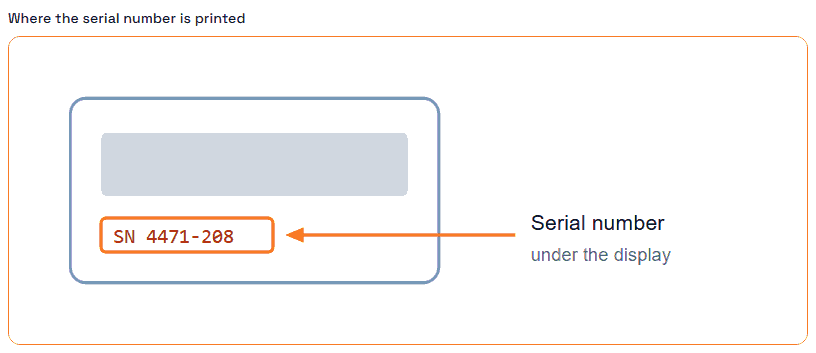
Use it for a header that makes a public form look like it belongs to you, or for a diagram that answers a question before it gets asked — which meter to read, where the serial number is printed.
Write the alt text. It is read aloud by screen readers, shown if the image ever fails to load, and — in this component — printed above the image as its caption, so it is visible to everyone. For a decorative header, describing it briefly is enough; for a diagram that carries instructions, the alt text has to carry the same instruction, or people relying on it get a form they cannot complete.
The trap
Structure components are not a substitute for a page break. A very long form is still a very long form with headings in it. If people are dropping out halfway, splitting the form is the fix; adding a heading is not.
Next
Praxsuite Forms: Components Overview
How to Create a Form
Text Box Component
Files
File Component