
Praxsuite Forms: Components Overview
Camila Escobar · June 17, 2026
A form is built by dragging components from the palette onto the canvas. There are thirteen of them, and choosing the right one matters more than the layout does — the component decides what people can enter and what shape the answer arrives in.
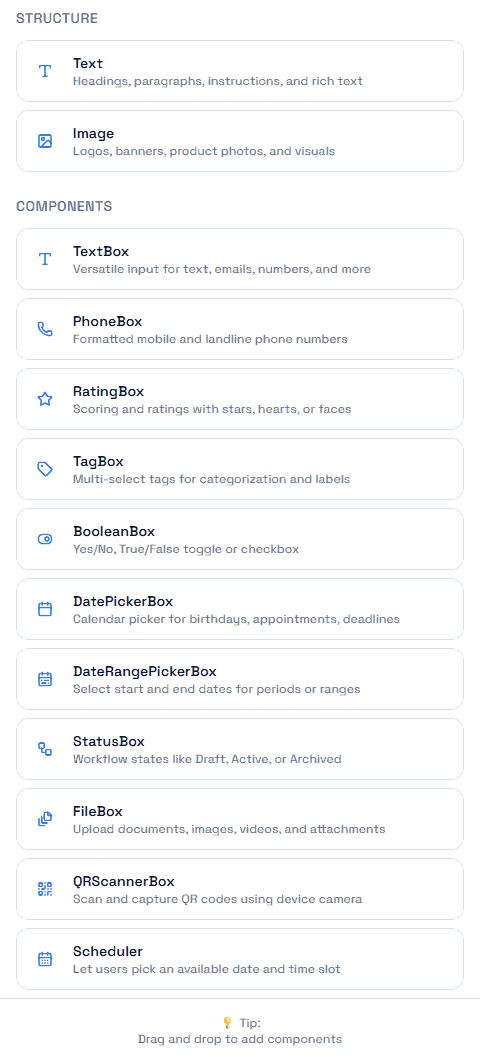
The palette is split in two, and the split is the important idea.
Structure: components that collect nothing
Component | Purpose |
Text | Headings, paragraphs, instructions |
Image | A logo, a banner, a diagram |
These exist to make the rest of the form make sense. The most common cause of bad form answers is not a bad field — it is that nobody explained what the section was for.
Components: everything that collects an answer
Component | Collects |
TextBox | One line of free text |
PhoneBox | A phone number, with a country selector |
RatingBox | A score on a fixed scale |
TagBox | Several short labels |
BooleanBox | Yes or no |
DatePickerBox | One calendar day |
DateRangePickerBox | A start day and an end day |
StatusBox | One option from a Status column |
FileBox | One or more uploaded files |
QRScannerBox | A code read by the camera |
Scheduler | An appointment slot |
How to choose
Three questions settle almost every case:
Will you filter by this answer, or only read it? Filtering wants a component whose values are constrained — StatusBox, TagBox, BooleanBox. Reading tolerates free text.
Is the set of answers known in advance? If yes, a StatusBox keeps everyone using the same vocabulary. If no, and you are still discovering the categories, a TagBox with custom entry allowed is the honest choice — until you know, and then you tighten it.
Does the answer have to be correct, or just present? Email validates. Phone does not. Required means "something was entered", never "the right thing was entered". Anything that must be correct needs a check after submission.
The component and the column are two decisions
A component collects; a column stores. They are chosen separately, and mismatching them is the most common source of surprise.
The clearest example is dates: a DatePickerBox bound to a Date column stores the day exactly as chosen, while the same picker bound to a Date & Time column attaches a time and converts it — which is how a form full of correct dates produces reports that are off by one.
Get the column types right first, then build the form on top of them.
Next
How to Create a Form
Text Box Component
State Component
Structure Components: Text and Image
Datatypes in Praxsuite