
Utility, Vault and Docs Nodes
Camila Escobar · June 17, 2026
The remaining nodes: secrets, timing, documents, and one that does nothing at all on purpose.
Secrets
Read Secret
Resolves a secret from the workspace Vault and makes it available to the nodes downstream as {{vault.alias}}.
The guarantee is what matters: the value never appears in logs, in the run context, or in an API response. A run that used a secret shows that it used one, not what it was.
That is the difference between this and typing a key into a node's configuration field. A key in a config field is visible to everyone who can open the automation, it travels in exports, and it turns up in screenshots. Read Secret has none of those exposures.
Everything that authenticates to something else goes here: API keys, tokens, passwords for an FTP drop, a signing secret.
Vault: Write Secret
Rotates a secret by writing a new version, keeping the previous one in version history.
This is what makes automated credential rotation possible. The shape is: a scheduled automation refreshes a token with the provider, then writes the new value back with this node — so the credential renews itself and no human has to remember. Instagram's 60-day token is the textbook case.
Timing
Delay
Pauses the flow for a set duration before continuing.
Reach for it when something outside your control needs a moment — a provider that reports a resource as ready before it is, an external job that needs a beat before you poll it.
It is not a solution to rate limits in bulk work; the bulk email node's own spacing controls do that better. And a long delay is time the run spends alive, so prefer a schedule over a very long wait.
Note
A visual annotation. It does not execute, and it does not connect to anything.
It exists so a flow can explain itself on the canvas. A branch whose condition is not obvious, a node kept for a reason that is not visible, the reason a delay is there at all — write it next to the thing. The person who opens this automation in eight months is probably you, and the run history will not tell them why.
Documents
The Docs category has twelve nodes — generating from templates, publishing, exporting, signatures and more. They are all covered in Automations, AI and the API in the Docs Module. The two you will reach for most:
Docs Query
Semantic search across workspace documents. It returns the passages closest in meaning to your query, not the ones containing your words.
That distinction is the whole feature. A query for "how do I get a refund" finds a passage about returning an order even with no shared vocabulary. Its main use is giving an AI model the right context from your own documentation, so an answer comes from your material instead of the model's guesses.
It only searches documents that have been indexed for AI, and indexing is manual. A document nobody indexed is invisible to it.
Docs Write
Creates or updates a document, from markdown or rich-text input, with three modes:
Mode | Effect |
Create | A new document |
Update | Replaces the content of an existing one |
Append | Adds to the end of an existing one |
Append is the one to reach for when a flow accumulates — a running log, a digest that grows through the day, notes collected per event. Update replaces everything, so appending with Update is a data-loss bug waiting to happen.
Paired with Docs Query, this gives a read → process → write loop entirely inside the workspace.
Next
Server-side logic — where secrets and control flow come together
Action nodes — calling APIs, other automations and agents
Runs and debugging — reading a run without leaking a secret into it
What it looks like
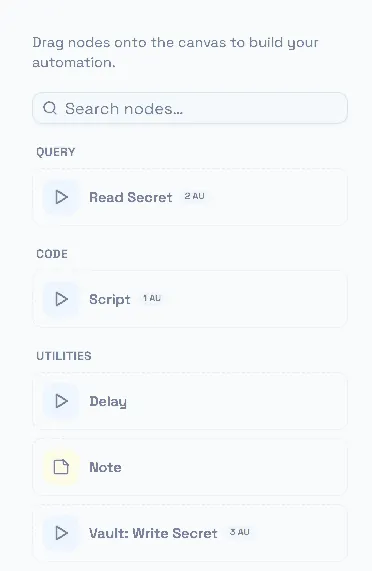
The small groups at the bottom of the palette, together.
Note is here and it is the one node that does nothing: it is a comment pinned to the canvas. Use it. An automation someone else has to change in six months is worth one sentence explaining why the graph is shaped the way it is.