
Automations Overview
Vincent Depassier · August 30, 2026
An automation is a flow that runs on Praxsuite's servers: something happens, and a chain of steps does work in response. Rows get written, emails go out, an external API is called, a decision gets made.
It is the part of Praxsuite where logic lives. Tables hold your data, the gateway exposes it, apps display it — and automations are where anything happens to it.
The shape of one
Every automation is a graph: nodes that do things, joined by edges that decide what runs next.
Trigger ──▶ Query Rows ──▶ If / Else ──┬─(true)─▶ Send Email
                                       └─(false)─▶ Update Rows
Three rules cover most of it:
Exactly one trigger starts it. The trigger decides when the automation runs and what it starts with.
A node runs when something reaches it. Nodes with no incoming edge never run.
Branching nodes have several outputs. If/Else has a true path and a false path; Try/Catch has three.
Triggers
Trigger | Runs when |
Manual | You start it — from the builder, the API, or another automation |
Schedule | On an interval or a recurring time, in the workspace timezone |
System event | A row is created, updated, or changes status |
Webhook | An inbound HTTP request arrives at its URL |
Endpoint | A request arrives and waits for the answer |
The last two look similar and are not. A webhook accepts the request, answers immediately and does the work afterwards — right for notifications from another system. An endpoint holds the connection open and returns whatever your flow decides, which is what makes an automation usable as an API your own app calls.
Context: how a step sees what came before
Every node writes its result into the run's context, and later nodes read it with a template:
{{context.steps.queryRows.rows}}
{{context.request.body.email}}
{{context.trigger.rowId}}
This is the single most important thing to internalise, because almost every automation that "doesn't work" is a template pointing at something that is not there.
Two traps worth naming now:
A skipped node's template arrives as text. If a branch did not run, a node downstream that reads {{context.steps.thatNode.value}} receives the literal string — not an empty value. It is truthy, so a || fallback will not catch it. Check the branch, not the value.
Script inputs need the braces. Passing a value into a Script node means writing the template. A bare field name is a bare field name.
The node palette
Nodes are dragged onto the canvas from the palette on the left. It groups them by category and shows what each one costs to run:
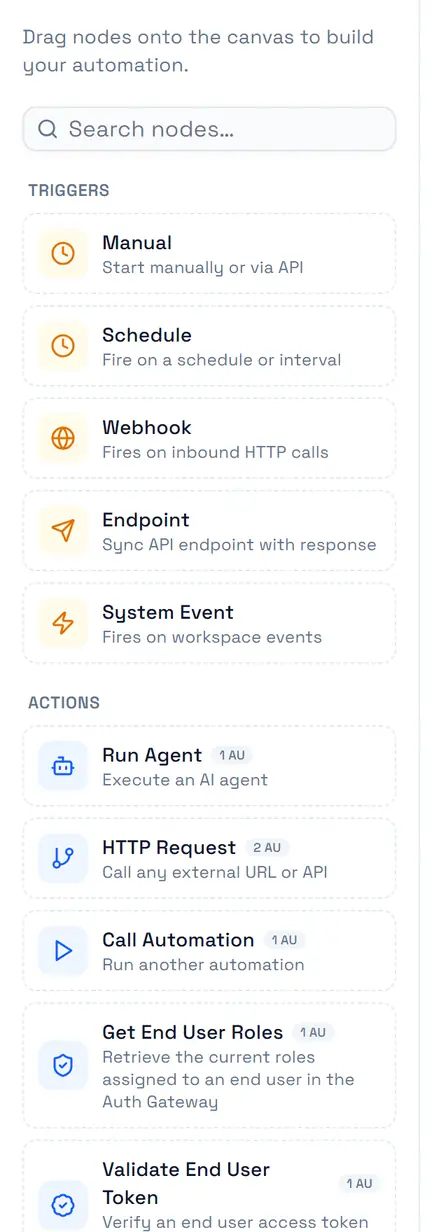
Fifty-five nodes ship in the catalog, grouped by what they touch:
Category | For |
Triggers | Starting the flow |
Database | Reading and writing table rows, aggregating, snapshots |
Logic | Branching, looping, error handling, formulas, responses |
Actions | HTTP calls, other automations, end users and roles, processes |
Communication | Email, push, calls, meetings, Instagram, inbox replies |
Code | Running your own JavaScript or Python |
Docs | Searching and writing workspace documents |
Utilities | Delays, notes, secrets |
Each category has its own page with every node in it.
Draft, publish, run
An automation you are editing is a draft. Publishing turns it into a version, and versions are what actually run — so editing a live automation is safe in the same way editing a live page is safe: nothing you type reaches production until you publish.
Every execution is a run, and a run records each step: what it received, what it produced, how long it took, and the error if it failed. When something goes wrong, the run is the answer — not the automation.
When to use an automation instead of the gateway
They overlap, and the line is about who holds the secret and who is trusted.
Use the gateway | Use an automation |
Read rows for a page | Anything using an API key that must stay private |
Submit a form | Work that touches several tables in order |
Straightforward reads and writes a client is allowed to do | Decisions, retries, error handling, calling third parties |
A browser can hold a publishable key and read a product table directly. It cannot hold your payment provider's secret key — so charging a card is an automation, and the app just calls it.
Next
Create your first automation — building one, step by step
Trigger nodes — the five ways a flow starts
Server-side logic — automations as your backend