
Database Nodes
Camila Escobar · June 17, 2026
Seven nodes read and write workspace tables. They are the ones almost every automation uses, so the details here pay for themselves quickly.
Query Rows
Retrieves rows from a table. Two modes, and picking the right one matters:
By row id — a single-row lookup. Fastest, and the right choice when a previous step already gave you the id.
By filters — with sorting and pagination, for anything else.
Row reads are capped per call, so a query without a filter on a large table returns the first page and not an error. Filter in the query. A flow that reads everything and discards most of it in a later step has already paid for the read, and on a big table it silently misses the rows past the cap.
Two shapes to expect downstream
A Status column comes back as its option id, not its name. Comparing a status to the text "Approved" in a later node fails without erroring — compare against the option, or branch on something else.
Inside a Script node, the row keys lose their spaces: Player_Name, not Player Name. This is specific to scripts; other nodes and the gateway see the spaced names.
Insert Rows
Inserts one or many rows. A single row uses a field map; a batch takes a list, which can come straight from a previous step's output.
Ids are generated for you — do not invent them.
Prefer one batch insert over a loop with an insert inside it. Same result, a fraction of the work.
Update Rows
Updates fields on one row by id, or on many by filter.
The filter form is the sharp edge in the whole category: an update with a filter that matches more than you meant updates all of them, and there is no confirmation step. Before writing a filtered update, run the same filter through a Query Rows node once and look at the count.
Delete Rows
Deletes by row id or by filter, and requires at least one targeting criterion — there is no "delete everything" by omission.
The same caution as Update applies, with less recovery. If the flow is destructive and runs unattended, pair it with a Table Snapshot.
Aggregate Rows
Groups a table by one or more columns and computes, in a single query, a count per group plus optional SUM, AVG, MIN, MAX or COUNT over numeric or formula columns. Filters can narrow it first. The output is a list of groups, each with its values, its count and its metrics.
This exists so you do not read ten thousand rows to add up a column. If a flow's job is "how many, per status" or "total per customer this month", this is one node instead of a query, a loop and an accumulator — and it is the difference between a flow that runs in a second and one that times out.
Table Snapshot
Takes a checkpoint of every row in a table, stored as a blob.
Its purpose is the node below it. Snapshot before a risky sequence, and you have something to go back to.
Table Restore
Restores a table from a checkpoint. Two things to be clear about:
It is a full-table replace, not a merge. Everything currently in the table goes, and the checkpoint's rows take its place. Rows created after the snapshot are not preserved.
It requires an explicit confirmation. Without it the node fails and changes nothing — a deliberate guard, so a restore cannot happen because a template resolved to something unexpected.
The pattern they are built for
Table Snapshot ──▶ Try ──▶ risky work ──▶ …
                     └── Catch ──▶ Table Restore
Snapshot, work inside a Try, and restore in the Catch. That gives a multi-step data change something close to all-or-nothing behaviour, which the individual write nodes do not provide on their own.
Next
Logic nodes — Try/Catch, loops, branching
Server-side logic — where these fit in a real flow
Runs and debugging — checking what a write actually did
What it looks like
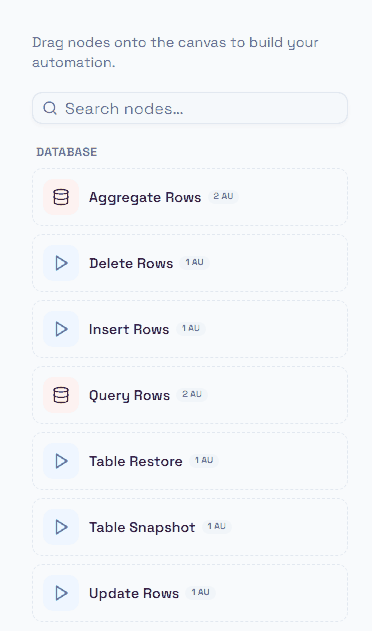
All seven database nodes, as they appear in the palette.
Notice the two icon colours. The red database icon marks a query node — Aggregate Rows and Query Rows read and return data. The blue play icon marks an action node — Insert, Update, Delete, Snapshot and Restore change something. That distinction is not cosmetic: a query node can sit anywhere, an action node is a write you are accountable for.
The cost badges also split along that line: reading costs 2 AU, writing costs 1 AU.