
Action Nodes
Camila Escobar · June 17, 2026
Eleven nodes that make something happen outside the current flow: call an API, start another automation, run an AI agent, manage the people who sign into your apps, or push an event to connected clients.
Reaching other systems
HTTP Request
Sends an HTTP request to any internal or external endpoint and captures the response.
This is the general-purpose integration node. Combined with the Vault, it is the whole pattern for talking to a third party: read the credential, make the call, use what comes back — with the credential never leaving the server.
Wrap it in a Try/Catch. Someone else's API will fail eventually, and without a catch path the run stops mid-flight.
Call Automation
Fires another automation as a sub-flow. Two things define how you use it:
It is fire-and-forget. It starts the other flow and continues; it does not wait, and no result comes back. If you need the answer, this is the wrong node — put the work inline, or expose it behind an endpoint and call that.
The target must be active with a published version. A draft is not callable. This is the usual reason a Call Automation "does nothing".
Its real use is decomposition: a shared notification flow, a shared cleanup routine, called from several places instead of copied into each.
Run Agent
Runs one of the workspace's AI agents with a message you give it, waits for the run to finish, and passes the agent's answer — and any images it generated — to the next node.
Unlike Call Automation, it waits and it returns a result. That makes it the node for "classify this ticket", "summarise this document", "draft a reply" inside a flow.
It needs an agent and a non-empty message, and it is refused on plans that do not include agents in automations. A run that fails, fails the step.
Browser Agent
AI-driven browser automation. It launches a headless browser and uses a vision model to navigate a site and complete an objective, with support for persistent sessions on authenticated sites.
This is the last resort, and it should feel like one. It exists for systems with no API at all. It is slower and less predictable than any other node here — if the target has an API, HTTP Request is the right answer.
Managing the people who sign in
Five nodes cover gateway end users. They are what makes a members area or a client portal self-service rather than something you administer by hand.
Node | Does |
Register End User | Creates an account — email and password, or an external provider |
Query End Users | Finds end users by id, email or text search, with their profile and roles |
Get End User Roles | Returns the roles currently assigned to one end user |
Manage End User Roles | Assigns, removes, or replaces the whole set of roles for one end user |
Manage Gateway Roles | Creates, updates or deletes the role definitions themselves |
The order matters when provisioning something new: define the role first with Manage Gateway Roles, then assign it with Manage End User Roles. Creating a role is idempotent by name, so a flow that provisions on demand can run repeatedly without piling up duplicates.
Roles are where access actually comes from — a role carries the row filters that decide which rows that person can see. Assigning a role is granting data access, not labelling someone.
Validate End User Token
Validates a gateway-issued end-user token and resolves the verified caller: their id, email and role ids.
It fails the step when the token is missing or invalid, and that is the point. Put it first in an endpoint automation and everything downstream is unreachable for an unauthenticated caller — you do not have to remember to check.
Never trust a user id sent in the request body. The body is written by the caller; the token is signed. This node is the difference between the two.
Publish Realtime Event
Broadcasts an event to every client subscribed to a workspace resource — a chat channel, a thread, a dashboard.
It is fire-and-forget by design: a failed broadcast never fails the automation. That is the right trade for a live update, because the data is already written and a missed notification should not roll back the work. It also means you cannot use a successful run as proof that anyone received it.
Next
Communication nodes — email, push, calls, meetings, social
Server-side logic — where these fit in a real backend
End users and roles — the gateway side of the account nodes
What it looks like
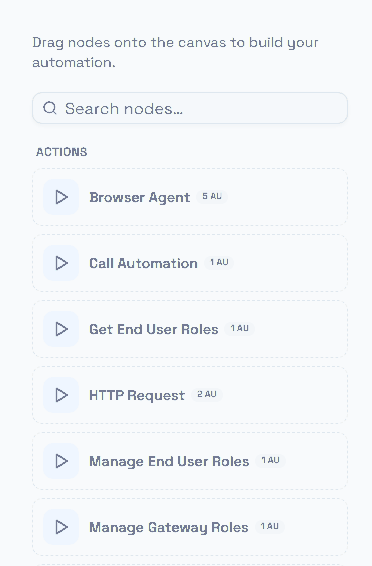
The action nodes in the palette.
The cost badges are worth reading here more than anywhere else. Most actions are 1 AU, but the ones that reach outside the platform or do real work are not — and an action inside a For Each pays that cost on every iteration.