
Logic Nodes
Camila Escobar · June 17, 2026
Six nodes decide what runs, how often, and what happens when something breaks. Four of them branch — they have more than one output, and which one fires is the whole point.
If / Else
Branches on one or more conditions. Conditions are organised in groups: the True path runs when all groups pass, the False path runs otherwise.
The habit worth forming is to always connect the False path. An unconnected False is a flow that silently stops for exactly the inputs you did not think about — and it looks identical, in the run history, to a flow that finished.
Watch what you compare. A Status column arrives as its option id, not its name, so a condition testing for the text "Approved" never matches.
Try / Catch
Three paths:
Path | Runs |
Try | Normally |
Catch | When something in Try fails, with the error available |
Finally | Always, after either of the above |
Inside Catch you can read {{context.error.message}}, {{context.error.stepKey}} and {{context.error.nodeType}} — what went wrong, which step, and which kind of node.
Wrap anything that leaves your workspace. Someone else's API will fail eventually: their outage, a timeout, a change they did not announce. Without a Catch, the run stops mid-flight and everything before it stays half-done.
Finally is for the cleanup that must happen either way — releasing a lock, marking a row as no longer processing, sending the notification that says what happened whichever way it went.
For Each
Iterates a list and runs its child nodes once per item. The list can be a path into the context, a previous step's output, or an inline list. Body nodes connect through the loop's own body handle, not the normal output.
Before reaching for it, ask whether a batch node would do. Inserting fifty rows is one Insert Rows call; a For Each with an Insert inside is fifty.
Where it genuinely earns its place is per-item work that cannot be batched — sending a personalised message, calling an API once per record.
For Table
Iterates every row of a table, with filters and sorting, and no row limit — it runs until the table is exhausted.
That last part is the whole warning. This is the one node that will happily do an unbounded amount of work: on a table with a hundred thousand rows, it runs its body a hundred thousand times.
Filter it. And if your body is "check a condition, act on some", replace the check with a filter on the loop — same outcome, a fraction of the runs.
Formula
Evaluates arithmetic and expressions without dropping into code, using the same syntax as column formulas: arithmetic, ROUND, IF, SQRT, CONCAT and more.
For a total, a percentage or a rounded price, this is lighter than a Script node and easier for the next person to read. Reach for Script when you need control flow or data structures — not for a multiplication.
Response
The terminal node for endpoint automations. It defines the HTTP response the caller receives: status code, headers, body.
The rules are enforced when you save:
An endpoint automation requires exactly one Response node.
Only one is allowed.
An automation without an endpoint trigger may not have one at all.
The single-Response rule is worth designing around. If your flow branches and each branch wants to answer differently, they cannot each end in their own Response — converge the branches first and build the body from what the flow decided.
Next
Database nodes — the rows these decisions act on
Server-side logic — Try/Catch, endpoints and Response in a real API
Runs and debugging — seeing which path a run actually took
What it looks like
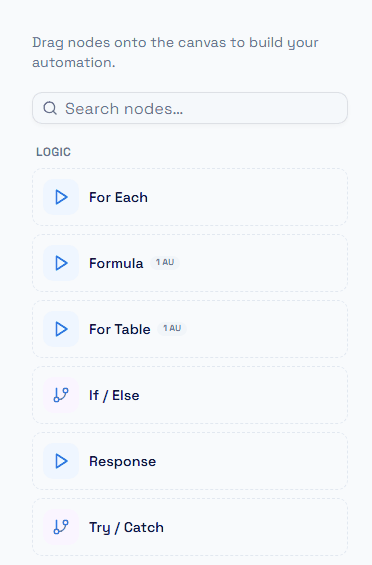
The six nodes that decide what runs next, in the palette.
Response sits in this group rather than with the actions, and that placement is correct: it does not do anything to your data, it ends the run and hands a body back to whoever called the endpoint. A Sync endpoint's automation is not finished without one.