
Communication Nodes
Camila Escobar · June 17, 2026
Seventeen nodes reach people: email, push, live calls, scheduled meetings and Instagram. It is the largest category in the catalog, and the one where the constraints come from other companies' rules rather than from Praxsuite.
Send Email
Sends one email through the workspace's configured mailing provider. If no provider is configured, nothing sends — that setup is the first thing to check when a flow "runs fine" and no mail arrives.
Send Bulk Email
Sends personalised email to every recipient from a table query. It is not a loop with Send Email inside it; it is built for volume, and carries the machinery that makes volume survivable:
Control | Why it exists |
Batching | Sending in groups instead of all at once |
Delays — fixed, random or progressive | Spacing sends so a burst does not look like a burst |
Rate limiting | Staying under what your provider accepts |
Deduplication | The same address appearing twice gets one email |
Loop body | Per-recipient work after their send, like stamping a row |
The delay options are the interesting part. Providers and inbox filters treat a thousand identical sends in one second differently from the same thousand spread out, and random or progressive spacing looks more like normal traffic than a fixed interval does.
Reply in Inbox
Replies into an existing Inbox conversation, routing automatically to whatever transport that conversation is on — email, SMS or WhatsApp.
The routing is the point: you reply to the conversation, not to a channel. The same node answers a customer whether they wrote in by email or WhatsApp.
Push notifications
Send Push Notification sends a browser or OS notification to one end user's registered devices. It arrives when the app is closed, which is the difference from Publish Realtime Event — that one only reaches a page that is currently open.
Two conditions:
The person must have granted notification permission in the app first. There is no way around this and no way to ask on their behalf.
It is fire-and-forget: a device that uninstalled the app does not fail the automation.
So a successful run means "sent", never "seen". If something must be acknowledged, put it somewhere the person can find it later too.
Calls
Node | Does |
Start Video Call | Creates a call and rings the invitees; returns the session id |
End Video Call | Ends it for everyone and tears down the room |
End Video Call is idempotent: a call that already finished on its own is reported as skipped, not as an error. That is what makes a scheduled "close anything still open" flow safe to run on a timer.
Scheduled meetings
Six nodes cover Microsoft Teams and Google Meet. All of them need the matching channel connected in the Inbox first, with the right permission granted — that is the usual reason one of these fails on the first attempt.
Node | Notes |
Create Teams Webinar | Returns the webinar id, join URL and registration URL |
Register Teams Attendee | Microsoft emails the confirmation and calendar invite itself |
Schedule Teams Meeting | A normal meeting; returns the join URL — chain a Send Email to deliver it |
Schedule Google Meet | Creates a calendar event; Google emails each attendee |
Register Google Meet Attendee | Adds an attendee and re-sends the invitation |
Note who sends the invitation. For Teams webinars and for Google Meet, the provider emails the attendee. For a plain Teams meeting, nobody does — you get a join URL and you send it. Chaining Send Email there is not optional.
Six nodes, and the rules here are Instagram's, not ours. They are strict, and a flow that ignores them fails at the worst moment.
Node | Does |
Get Comments | Reads comments on a post, with keyword filtering |
Reply to Comment | Replies publicly to a comment |
Send DM | A private reply to someone who commented |
Send Message | A DM inside an existing conversation, by their Instagram-scoped id |
Get User | Resolves a public profile from that id |
Refresh Token | Extends the access token for another 60 days |
The two DM nodes are not interchangeable
Send DM is a private reply to a comment. One DM per comment, within seven days of it.
Send Message answers someone in an existing conversation — they must have messaged you first, within the last 24 hours.
Picking the wrong one is a rejection from Instagram, not a Praxsuite error. The usual campaign shape is: poll comments for a keyword, reply publicly to acknowledge, then private-reply with the actual content.
Refresh the token before it dies
An Instagram token lasts 60 days. Refresh Token extends it, and the token must be at least 24 hours old and not yet expired.
The word expired is doing a lot of work there: once it lapses, this node cannot save you and the connection has to be re-authorised by hand. Put a scheduled automation on it every 50 days and forget about it. Get User only resolves people who already interacted with your account, so it is no help for finding anyone else.
Next
Action nodes — HTTP, sub-flows, end users, processes
Server-side logic — error handling around calls that leave your workspace
Runs and debugging — confirming what was actually sent
What it looks like
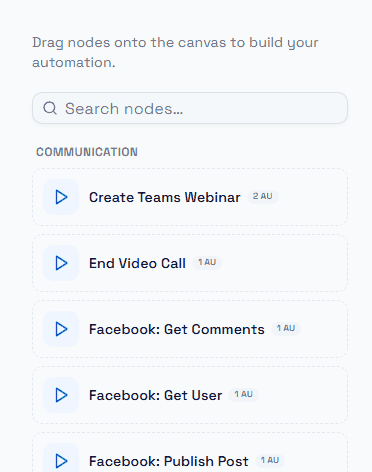
The top of the Communication group in the palette — the first few of a long list.
This is by far the largest category in the catalogue, and it grows as channels are added, so treat the palette as the authority rather than any written list. Use the search box at the top: typing a channel name is faster than scrolling, and it matches the node's description as well as its name.