
Apps Overview
Vincent Depassier · August 30, 2026
An App is a website your workspace publishes and Praxsuite hosts. It gets its own address, its own pages and its own navigation — and it reads live workspace data through the API Gateway, so the site and the system behind it never drift apart.
The premise is that your business already runs on Praxsuite. An App is how you expose part of it to the outside world: a marketing site, a client portal, a catalogue, a landing page for a campaign, a members area.
One workspace, several Apps
Apps are not a single site per workspace. A workspace can hold as many as its plan allows, and they are fully independent of each other — separate pages, separate navigation, separate address, separate visibility.
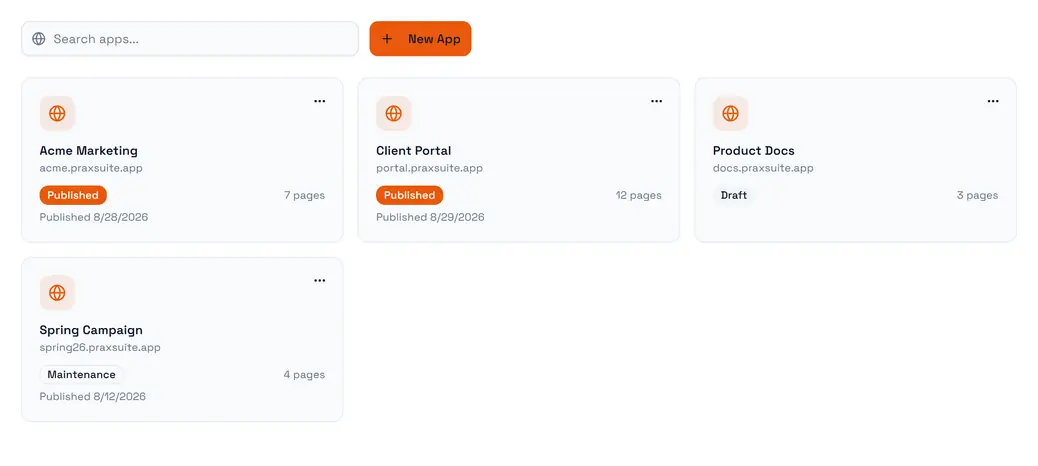
That matters more than it sounds. An agency runs one App per brand. A product team runs a public marketing site and a private client portal side by side, from the same tables, without either one being a section of the other.
What an App is made of
Piece | What it holds |
App | The site itself: name, address, theme, languages, visibility |
Pages | One per URL, arranged in a tree |
Navigation | Menus, defined separately from the page tree |
Components | Reusable blocks shared across pages |
Versions | A snapshot per publish, so you can roll back |
Domains | The custom domains pointed at this App |
Pages
Every URL is a page, and pages nest — a page can have a parent, which is how /docs/getting-started gets to live under /docs.
A page has a type:
Type | What it does |
Static | Fixed content you lay out yourself |
Dynamic collection | One page that lists rows from a table |
Dynamic detail | One template that renders any single row |
Folder | A grouping node in the tree, with no page of its own |
The dynamic types are the reason an App stays in sync with the workspace. You do not publish a page per product; you publish one detail template, and every row in the table is reachable through it.
A page also carries a status — draft, published or archived — and, separately from that, two bodies: the one visitors are served, and the draft you are editing. Editing a published page does not change what the world sees until you publish it. This is worth internalising early, because it is the opposite of how most in-app editors behave.
Who can see it
Visibility is set on the App:
Mode | Effect |
Public | Everyone sees every page. The default |
Private | The whole site requires a signed-in end user |
Mixed | Public by default, and individual pages are marked as requiring sign-in |
Authentication is not a separate system: a gated App signs people in as gateway end users, the same accounts documented under End Users & Roles. The App carries a gateway credential for this, and an unauthenticated visitor is sent to the App's login path — /login unless you change it — and returned to where they were going afterwards.
Mixed is the mode most portals actually want. A public home page and pricing page, a members area behind them, one site.
The address
Every App gets a subdomain immediately:
https://{subdomain}.praxsuite.appYou can attach your own domains on top of it. Each one is verified before it goes live, and its certificate is issued for you — both steps report their own status, so a domain that is not serving yet tells you which half is pending:
Domain status | Certificate status |
Pending verification | Pending |
Active | Provisioning |
Failed | Active |
Expired | Failed |
An App with several domains has one marked primary. That is the one canonical links point at, which is what keeps search engines from treating the same page on two hostnames as two pages.
Publishing
Publishing is an explicit act, and it produces a version. The version history is the list of everything the site has been, and you can roll back to any entry in it — a rollback is a publish of an older version, not a delete of the newer ones.
The App itself has a status alongside all this: draft, published, maintenance or disabled. Maintenance is the one to reach for when you want the address to keep answering while you are working, without serving a half-finished site.
Languages
An App declares a default locale and the set of locales it serves, and picks how a locale appears in the URL:
Strategy | Looks like |
Path prefix |
|
Subdomain |
|
Query parameter |
|
It can also detect the visitor's language from their browser on first arrival, and show a switcher. Path prefix is the default and the one search engines handle best.
What it is not
Apps are static-first. What you publish is served as files, and nothing of yours executes on a server while a visitor loads a page. Reusable components are the one thing that gets compiled, and that happens when you save them — never per request.
That is a deliberate trade. It means a published App is fast, cheap to serve and hard to break. It also means anything dynamic — reading rows, submitting a form, showing something only for the signed-in visitor — happens from the browser through the API Gateway, using a publishable key scoped to exactly what that site is allowed to see.
If you need logic to run on a server, that is what automations are for: the App calls an endpoint, the automation does the work with credentials the browser never sees, and returns an answer.
Next
Pages and navigation — building the page tree and the menus over it
Data and forms — wiring an App to workspace tables through the gateway
Publishing and versions — the publish flow in detail
Domains — attaching a domain and reading its status
Deploy targets — publishing the same App somewhere else as well