
Deploy Targets
Vincent Depassier · August 30, 2026
Publishing puts an App on its Praxsuite address. A deploy target sends the same built site somewhere else as well — your own hosting, a client's server, a static host you already pay for, or a file on your disk.
An App can have several targets, and they are independent: enabling one does not disable another, and you can deploy to one without touching the rest.
The targets
Target | Where it sends the site |
Praxsuite hosting | The built-in address. No configuration — this is the default one |
FTPS | A host, port, user, password and remote path of your own |
GitHub Pages | An owner, repository, branch and subfolder, using a personal access token |
Netlify hook | A build hook URL that triggers a deploy there |
Vercel hook | The same, for Vercel |
MCP push | An MCP server URL and its API key |
PraxQL export | A file, streamed to you as a download — no remote credentials |
Static ZIP | The built site as an archive |
The hook targets are a different shape from the rest, and it is worth being clear about it: Praxsuite does not upload the site to Netlify or Vercel. It calls the build hook, and that platform builds from wherever it is already configured to build. Use those when the site's source lives in a repository they already watch.
The credentials on a target — an FTPS password, a GitHub token, an MCP key — are encrypted before they are stored, and they are never returned when you read the target back.
Testing before deploying
Every target can be tested. The test checks that the destination is reachable and that the credentials work, without sending a site.
Do it before the first deploy and again after any credential change. A failed test names the connection problem; a failed deploy has to be read out of a job log, which is more work for the same answer.
Jobs
A deploy is a job, and it has a life of its own:
Status | Meaning |
Queued | Accepted, not started |
Running | In progress |
Success | Finished |
Failed | Stopped on an error |
Cancelled | Stopped because you cancelled it |
Each job keeps a log, which is where a failure explains itself. A running job can be cancelled — useful when you notice you deployed the wrong version, though it is a race: a job that has already copied half the files will leave that half in place.
Each target also records its last deploy: when, the outcome, and which version number went out. That last field is the one that answers the question that actually comes up — is the client's server running the same version as our site?
Deploying to everything at once
There is a deploy-all, which queues a job per enabled target.
It is convenient and it is worth a moment's thought before pressing: it deploys the current published version to every destination, including the ones you set up for a different purpose months ago. If a target should not receive routine deploys, disable it rather than remembering not to include it.
The export target
PraxQL export is not a hosting destination — it hands you a file. It is the target to use for an archive, for moving a site between workspaces, or for keeping a copy of what was published at a point in time outside the version history.
Next
Publishing and versions — what gets built and sent
Domains — the addresses on the Praxsuite side
What it looks like
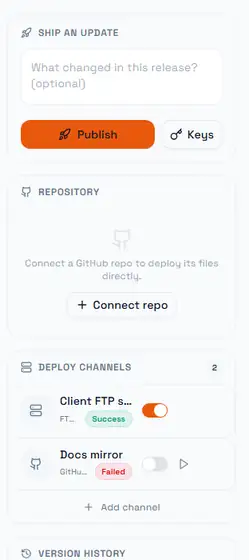
Each row is one destination, and the toggle on it is the whole idea: a destination can exist, keep its configuration and its history, and simply not receive the next publish. The second row here is switched off after a failure — its last result is still shown, so turning it back on is a deliberate act taken with the failure in view rather than a blind retry. A disabled destination also gets a manual run button, which is how you test a fix without re-publishing the App.
Above the channels, the repository card is in its unconnected state. Connecting one is optional and separate from publishing: it pulls the files a build produces into the App, whereas a channel pushes what the App has published outward. An App can have neither, one, or both.
The count next to the panel title is the number of destinations, not the number that are enabled — worth remembering when you are wondering why a publish reached fewer places than the header suggests.