
Domains
Vincent Depassier · August 30, 2026
Every App answers on {subdomain}.praxsuite.app from the moment it is created. Attaching your own domain is a second address on the same site, not a move — the subdomain keeps working, which is useful while you are still setting the real one up.
The two things that must happen
A custom domain is live when both of these are true, and they are tracked separately:
Track | States |
Domain | Pending verification → Active (or Failed, or Expired) |
Certificate | Pending → Provisioning → Active (or Failed) |
Keeping them apart is deliberate. "The site does not load" has two very different causes, and the pair of statuses tells you which one you have: a domain still pending verification is a DNS problem on your side; a verified domain with a certificate still provisioning is a wait.
Pointing the domain
Add the domain in the App, and the screen gives you the DNS record to create:
A CNAME from your domain to the target Praxsuite shows you.
An ownership TXT record, when one is required for that domain.
Then verify. Verification checks that the records resolve; if they do not, the message tells you which part is wrong rather than just failing — including the common case where the domain resolves fine but its CNAME points at the wrong target, which is what happens when a domain was previously hosted somewhere else.
DNS changes are not instant. A verification that fails a minute after you created the record is usually just early; wait and run it again.
Apex domains
example.com — with no www — is worth a note. Strictly, DNS does not allow a CNAME at the apex, and providers that support it do so by flattening the record into an address behind the scenes.
That works here. What it means in practice is that an apex domain can verify without a CNAME being visible to a lookup, so the check treats a missing CNAME as unknown, never as wrong. If your apex resolves and the certificate goes active, it is set up correctly even if the CNAME check has nothing to report.
Several domains, one primary
An App can hold several domains at once — example.com and www.example.com, an old domain kept alive after a rebrand, a country-specific variant.
One of them is marked primary, and that choice is not cosmetic: it is the address used for canonical links. Without a primary, a search engine that finds the same page under two hostnames has to guess whether they are one page or two, and it splits the ranking between them either way.
Set the primary to the domain you actually want people to see and share. The rest keep serving.
Removing one
Detaching a domain stops it serving that App. Do the DNS side too — a CNAME left pointing at a target that no longer accepts it is a hostname that fails in a confusing way for as long as anyone remembers it exists.
Next
Publishing and versions — getting a version onto the address
Deploy targets — serving the same App from somewhere else entirely
What it looks like
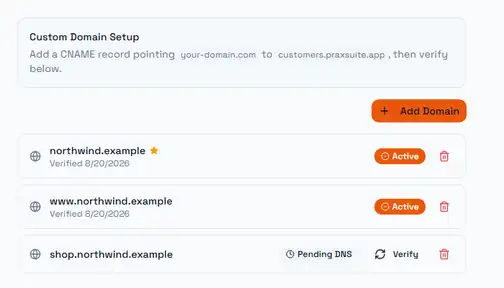
The instruction at the top is the only step that happens outside Praxsuite: you point a CNAME at the address shown, then come back and verify. Everything below it is the result of that.
The star marks the primary domain. Only one domain can hold it, and it is the one canonical links are built from — which is why the apex and the www. form here are both active but only one is starred. Making the other one primary is a single action and changes what search engines are told to treat as the real address.
The third row is the state you will actually spend time in. Pending DNS with a Verify button means the record has not been seen yet, and the button re-checks on demand rather than waiting for the next automatic pass. Two things commonly cause it: the record has not propagated yet, or it was created on the wrong name. Nothing is lost while it sits there — the domain keeps its verification token, so verifying later needs no re-entry.