
Agent Tasks and Teams
Vincent Depassier · September 1, 2026
Two features turn individual agents into an organisation: task structures, which let agents work a queue, and teams, which say who reports to whom.
Task structures
A task structure turns a table you already have into a work queue an agent can pick up from. You do not create a separate task system; you point at the table where the work already lives.
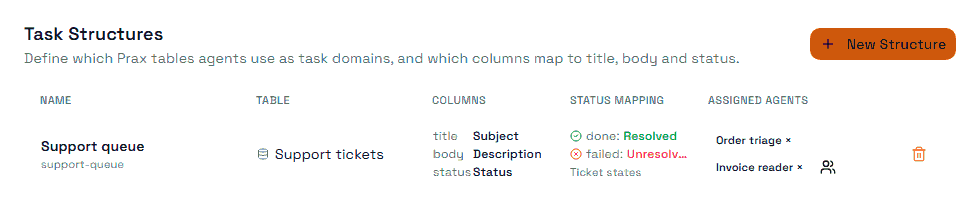
Building one is a mapping exercise:
You point at | Which must be |
The table | The table holding the work |
Title column | What the task is |
Status column | A Status column |
Done status | The option that means finished |
Failed status | The option that means it could not be done |
Body column | Optional. The detail |
Due date column | Optional |
Assignee column | Optional |
Then you assign agents to the structure, and they work it.
The design is worth appreciating: because the queue is your table, the work stays visible to people in the normal table view, filterable, reportable, and editable by hand. There is no separate place to go and check what the agents are doing.
The trap: the done and failed statuses are how an agent signals an outcome. If the status group does not have a clear terminal option for failure — if everything is "open", "in progress" and "done" — an agent that cannot complete a task has nowhere to put it, and the task either sits or gets marked done. Add an explicit failure state before you point agents at a queue.
A structure can be deactivated, which stops agents picking up from it without dismantling the mapping.
Teams
Teams describe structure. They nest, using four levels: division, department, section, team.
Membership can be human or agent, in the same team. That is deliberate — a team is a unit of your organisation, not a container for bots. A support section can hold four people and two agents, and the org chart shows all six.
Teams carry a status of active, inactive or archived, and members carry their own active or inactive state, so somebody leaving a team does not require deleting the record of them having been in it.
Runs and usage records can be attributed to a team, which is what makes "what did the support section's agents cost this month" a question with an answer.
What teams do not do
A team is not a permission. Putting an agent in a team does not grant or restrict anything — access comes from its role and its tool grants, and nothing else. A team is how you organise, report and find things; it is not a security boundary, and using it as one leaves the agent with whatever access it already had.
Where to start
If you are trying agents for the first time, do not start with teams. Start with one agent, one narrow role, one task structure over a table that already has work in it, and an explicit failure status. Add structure when you have enough agents that you cannot remember what they all do.
Next
Agents Overview
Agent Access and Tools
Agent Runs and Usage
How to Create States From Scratch
Datatypes in Praxsuite