
Agent Runs and Usage
Vincent Depassier · September 1, 2026
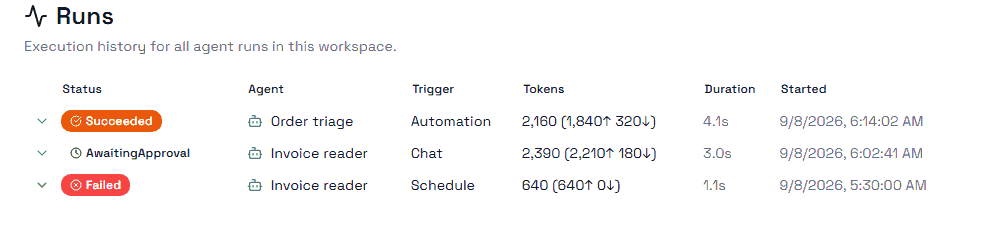
Every time an agent does anything, it produces a run. A run is the record you read when you want to know what happened and what it cost.
Where runs come from
Trigger | What started it |
Manual chat | Somebody talked to it |
Automation | An automation node called it |
Task execution | It picked up an assigned task |
Scheduled | A schedule fired |
System event | Something in the workspace happened |
Delegation | Another agent handed it work |
Tool call | An outside caller invoked it as a tool |
Knowing the trigger is usually the fastest way to answer "why did this agent do that at 3am" — it was almost certainly a schedule or an event, not a person.
Statuses
Status | Meaning |
Queued | Accepted, not started |
Running | In progress |
Succeeded | Finished normally |
Failed | Stopped on an error; the run carries the code and message |
Cancelled | Stopped deliberately |
Awaiting approval | Paused, waiting for a person |
Awaiting client tool | Paused, waiting on a tool that runs outside Praxsuite |
Escalated | Handed to a human or another agent |
The two "awaiting" states are the ones to watch. They are not failures and they will not resolve themselves. A run waiting on an approval nobody answers stays open indefinitely, and so does one waiting on a client tool that never reports back. If your agent seems to have silently stopped, look for these before you look for a bug.
What a run records
Beyond the status, each run keeps the tool calls it made and in what order, the approvals it raised, how long it took, its token counts — input and output separately — and its cost, both the estimate made up front and the final figure.
It also keeps the exact instruction version it ran on. That is what lets you answer "did this get worse after we changed the prompt" instead of guessing.
Failed runs carry an error code and message. Read those first; most failures are a missing tool grant or a permission the agent's role does not have, and both say so.
Delegation
An agent can hand work to another agent. When it does, the child run records its parent and how deep the chain has gone.
Watch the depth. Delegation chains are the easiest way to spend a lot of credits from one instruction, because each link is a full run with its own model calls. If a chain is running deeper than you expected, that is worth understanding before it becomes a monthly bill.
Credits
Agent usage is metered in credits, and your workspace's balance has three sources:
Source | Behaviour |
Monthly credits | Granted each billing period |
Rollover credits | What carried over from last period |
Top-up credits | Bought separately |
Against those sit consumed credits — what has been spent — and reserved credits, which are held for runs that are in flight but not finished. Reserved credits are why your available balance can drop before a run completes; they are released or converted when it does.
Not everything costs the same. Input and output tokens are counted separately, and web searches and image generations are counted on top, because they are billed on their own terms.
Estimated cost and final cost
Every run carries both. The estimate is written when the run starts; the final figure when it ends.
They differ, and the difference is not a bug. A run that ends early costs less than estimated; one that loops through more tool calls than expected costs more. Report on the final figure — the estimate exists so that a run in flight has a number at all.
Next
Agents Overview
Agent Access and Tools
Agent Models and Providers
Usage & Quotas
Runs and Debugging