
Agent Access and Tools
Vincent Depassier · September 1, 2026
Everything an agent is allowed to do is a list you control. This page is about that list, and about the two independent limits that sit on top of it.
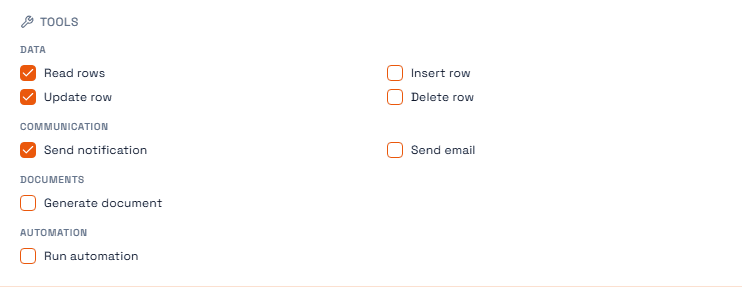
Tool grants
An agent's tools are granted one at a time. No grant, no tool — the agent is not told the tool exists, so it cannot ask for it.
The catalogue is grouped by category, and only the ticked entries are granted. In the example above the agent can read and update rows and send a notification; it cannot insert, delete, email or generate documents, no matter what its instructions say.
Each grant carries four things:
On the grant | What it decides |
Tool | Which capability is being granted |
Access mode | Read, Write or Execute |
Scope | An optional narrowing, such as which tables it applies to |
Requires approval | Whether a human must sign off before the call runs |
Status | Active or disabled, without deleting the grant |
Access mode is the cheapest safety you will ever buy. An agent that summarises tickets needs Read. Granting it Write because it was easier than thinking about it is how an agent that was supposed to report ends up editing.
Disabling a grant is better than deleting it when you are diagnosing something. The configuration survives, so you can put it back exactly as it was.
Requires approval
This is the real approval control, and it lives on the grant — not on the agent's declared autonomy posture.
When a grant is marked as requiring approval and the agent tries to use it, the run pauses. It moves to awaiting approval, an approval record is created, and nothing further happens until a person responds. Approve it and the run continues from where it stopped; reject it and the run ends.
Put it on the grants whose consequences leave the workspace or are hard to undo: sending messages to customers, deleting rows, anything that spends money.
The trap: a run waiting for approval is a run that is still open. If nobody ever answers, it waits. Approvals need an owner and a habit of clearing them, in the same way a queue does.
Roles: what the agent can see
Tool grants decide which capabilities the agent has. A role decides which data those capabilities reach. The agent's roles are shown alongside its tools, because the two together are its whole boundary.
Assign an agent a system role that has table access, and the agent switches into role-enforced mode. From then on its data operations run through the RBAC-enforcing path, and it sees exactly the tables, rows and columns that role sees. Hidden columns stay hidden.
Give every agent a role. An agent without one operates with full workspace access, which is almost never what you want and is very easy to create by accident — you get it by simply not choosing.
One consequence worth knowing
A role-scoped agent uses a different, permission-enforcing set of data tools than a full-access one. If you read an agent's run and see it say that a tool is unavailable and it will use another, that is this working as designed: the direct tool was refused and the enforced equivalent was used instead.
How a run actually executes
Understanding the loop makes debugging much faster:
The agent's instructions, model profile and active tool grants are loaded.
The model is given the message and the tools it has been granted.
If it calls a tool, the tool runs and the result goes back to the model, which continues.
If that tool's grant requires approval, the run pauses instead and waits.
When the model answers instead of calling a tool, the run ends.
A usage record is written and the run is finalised.
Step 3 repeats, but not forever: a run is capped at a fixed number of tool iterations. An agent that has got itself into a loop hits that ceiling and stops rather than running up an unbounded bill.
Checklist before you make one Active
Does it have a role, and is that role narrow enough?
Is every grant at the lowest access mode that still works?
Does every grant with an irreversible or outward-facing effect require approval?
Does someone own it, and will they see its approvals?
Next
Agents Overview
Agent Runs and Usage
Roles & Access
Access Grants in Praxsuite
The Vault