
Agent Models and Providers
Vincent Depassier · September 1, 2026
You can run agents on Praxsuite's own models and pay in credits, or connect a provider account of your own and be billed by them directly. Both work, and the choice is per model, not per workspace.
The decision
| Praxsuite credits | Your own provider account |
Billing | Credits from your workspace balance | Your provider bills you |
Setup | None | Connect the provider, add a key |
You choose the model | From what Praxsuite offers | Anything your account can reach |
Key management | Nothing to manage | Yours to rotate and protect |
Start on credits. Move to your own account when you have a reason — a negotiated rate, a model Praxsuite does not carry, or a compliance requirement that your data go through your own contract.
There is also a hybrid mode, where some models bill one way and some the other. That is normal in practice: a cheap classifier on credits, a specific model on your own key.
Connecting a provider
Praxsuite can connect to the major AI providers, and to any provider that speaks a compatible interface through a custom connection. The base Praxsuite model is present without any setup.
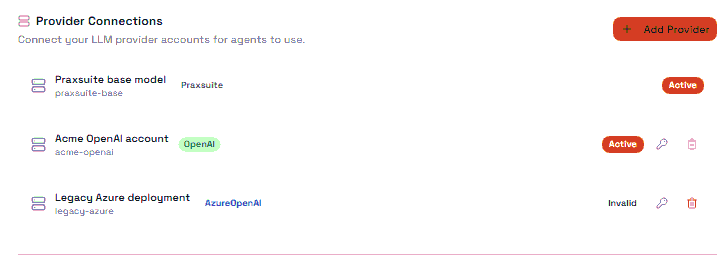
A connection has a status, and it is worth understanding which is which:
Status | Meaning |
Draft | Created, not yet in use |
Active | Working |
Invalid | The credentials were rejected |
Disabled | Turned off deliberately |
Invalid is the one that bites. A connection goes invalid when the key behind it stops working — revoked at the provider, expired, or spending-capped. The connection does not delete itself and the agents pointed at it do not warn you in advance; their runs simply start failing. If several agents fail at once and nothing about them changed, check the connection before you check the agents.
Provider keys are stored as credentials and can be revoked. Rotate them the way you would any other key.
Below the connections sit the model registrations — the individual models available on each of your own connections, each tagged with what it can do. The Praxsuite base model is registered automatically; the rest come from the accounts you connected.
Model profiles
An agent does not point at a raw model. It points at a model profile, which is a model plus how it is allowed to behave.
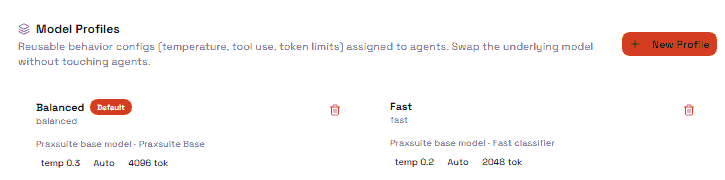
On the profile | What it sets |
Model | Which model runs |
Tier | Fast, standard or advanced |
Capability | What it is good at — reasoning, speed, economy, vision, structured output, image generation |
Tool use | Not allowed, allowed, or required |
Response format | Free text, markdown, structured data, or bound to a schema |
Reasoning level | Low, balanced or high |
The indirection earns its keep the first time you change models. Point ten agents at one profile, switch the model on the profile, and all ten move — with no agent to edit and no instructions to rewrite.
Choosing a profile
Match the tier to the job, not to your ambition. Most agent work — classifying a ticket, extracting fields, drafting a short reply — is done perfectly well by a fast tier at a fraction of the cost. Reserve the advanced tier for work that genuinely reasons.
Set response format deliberately. An agent feeding an automation should return structured output, ideally bound to a schema, so the next node can read it without interpretation. An agent talking to a person should return text. Getting this wrong is the most common reason an agent "works in chat but breaks in the automation".
Tool use required forces the model to call a tool rather than answer from memory. That is what you want for an agent whose whole job is to look something up, and wrong for one meant to converse.
The trap
A higher reasoning level is not free, and not always better. It costs more per run and takes longer, and on a simple classification task it buys nothing measurable. Change it when you have a case the current level gets wrong — not as a precaution.
Next
Agents Overview
Agent Runs and Usage
Agent Access and Tools
The Vault
AI Connectors