
Agents Overview
Vincent Depassier · September 1, 2026
An agent is a configured AI worker inside your workspace. It has instructions, a model, and a list of tools it is allowed to call — and that last one is the only thing that decides what it can actually do.
Two sentences are worth reading twice before you build one:
An agent can do exactly what its tool grants allow, and nothing else. Not what its instructions ask for, not what its description says, not what its type is called. If a tool is not granted, the agent does not have it, and no amount of prompting changes that.
An agent with a role sees only what that role sees. Assign it a system role with table access and it switches into role-enforced mode, where every data read and write is filtered the same way it would be for a person holding that role.
What an agent is made of
Part | What it does |
Instructions | The standing brief. Versioned, so you can see what changed |
Model profile | Which model it runs on, and how it is allowed to answer |
Tool grants | The list of things it may call — the real permission boundary |
Role | Optional. Narrows what data it can reach |
Owner | The person accountable for it |
Team | Optional. Where it sits in the workforce |
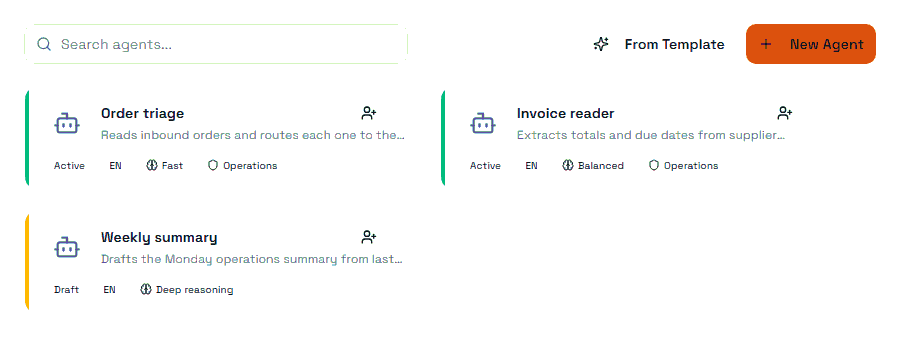
The list shows most of this at a glance: the status, the language, the model profile it points at, and the role that scopes it.
Types
Assistant, Analyst, Reviewer, Coordinator, Writer, Classifier, Executor, Supervisor.
The type is a label. It describes the job you have in mind and helps a list of thirty agents stay readable — it does not grant or restrict anything on its own.
Status
Status | Meaning |
Draft | Being built, not in service |
Active | Can be run |
Disabled | Turned off; keeps its configuration |
Archived | Retained, out of service |
Disabled is the right response to an agent behaving badly. It stops immediately and loses nothing, so you can inspect its runs before deciding whether to fix it or retire it.
Channels and output
Channel says where the agent is meant to work: chat, automations, or both. Output mode says what shape its answers take: conversation, structured data, or a mix.
Structured output is what makes an agent usable inside an automation. An agent that answers in prose is pleasant to talk to and awkward to branch on; one that returns a defined structure can be read by the next node without parsing English.
Autonomy posture
Each agent carries a declared posture — suggest only, draft only, act with approval, or bounded autonomous.
Treat this as documentation of intent, not as a control. What actually stops an agent from acting is the tool grants: whether a tool is granted at all, at what access mode, and whether that grant requires approval. Set the posture so a reader knows what the agent is for, and then make it true by configuring the grants to match.
What an agent is not
It is not a person with an inbox. It runs when something runs it — a chat message, an automation, a task, a schedule, an event.
It is not a way around permissions. A role-scoped agent is bound by that role; giving it broader instructions does not widen its access.
It is not free. Every run writes a usage record against your workspace's AI credit balance.
Next
Agent Access and Tools
Agent Runs and Usage
Agent Models and Providers
Roles & Access
Automations Overview