
Access Grants in Praxsuite
Camila Escobar · June 17, 2026
Learn how Access Grants in Praxsuite provide fine-grained, resource-level access control, complementing roles to ensure secure, flexible, and scalable permission management across your workspace.
Access Grants represent the most granular layer of Praxsuite's security model. While Roles define what a user can do at a global level, Access Grants determine what a user (or role) can do on a specific resource.
This separation is intentional and fundamental to maintaining a secure, flexible, and scalable system.
Why Access Grants exist
In real-world enterprise systems, global permissions are not always sufficient.
Common examples:
A user should not see all tables, only some of them.
A role should not edit all dashboards, only a specific one.
An automated system needs limited access to a single resource.
Access Grants exist to solve these scenarios without breaking the role model or creating complex or inconsistent permissions.
What an Access Grant is
An Access Grant is an explicit authorization that grants permission to perform a specific action on a specific resource.
Unlike roles, Access Grants:
Are granular
Are contextual
Are evaluated only when roles are not sufficient
An Access Grant can be applied to:
An individual user
A role
A system identity (for example, automations)
How Access Grants fit into the security model
Praxsuite evaluates access following a strict sequence:
Owner
Roles
Access Grants
Access Grants are always evaluated last.
They never replace roles; they complement them.
This ensures that:
Global authority remains clear (Roles)
Specific access is controlled (Access Grants)
What Access Grants answer
Access Grants answer the following question:
"Does this user have permission to perform this action on this specific resource?"
Examples:
Can this user read this table?
Can this role edit this form?
Can this automation execute this action?
If a valid Access Grant exists → Access granted
If none exists → Access denied
Difference between Roles and Access Grants
Characteristic | Roles | Access Grants |
Level | Global | Specific |
Scope | Entire categories | Individual resource |
Granularity | Low | High |
Primary use | Organizational authority | Exceptions and fine-grained control |
Evaluation order | Second | Third |
Both are necessary. Neither replaces the other.
Common use cases
Limited resource access
A user without global Tables permission can read a specific table.
Role exceptions
A role without edit permission can edit a specific form through an Access Grant.
Controlled sharing
Share dashboards, tables, or forms with internal or external users without expanding their roles.
Secure automations
Grant an automation access only to the resources it needs.
How Access Grants work
An Access Grant explicitly defines:
Who receives the access (user, role, or system)
What action is allowed (read, edit, execute, etc.)
Which specific resource it applies to
They are not implicit.
They are not inherited.
They do not expand automatically.
Each Access Grant exists because someone intentionally granted it.
Why Access Grants are critical
Access Grants enable:
Precise, auditable access control
Avoidance of role over-assignment
Realistic and flexible permission models
Security without operational friction
Scalability without excessive complexity
Without Access Grants, the system would be rigid or insecure.
With them, Praxsuite maintains a balance between control, clarity, and flexibility.
Main difference from Roles
Roles define authority.
Access Grants define access.
This principle is the foundation of Praxsuite's security model and guarantees that every action within the system is explicitly authorized, understandable, and auditable
Granting access on one resource
A grant is always made against a single resource. Open the resource, choose Manage access, pick who the grant is for, and the right-hand panel lists every action that resource supports.
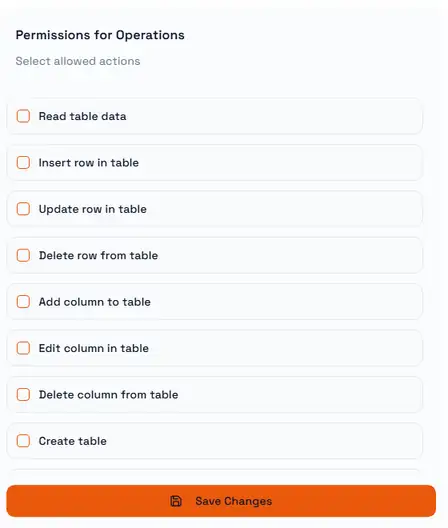
The actions are deliberately narrow. On a Table you can allow reading rows without allowing inserts, or allow exporting without allowing column changes, so a grant can be exactly as wide as the job requires and no wider.
Nothing takes effect until you press Save Changes. A grant applies only to the resource it was made on — granting access to one Table says nothing about any other Table.