
Recovery
Vincent Depassier · September 3, 2026
Deleting a table or a form in Praxsuite does not destroy it. It is disabled: it disappears from the sidebar, from pickers, from everywhere you would normally reach it — and it waits.
Settings → Recovery is where it waits, and where you decide its fate: bring it back, or destroy it for real.
What the screen holds
Three sections, in this order:
Section | What appears there |
Workspace | This workspace, and only when it has itself been disabled |
Tables | Every disabled table in the workspace |
Forms | Every disabled form in the workspace |
Each entry shows its name, its description, and when it was deleted, with two actions: Recover and Delete permanently.
If a section is empty it says so. An empty Recovery screen is the normal, healthy state.
Recover
Recovering puts the item back exactly where it was, with its data intact. A recovered table still has its rows; a recovered form still has its fields, its layout and its submissions.
There is nothing to reconstruct and no import step. This is the entire point of soft deletion.
Delete permanently
This one is real, and it is the only irreversible action on the page.
To make it hard to do by accident, the confirmation dialog asks you to type the item's name before the button becomes usable. Not a checkbox, not an "are you sure" — the name.
Once it completes, nothing on this page or anywhere else will bring the item back.
Permanently deleting a table destroys its rows. Permanently deleting a form destroys its submissions. Neither is recoverable afterwards, by you or by anyone.
Nothing expires on its own
There is no countdown. A disabled table does not evaporate after thirty days, and nothing sweeps this page clean on a schedule. Items stay here until a person recovers them or permanently deletes them.
Two consequences worth being deliberate about:
Recovery is not a queue you have to empty. Leaving something disabled indefinitely is a legitimate choice, and often the right one for a table you are fairly sure you are done with but cannot yet prove it.
Disabled items are not free. Their data is still stored, and a disabled table's rows still exist. If you are deleting to reclaim room, only the permanent delete actually does that.
The workspace section
Most of the time this section is empty and simply says so, because you are looking at a workspace that is currently active.
It fills in only when the workspace you are inside has itself been disabled — the state where the workspace survives but is closed for business. From here it can be reactivated, or destroyed permanently with the same typed-name confirmation.
What is not on this page
Recovery covers tables, forms, and the workspace. It does not cover everything that can be deleted, and knowing where the other things live saves a search:
Deleted thing | Where to get it back |
Columns | In the table itself — deleted columns can be restored from the table's own column list |
Automations | Automations → Trash, which is a separate screen with the same idea |
Rows | Not recoverable individually. For a whole table's worth, see Table Snapshots |
Dashboards, apps, files | Not covered by Recovery — deleting one of these is immediate |
That last row is the one to internalise. Not everything in Praxsuite is soft-deleted. Tables and forms are the two things that get a safety net; treat a dashboard delete as final, because it is.
Practical guidance
Prefer deleting a table to emptying it. A disabled table keeps its rows and can come back whole; a table you cleared row by row cannot.
Do not use permanent delete as cleanup. It buys you tidiness in exchange for an unrecoverable loss, and the tidiness was available for free by ignoring the entry.
Before permanently deleting a table, take a snapshot if there is any chance the data matters. It is a minute of work against a decision that cannot be revisited.
Check Recovery when something "disappeared". A table nobody can find was very often deleted by somebody who meant to delete a different one, and this page both proves it and undoes it.
Next
Deleting Columns and Rows in a Table — the deletions that never reach this page.
Table Snapshots — checkpoint and restore, for the data a delete would take with it.
What Are Activity Logs in Praxsuite? — who deleted it, and when.
What it looks like
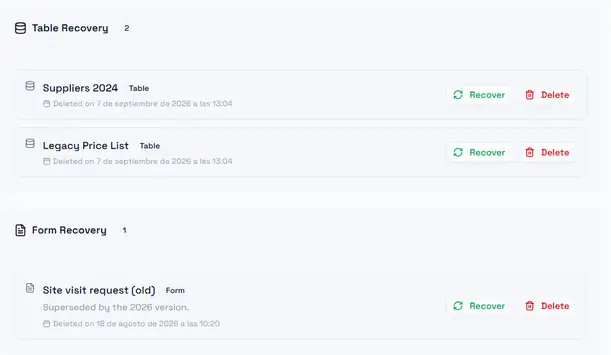
Each section carries a count in its header, so a glance tells you whether anything is waiting. Note that the date shown for a disabled table is currently the date you are looking at it, not the date it was deleted — only forms record a real deletion date today.