
Event Bus
Vincent Depassier · August 29, 2026
The Event Bus is Praxsuite's realtime primitive. It is a live channel your apps connect to over a WebSocket to share state with each other as it changes, without any of it passing through a table, an automation or a poll.
It sits alongside the other two things the API Gateway exposes — PraxQL for data and endpoints / automations for logic — and covers the one case neither of them handles well: state that is changing right now.
You manage it in API Gateway → Event Bus.
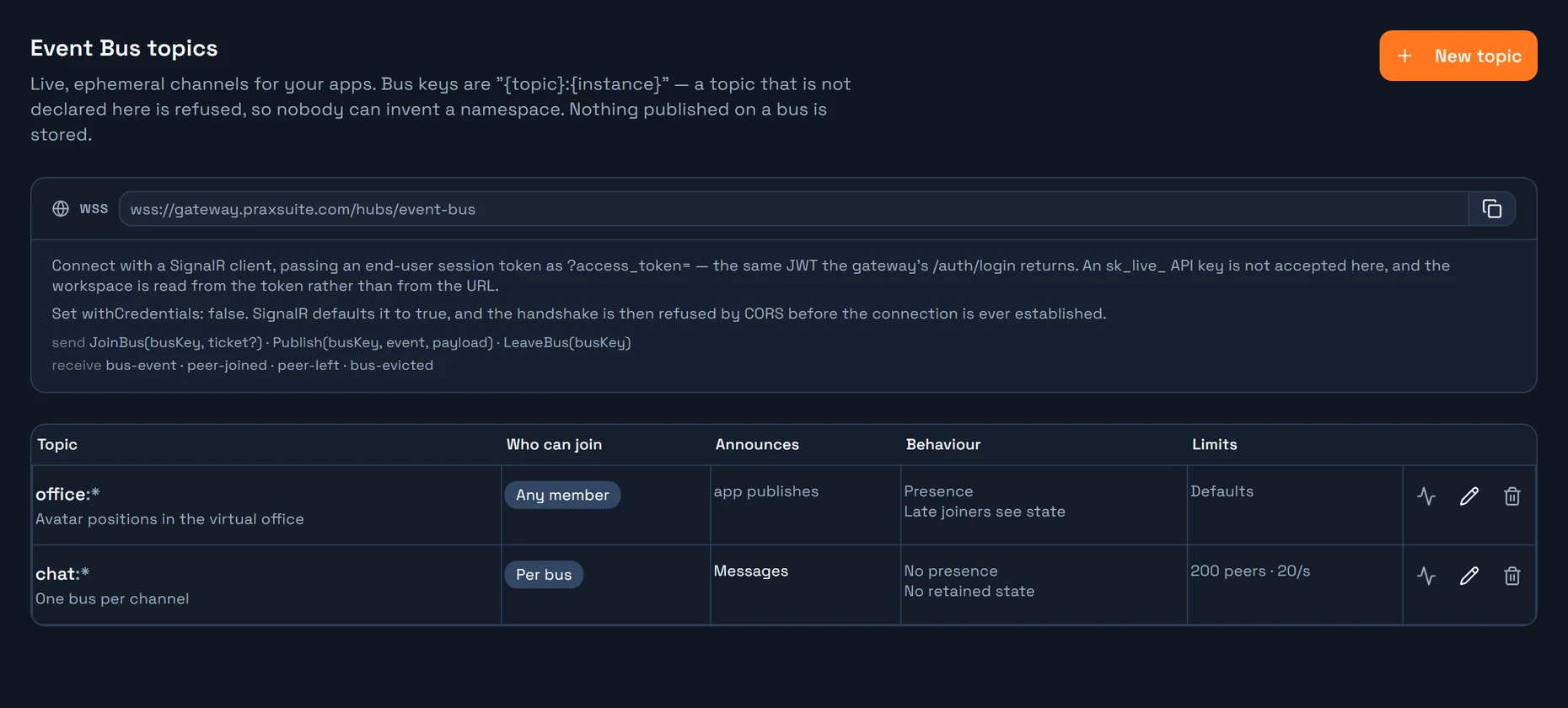
What it actually is
A dumb relay. The server holds a list of connections per bus and forwards bytes from one of them to the others. It does not parse your payload, does not know what your app's objects are, and does not touch the database.
Nothing published on a bus is stored. Not in a table, not in a log, not in a history you can replay. A message that arrives while nobody is listening is simply gone — and that is the correct behaviour, not a limitation.
This is the whole trade. Because there is no durability to pay for, delivery is immediate and the cost scales with activity rather than with the number of idle clients waiting for something to happen.
When to use it — and when not to
The Event Bus is not a replacement for automations. They solve opposite problems, and the platform is designed for you to use both.
| Automations (durable) | Event Bus (ephemeral) |
If nobody is listening | stored, processed anyway | nothing happened, and that is correct |
Guarantee | at-least-once, with retries | best-effort, no retry |
History | full run history, auditable | none |
Who receives it | the system — send mail, write a row | another person looking at a screen |
Latency | not the point | is the point |
Semantics | state that changed | state that is changing |
The test: if this message is lost, does it matter?
Yes → automation. No, because there will be a newer one in 100 ms → bus.
They compose. A chat message uses both: the automation persists it and notifies people who are away, while the bus makes it appear instantly for everyone currently connected.
Getting the split wrong hurts in both directions. Ephemeral traffic pushed through automations saturates your workspace's execution budget and starves real business events; business events pushed onto a bus vanish when nobody is connected, with no trace that they ever existed.
Topics and bus keys
A bus is addressed by a key of the form:
{topic}:{instance}office:hq, cursor:doc-42, chat:9f2c8ab1-.... The part before the first colon is the topic, the part after it is the instance.
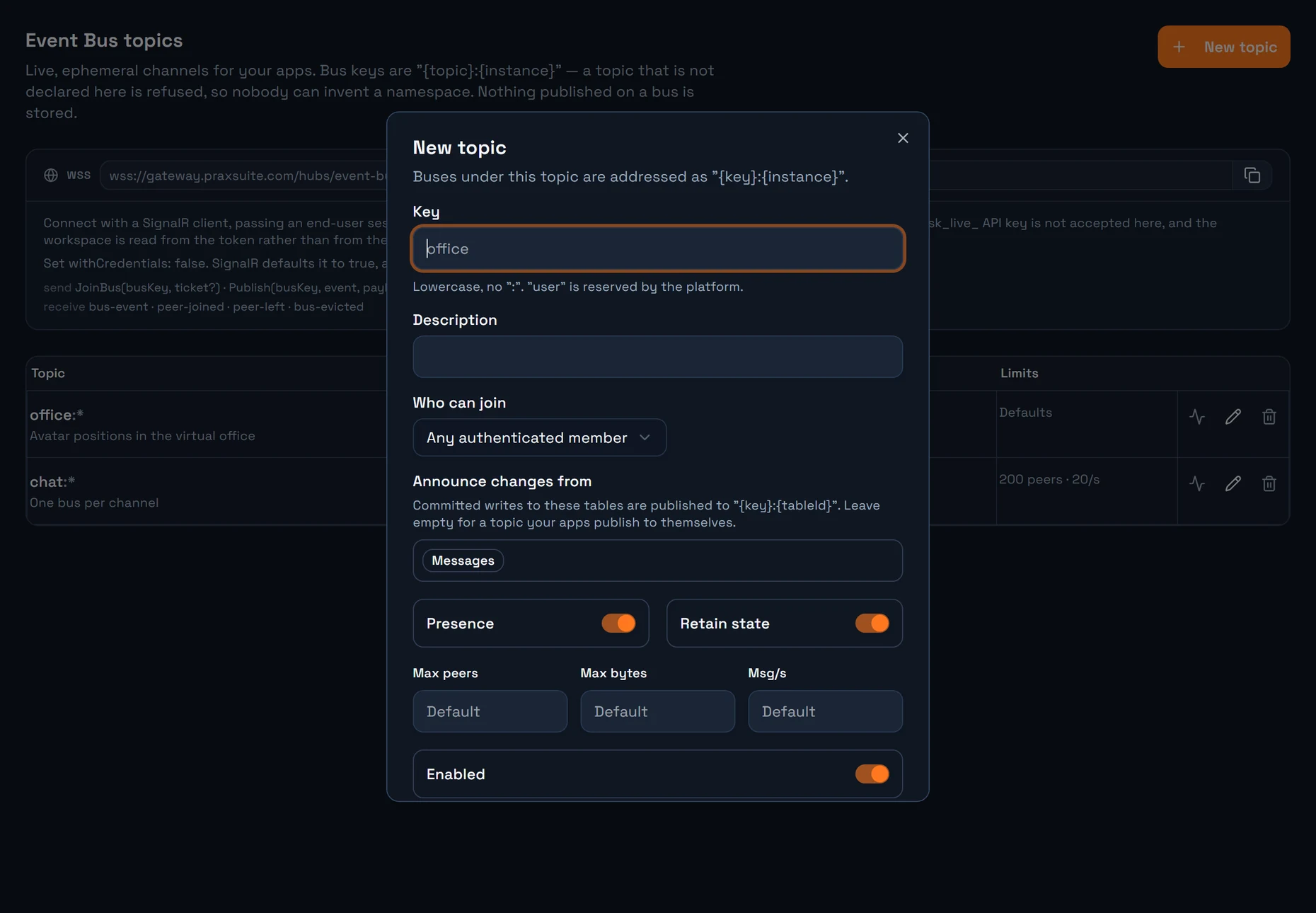
Topics are declared by an admin; instances are not. Once you have declared a topic called chat, your app can open as many buses under it as it likes — one per channel, per document, per game room — without declaring each one.
A topic that has not been declared is refused at join time. This is what stops bus squatting: nobody can invent a namespace on your workspace and start listening in it, or occupy a key before your own app gets there.
The topic segment is folded to lowercase; the instance is left exactly as you wrote it, because it is usually an id you chose.
user is reserved by the platform. Every signed-in end user has a private bus addressed as user:self, which the server resolves to their own id. It cannot be used to address anybody else.
Who can join a bus
Each topic carries its own rule. The first two cost nothing at join time — they are read straight out of the caller's token, with no database lookup and no automation run.
Mode | Who gets in | Use it for |
Any member | any authenticated end user of the workspace | cursors, "user is typing", a public lobby |
By role | anyone holding one of the topic's gateway roles | a staff-only presence channel |
Per bus | anyone holding a grant on that instance in the resource access list | one chat channel private and the next one open |
By ticket | anyone presenting a short-lived signed ticket | rules the platform cannot express generically |
Per bus is the mode for anything whose permissions differ from one bus to the next. The instance segment must be a GUID, and it is looked up as the resource id in the same access list the rest of the gateway already uses — so a resource you declare once is reachable over every transport, with nothing declared twice. Like every grant it fails closed: an instance with no grants is denied, never public.
By ticket is present in the topic model, but Praxsuite does not yet ship a way for your app to mint a ticket. Until it does, use Per bus for per-instance rules.
Joining a bus needs read on it. Publishing to it needs participate — that is what separates a peer who may watch a bus from one who may speak on it.
Permission is re-checked on every publish, not only at join. Disabling a topic, or narrowing who may reach a bus, ejects the peers who no longer qualify instead of letting an open socket outlive the check that admitted it.
Presence and late joiners
Two per-topic behaviours, both on by default:
Presence — the bus emits
peer-joinedandpeer-left, and hands a new arrival the list of who is already there. Turn it off for topics where simply knowing who is online is information you would rather not publish.Retain state — the bus keeps each peer's last message and replays it to somebody who joins later. Without this, a late joiner stares at an empty world until somebody moves. It is essential for position-shaped topics and pointless for notification-shaped ones.
What can publish onto a bus
Four producers, all landing on the same relay:
A connected client — the normal case. Your app calls
Publishand every other peer in that bus receives it.A PraxQL mutation — a write can announce itself on a bus the moment it commits, with no automation in the path. See the implementation guide.
A table binding — a topic can name source tables. Every committed write to one of them is announced to
{topic}:{tableId}, so a grid or dashboard watching that bus updates itself. The binding is declared on the topic, never on the table.The server — automations and admin tooling can emit onto a bus directly, for wiring and for events your backend originates.
Limits
These are the defaults every workspace gets. A topic can override the last three when its shape genuinely differs — a cursor topic and an avatar topic do not belong under one ceiling.
Limit | Default |
Publishes per second, per connection | 60 |
Outbound messages per second, per connection | 600 (burst 1200) |
Max payload | 8 KB |
Peers per bus | 200 |
Buses per connection | 20 |
Retained state per peer | 2 KB |
Bus key length | 128 characters |
Event name length | 64 characters |
A publish is charged per recipient, not per call: sending one message into a bus of 50 peers costs 50. Fan-out is what actually consumes the server, so that is what is metered.
Watching what a topic carries
Because the bus stores nothing, there is no message log to open when something looks wrong. Instead, a topic can be put under observation for a few minutes from the Event Bus tab: while the window is open, recent events on its buses are held in memory so you can see what is really flowing — event names, who sent them, and how many peers each one reached.
An event that reached zero peers is the useful one. From outside, a publish that nobody was joined for looks exactly like a publish that never happened.
The window expires on its own. This is deliberate: it exposes the live traffic of your app's users, so forgetting to switch it off must not be the same as never switching it off.
What does not belong on a bus
Anything you would be sad to lose. There is no retry and no history.
Anything you would have to audit later. Write it to a table; announce it on the bus.
Anything your client renders as HTML without escaping it. The bus forwards payloads verbatim between users, so it bypasses every server-side sanitiser. Treat everything arriving on a bus as untrusted input from another person, because that is exactly what it is.
Next
Connecting an app to the Event Bus — the URL, the token, a working client, and the error codes.