
Connecting an app to the Event Bus
Vincent Depassier · August 29, 2026
This page is the practical half of Event Bus: the URL, the token, a working client, and what every error code means.
The connection URL
One hub serves every workspace:
wss://gateway.praxsuite.com/hubs/event-busThe exact host is the one shown at the top of API Gateway → Event Bus, and it is the same gateway host your PraxQL queries go to. Copy it from there rather than assembling it by hand — a dedicated deployment has its own hostname.
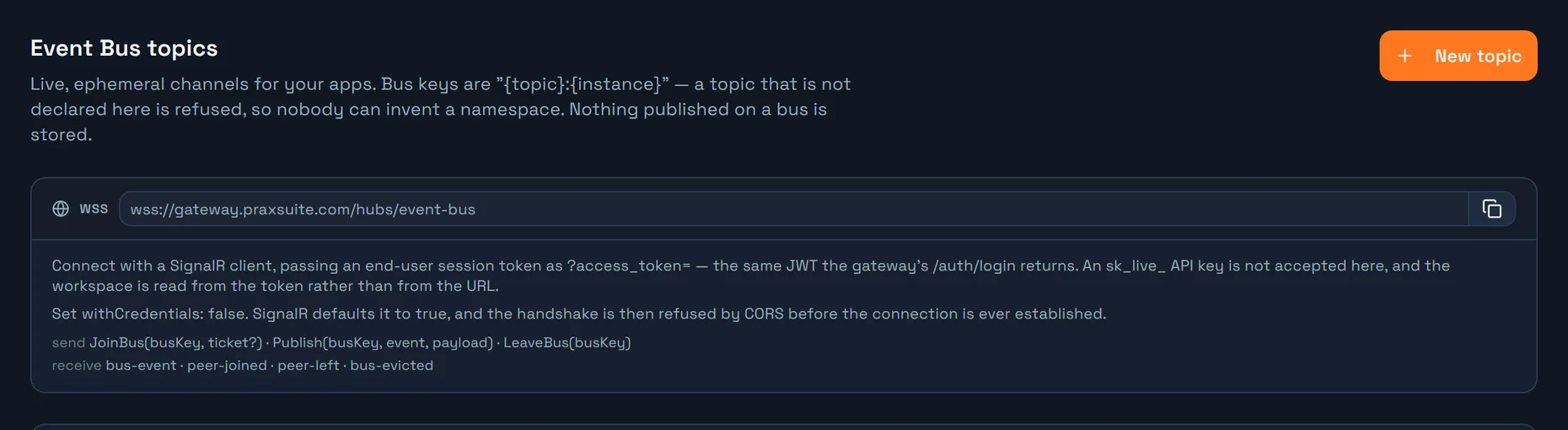
There is no workspace id in the URL. That is deliberate: the workspace is read from the token, never from the path. A caller cannot address another tenant's bus, because there is no place in the request to name one.
The transport is SignalR. Point any SignalR client at that URL — the JavaScript client, the .NET client, or any of the SDKs — and you are on the bus.
Authentication
This is the part that trips people up, so it is worth stating plainly.
An API key does not connect you to the bus. sk_live_ and pk_live_ keys authenticate your application to the gateway. The Event Bus authenticates a person, because every message it relays is stamped with who sent it, and a shared key names nobody.
What the bus wants is an end-user session token — the JWT the gateway hands back when one of your app's users signs in. The chain is:
  your API key (pk_live_ / sk_live_)
        |
        |  POST /{workspaceId}/auth/login
        v
  end-user access token (JWT)
        |
        |  wss://.../hubs/event-bus?access_token=<JWT>
        v
  connected to the Event Bus
The key is used once, to log the user in. From there on, the user's own token is the credential.
Getting the token
POST https://gateway.praxsuite.com/{workspaceId}/auth/login
Authorization: Bearer pk_live_xxxxxxxx
Content-Type: application/json

{ "email": "player@example.com", "password": "..." }
{
"isSuccess": true,
"data": {
"accessToken": "eyJhbGciOi...",
"refreshToken": "...",
"accessTokenExpiresAt": "2026-08-29T18:40:00Z",
"tokenType": "Bearer",
"user": { "id": "...", "email": "player@example.com" }
}
}data.accessToken is what the bus wants. If your app already signs users in through the gateway, you have this token already — it is the same one you use for authenticated endpoint calls.
Passing it to the hub
A WebSocket cannot send an Authorization header, so SignalR passes the token as a query-string parameter and the server reads it from there:
wss://gateway.praxsuite.com/hubs/event-bus?access_token=<JWT>Every SignalR client does this for you if you give it an accessTokenFactory. Use the factory rather than baking the token into the URL string — access tokens are short-lived, and the factory is re-invoked on reconnect.
The one setting that will otherwise waste your afternoon
withCredentials: falseSignalR defaults it to true, which makes the browser send the negotiate request in credentials mode include. The CORS specification forbids answering that with a wildcard Access-Control-Allow-Origin, which is what the gateway replies. The handshake is then refused before it starts, with an error that reads like a server misconfiguration:
The value of the 'Access-Control-Allow-Origin' header in the response must not be the wildcard '\*' when the request's credentials mode is 'include'.
The bus authenticates with a bearer token and never a cookie, so credentials serve no purpose here. Set it to false and the error goes away.
A working client
import * as signalR from "@microsoft/signalr";

const GATEWAY = "https://gateway.praxsuite.com";
const WORKSPACE_ID = "3fa85f64-5717-4562-b3fc-2c963f66afa6";

// 1. Sign the end user in. This is the only place your API key is used.
async function login(email, password) {
  const res = await fetch(`${GATEWAY}/${WORKSPACE_ID}/auth/login`, {
    method: "POST",
    headers: {
      "Content-Type": "application/json",
      Authorization: "Bearer pk_live_xxxxxxxx",
    },
    body: JSON.stringify({ email, password }),
  });
  const body = await res.json();
  return body.data.accessToken;
}

// 2. Connect to the bus with that user's token.
const accessToken = await login(email, password);

const connection = new signalR.HubConnectionBuilder()
  .withUrl(`${GATEWAY}/hubs/event-bus`, {
    accessTokenFactory: () => accessToken,
    withCredentials: false, // required - see above
  })
  .withAutomaticReconnect()
  .build();

// 3. Listen before you join, so nothing that arrives during the join is missed.
connection.on("bus-event", ({ fromUserId, event, payload }) => {
  if (event === "move") renderPeer(fromUserId, payload);
});
connection.on("peer-joined", ({ userId }) => addPeer(userId));
connection.on("peer-left", ({ userId }) => removePeer(userId));
connection.on("bus-evicted", ({ bus }) => console.warn("no longer allowed on", bus));

await connection.start();

// 4. Join. The second argument is the ticket: null unless the topic is ticket-gated,
//    but it must always be sent - see "Always send the ticket argument" below.
//    The result carries the retained state of everyone already there.
const join = await connection.invoke("JoinBus", "office:hq", null);
if (!join.ok) throw new Error(`could not join: ${join.error}`);
for (const peer of join.peers) renderPeer(peer.userId, peer.payload);

// 5. Publish. One message per decision - never one per animation frame.
const result = await connection.invoke("Publish", "office:hq", "move", {
  from: [10, 4],
  to: [12, 4],
  facing: "east",
});
console.log(`reached ${result.recipients} peers`);

// 6. Group membership does NOT survive a reconnect. Re-join, every time.
connection.onreconnected(() => connection.invoke("JoinBus", "office:hq", null));
Hub reference
Three methods to call:
Call | Returns |
|
|
|
|
| nothing — leaving a bus you never joined is not an error |
Four events to listen for:
Event | Payload | When |
|
| another peer, or the server, published |
|
| somebody joined — only if the topic has presence on |
|
| somebody left or disconnected |
|
| you are no longer allowed on this bus |
Notes worth having in mind:
`event` is a string you invent. The bus never interprets it. It is
postMessagebetween browsers.`fromUserId` is stamped by the server from your validated token and is never read from the payload — no peer can claim to be somebody else. A
nullmeans the event came from the server rather than from a peer.`peers` is empty unless the topic has retain state on.
A publish does not echo back to you. Apply your own action locally; the bus tells the others.
`recipients` is how many peers it reached. Zero means nobody was joined — useful, because from the outside that is indistinguishable from never having published.
Always send the ticket argument
ticket is null for every topic that is not ticket-gated — but it is not optional. SignalR matches a call to a hub method by its exact number of arguments and ignores default values, so JoinBus must always be invoked with two:
await connection.invoke("JoinBus", "office:hq", null);     // right
await connection.invoke("JoinBus", "office:hq");           // fails
The one-argument call never reaches the bus at all, so it does not come back as { ok: false, error } with a reason. It throws, with nothing more than:
Failed to invoke 'JoinBus' due to an error on the server.
If you see that message, count your arguments before suspecting the server.
Your own private bus
await connection.invoke("JoinBus", "user:self", null);user:self resolves server-side to the caller's own id, needs no declaration and no permission, and cannot be used to name anybody else. It is where per-user server notifications land — an incoming call, a mention, a job that finished.
Errors
Every rejection comes back as { ok: false, error } rather than an exception. A call that throws instead never reached the bus logic — almost always a wrong number of arguments (see Always send the ticket argument).
| What happened |
| not of the form |
| empty, too long, or an attempt to name another user's bus |
| the topic was never declared in the Event Bus tab |
| declared, but switched off |
| role-gated topic, and your token holds none of its roles |
| per-bus topic, and you hold no grant on this instance (or the instance is not a GUID) |
| ticket-gated topic, and the ticket is missing, expired or not for this bus |
| the bus is at its peer limit, or you are already in the maximum number of buses |
| you published to a bus you never joined |
| empty, or longer than 64 characters |
| over the topic's payload limit |
| you are publishing faster than the topic allows |
If your connection is refused before any of this — a 401 on `/negotiate` — the token is the problem: missing, expired, or an API key rather than an end-user JWT.
Wiring per-bus permissions
For a Per bus topic, the instance segment is the resource id, and access comes from the gateway's resource access list. Declare who may reach a given bus:
POST https://api.praxsuite.com/api/v1/gateway/{workspaceId}/resources/{topicKey}/{instanceId}/grants
Authorization: Bearer sk_live_xxxxxxxx
Content-Type: application/json

{ "grantee": "endUser", "endUserId": "...", "accessLevel": "participate" }granteeisrole,endUserorany(any= every authenticated end user of your app, stated explicitly — the absence of grants means denied, never public).accessLevelisread(may watch),participate(may publish, the default) ormanage.Grants are idempotent per grantee, so an app can re-assert a bus's whole access list on every change instead of computing a diff.
PUTon the same path replaces the list outright.
Note the host. Resource grants are served on the api host under
/api/v1/gateway/..., not on the short gateway route. You can also declare them from the MCP tools (grant_resource), which is usually simpler from an agent or a script.
Announcing data changes on a bus
You do not need a client to be the producer. Two options put database writes onto a bus with no automation in the path — and therefore at PraxQL speed.
Per statement
Add notify to a PraxQL mutation. It fires after the write commits, so nothing is announced that could still roll back:
{
  "refs": { "m": "<table_id>" },
  "mutation": {
    "type": "insert",
    "table": "m",
    "values": [{ "Channel": "9f2c...", "Body": "hello" }],
    "returning": ["Body", "Channel"],
    "notify": { "bus": "chat:9f2c8ab1-...", "event": "message.created" }
  }
}
The event body is built from what the database returned, never from your request, and it is masked with the same column rules as a read — a column the caller cannot see over REST does not arrive over the bus instead. With returning the rows go out; without it, only the row ids do, which is enough for a subscriber to fetch what it is entitled to.
event defaults to row.created / row.updated / row.deleted. Publishing requires participate on the target bus, and the reserved user: topic cannot be a notify target.
Per table
A topic can declare source tables. Every committed write to one of them is announced to {topic}:{tableId} — one bus for the whole table, carrying { table, op, rowIds }.
That is exactly right for "a dashboard is watching this table" and exactly wrong for anything whose subscribers must not see each other's rows: bound to a chat table it would deliver every channel's messages to every listener. Use notify when the write should pick its audience.
Both are best-effort. The row is already durable; an ephemeral fan-out is never allowed to fail a persistent write.
Replacing a polling loop
The usual migration, in order:
Declare a topic in API Gateway → Event Bus. Pick the access mode first — it is the only decision that is awkward to change later.
Keep the write path exactly as it is. The bus is an addition, not a replacement: what was worth persisting still gets persisted.
Announce the change — from the writing client, from a
notifyon the mutation, or from a source-table binding.On the reading side, connect, join, and apply incoming events to the state you already have.
Keep one fetch on connect, and keep a slow safety refresh. The bus tells you what changed while you were listening; it can tell you nothing about what changed before you connected, and it never retries.
Only then remove the fast poll.
Two habits that decide whether this scales:
Publish decisions, not frames. A two-second walk is one
moveevent with a start and an end, not twenty position updates. Interpolate on the receiving side.Publish nothing when nothing happens. A loop that emits at a fixed rate while the user stands still is the polling you were trying to remove, just moved onto a socket.
Security
The bus relays your payload verbatim between users. It performs no sanitisation, and nothing else in the request path does either, because there is no server-side processing step to hook one into.
That makes it an untrusted-input channel between your users. Anything a client renders as HTML without escaping it is a stored XSS delivered peer to peer, bypassing every protection your write path has. Treat what arrives on a bus exactly as you would treat a form submission from a stranger.