
Gateway Roles
Vincent Depassier · August 30, 2026
An end-user account decides who someone is. A gateway role decides what they can see.
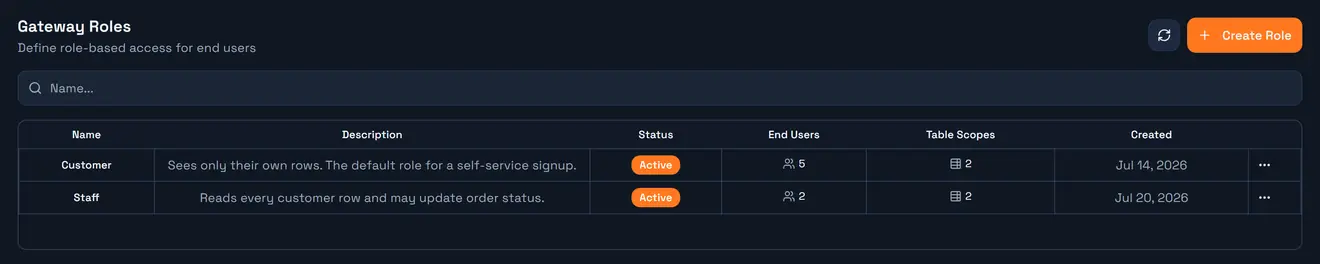
Roles are where per-user data isolation actually lives. Assign none, and a signed-in user can reach nothing. Assign one, and they get exactly what it describes — including, usually, a filter that quietly restricts every query to their own rows.
You manage them in API Gateway → Roles.
Why roles and not credential scopes
A credential's scopes are fixed: whoever holds the key gets exactly those tables and those rows. That works for an application. It cannot work for people, because "their own rows" is a different set for every person, and you are not going to issue one API key per customer.
So the gateway splits it:
Caller | Permissions come from |
An application holding | that credential's table and column scopes |
A person holding an end-user JWT | the scopes of the roles on their account, merged |
Same enforcement engine, same guardrails, different source. The one thing roles add is that their row filters can read the caller's token — which is what turns one rule into per-user isolation.
What a role scope holds
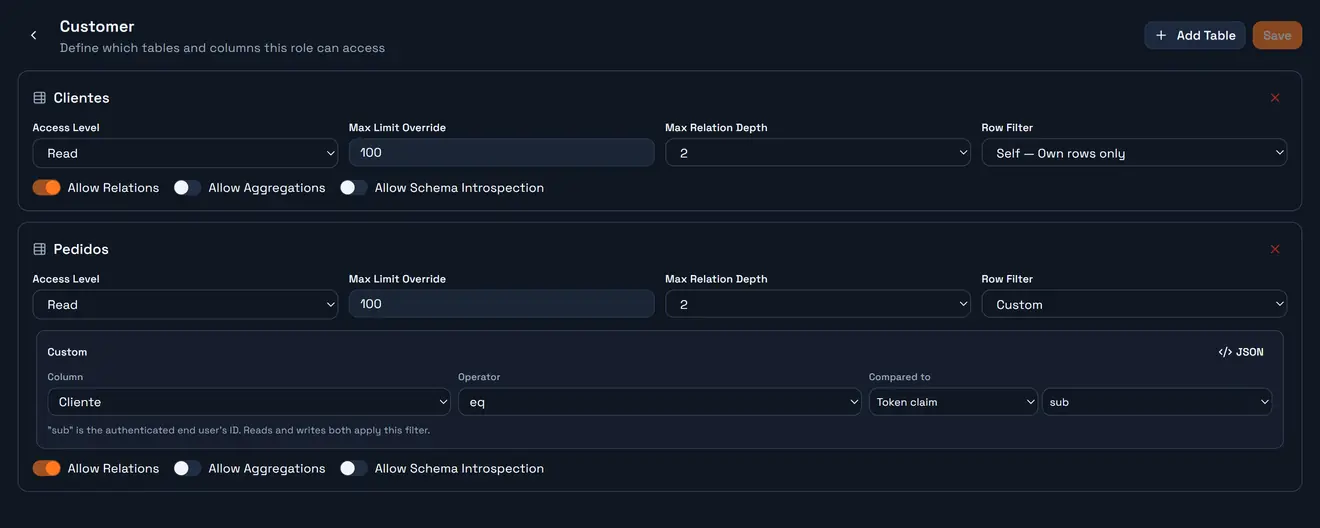
A role grants access one table at a time. Each grant carries the same settings a credential scope does:
Setting | Default on a new role scope |
Access level |
|
Max limit override | 100 rows |
Max relation depth | 2 |
Allow relations | on |
Allow aggregations | off |
Allow schema introspection | off |
Read row filter | none |
Write row filter | none — writes reuse the read filter |
Note the first number: a role scope starts at 100 rows, lower than the 200 a credential scope starts at, and well under the platform ceiling of 1,000. A user-facing list that seems to stop short is usually this, not the platform. The effective value is always in meta.limit.
Column scopes work exactly as they do on a credential: CanRead, CanFilter and CanSort on by default, CanGroup, CanAggregate and `CanWrite` off, plus a masking rule and an optional default value template per column.
The row filter is the point
Three options, and the middle one is the one you will use.
No filter. The role sees every row in the table. Correct for reference data — a product catalogue, a list of countries.
Self — own rows only. The platform finds the table's first end-user column itself and builds the filter for you. Nothing to name, nothing to maintain, and it does not break when somebody renames the column.
Custom. You pick the column, the operator, and what it compares against — a fixed value, or a claim from the caller's token:
{ "field": "Cliente", "op": "eq", "valueFromClaim": "sub" }sub is the authenticated end user's id. At request time the placeholder is replaced with the real value before anything runs, and the resulting condition is ANDed onto whatever the caller sent. They cannot see it, remove it, or write around it.
If a table has no end-user column, Self has nothing to bind to. Add the column before relying on it.
Reads and writes can have different filters
By default a scope has one filter and it governs everything: a row you cannot read is a row you cannot update or delete, because the same condition is injected into the mutation's where.
That default is right most of the time, and wrong in one very common shape. Consider a chat channel scoped Channel = X with write access. One filter can only decide which rows are matched, so every member of that channel could edit and delete every other member's messages. The rule you actually wanted was two rules:
read the whole room, change only what is yours
So a scope can carry a separate write filter. Leave it empty and writes reuse the read filter — exactly the behaviour every scope had before the setting existed. Set it, and inserts, updates and deletes are matched against it instead:
Filter | Applies to |
Row filter |
|
Write row filter |
|
For the chat example: read filter Channel eq X, write filter CREATEDBY eq {{claim:sub}}.
`CREATEDBY` is the natural anchor for a write filter. The gateway stamps it from the caller's verified token on every insert and refuses to let a client set it, so it is the one column a caller can never forge.
__SELF__ works on the write filter too, and an UPDATE is re-checked after it runs: if the rows it touched do not satisfy the write filter, the transaction is rolled back rather than committed.
When someone holds several roles
Roles merge with union semantics: more roles means more access, never less. The exact rules matter, because the intuitive reading of "and also has role X" is often the wrong one.
What is merged | Rule |
Access level | the highest wins — |
Allow relations / aggregations / introspection | OR — any role granting it grants it |
Max limit, max relation depth | the largest wins |
Column permissions | OR per column — any role granting |
Masking | the least masking wins — an unmasked role reveals a column another role masks |
Column default value | the first role that defines one |
Read and write filters | merged separately, each by the rule below |
The trap
A role with no row filter on a table gives unfiltered access to that table — and it overrides every filtered role.
Give someone Customer (own rows only) and Staff (no filter, because staff should see everything), and on any table both roles touch, they see everything. That is the intended union behaviour, and it is also how a "just let them also view the dashboard" role quietly removes an isolation rule that was working.
When two or more roles do each carry a filter, their conditions are combined with OR — the user sees the union of what each role would have shown them. Read filters and write filters are merged independently, so a role that leaves the write filter empty widens writes even if its read filter is narrow.
The practical rule: a role that grants broad access should not overlap, on the same table, with a role that grants narrow access. If you need both, put the broad grant on a different table, or make the broad role's filter explicit instead of empty.
A worked setup
The shape almost every self-service product ends up with:
Role |
|
| Assigned to |
Customer | Read, Self | Read, | everyone at signup |
Support | Read, no filter | ReadWrite, no filter | your staff |
A customer signing in sees their own record and their own orders, with no where clause anywhere in your client code. A support agent signing in sees all of them and can update an order.
The two roles overlap on both tables, so do not give an account both — a customer who is also given Support stops being filtered. If somebody genuinely needs both hats, give them two accounts, or drop Support's grant on Clientes so the overlap disappears.
Assigning roles
From the End Users tab, per account. Assigning is additive and already-assigned roles are skipped, so re-asserting a set is safe.
A change takes effect on the user's next token. An access token already issued carries the role claims it was minted with, so a role you just removed keeps working until that token expires. Deactivating the account revokes every session immediately, which is the lever when you need a change to be instant.
Guidance
Start from one role that filters, and add narrower ones. A workspace with a single
Customerrole that has Self on everything is already correct for most products.Never leave a row filter empty by accident. Empty means "all rows", not "no rows", and it is the union winner.
Split the write filter whenever people share a container. A channel, a project, a shared folder: read the container, write only your own rows.
Keep `CanWrite` deliberate. Defining column scopes at all switches writing off; granting it back should be a decision per column, not a sweep.
Check `meta.limit` before optimising a slow list. 100 rows is the role default, and it is not the platform's ceiling.
Verify a role in the Playground. Select a credential with the same shape and run the query — the results are what that permission set actually returns.
Next
End Users — the accounts these roles are assigned to.
Security Model — the six layers a filtered query passes through.