
End Users
Vincent Depassier · August 30, 2026
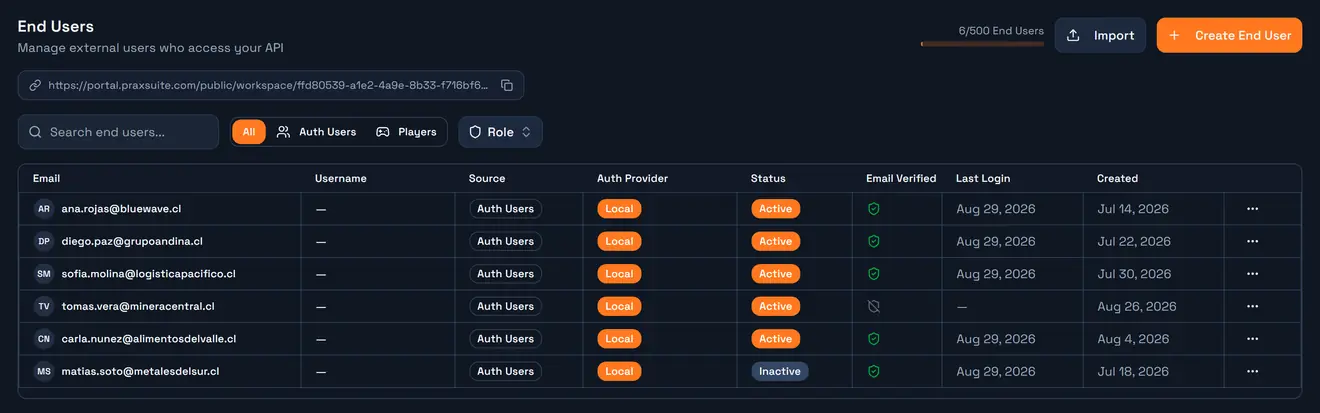
An end user is a person who signs in to your application — a customer, a player, a client of your client. They are not members of your Praxsuite workspace and they never see the portal.
The API Gateway gives them their own identity system: they register, sign in, hold a session, and every request they make carries who they are. That is what lets the platform answer "show me my orders" without your backend having to enforce it.
You manage them in API Gateway → End Users.
Three kinds of identity, and why they are separate
Praxsuite has three, and confusing them is the most common early mistake.
| Who they are | Where they sign in | What governs their data access |
Workspace member | Someone on your team | the Praxsuite portal | workspace roles and permissions |
Credential / principal | An application | nowhere — it holds a key | the credential's table scopes |
End user | A user of your app | your app, through the gateway | the gateway roles they hold |
An API key answers "which application is calling". An end user answers "which person". You almost always need both, and they arrive in the same request: the key identifies the app, the JWT identifies the person.
The two-key chain
This is the shape every app follows, and it is worth internalising before writing any code.
  your API key (pk_live_ or sk_live_)
        │
        │  POST /{workspaceId}/auth/login
        ▼
  end-user access token (JWT)  +  refresh token
        │
        │  Authorization: Bearer <JWT>
        ▼
  queries, endpoints, files, Event Bus — all as that person
The key is used to reach the auth endpoints. From there on, the user's own token is the credential. A browser app holds a pk_live_ key openly and a per-user JWT privately; that combination is what makes a public frontend safe.
The auth endpoints are the only place your API key touches a user's credentials. Nothing else in the flow needs it.
Where an end user comes from
Source | How the account appears |
Self-service | Your app calls |
Admin | Somebody creates it in the End Users tab |
Bulk import | The Import button, which validates a file before executing it |
External provider | The first successful sign-in through a configured OIDC provider creates the account |
Hosted page | Praxsuite serves a ready-made sign-in page at |
That last one is worth knowing about before you build a login screen: if you only need users to authenticate, the hosted page already exists.
The account itself
Field | Notes |
| The identifier. Unique per workspace. |
|
|
| The external provider's subject id, when the account is not local |
| Profile |
| Your own custom fields, keyed by the field definitions you configure |
| Deactivating revokes every session immediately |
| Whether they clicked the confirmation link |
| Empty until their first successful sign-in |
| Which gateway roles they hold — this is what decides their data access |
End users are per workspace. The same person signing in to two of your workspaces is two accounts, with two sets of roles, and no relationship between them.
Lifecycle
  register ──▶ confirmation email ──▶ verified
     │                                   │
     │                                   ▼
     └──────────────────────────────▶ login ──▶ access token (short-lived)
                                         │       + refresh token (long-lived)
                                         │
                            refresh ◀────┘
                                         │
                      logout / deactivate ──▶ sessions revoked
Three points that decide how you build the client:
The access token is short-lived and the refresh token is long-lived. Store the refresh token, use it to get a new access token, and never make the user sign in again just because 30 minutes passed.
Refresh rotates. Each refresh returns a new refresh token and invalidates the old one. Keep only the newest; replaying an old one fails.
Verification is not a gate by default. An account can sign in before confirming its email —
emailVerifiedtells you the state, and it is your app that decides what an unverified user may do.
What an end user can reach
Once authenticated, that JWT is accepted everywhere the gateway accepts an identity:
PraxQL queries and mutations — filtered by their roles' row filters
Endpoints — your automations exposed over HTTP
Files — subject to the same permissions as the rows that reference them
The Event Bus — the hub authenticates end users and nobody else
What they can see is never decided by the account. It is decided entirely by the gateway roles assigned to it — which is the next page.
Deactivating and deleting
Deactivate flips isActive to false and revokes every session that account holds. The row stays, the history stays, and reactivating restores access. This is what you want in almost every case.
Delete is permanent and takes the related data with it. There is no undo.
Revoking a credential is not instantaneous — the gateway caches credential lookups for up to two minutes, so a revoked API key can still be accepted briefly. End-user session revocation does not go through that cache and takes effect immediately.
Next
Authentication endpoints — register, login, refresh, password reset and OIDC, with the exact auth each one needs.
Gateway roles — how a role decides which rows an end user sees.