
Unity SDK Use Case
Mirko Franichevic · August 27, 2026
What Are We Going to Build?
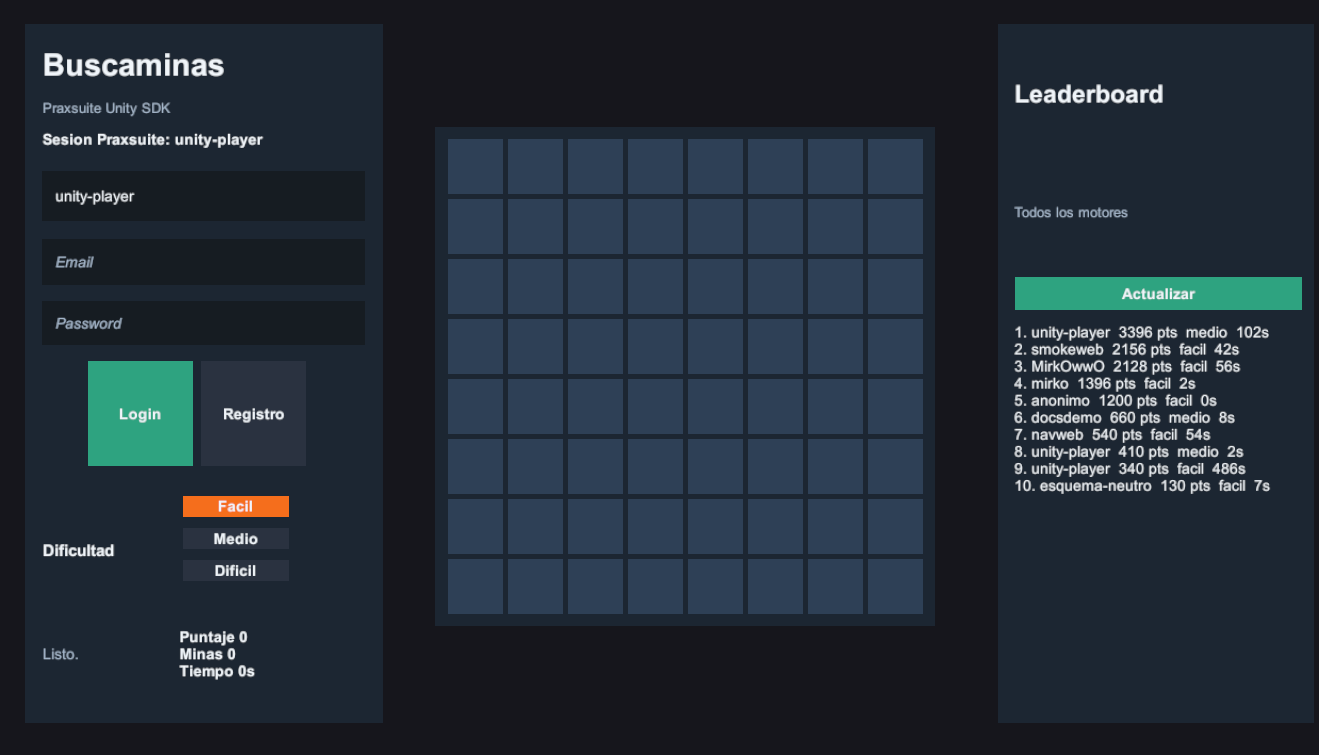
In this guide you'll build a complete 2D Minesweeper game in Unity with Praxsuite as the backend. Unity draws the screen, handles clicks, and keeps the moment-to-moment interaction responsive. Praxsuite signs players in, stores the hidden mine matrix, resolves every move, closes the game, and returns a shared leaderboard that can include Unity, Roblox, and web entries together.
You build both halves. Part 1 is the backend, inside the Praxsuite portal. Part 2 is the Unity client. Part 3 adds redeemable codes that unlock cosmetics.
By the end of this guide you'll know:
How to model the game in two Tables, and why the minefield has to be one of their columns
How to build three Automations node by node, from the trigger to the response
How to install and configure the Praxsuite SDK (Software Development Kit) in Unity
How to use
Prax.Authfor login and registrationHow to call server-side Automations with
Prax.Endpoints.CallAsyncHow to render a Minesweeper board without ever downloading the mines
How to create the visible Unity GameObjects once and generate only the board cells at runtime
How to show a leaderboard that mixes entries from every client type
How to issue one-use codes that unlock a cosmetic and survive across devices
Required level: You should know basic C# and Unity 2D UI. You do not need prior Praxsuite experience.
How It Works
Think of Praxsuite as the referee sitting outside the player device. Unity can ask for a new game or send a move, but the referee keeps the answer sheet. That matters because a Unity build runs on hardware the player controls. If the build knows where the mines are, a modified build can know too.
Runs on the client | Runs on Praxsuite |
Shows the login and register fields | Creates and refreshes the authenticated player session |
Sends | Creates the game row and prepares the hidden board state |
Creates the visible board cell buttons | Stores |
Sends | Reveals cells, toggles flags, seeds mines on first reveal, detects win or loss |
Renders | Computes |
Requests the leaderboard with | Returns the best rows across Unity, Roblox, and browser entries |
Golden rule: Unity renders the board, but Praxsuite owns the truth. The client never receives the `Matriz` column and never submits `Points`.
The board view is a list of strings, one string per row. Each character is a public state:
Character | Meaning |
| Hidden cell |
| Flagged cell |
| Revealed cell with adjacent mine count |
| Mine, only returned after losing |
What the shipped demo does differently today
This guide teaches the pattern above because it is the clearest way to learn the rule that matters: never trust the client with anything that decides the outcome. Steps 3 to 5 build exactly that: an Automation, Buscaminas: Jugar, that runs on every move and decides win, loss and score itself.
Praxsuite's own Unity reference project (PraxsuiteSDKDemo) has since moved past that baseline, for the same reason the TypeScript and Roblox demos did: a full round trip per click (Unity -> Gateway -> Automation -> Table -> Automation -> Unity) added latency that showed up under fast clicking. Its game logic now resolves every move locally in C#, mirroring what Buscaminas: Jugar does, and Praxsuite is called only twice per game: once to open it (Nueva Partida) and once at the end, through a Validar Resultado endpoint that recomputes the whole result from scratch against the saved row. Buscaminas: Jugar still exists in the workspace; the shipped client simply does not call it on every move anymore.
Both shapes are legitimate, and this guide still builds the one that teaches the underlying rule most directly. The lower-latency shape the reference project actually ships with is built later in this guide, under The `Validar Resultado` Automation.
Prerequisites
Requirement | Description |
Unity 2021.3 or newer | The installed package declares Unity 2021.3 as the minimum version |
uGUI | This guide uses |
Input System package | The demo project uses the new Input System, so the EventSystem must use |
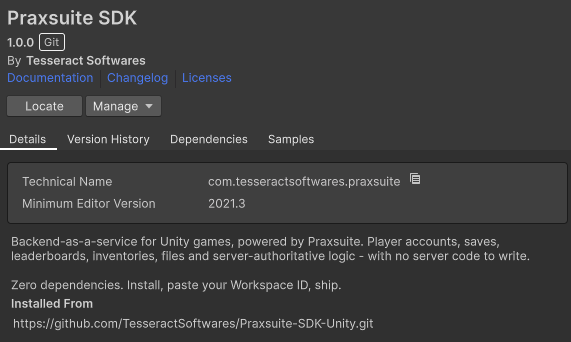
Praxsuite SDK package | Installed as |
Your own workspace | You build the backend in it. Part 1 creates everything from scratch, so a brand new workspace works |
Test end-user account | Needed for |
What is a workspace? A workspace is the Praxsuite area that holds your Tables, Automations, Gateway endpoints, users, and Docs. For a game, it is the backend project your Unity client talks to.
Part 1 - Build the Backend
Three endpoints expose the game, and each one runs an Automation. A Sync endpoint runs its Automation and returns the result in the same request, which is what Endpoints.Call waits for.
Endpoint | Input | Output |
|
|
|
|
|
|
|
|
|
accion is revelar or bandera.
Step 1 - Create the Two Tables
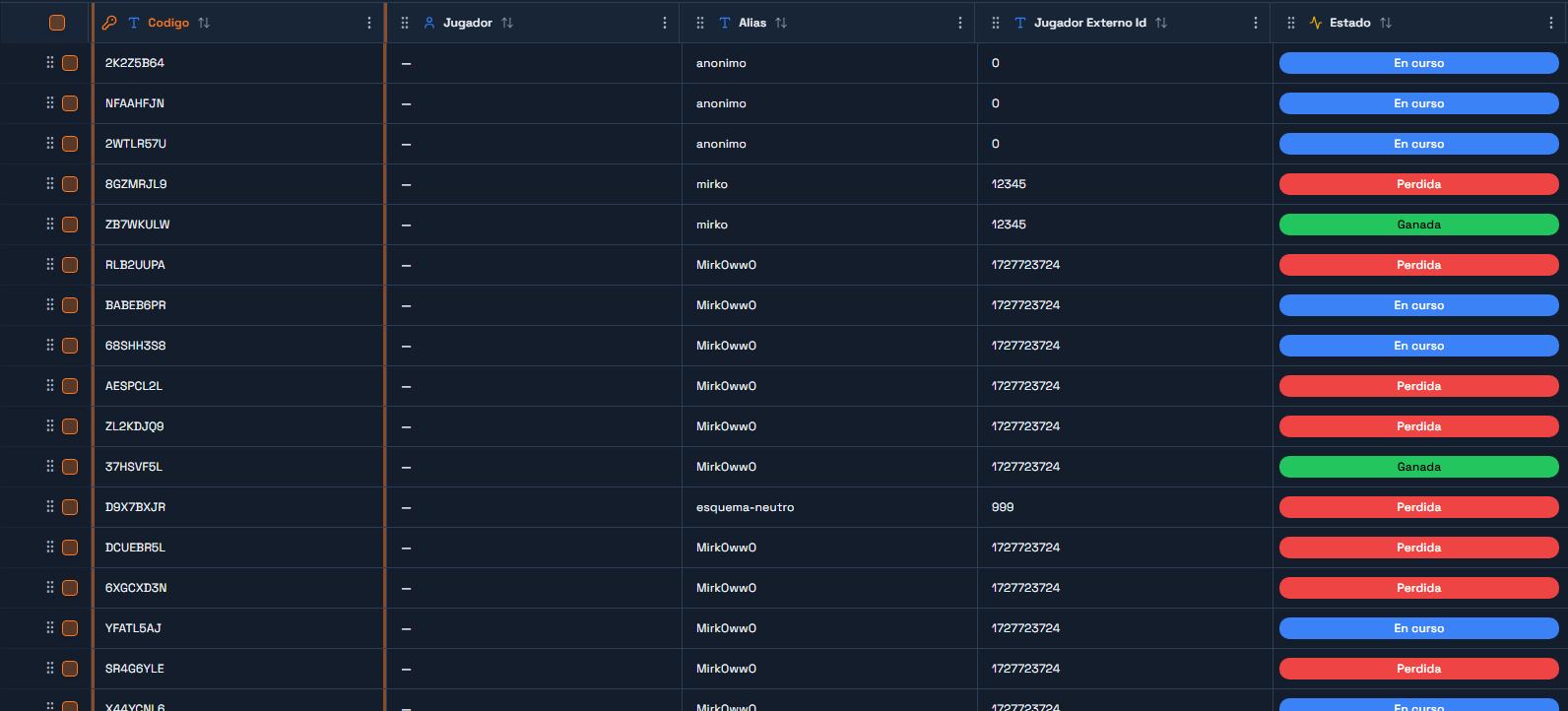
In the portal, go to DataEngine and create a Table named `Buscaminas Partidas`. One row is one game.
Column | Type | What it holds |
| ShortText | The 8-character game code the client sends back on every move |
| ShortText | Display name, used by the leaderboard |
| ShortText | The player's id on whatever platform hosts them - a Praxsuite end-user id here |
| Status |
|
| Integer | Board height |
| Integer | Board width |
| Integer | How many mines the board will have |
| ShortText |
|
| Json | The mine field. This is the secret. |
| Json | Grid of 0/1: which cells are open |
| Json | Grid of 0/1: which cells are flagged |
| Integer | Running count, so the win check is a comparison |
| Integer | Final score, written when the game ends |
| DateTime | When the first move happened |
| DateTime | When the game ended |
| Integer | Duration |
| ShortText |
|
| ShortText |
|
When you create Estado, add exactly three statuses: `En curso`, `Ganada`, `Perdida`. The Automation writes those names as text, so a typo here is a rejected write later.
Why are `Matriz`, `Revelado` and `Banderas` Json and not three tables? Because they are always read and written whole, together, for one game. Splitting a 16x16 grid into 256 rows would buy you nothing and cost you a query per move. A Json column is the right shape when the value has no life of its own outside its row.
Now create a second Table named `Demos Leaderboard`. One row is one finished game.
Column | Type | What it holds |
| ShortText | A human-readable label for the row |
| ShortText | Display name |
| ShortText | Same id as above |
| Integer | The score |
| ShortText | Which preset was played |
| Integer | How long it took |
| ShortText | Always |
| ShortText |
|
| ShortText |
|
Write down both table UUIDs from Gateway → Playground. The Automations need them.
The Player Role, and What It Must NOT Touch
The tables exist now, and a player's role currently reaches neither of them. Decide what it may see before going any further, because the easy answer — grant access to the table and move on — is exactly the one that drains the rest of this guide of meaning.
Under Settings → API Gateway → Roles, create a role called `Buscaminas Jugador` and give it a scope over Buscaminas Partidas:
Row filter:
__SELF__on theJugadorcolumn, so each player reaches only their own games.Default value for the
Jugadorcolumn:{{claim:sub}}, applied to whatever the player writes themselves.Column access, which is where the whole thing lives:
Column | Read | Write |
| No | No |
| Yes | No |
Everything else ( | Yes | No |
`Matriz` is the entire security model. If the player's role can read it, a modified client asks for its own row through the Gateway and knows where every mine is before the first click. If it can also write it, it can rewrite the minefield so that an invented result validates. Automations do not go through these scopes — they run with the workspace's own authority — so closing `Matriz` to the player costs them nothing.
Same reasoning for Demos Leaderboard: the player's role reads it (the game shows the top) and never writes. The only write comes from the Automation that validates the result.
A freshly created end user account starts with whatever default roles the workspace is configured with, and if there are none it has access to nothing: every query comes back empty or 403. Assign Buscaminas Jugador when you register the player, or from an Automation that validates their token.
Quick check: open Gateway → Playground, pick the `Buscaminas Jugador` role and ask for a game's `Matriz` column. It has to fail. If it hands you the grid, the scope is open and any player can read the mines.
Step 2 - Create the Three Endpoints
Under Gateway → Endpoints, create three endpoints, all in Sync mode:
Buscaminas: Nueva PartidaBuscaminas: JugarBuscaminas: Leaderboard
Leave them unlinked for now - you link each one to its Automation as you build it. Copy the three UUIDs; Part 2 puts them in a C# component.
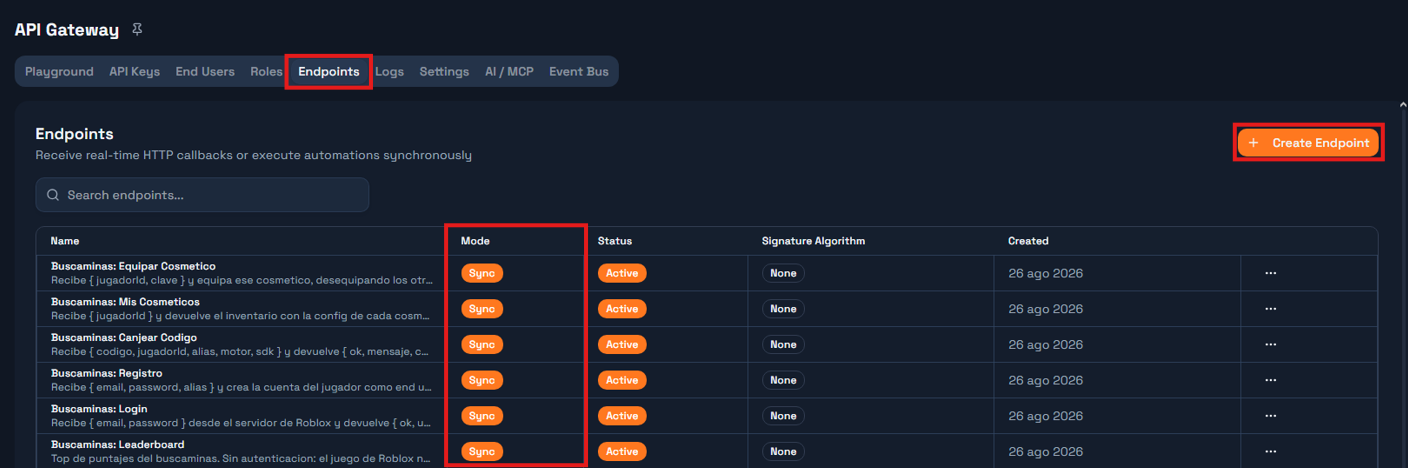
Sync or Async? Sync blocks until the Automation answers and hands you its Response node output. Async accepts the request and returns immediately. A move needs an answer before the next line runs, so all three are Sync.
Step 3 - The `Nueva Partida` Automation
Create an Automation named Buscaminas: Nueva Partida. It is four nodes in a straight line:
Endpoint trigger → Script: generate board → Insert row → ResponseNode 1 - Endpoint trigger. Point it at the Buscaminas: Nueva Partida endpoint. Give it this test payload so you can run the Automation without a game:
{ "alias": "mirko", "jugadorId": "1", "dificultad": "facil", "motor": "roblox", "sdk": "lua" }Node 2 - Script, named generar. One input: payload, sourced from {{context.request.body}}. Language JavaScript.
// Opening a game. This endpoint is engine-agnostic: the Lua (Roblox), C# (Unity)
// and TypeScript SDKs all call it, which is why the body carries `motor` and
// `sdk`. They are stored with the game and travel to the leaderboard.
//
// The mines are NOT seeded here. This only reserves the board: dimensions, how
// many mines it will have, and the revealed/flag grids at zero. The mines are
// seeded on the first move, once we know which cell the player touched and can
// keep it clear.
//
// Seeding here would make the first move a coin flip: on hard there are 45 mines
// in 256 cells, so one game in six would end on the first click before the player
// decided anything. That is not difficulty, it is a coin toss before the start.

const body = payload || {};

const PRESETS = {
  facil:   { filas: 8,  columnas: 8,  minas: 10 },
  medio:   { filas: 12, columnas: 12, minas: 24 },
  dificil: { filas: 16, columnas: 16, minas: 45 }
};

const dificultad = String(body.dificultad || "facil").toLowerCase();
const preset = PRESETS[dificultad] || PRESETS.facil;

const R = Math.max(4, Math.min(20, Number(body.filas)    || preset.filas));
const C = Math.max(4, Math.min(20, Number(body.columnas) || preset.columnas));
const M = Math.max(1, Math.min(R * C - 1, Number(body.minas) || preset.minas));

const revelado = Array.from({ length: R }, () => new Array(C).fill(0));
const banderas = Array.from({ length: R }, () => new Array(C).fill(0));
const vista    = Array.from({ length: R }, () => "?".repeat(C));

const ALFA = "ABCDEFGHJKLMNPQRSTUVWXYZ23456789";
let codigo = "";
for (let i = 0; i < 8; i++) codigo += ALFA[Math.floor(Math.random() * ALFA.length)];

// `Inicio` gets the opening time so the column is never empty, but it is not the
// game clock yet: the Jugar automation overwrites it with the first move's time.
// What gets timed is the game, not the menu.
const inicio = new Date().toISOString();

const alias = String(body.alias || "anonimo");
const jugadorId = String(body.jugadorId || body.robloxUserId || "0");
const motor = String(body.motor || "desconocido").toLowerCase();
const sdk = String(body.sdk || "desconocido").toLowerCase();

const respuesta = {
  ok: true,
  codigo: codigo,
  filas: R,
  columnas: C,
  minas: M,
  dificultad: dificultad,
  motor: motor,
  sdk: sdk,
  estado: "En curso",
  celdasReveladas: 0,
  puntaje: 0,
  sembrado: false,
  vista: vista,
  inicio: inicio
};

return {
  codigo: codigo,
  filas: R,
  columnas: C,
  minas: M,
  dificultad: dificultad,
  matriz: "[]",
  revelado: JSON.stringify(revelado),
  banderas: JSON.stringify(banderas),
  inicio: inicio,
  alias: alias,
  jugadorId: jugadorId,
  motor: motor,
  sdk: sdk,
  respuesta: JSON.stringify(respuesta)
};
Declare the outputs the node returns, so later nodes can reference them: codigo, filas, columnas, minas, dificultad, matriz, revelado, banderas, inicio, alias, jugadorId, motor, sdk and respuesta. All strings except filas, columnas and minas, which are numbers.
Node 3 - Insert Rows, named guardar, pointed at your Buscaminas Partidas table. Map the fields:
Column | Value |
|
|
|
|
|
|
|
|
|
|
|
|
|
|
|
|
|
|
|
|
|
|
|
|
|
|
|
|
|
|
|
|
Node 4 - Response. Status 200, content type application/json, body template {{context.steps.generar.respuesta}}.
Publish the Automation and link it to the Buscaminas: Nueva Partida endpoint.
Why does the Script return both a row and a `respuesta`? Because they are two different audiences. The row keeps everything, including `matriz`. The `respuesta` is what leaves the workspace, and it has no `matriz` in it. Building them separately is what makes the omission deliberate rather than accidental.
Step 4 - The `Jugar` Automation
This is the referee. Create an Automation named Buscaminas: Jugar with eight nodes:
Endpoint trigger → Query row → Script: resolve → Update row → If ended?
                                                                 ├─ no  → Response
                                                                 └─ yes → Close game → Leaderboard row → Response
Node 1 - Endpoint trigger, pointed at Buscaminas: Jugar. Test payload:
{ "codigo": "2K2Z5B64", "accion": "revelar", "fila": 0, "columna": 0 }Node 2 - Query Rows, named buscar, on Buscaminas Partidas. One filter: column Codigo, operator eq, value {{context.request.body.codigo}}. Limit 1.
Node 3 - Script, named resolver. Two inputs: payload from {{context.request.body}}, and partida from {{context.steps.buscar.row}}.
// Resolve one move. All the authority lives here: the client only sends
// coordinates and receives a masked view. The mines never travel to the game,
// except on a loss, when it no longer matters.
//
// NOTE: in the step context, column names arrive with underscores
// ('Jugador Externo Id' -> Jugador_Externo_Id).

const body = payload || {};
const p = partida || {};

function parseJ(v, fallback) {
  if (v === null || v === undefined) return fallback;
  if (typeof v === "string") {
    try { return JSON.parse(v); } catch (e) { return fallback; }
  }
  return v;
}

function isoDe(v, porDefecto) {
  if (!v) return porDefecto;
  const t = Date.parse(String(v));
  return Number.isFinite(t) ? new Date(t).toISOString() : porDefecto;
}

let matriz     = parseJ(p.Matriz, []);
const revelado = parseJ(p.Revelado, []);
const banderas = parseJ(p.Banderas, []);

// Dimensions come from the row, NOT from the matrix: until the first move the
// matrix is empty on purpose, and `matriz.length` would be 0.
const R = Number(p.Filas) || 0;
const C = Number(p.Columnas) || 0;
const M = Number(p.Minas) || 0;

const existe = Boolean(p.Codigo) && R > 0 && C > 0;

let sembrado = Array.isArray(matriz) && matriz.length > 0;

// A Status column can arrive as { Id, Name, ... } or as plain text.
let estado = (p.Estado && p.Estado.Name) ? p.Estado.Name : String(p.Estado || "En curso");

const accion = String(body.accion || "revelar").toLowerCase();
const fila = Number(body.fila);
const col  = Number(body.columna);

let mensaje = "";

function dentro(r, c) { return r >= 0 && r < R && c >= 0 && c < C; }

// Seed the mines, keeping the cell the player just touched clear along with its
// eight neighbours where they fit.
//
// Excluding only the touched cell would be enough to avoid losing on the first
// click, but it would leave the player staring at a lone number, still guessing.
// With the 3x3 clear, the touched cell has zero adjacent mines, so the flood fill
// opens a hole and the game starts with information.
function sembrar(rSeguro, cSeguro) {
  const m = Array.from({ length: R }, () => new Array(C).fill(0));

  const prohibidas = {};
  let cuantasProhibidas = 0;
  for (let dr = -1; dr <= 1; dr++) {
    for (let dc = -1; dc <= 1; dc++) {
      const rr = rSeguro + dr, cc = cSeguro + dc;
      if (rr >= 0 && rr < R && cc >= 0 && cc < C && !prohibidas[rr * C + cc]) {
        prohibidas[rr * C + cc] = true;
        cuantasProhibidas++;
      }
    }
  }

  // Small, heavily mined board: if the mines do not fit with the 3x3 clear, the
  // safe zone shrinks to the touched cell. Without this the loop below never ends.
  if (R * C - cuantasProhibidas < M) {
    for (const k in prohibidas) delete prohibidas[k];
    prohibidas[rSeguro * C + cSeguro] = true;
  }

  let puestas = 0;
  while (puestas < M) {
    const r = Math.floor(Math.random() * R);
    const c = Math.floor(Math.random() * C);
    if (prohibidas[r * C + c]) continue;
    if (m[r][c] === -1) continue;
    m[r][c] = -1;
    puestas++;
  }

  for (let r = 0; r < R; r++) {
    for (let c = 0; c < C; c++) {
      if (m[r][c] === -1) continue;
      let n = 0;
      for (let dr = -1; dr <= 1; dr++) {
        for (let dc = -1; dc <= 1; dc++) {
          if (dr === 0 && dc === 0) continue;
          const rr = r + dr, cc = c + dc;
          if (rr >= 0 && rr < R && cc >= 0 && cc < C && m[rr][cc] === -1) n++;
        }
      }
      m[r][c] = n;
    }
  }
  return m;
}

let inicio = isoDe(p.Inicio, new Date().toISOString());

if (!existe) {
  mensaje = "Partida no encontrada";
} else if (estado !== "En curso") {
  mensaje = "La partida ya termino";
} else if (!dentro(fila, col)) {
  mensaje = "Coordenada fuera del tablero";
} else if (accion === "bandera") {
  // Flagging before the first click is legal and seeds nothing.
  if (revelado[fila][col] === 0) {
    banderas[fila][col] = banderas[fila][col] ? 0 : 1;
  }
} else {
  if (banderas[fila][col] === 1) {
    mensaje = "Esa celda tiene bandera";
  } else if (revelado[fila][col] === 1) {
    mensaje = "Ya estaba revelada";
  } else {
    // First valid move: only now do we know which cell to keep clear.
    if (!sembrado) {
      matriz = sembrar(fila, col);
      sembrado = true;
      // The clock starts with the first move, not when the game was opened.
      inicio = new Date().toISOString();
    }

    if (matriz[fila][col] === -1) {
      revelado[fila][col] = 1;
      estado = "Perdida";
      mensaje = "Pisaste una mina";
    } else {
      // Iterative flood fill: opening a 0 opens the whole empty block.
      const pila = [[fila, col]];
      while (pila.length > 0) {
        const par = pila.pop();
        const r = par[0], c = par[1];
        if (!dentro(r, c)) continue;
        if (revelado[r][c] === 1 || banderas[r][c] === 1) continue;
        revelado[r][c] = 1;
        if (matriz[r][c] === 0) {
          for (let dr = -1; dr <= 1; dr++) {
            for (let dc = -1; dc <= 1; dc++) {
              if (dr === 0 && dc === 0) continue;
              pila.push([r + dr, c + dc]);
            }
          }
        }
      }
    }
  }
}

let reveladas = 0;
for (let r = 0; r < R; r++) {
  for (let c = 0; c < C; c++) if (revelado[r] && revelado[r][c] === 1) reveladas++;
}

const seguras = R * C - M;
if (existe && estado === "En curso" && sembrado && reveladas >= seguras) {
  estado = "Ganada";
  mensaje = "Campo despejado";
}

const ahora = Date.now();
const segundos = sembrado
  ? Math.max(0, Math.round((ahora - Date.parse(inicio)) / 1000))
  : 0;

const terminada = existe && estado !== "En curso";
let puntaje = 0;
if (terminada) {
  puntaje = reveladas * 10;
  if (estado === "Ganada") {
    puntaje += M * 50 + Math.max(0, 600 - segundos) * 2;
  }
}

// Masked view: '?' hidden | 'F' flag | '0'-'8' revealed | '*' mine (only on a loss)
const vista = [];
for (let r = 0; r < R; r++) {
  let s = "";
  for (let c = 0; c < C; c++) {
    if (sembrado && estado === "Perdida" && matriz[r][c] === -1) s += "*";
    else if (sembrado && revelado[r][c] === 1) s += String(matriz[r][c]);
    else if (banderas[r][c] === 1) s += "F";
    else s += "?";
  }
  vista.push(s);
}

const motor = String(p.Motor || "desconocido");
const sdk = String(p.SDK || "desconocido");

const respuesta = {
  ok: existe,
  codigo: String(p.Codigo || ""),
  filas: R,
  columnas: C,
  minas: M,
  estado: estado,
  celdasReveladas: reveladas,
  puntaje: puntaje,
  segundos: segundos,
  terminada: terminada,
  sembrado: sembrado,
  mensaje: mensaje,
  motor: motor,
  sdk: sdk,
  vista: vista
};

return {
  rowId: String(p.ID || ""),
  codigo: String(p.Codigo || ""),
  alias: String(p.Alias || "anonimo"),
  jugadorId: String(p.Jugador_Externo_Id || p["Jugador Externo Id"] || "0"),
  motor: motor,
  sdk: sdk,
  dificultad: String(p.Dificultad || "facil"),
  estado: estado,
  matriz: JSON.stringify(matriz),
  revelado: JSON.stringify(revelado),
  banderas: JSON.stringify(banderas),
  inicio: inicio,
  celdasReveladas: String(reveladas),
  puntaje: String(puntaje),
  segundos: String(segundos),
  fin: new Date(ahora).toISOString(),
  terminada: terminada ? "si" : "no",
  respuesta: JSON.stringify(respuesta)
};
Node 4 - Update Rows, named actualizar, on Buscaminas Partidas, with row id {{context.steps.resolver.rowId}}:
Column | Value |
|
|
|
|
|
|
|
|
|
|
|
|
Node 5 - If/Else, named termino. One rule: {{context.steps.resolver.terminada}} == si.
Node 6 - Update Rows on the true branch, named cerrar, same table and row id:
Column | Value |
|
|
|
|
|
|
Node 7 - Insert Rows, named marcador, on Demos Leaderboard:
Column | Value |
|
|
|
|
|
|
|
|
|
|
|
|
|
|
|
|
|
|
Node 8 - Response, reached from both branches. Body template {{context.steps.resolver.respuesta}}.
Publish and link it to the Buscaminas: Jugar endpoint.
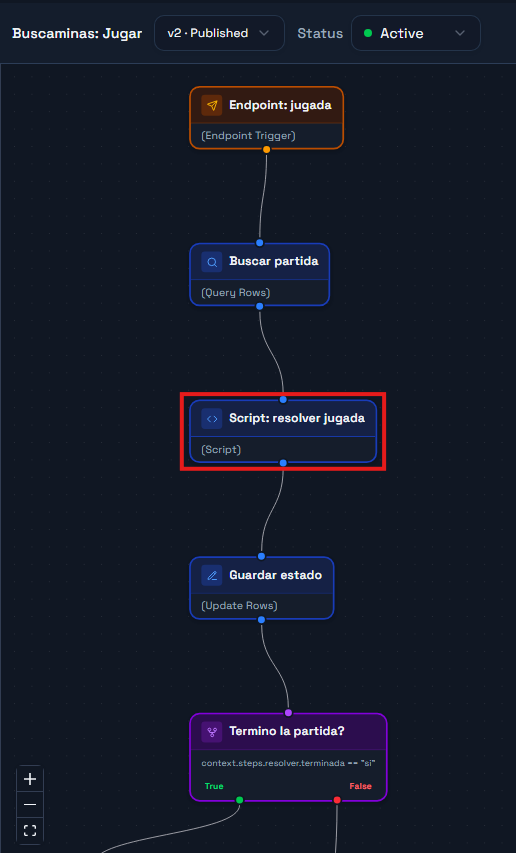
Why does the score only exist when the game ends? Because a running score is a number the client could show and the player could chase mid-game. Computing it once, at the end, on the server, keeps it out of every intermediate response.
Step 5 - The `Leaderboard` Automation
Four nodes again:
Endpoint trigger → Query rows → Script: format → ResponseNode 1 - Endpoint trigger, pointed at Buscaminas: Leaderboard. Test payload { "limite": 10 }.
Node 2 - Query Rows, named consultar, on Demos Leaderboard. Filter: Juego eq Buscaminas. Order by Points descending. Limit 50.
Node 3 - Script, named formatear. Two inputs: filas from {{context.steps.consultar.rows}} and payload from {{context.request.body}}. One output: respuesta.
// Takes the raw leaderboard rows and returns a top list ready to paint.
//
// The dedupe key is alias + motor, not alias alone: the point of this board is
// seeing the same player coming in from Roblox, from Unity and from the browser,
// and comparing. Deduping by alias alone would let the best game hide the other two.

const body = payload || {};
const limite = Math.max(1, Math.min(25, Number(body.limite) || 10));
const filtroMotor = body.motor ? String(body.motor).toLowerCase() : null;

const rows = Array.isArray(filas) ? filas : [];

const mejorPorClave = new Map();
let contados = 0;

for (const r of rows) {
  const motor = String(r.Motor || "desconocido").toLowerCase();
  if (filtroMotor && motor !== filtroMotor) continue;
  contados++;

  const alias = String(r.Alias || r.Jugador_Externo_Id || "anonimo");
  const clave = alias + "|" + motor;
  const puntos = Number(r.Points) || 0;

  const previo = mejorPorClave.get(clave);
  if (!previo || puntos > previo.puntos) {
    mejorPorClave.set(clave, {
      alias: alias,
      puntos: puntos,
      motor: motor,
      sdk: String(r.SDK || "desconocido"),
      dificultad: String(r.Dificultad || ""),
      segundos: Number(r.Segundos) || 0,
      jugadorId: String(r.Jugador_Externo_Id || r["Jugador Externo Id"] || "0")
    });
  }
}

const top = Array.from(mejorPorClave.values())
  .sort((a, b) => b.puntos - a.puntos)
  .slice(0, limite)
  .map((e, i) => Object.assign({ posicion: i + 1 }, e));

const porMotor = {};
for (const r of rows) {
  const m = String(r.Motor || "desconocido").toLowerCase();
  if (filtroMotor && m !== filtroMotor) continue;
  porMotor[m] = (porMotor[m] || 0) + 1;
}

return {
  respuesta: JSON.stringify({
    ok: true,
    total: contados,
    porMotor: porMotor,
    top: top
  })
};
Node 4 - Response, body template {{context.steps.formatear.respuesta}}.
Publish, link it, and the backend is done.
Note the field name. Each entry in `top` carries `puntos`, not `puntaje`. `puntaje` is the game's score inside `Jugar`; `puntos` is the leaderboard entry's. Reading the wrong one gives you `nil` in Lua, silently.
The `Validar Resultado` Automation
Up to here the game calls Jugar on every move, and Praxsuite is the authority at all times. The published demos of this game — Roblox, Unity, the web app and the Minecraft plugin — went one step further for latency: they resolve the move on the client and call Praxsuite only twice per game, to open it and to close it. This Automation is the only thing that keeps that shortcut safe.
It does not replay the game: it compares what the client reports against the dimensions and mine count Praxsuite generated when the game was opened, and checks that the reported result is internally consistent with that. If anything fails to add up, nothing is written — neither the game's closing row nor the leaderboard.
Do I need it if I stay with the per-click design? No, and the two coexist happily in the same workspace. But the moment you move the engine to the client it becomes mandatory: without it, "local" means "the client decides and Praxsuite takes notes".
Ten nodes, with one branch:
Trigger → Find game → Current top 3 → Script: validate → Valid?
   ├── true  → Close game → Record on leaderboard → Vault → Publish to bus → Respond
   └── false → Respond
Node 1 - Endpoint Trigger, pointed at Buscaminas: Validar Resultado. Test payload, with a 2×2 board you can check by hand:
{
  "codigo": "2K2Z5B64",
  "estado": "Ganada",
  "matriz": [[0,0],[0,-1]],
  "revelado": [[1,1],[1,0]],
  "banderas": [[0,0],[0,1]],
  "puntaje": 0,
  "segundos": 12,
  "alias": "mirko",
  "jugadorId": "1",
  "motor": "unity",
  "sdk": "csharp"
}
Node 2 - Query Rows, named buscar, over Buscaminas Partidas. Filter Codigo eq {{context.request.body.codigo}}, limit 1. This row is the only source of truth about how many mines the game had.
Node 3 - Query Rows, named top3, over Demos Leaderboard. Filter Juego eq Buscaminas, order by Points descending, limit 3. It is read before inserting this game, so there is a threshold to compare against.
Node 4 - Script, named validar, JavaScript. Three inputs: payload from {{context.request.body}}, partida from {{context.steps.buscar.row}} and top3rows from {{context.steps.top3.rows}}.
// -- Minesweeper: validate the final result -----------------------------------
// Inputs:
//   payload   <- {{context.request.body}}        final result from the local engine
//   partida   <- {{context.steps.buscar.row}}     row from 'Buscaminas Partidas'
//   top3rows  <- {{context.steps.top3.rows}}      current top 3, BEFORE inserting this game
//
// The local engine (Roblox/Unity/web/Minecraft) already played the whole game
// with no network per click. This does not replay it: it uses the rows/columns/
// mines Praxsuite generated in 'Buscaminas: Nueva Partida' -never what the client
// sends- as the single point of comparison, and checks that the reported result
// is internally consistent with that. If anything fails to add up, nothing is
// written: neither the game's closing row nor the leaderboard.

const body = payload || {};
const p = partida || {};

function parseJ(v, fallback) {
  if (v === null || v === undefined) return fallback;
  if (typeof v === "string") {
    try { return JSON.parse(v); } catch (e) { return fallback; }
  }
  return v;
}

const R = Number(p.Filas) || 0;
const C = Number(p.Columnas) || 0;
const M = Number(p.Minas) || 0;
const rowId = String(p.ID || "");
const codigo = String(p.Codigo || "");
const estadoActual = (p.Estado && p.Estado.Name) ? p.Estado.Name : String(p.Estado || "En curso");

const motivos = [];
function fallar(m) { motivos.push(m); }

const existe = Boolean(codigo) && R > 0 && C > 0;
if (!existe) fallar("partida_no_encontrada");
if (existe && estadoActual !== "En curso") fallar("partida_ya_cerrada");

const estadoReportado = String(body.estado || "").trim();
if (estadoReportado !== "Ganada" && estadoReportado !== "Perdida") fallar("estado_invalido");

const matriz = parseJ(body.matriz, null);
const revelado = parseJ(body.revelado, null);
const banderas = parseJ(body.banderas, null);

function formaValida(g) {
  return Array.isArray(g) && g.length === R && g.every(function (fila) {
    return Array.isArray(fila) && fila.length === C;
  });
}

if (existe && motivos.length === 0) {
  if (!formaValida(matriz) || !formaValida(revelado) || !formaValida(banderas)) {
    fallar("forma_de_tablero_invalida");
  }
}

let minasReportadas = 0;
let reveladas = 0;
let minaRevelada = false;
let numerosConsistentes = true;

if (motivos.length === 0) {
  for (let r = 0; r < R; r++) {
    for (let c = 0; c < C; c++) {
      if (matriz[r][c] === -1) minasReportadas++;
    }
  }
  for (let r = 0; r < R; r++) {
    for (let c = 0; c < C; c++) {
      if (matriz[r][c] !== -1) {
        let n = 0;
        for (let dr = -1; dr <= 1; dr++) {
          for (let dc = -1; dc <= 1; dc++) {
            if (dr === 0 && dc === 0) continue;
            const rr = r + dr, cc = c + dc;
            if (rr >= 0 && rr < R && cc >= 0 && cc < C && matriz[rr][cc] === -1) n++;
          }
        }
        if (matriz[r][c] !== n) numerosConsistentes = false;
      }
      if (revelado[r][c] === 1) {
        reveladas++;
        if (matriz[r][c] === -1) minaRevelada = true;
      }
    }
  }

  if (minasReportadas !== M) fallar("cantidad_de_minas_no_coincide");
  if (!numerosConsistentes) fallar("numeros_de_la_matriz_inconsistentes");

  if (estadoReportado === "Ganada") {
    if (minaRevelada) fallar("gano_pero_hay_una_mina_revelada");
    if (reveladas !== R * C - M) fallar("gano_pero_no_revelo_todas_las_celdas_seguras");
  } else if (estadoReportado === "Perdida") {
    if (!minaRevelada) fallar("perdio_pero_ninguna_mina_esta_revelada");
  }
}

const segundos = Math.max(0, Math.min(36000, Number(body.segundos) || 0));

let puntajeEsperado = 0;
if (motivos.length === 0) {
  puntajeEsperado = reveladas * 10;
  if (estadoReportado === "Ganada") {
    puntajeEsperado += M * 50 + Math.max(0, 600 - segundos) * 2;
  }
  if (Number(body.puntaje) !== puntajeEsperado) fallar("puntaje_no_coincide");
}

const valido = motivos.length === 0;

const alias = String(body.alias || p.Alias || "anonimo");
const jugadorId = String(body.jugadorId || p.Jugador_Externo_Id || p["Jugador Externo Id"] || "0");
const motor = String(body.motor || p.Motor || "desconocido");
const sdk = String(body.sdk || p.SDK || "desconocido");
const dificultad = String(p.Dificultad || "facil");

// Top 3 threshold BEFORE inserting this game: while there are fewer than 3 rows,
// any valid score gets in.
const top3 = Array.isArray(top3rows) ? top3rows : [];
const umbral = top3.length >= 3 ? (Number(top3[top3.length - 1].Points) || 0) : -1;
const esTop3 = valido && Number(body.puntaje) > umbral;

const fin = new Date().toISOString();

const respuesta = {
  ok: valido,
  codigo: codigo,
  estado: valido ? estadoReportado : estadoActual,
  puntaje: valido ? Number(body.puntaje) : 0,
  motivos: motivos,
  mensaje: valido ? "Resultado validado" : ("Resultado rechazado: " + motivos.join(", "))
};

return {
  valido: valido ? "si" : "no",
  rowId: rowId,
  codigo: codigo,
  alias: alias,
  jugadorId: jugadorId,
  motor: motor,
  sdk: sdk,
  dificultad: dificultad,
  estado: estadoReportado,
  matriz: JSON.stringify(matriz),
  revelado: JSON.stringify(revelado),
  banderas: JSON.stringify(banderas),
  celdasReveladas: String(reveladas),
  puntaje: String(valido ? Number(body.puntaje) : 0),
  segundos: String(segundos),
  fin: fin,
  esTop3: esTop3 ? "si" : "no",
  respuesta: JSON.stringify(respuesta)
};
Declare the eighteen outputs: valido, rowId, codigo, alias, jugadorId, motor, sdk, dificultad, estado, matriz, revelado, banderas, celdasReveladas, puntaje, segundos, fin, esTop3 and respuesta.
Node 5 - If/Else, named esvalido. One rule: {{context.steps.validar.valido}} == si.
Node 6 - Update Rows (the true branch), named cerrar, over Buscaminas Partidas, with rowId = {{context.steps.validar.rowId}}:
Column | Value |
|
|
|
|
|
|
|
|
|
|
|
|
|
|
|
|
Node 7 - Insert Rows, named marcador, over Demos Leaderboard:
Column | Value |
|
|
|
|
|
|
|
|
|
|
|
|
|
|
|
|
|
|
Node 8 - Vault, named vaultbus. Alias busKey, pointed at the secret holding an API key allowed to publish to the Event Bus.
Node 9 - HTTP Request, named publicartop3. POST to your workspace's bus publish route:
https://gateway.praxsuite.com/api/v1/gateway/<your-workspace-uuid>/bus/leaderboard/buscaminas/publishHeaders x-api-key: {{vault.busKey}} and Content-Type: application/json. Body:
{"event":"game_completed","payload":{"alias":"{{context.steps.validar.alias}}","puntaje":{{context.steps.validar.puntaje}},"estado":"{{context.steps.validar.estado}}","dificultad":"{{context.steps.validar.dificultad}}","motor":"{{context.steps.validar.motor}}","codigo":"{{context.steps.validar.codigo}}","esTop3":"{{context.steps.validar.esTop3}}"}}Turn on `continueOnError` for this node. That is what keeps closing the game and writing the leaderboard from ever depending on the bus being up: the announcement is strictly a bonus on top of a write that already happened.
The event is called `game_completed`, and it fires on every validated game — not only the podium ones. Who made the top travels as the `esTop3` field of the payload, not as the event name. A subscriber that only wants to announce records filters on that field; one that wants to show all activity filters on nothing. If you are coming from an earlier version of these guides that mentioned a `topscore` event, that is the name to fix on the subscriber side.*
Node 10 - Response. Status 200, application/json, body {{context.steps.validar.respuesta}}. Both branches end here: the invalid one answers with ok: false and the list of motivos, having written nothing.
Publish the Automation and bind it to the Buscaminas: Validar Resultado endpoint. You will need that endpoint alongside the other three — create it in Sync mode like the rest.
What does this actually prevent? Not a client that lies about everything — a determined cheater could still invent an internally consistent board. What it does prevent is exactly the "trust the client" failure mode: a bug in the local engine, or a deliberately modified binary, reporting an impossible board (more mines than the game opened with, numbers that do not match the minefield, a score the arithmetic does not support) and having that land silently on a leaderboard where everyone else's real games appear.
Checkpoint - Test the Backend Before Opening Unity
Run each Automation from the portal with its test payload. Nueva Partida should return a codigo and a vista of eight strings of eight ? each. Copy that codigo into the Jugar test payload and run it: the first reveal opens a patch, because the mines were seeded around your click.
{ "ok": true, "codigo": "3KQQ9KRN", "filas": 8, "columnas": 8, "minas": 10,
  "estado": "En curso", "celdasReveladas": 37, "sembrado": true, "mensaje": "",
  "vista": ["01??????", "01??????", "02?212??", "01?101??",
            "011102??", "000002??", "011102??", "01?101??"] }
Coordinates start at zero. `fila` and `columna` are `0` to `R-1`. Send `fila = 8` on an 8x8 board and you get `"Coordenada fuera del tablero"`. C# collections start at 0 as well, so Unity passes its loop indices straight through - one of the few places this client has less to get wrong than a Luau one.
[ IMAGEN - prax-unity-usecase-02.png ] Estado: falta capturar - requiere sesión iniciada en el portal. Where to capture: portal.praxsuite.com -> demos workspace -> DataEngine ->
Buscaminas Partidas. What you see: the table columns, especiallyMatriz,Revelado, andBanderas. Annotate: outline the three Json columns. Why this goes here: those columns are the server-owned state that makes the game cheat-resistant. [ IMAGEN - prax-unity-usecase-03.png ] Estado: falta capturar - requiere sesión iniciada en el portal. Where to capture: portal.praxsuite.com -> demos workspace -> Automations ->buscaminas-jugar. What you see: the graph with trigger, lookup, resolver script, update, close, leaderboard insert, and response. Annotate: outline the terminal branch that writes intoDemos Leaderboard. Why this goes here: the student sees that Unity never submits the final score.
Part 2 - The Unity Client
Step 6 - Install the SDK
Repository: https://github.com/TesseractSoftwares/Praxsuite-SDK-Unity
Open Unity Package Manager and add the package from Git URL:
https://github.com/TesseractSoftwares/Praxsuite-SDK-Unity.gitUnity writes the package into Packages/manifest.json like this:
{
  "dependencies": {
    "com.tesseractsoftwares.praxsuite": "https://github.com/TesseractSoftwares/Praxsuite-SDK-Unity.git"
  }
}
When Unity finishes resolving packages, you should be able to write using Praxsuite; from a script under Assets/.
Why a package and not copied scripts?
The SDK includes editor build checks, session storage, request retry logic, JSON parsing, and typed modules. Copying one file into Assets/ loses those guardrails. A package keeps the SDK as one unit and lets Unity update it cleanly.
Step 7 - Configure Praxsuite
The SDK can read a settings asset, but this use case configures it in code because the sample needs a custom token store and disables schema fetch. Create Assets/Scripts/Buscaminas/PraxsuiteMinesweeperApi.cs and start with this structure:
using System;
using System.Collections.Generic;
using System.Threading.Tasks;
using Praxsuite;
using UnityEngine;

public class PraxsuiteMinesweeperApi : MonoBehaviour
{
    private const string BaseUrl = "https://gateway.praxsuite.com";
    private const string WorkspaceId = "your-workspace-uuid";

    // The three endpoint UUIDs you copied in Part 1, Step 2.
    private const string NewGameEndpoint = "your-nueva-partida-endpoint-uuid";
    private const string PlayEndpoint = "your-jugar-endpoint-uuid";
    private const string LeaderboardEndpoint = "your-leaderboard-endpoint-uuid";

    private bool configured;

    private void EnsureConfigured()
    {
        if (configured && Prax.IsConfigured)
            return;

        Prax.Configure(new PraxsuiteOptions
        {
            BaseUrl = BaseUrl,
            WorkspaceId = WorkspaceId,
            AutoFetchSchema = false,
            PersistSession = true
        });

        configured = true;
    }
}
This compiles without a publishable key because the SDK can fetch the workspace publishable key from /auth/config.
Golden rule: Never paste a secret key - the kind whose prefix is `sk` followed by `live` - into a Unity client. The SDK and build guard are designed to stop that from shipping, but you should still treat any committed secret as compromised.
Step 8 - Add Login and Registration
Add player state and auth methods to the same API component:
public string CurrentAlias { get; private set; }
public string CurrentPlayerId { get; private set; }

private void Awake()
{
    EnsureConfigured();
    CurrentAlias = PlayerPrefs.GetString("buscaminas.alias", "unity-player");
    CurrentPlayerId = PlayerPrefs.GetString("buscaminas.playerId", SystemInfo.deviceUniqueIdentifier);

    var user = Prax.Auth.CurrentUser;
    if (user != null)
        ApplyUser(user);
}

public void Login(string email, string password, Action<PraxAuthResult> onSuccess, Action<string> onError)
{
    EnsureConfigured();
    StartCoroutine(RunTask(() => Prax.Auth.LoginAsync(email, password), result =>
    {
        if (result.User != null)
            ApplyUser(result.User);

        onSuccess?.Invoke(result);
    }, onError));
}

public void Register(string email, string password, string alias, Action<PraxAuthResult> onSuccess, Action<string> onError)
{
    EnsureConfigured();
    StartCoroutine(RunTask(() => Prax.Auth.RegisterAsync(email, password, alias, alias, "Unity"), result =>
    {
        if (result.User != null)
            ApplyUser(result.User);

        onSuccess?.Invoke(result);
    }, onError));
}

private void ApplyUser(PraxUser user)
{
    CurrentAlias = FirstNonEmpty(user.DisplayName, user.Username, user.FirstName, user.Email, CurrentAlias);
    CurrentPlayerId = FirstNonEmpty(user.Id, CurrentPlayerId);
    PlayerPrefs.SetString("buscaminas.alias", CurrentAlias);
    PlayerPrefs.SetString("buscaminas.playerId", CurrentPlayerId);
    PlayerPrefs.Save();
}
Prax.Auth.LoginAsync and Prax.Auth.RegisterAsync return Task<PraxAuthResult>, so the wrapper uses a coroutine bridge. Add that bridge below:
private static System.Collections.IEnumerator RunTask<T>(
    Func<Task<T>> taskFactory,
    Action<T> onSuccess,
    Action<string> onError)
{
    Task<T> task;
    try
    {
        task = taskFactory();
    }
    catch (Exception ex)
    {
        onError?.Invoke(ToMessage(ex));
        yield break;
    }

    while (!task.IsCompleted)
        yield return null;

    if (task.IsFaulted)
    {
        onError?.Invoke(ToMessage(task.Exception));
        yield break;
    }

    if (task.IsCanceled)
    {
        onError?.Invoke("Operation cancelled.");
        yield break;
    }

    onSuccess?.Invoke(task.Result);
}
After this step, a Unity button can call Login() or Register() without making the method itself async void.
Why login through the SDK and not a custom endpoint?
The workspace may contain login wrapper Automations for clients that cannot safely hold a publishable key. Unity can use the SDK directly. The SDK stores the session, refreshes it, and exposes Prax.Auth.CurrentUserId, which is the value the server can trust as the JSON Web Token (JWT) subject claim.
Step 9 - Call the Minesweeper Endpoints
The current SDK exposes Prax.Endpoints.CallAsync, which is the right path for server-authoritative game rules. Add these methods to PraxsuiteMinesweeperApi:
public void StartGame(string difficulty, Action<MinesweeperGameState> onSuccess, Action<string> onError)
{
    EnsureConfigured();

    var body = new Dictionary<string, object>
    {
        { "alias", CurrentAlias },
        { "jugadorId", CurrentPlayerId },
        { "dificultad", difficulty },
        { "motor", "unity" },
        { "sdk", "csharp" }
    };

    StartCoroutine(RunTask(
        () => Prax.Endpoints.CallAsync(NewGameEndpoint, body),
        raw => onSuccess?.Invoke(MapGameState(raw)),
        onError));
}

public void Play(string code, string action, int row, int column, Action<MinesweeperGameState> onSuccess, Action<string> onError)
{
    EnsureConfigured();

    var body = new Dictionary<string, object>
    {
        { "codigo", code },
        { "accion", action },
        { "fila", row },
        { "columna", column }
    };

    StartCoroutine(RunTask(
        () => Prax.Endpoints.CallAsync(PlayEndpoint, body),
        raw => onSuccess?.Invoke(MapGameState(raw)),
        onError));
}

public void LoadLeaderboard(Action<MinesweeperLeaderboardResponse> onSuccess, Action<string> onError)
{
    EnsureConfigured();

    StartCoroutine(RunTask(
        () => Prax.Endpoints.CallAsync(LeaderboardEndpoint, new Dictionary<string, object> { { "limite", 10 } }),
        raw => onSuccess?.Invoke(MapLeaderboard(raw)),
        onError));
}
Notice that LoadLeaderboard does not pass motor. That is intentional: the board should show all entry types, not only Unity.
Step 10 - Map the Responses
The endpoint returns dictionaries. Create simple serializable classes for the shapes Unity needs:
[Serializable]
public class MinesweeperGameState
{
    public bool ok;
    public string codigo;
    public int filas;
    public int columnas;
    public int minas;
    public string dificultad;
    public string estado;
    public int celdasReveladas;
    public int puntaje;
    public int segundos;
    public bool terminada;
    public bool sembrado;
    public string mensaje;
    public string motor;
    public string sdk;
    public List<string> vista = new List<string>();
    public string inicio;
}

[Serializable]
public class MinesweeperLeaderboardResponse
{
    public bool ok;
    public int total;
    public Dictionary<string, int> porMotor = new Dictionary<string, int>();
    public List<MinesweeperLeaderboardEntry> top = new List<MinesweeperLeaderboardEntry>();
}

[Serializable]
public class MinesweeperLeaderboardEntry
{
    public int posicion;
    public string alias;
    public int puntos;
    public string motor;
    public string sdk;
    public string dificultad;
    public int segundos;
    public string jugadorId;
}
Then map values defensively. Gateway JSON numbers can arrive as long or double, depending on the parser path, so do not cast directly:
private static int ToInt(object value)
{
    if (value == null) return 0;
    if (value is long l) return (int)l;
    if (value is double d) return (int)Math.Round(d);
    return int.TryParse(Convert.ToString(value), out var parsed) ? parsed : 0;
}
With these classes in place, the rest of the Unity code deals with normal fields instead of raw dictionaries.
Step 11 - Create the Visible Scene Objects
Create a scene with a camera, a directional light, a Canvas, and three panels: auth/difficulty on the left, board in the middle, leaderboard on the right. The important design choice is that all visible controls exist as GameObjects in the scene. The only thing created at runtime is the grid of individual board cells, because its size changes with difficulty.
The actual implementation uses an editor menu item named Praxsuite/Buscaminas/Create Demo Scene. It creates:
Buscaminas Game
  PraxsuiteMinesweeperApi
  MinesweeperGameController

Buscaminas Canvas
  Buscaminas Root
    Buscaminas Shell
      Buscaminas Left Panel
        Buscaminas Alias Field
        Buscaminas Email Field
        Buscaminas Password Field
        Buscaminas Login Button
        Buscaminas Register Button
        Buscaminas Easy Button
        Buscaminas Medium Button
        Buscaminas Hard Button
      Buscaminas Board Area
        Buscaminas Board Grid
      Buscaminas Leaderboard Panel
        Buscaminas Refresh Leaderboard Button
        Buscaminas Leaderboard Text
[ IMAGEN - prax-unity-usecase-04.png ] Estado: falta capturar - requiere Unity Editor con la escena
BuscaminasDemo.unity. What you see: the Hierarchy with the fixed GameObjects expanded. Annotate: outlineBuscaminas Board Gridand note that only its children are generated at runtime. Why this goes here: the student sees which UI objects must exist before Play mode.
Why create the controls in the scene and not in the game script?
Scene GameObjects are easier to inspect, bind, restyle, and debug. If the whole interface is created in Start(), a missing reference becomes invisible until Play mode. Here the controller has serialized fields, the editor setup binds them, and the runtime only manages the part that truly changes: the cells.
Step 12 - Wire the Controller
Create MinesweeperGameController.cs. Its fields mirror the objects from the scene:
public class MinesweeperGameController : MonoBehaviour
{
    [Header("Praxsuite")]
    [SerializeField] private PraxsuiteMinesweeperApi api;

    [Header("Auth")]
    [SerializeField] private InputField emailInput;
    [SerializeField] private InputField passwordInput;
    [SerializeField] private InputField aliasInput;
    [SerializeField] private Text sessionText;

    [Header("Game")]
    [SerializeField] private Text statusText;
    [SerializeField] private Text scoreText;
    [SerializeField] private GridLayoutGroup boardGrid;
    [SerializeField] private RectTransform boardRect;
    [SerializeField] private Button easyButton;
    [SerializeField] private Button mediumButton;
    [SerializeField] private Button hardButton;

    [Header("Leaderboard")]
    [SerializeField] private Button refreshLeaderboardButton;
    [SerializeField] private Text leaderboardText;
}
On Start(), the controller prepares the EventSystem, validates references, hides the password, renders a blank 8 x 8 board, and loads the leaderboard:
private void Start()
{
    EnsureEventSystem();

    if (!ResolveSceneReferences())
        return;

    passwordInput.contentType = InputField.ContentType.Password;
    passwordInput.ForceLabelUpdate();

    api.UseGuest(aliasInput.text);
    RefreshSessionText();
    RenderBoard(new MinesweeperGameState
    {
        filas = 8,
        columnas = 8,
        minas = 10,
        estado = "En curso",
        vista = HiddenBoard(8, 8)
    });
    LoadLeaderboard();
}
You should now be able to press Play and see a blank board before any server call finishes.
Step 13 - Support the New Input System
If your project uses the Input System package, a legacy StandaloneInputModule throws this Unity error:
InvalidOperationException: You are trying to read Input using the UnityEngine.Input class, but you have switched active Input handling to Input System package in Player Settings.Fix the EventSystem in code:
private static void EnsureEventSystem()
{
    var eventSystem = UnityEngine.Object.FindAnyObjectByType<EventSystem>();
    if (eventSystem == null)
        eventSystem = new GameObject("EventSystem", typeof(EventSystem)).GetComponent<EventSystem>();

#if ENABLE_INPUT_SYSTEM
    var legacyInput = eventSystem.GetComponent<StandaloneInputModule>();
    if (legacyInput != null)
        UnityEngine.Object.Destroy(legacyInput);

    if (eventSystem.GetComponent<InputSystemUIInputModule>() == null)
        eventSystem.gameObject.AddComponent<InputSystemUIInputModule>();
#else
    if (eventSystem.GetComponent<StandaloneInputModule>() == null)
        eventSystem.gameObject.AddComponent<StandaloneInputModule>();
#endif
}
This keeps the same scene working in both old-input and new-input Unity projects.
Step 14 - Render the Board
The server returns the public vista. Unity creates one button per character:
private void RenderBoard(MinesweeperGameState state)
{
    foreach (Transform child in boardGrid.transform)
        Destroy(child.gameObject);

    boardGrid.constraint = GridLayoutGroup.Constraint.FixedColumnCount;
    boardGrid.constraintCount = Math.Max(1, state.columnas);
    boardGrid.cellSize = CellSizeFor(state.columnas);

    for (var r = 0; r < state.filas; r++)
    {
        var row = state.vista != null && r < state.vista.Count ? state.vista[r] : string.Empty;
        for (var c = 0; c < state.columnas; c++)
        {
            var ch = c < row.Length ? row[c] : '?';
            var cell = CreateCell(boardGrid.transform);
            cell.Bind(this, r, c, ch);
        }
    }
}
The cell view turns F into a small flag built from UI Images, not a letter:
private void EnsureFlagIcon()
{
    if (flagIcon != null)
        return;

    var root = new GameObject("Flag Icon", typeof(RectTransform));
    root.transform.SetParent(transform, false);
    flagIcon = root.GetComponent<RectTransform>();
    flagIcon.sizeDelta = new Vector2(26f, 28f);

    flagPole = CreateFlagPart("Pole", flagIcon, Color.white, new Vector2(3f, 24f), new Vector2(-5f, 0f));
    flagCloth = CreateFlagPart("Cloth", flagIcon, new Color(0.90f, 0.10f, 0.15f), new Vector2(17f, 12f), new Vector2(2f, 6f));
    flagBase = CreateFlagPart("Base", flagIcon, Color.white, new Vector2(17f, 3f), new Vector2(-3f, -11f));
    flagIcon.gameObject.SetActive(false);
}
[ IMAGEN - prax-unity-usecase-05.png ] Estado: falta capturar - requiere Unity Editor en Play mode. What you see: a started Unity Minesweeper game with visible cells and flag icons. Annotate: outline a flag icon and one revealed number. Why this goes here: it proves that Unity is rendering the masked view, not a local solver.
Step 15 - Send Moves and Start Difficulties
The difficulty buttons call server presets:
public void StartEasyGame() => StartNewGame("facil");
public void StartMediumGame() => StartNewGame("medio");
public void StartHardGame() => StartNewGame("dificil");

private void StartNewGame(string difficulty)
{
    api.UseGuest(aliasInput.text);
    SetBusy(true, "Creating game...");
    api.StartGame(difficulty, state =>
    {
        SetBusy(false);
        ApplyGame(state);
    }, ShowError);
}
Each cell sends either revelar or bandera. Right click flags; left click reveals:
public void OnPointerClick(PointerEventData eventData)
{
    var flag = eventData.button == PointerEventData.InputButton.Right;
    controller.CellClicked(row, column, flag);
}

public void CellClicked(int row, int column, bool flag)
{
    if (busy || game == null || game.terminada)
        return;

    SetBusy(true, flag ? "Marking flag..." : "Revealing cell...");
    api.Play(game.codigo, flag ? "bandera" : "revelar", row, column, state =>
    {
        SetBusy(false);
        ApplyGame(state);
        LoadLeaderboard();
    }, ShowError);
}
After each move, Unity throws away the old board view and renders the new one from the server response.
Step 16 - Show the Shared Leaderboard
The leaderboard endpoint can filter by motor, but the Unity use case intentionally does not. The player should see every client using the same backend:
public void LoadLeaderboard()
{
    refreshLeaderboardButton.interactable = false;

    api.LoadLeaderboard(response =>
    {
        refreshLeaderboardButton.interactable = true;
        RenderLeaderboard(response);
    }, error =>
    {
        refreshLeaderboardButton.interactable = true;
        leaderboardText.text = "Leaderboard unavailable.\n" + error;
    });
}
Render the returned rows with their motor and sdk so Unity, Roblox, and browser scores are visibly different:
private void RenderLeaderboard(MinesweeperLeaderboardResponse response)
{
    var lines = new List<string>();
    foreach (var entry in response.top)
        lines.Add($"{entry.posicion}. {entry.alias}  {entry.puntos} pts  {entry.motor}/{entry.sdk}  {entry.segundos}s");

    leaderboardText.text = string.Join("\n", lines);
}
[ IMAGEN - prax-unity-usecase-06.png ] Estado: falta capturar - requiere Unity Editor en Play mode. What you see: the leaderboard panel with entries from more than one
motor. Annotate: outline themotor/sdktext and the total-by-motor footer if present. Why this goes here: the course goal is a shared backend, not a Unity-only scoreboard.
Step 17 - Persist Sessions Carefully
The SDK includes PraxEncryptedFileTokenStore, but the sample hit a Unity threading rule: SystemInfo.deviceUniqueIdentifier must be read on the main thread. The fix is to make sure any custom token store gathers Unity-only values from Awake() or another main-thread method, not from a background callback or field initializer.
Use this principle if you supply your own IPraxTokenStore:
private void Awake()
{
    var deviceId = SystemInfo.deviceUniqueIdentifier;

    Prax.Configure(new PraxsuiteOptions
    {
        WorkspaceId = WorkspaceId,
        PersistSession = true,
        TokenStore = new MinesweeperPraxTokenStore(WorkspaceId, deviceId)
    });
}
The exact storage mechanism is less important than the boundary: a stored player session should never be powerful enough to change scores or reveal mines directly.
Part 3 - Redeemable Codes
A code like PRAX-LAVA02 unlocks a cosmetic. One code, one use, one owner - forever.
That last word is what ties codes to accounts. The owner of an inventory is a Praxsuite end user, which in Unity is Prax.Auth.CurrentUserId - the same value CurrentPlayerId holds after a successful login. The platform id is stored beside it as informational data only.
Login → end user id → Redeem code → Inventory → EquipGuest play cannot own anything. `UseGuest` falls back to `SystemInfo.deviceUniqueIdentifier`, so a code redeemed as a guest is attached to a device, not a person: reinstall the game or open it on another machine and the cosmetic is gone. Gate the redeem UI behind a signed-in user.
Step 18 - Three More Tables
`Buscaminas Codigos` - one row is one code.
Column | Type | What it holds |
| ShortText | The code itself, uppercase: |
| ShortText | Which catalog entry it unlocks |
| Bool | Lets you retire a code without deleting it |
| Bool | Burned or not |
| DateTime | When it was burned |
| ShortText | Which end user burned it |
| ShortText | Their display name, for reading the table |
| ShortText |
|
`Buscaminas Cosmeticos` - the catalog. One row is one unlockable thing.
Column | Type | What it holds |
| ShortText | Stable id: |
| ShortText | Display name |
| ShortText | One line for the UI |
| ShortText | Always |
| ShortText | The slot it occupies: |
| Status |
|
| Json | What the cosmetic actually does. You define this. |
| Bool | Lets you pull a cosmetic without breaking inventories |
Config is deliberately open. The backend never reads it - it passes it through to the game, which decides what it means. For a board palette in Unity, RGB triples map straight onto a Color:
{ "oculta": [150, 150, 165], "revelada": [90, 90, 100], "bandera": [240, 120, 120] }`Buscaminas Inventario` - one row is one cosmetic owned by one player.
Column | Type | What it holds |
| ShortText | The Praxsuite end user id. The owner. |
| ShortText | Device or platform id, informational |
| ShortText | Display name at the time of unlock |
| Table | Link to the catalog row |
| ShortText | Denormalized key, so lookups need no join |
| ShortText | Copied from the catalog: one equipped item per type |
| Bool | Whether it is currently on |
| DateTime | When |
| ShortText | Which code produced it |
| ShortText | Where it was redeemed from |
| ShortText | Which SDK redeemed it |
Step 19 - The Three Cosmetic Automations
Create three more Sync endpoints - Buscaminas: Canjear Codigo, Buscaminas: Mis Cosmeticos, Buscaminas: Equipar Cosmetico - and one Automation behind each.
`Canjear Codigo` - nine nodes
Endpoint trigger → Query code → Query cosmetic → Query "already owned?" → Script: validate
                 → Valid? ─ no ──────────────────────────────────────────→ Response
                          └ yes → Burn the code → Add to inventory ───────→ Response
The three queries: buscarCodigo on Buscaminas Codigos filtering Codigo eq {{context.request.body.codigo}}; buscarCosmetico on Buscaminas Cosmeticos filtering Clave eq {{context.steps.buscarCodigo.row.Cosmetico_Clave}}; and buscarPosesion on Buscaminas Inventario filtering Jugador Id and Cosmetico Clave. All limit 1.
Note the underscores in Cosmetico_Clave: inside the step context, column names arrive with spaces replaced by underscores.
The Script node validar takes payload, codigo, cosmetico and posesion:
// One code, one use. All the decision lives here; the database nodes that
// follow only execute what this Script already resolved.
//
// WHO the owner is: `jugadorId` is the Praxsuite END USER id, not the device
// one. If the inventory hung off a device id, the same person opening the game
// on another machine would see none of what they unlocked.

const body = payload || {};
const cod = codigo || {};
const cos = cosmetico || {};
const ya = posesion || {};

function nombreDe(v) {
  if (!v) return "";
  if (typeof v === "object" && v.Name) return String(v.Name);
  return String(v);
}

const pedido = String(body.codigo || "").trim().toUpperCase();
const jugadorId = String(body.jugadorId || "").trim();
const alias = String(body.alias || "anonimo");
const ahora = new Date().toISOString();

const existe = Boolean(cod.Codigo);
const clave = String(cod.Cosmetico_Clave || cod["Cosmetico Clave"] || "");

let valido = false;
let mensaje = "";

if (!pedido) {
  mensaje = "Escribi un codigo";
} else if (!jugadorId) {
  mensaje = "Tenes que iniciar sesion para canjear";
} else if (!existe) {
  mensaje = "Ese codigo no existe";
} else if (cod.Activo === false) {
  mensaje = "Ese codigo fue dado de baja";
} else if (cod.Usado === true) {
  mensaje = "Ese codigo ya fue canjeado";
} else if (!cos.Clave) {
  // Points at a cosmetic that does not exist: a data error, not the player's
  // fault. The code is NOT burned.
  mensaje = "El premio de ese codigo no esta disponible";
} else if (cos.Activo === false) {
  mensaje = "Ese cosmetico esta desactivado";
} else if (ya.Cosmetico_Clave || ya["Cosmetico Clave"]) {
  // Also does not burn the code: if you already own it, the code stays alive.
  mensaje = "Ya tenes " + String(cos.Nombre || clave);
} else {
  valido = true;
  mensaje = "Desbloqueaste " + String(cos.Nombre || clave);
}

const tipo = nombreDe(cos.Tipo_Clave || cos["Tipo Clave"] || cos.Tipo);
const rareza = nombreDe(cos.Rareza);

let config = cos.Config;
if (typeof config === "string") {
  try { config = JSON.parse(config); } catch (e) { config = {}; }
}

const respuesta = {
  ok: valido,
  mensaje: mensaje,
  codigo: pedido,
  cosmetico: valido ? {
    clave: clave,
    nombre: String(cos.Nombre || clave),
    descripcion: String(cos.Descripcion || ""),
    tipo: tipo,
    rareza: rareza,
    config: config || {}
  } : null
};

return {
  valido: valido ? "si" : "no",
  mensaje: mensaje,
  rowIdCodigo: String(cod.ID || ""),
  clave: clave,
  nombre: String(cos.Nombre || clave),
  tipo: tipo,
  rareza: rareza,
  rowIdCosmetico: String(cos.ID || ""),
  referencia: alias + " / " + clave,
  ahora: ahora,
  respuesta: JSON.stringify(respuesta)
};
An If/Else on {{context.steps.validar.valido}} == si gates the two write nodes. quemar updates the code row (Usado to true, plus Usado En, Usado Por Id, Usado Por Alias, Usado Desde Motor), and guardar inserts the inventory row with Jugador Id, Plataforma Id, Alias, Cosmetico, Cosmetico Clave, Tipo, Equipado as false, Obtenido, Codigo Usado, Motor and SDK. Both branches reach a Response node with {{context.steps.validar.respuesta}}.
Two failures deliberately do not burn the code. A broken catalog entry is your bug, not the player's. Already owning the cosmetic is not a failure at all - the code stays alive so it can be given away.
`Mis Cosmeticos` - five nodes, read-only
Query the inventory filtered by Jugador Id, query the catalog filtered by Juego eq Buscaminas, then join them:
// The inventory stores only the cosmetic's key. The config lives in the
// catalog, so a cosmetic can be retouched without rewriting the row of every
// player who owns it. Joining here means the client gets the config already
// resolved and never needs to know the catalog exists.

function nombreDe(v) {
  if (!v) return "";
  if (typeof v === "object" && v.Name) return String(v.Name);
  return String(v);
}

function parseJ(v, porDefecto) {
  if (v === null || v === undefined) return porDefecto;
  if (typeof v === "string") {
    try { return JSON.parse(v); } catch (e) { return porDefecto; }
  }
  return v;
}

const porClave = new Map();
for (const c of (Array.isArray(catalogo) ? catalogo : [])) {
  porClave.set(String(c.Clave), c);
}

const items = [];
const equipado = {};

for (const fila of (Array.isArray(mios) ? mios : [])) {
  const clave = String(fila.Cosmetico_Clave || fila["Cosmetico Clave"] || "");
  const c = porClave.get(clave);
  if (!c) continue;
  if (c.Activo === false) continue;

  const tipo = nombreDe(c.Tipo_Clave || c["Tipo Clave"] || c.Tipo);
  const estaEquipado = fila.Equipado === true;

  const item = {
    clave: clave,
    nombre: String(c.Nombre || clave),
    descripcion: String(c.Descripcion || ""),
    tipo: tipo,
    rareza: nombreDe(c.Rareza),
    config: parseJ(c.Config, {}),
    equipado: estaEquipado,
    obtenido: String(fila.Obtenido || ""),
    codigo: String(fila.Codigo_Usado || fila["Codigo Usado"] || "")
  };
  items.push(item);

  if (estaEquipado) equipado[tipo] = item;
}

items.sort(function (a, b) {
  if (a.tipo !== b.tipo) return a.tipo < b.tipo ? -1 : 1;
  return a.nombre < b.nombre ? -1 : 1;
});

return {
  respuesta: JSON.stringify({
    ok: true,
    total: items.length,
    items: items,
    equipado: equipado
  })
};
`Equipar Cosmetico` - seven nodes
Query the inventory row by Jugador Id and Cosmetico Clave, validate, then unequip everything of the same Tipo before marking this one:
// Equipping is a two-step operation that has to stay consistent: first unequip
// everything of the same type, then mark this one. If the player does not own
// the cosmetic, nothing is touched.
//
// And it is a SWITCH, not a one-way button: tapping a cosmetic that is already
// on takes it off.

const body = payload || {};
const it = item || {};

const clave = String(body.clave || "").trim();
const jugadorId = String(body.jugadorId || "").trim();
const tipo = String(it.Tipo || "");
const yaPuesto = it.Equipado === true;

let queda;
if (typeof body.equipar === "boolean") {
  queda = body.equipar;
} else {
  queda = !yaPuesto;
}

let valido = false;
let mensaje = "";

if (!jugadorId) {
  mensaje = "Tenes que iniciar sesion";
} else if (!clave) {
  mensaje = "Falta el cosmetico";
} else if (!it.Cosmetico_Clave && !it["Cosmetico Clave"]) {
  mensaje = "No tenes ese cosmetico";
} else if (!tipo) {
  mensaje = "Ese cosmetico no tiene tipo asignado";
} else {
  valido = true;
  mensaje = queda ? "Equipado" : "Guardado";
}

return {
  valido: valido ? "si" : "no",
  mensaje: mensaje,
  rowId: String(it.ID || ""),
  clave: clave,
  tipo: tipo,
  // UpdateRows fields only accept strings, so the boolean travels as text.
  nuevoEstado: queda ? "true" : "false",
  accion: queda ? "equipar" : "desequipar",
  respuesta: JSON.stringify({
    ok: valido,
    mensaje: mensaje,
    clave: clave,
    tipo: tipo,
    equipado: valido ? queda : yaPuesto
  })
};
Finally, seed a catalog row and a code so there is something to redeem:
Table | Row |
|
|
|
|
Codes are compared uppercase, so store them uppercase.
Step 20 - Redeem From Unity
Add the three endpoint ids and the matching calls to PraxsuiteMinesweeperApi:
private const string RedeemEndpoint = "your-canjear-endpoint-uuid";
private const string MyCosmeticsEndpoint = "your-mis-cosmeticos-endpoint-uuid";
private const string EquipEndpoint = "your-equipar-endpoint-uuid";

public bool IsSignedIn => !string.IsNullOrEmpty(Prax.Auth.CurrentUserId);

public void RedeemCode(string code, Action<MinesweeperRedeemResult> onSuccess, Action<string> onError)
{
    EnsureConfigured();

    if (!IsSignedIn)
    {
        onError?.Invoke("Sign in before redeeming a code.");
        return;
    }

    var body = new Dictionary<string, object>
    {
        { "codigo", (code ?? string.Empty).Trim().ToUpperInvariant() },
        { "jugadorId", CurrentPlayerId },
        { "plataformaId", SystemInfo.deviceUniqueIdentifier },
        { "alias", CurrentAlias },
        { "motor", "unity" },
        { "sdk", "csharp" }
    };

    StartCoroutine(RunTask(
        () => Prax.Endpoints.CallAsync(RedeemEndpoint, body),
        raw => onSuccess?.Invoke(MapRedeem(raw)),
        onError));
}

public void LoadCosmetics(Action<MinesweeperCosmeticsResponse> onSuccess, Action<string> onError)
{
    EnsureConfigured();

    StartCoroutine(RunTask(
        () => Prax.Endpoints.CallAsync(MyCosmeticsEndpoint,
            new Dictionary<string, object> { { "jugadorId", CurrentPlayerId } }),
        raw => onSuccess?.Invoke(MapCosmetics(raw)),
        onError));
}

public void EquipCosmetic(string key, Action<MinesweeperEquipResult> onSuccess, Action<string> onError)
{
    EnsureConfigured();

    var body = new Dictionary<string, object>
    {
        { "jugadorId", CurrentPlayerId },
        { "clave", key }
    };

    StartCoroutine(RunTask(
        () => Prax.Endpoints.CallAsync(EquipEndpoint, body),
        raw => onSuccess?.Invoke(MapEquip(raw)),
        onError));
}
And the shapes they map onto:
[Serializable]
public class MinesweeperCosmetic
{
    public string clave;
    public string nombre;
    public string descripcion;
    public string tipo;
    public string rareza;
    public bool equipado;
    public Dictionary<string, object> config = new Dictionary<string, object>();
}

[Serializable]
public class MinesweeperRedeemResult
{
    public bool ok;
    public string mensaje;
    public string codigo;
    public MinesweeperCosmetic cosmetico;
}

[Serializable]
public class MinesweeperCosmeticsResponse
{
    public bool ok;
    public int total;
    public List<MinesweeperCosmetic> items = new List<MinesweeperCosmetic>();
    public Dictionary<string, MinesweeperCosmetic> equipado = new Dictionary<string, MinesweeperCosmetic>();
}

[Serializable]
public class MinesweeperEquipResult
{
    public bool ok;
    public string mensaje;
    public string clave;
    public string tipo;
    public bool equipado;
}
Now the UI. Add an InputField and a Button to the canvas and wire them from the controller:
[SerializeField] private InputField codeInput;
[SerializeField] private Button redeemButton;
[SerializeField] private Text redeemStatus;

private void Start()
{
    redeemButton.onClick.AddListener(OnRedeemClicked);
}

private void OnRedeemClicked()
{
    var code = codeInput.text?.Trim();
    if (string.IsNullOrEmpty(code))
    {
        redeemStatus.text = "Type a code first";
        return;
    }

    redeemButton.interactable = false;
    api.RedeemCode(code, result =>
    {
        redeemButton.interactable = true;
        redeemStatus.text = result.mensaje;

        if (!result.ok || result.cosmetico == null)
            return;

        codeInput.text = string.Empty;
        // Equip what was just unlocked, so the reward is visible immediately
        api.EquipCosmetic(result.cosmetico.clave, _ => ApplyPalette(), ShowError);
    },
    error =>
    {
        redeemButton.interactable = true;
        redeemStatus.text = error;
    });
}
Applying the palette reads equipado, keyed by type, with the catalog config already resolved:
private Color hiddenColor = new Color32(150, 150, 165, 255);
private Color revealedColor = new Color32(90, 90, 100, 255);
private Color flagColor = new Color32(240, 120, 120, 255);

private void ApplyPalette()
{
    api.LoadCosmetics(response =>
    {
        if (response.equipado != null && response.equipado.TryGetValue("paleta", out var paleta))
        {
            hiddenColor = ReadColor(paleta.config, "oculta", hiddenColor);
            revealedColor = ReadColor(paleta.config, "revelada", revealedColor);
            flagColor = ReadColor(paleta.config, "bandera", flagColor);
        }

        if (game != null)
            RenderBoard(game);
    }, ShowError);
}

private static Color ReadColor(Dictionary<string, object> config, string key, Color fallback)
{
    if (config == null || !config.TryGetValue(key, out var raw) || !(raw is IList<object> rgb) || rgb.Count != 3)
        return fallback;

    return new Color32((byte)ToInt(rgb[0]), (byte)ToInt(rgb[1]), (byte)ToInt(rgb[2]), 255);
}
Then use hiddenColor, revealedColor and flagColor in the cell view instead of the hardcoded values. Adding a new palette becomes one catalog row and one code - no Automation change, no rebuild.
A Unity client sends its own `jugadorId`, and that is a real difference. In the Roblox build the game server supplies it, so it cannot be forged. Here the value travels in the request body from a client the player controls, and the Automation trusts the body - so a modified build could redeem into another player's inventory if it learned their end user id. For cosmetics in a demo that is an acceptable trade. Before this pattern guards anything of value, resolve the caller from the request's authenticated identity inside the Automation rather than from `body.jugadorId`, or move redemption behind a server you control.
Complete Code
The complete Unity implementation is in the project under:
Assets/
  Editor/
    BuscaminasSceneSetup.cs
  Scripts/
    Buscaminas/
      PraxsuiteMinesweeperApi.cs
      MinesweeperGameController.cs
      MinesweeperCellView.cs
      MinesweeperPraxTokenStore.cs
BuscaminasSceneSetup.cs creates and binds the fixed UI GameObjects. PraxsuiteMinesweeperApi.cs owns Praxsuite configuration, auth, endpoint calls, and response mapping. MinesweeperGameController.cs owns Unity UI state. MinesweeperCellView.cs turns a server character into a clickable cell. MinesweeperPraxTokenStore.cs customizes session persistence.
[ IMAGEN - prax-unity-usecase-07.png ] Estado: falta capturar - requiere Unity Editor. What you see: Inspector for
Buscaminas Game, withPraxsuiteMinesweeperApiandMinesweeperGameControllerattached. Annotate: outline the serialized references on the controller. Why this goes here: it shows that the scene is configured with real GameObject references.
Common Errors and How to Avoid Them
Error | Cause | Solution |
|
| Create the settings asset or pass |
| The workspace id has extra characters or is not a UUID | Copy only the GUID from the portal URL |
|
| Check the constants for new game, play, and leaderboard |
| A session-only auth method was called before login | Disable account actions until |
| A refresh was requested before a session existed | Call |
| The scene has | Replace it with |
| A token store touched | Read Unity device/application values in |
HTTP 404 on every endpoint call | The endpoint id does not exist in your workspace, or its Automation has no published version | Re-copy the ids from Gateway → Endpoints and confirm each Automation is published |
The board renders but every cell is | The response was received and then discarded; the board was re-rendered from stale state | Always render from the |
| A row or column outside | Unity's loop indices are already 0-based - pass them through unchanged, do not add one |
| The redeem call arrived with an empty | Gate the redeem UI on |
A code works once and then reports | Working as intended. One code, one use | Add another row to |
A cosmetic unlocked as a guest disappears | Guest play keys the inventory to a device id, not an account | Sign in before redeeming; see the note in Part 3 |
Production Tips
Keep the player role away from direct writes to
Buscaminas PartidasandDemos Leaderboard.Keep
Matrizunreadable from any client-facing table scope.Send
motor: "unity"andsdk: "csharp"on every new game so shared leaderboards remain explainable.Use
CancellationTokenon long-lived screens if a request can outlive the object that started it.Keep
VerboseLoggingoff in release builds because request and response bodies can contain player data.Test a build, not only Play mode, so the SDK build guard can scan for secret keys and insecure remote hosts.
Next Steps
Add a resume screen that stores the current
codigoand asks the server for the next move using the same game row.Show filters for all motors side by side: Unity, Roblox, and browser.
Add cosmetic types beyond
paleta: aminasprite, a boardmaterial, a victory sound. The backend needs no change; only the game's reading ofconfiggrows.Add a cosmetics panel that lists
Mis Cosmeticosand lets the player toggle each one - the equip endpoint is already a switch.Add controller support for flagging, since right click is natural on desktop but awkward on gamepad.
Move score display into a richer results panel after
GanadaorPerdida.Move the engine into C# to drop the per-click latency, the way Praxsuite's own Unity reference client (
PraxsuiteSDKDemo) does: gameplay resolved locally,Buscaminas: Jugarunused, and theValidar Resultadoendpoint you built above revalidating the result once per game.
You now have a Unity game where the fun is local and the authority is remote, and you built both sides of that line. That is exactly the shape you want for a score-based game.