
TypeScript SDK Use Case
Mirko Franichevic · August 27, 2026
What Are We Going to Build?
In this guide you'll build a complete Minesweeper game, back to front, on top of Praxsuite: the Tables that store it, the Automations that rule it, and a React client with accounts, three difficulties and a global scoreboard. Every rule of the game lives on the server. The browser asks for a board, sends coordinates, and paints whatever comes back. It never learns where the mines are.
By the end of this guide you'll know:
How to model the game in two Tables, and why the minefield has to be one of their columns
How to build three Automations node by node, from the trigger to the response
How to wire a React and TypeScript app to that backend with the SDK (Software Development Kit)
How to register and sign in players, and keep their session across reloads
How to render a board you cannot cheat at, and read a shared leaderboard
You build both halves. Steps 1 to 6 are the backend, inside the Praxsuite portal. Steps 7 to 13 are the client.
Required level: You should be comfortable with TypeScript and React hooks. No prior experience with Praxsuite is needed. If you have never called a Praxsuite endpoint before, read the TypeScript SDK Implementation guide first: this one assumes you already got a client talking to a workspace.
How It Works
Most tutorials would generate the minefield in the browser. That is the one thing this app never does, and understanding why is the point of the whole guide.
If the browser knows where the mines are, the player knows too. It takes one open console and one line of JavaScript to win every game. So the minefield is generated inside Praxsuite, stored in a Table, and never sent out. What the browser receives is a masked view: one character per cell.
Character | Meaning |
| hidden |
| flagged |
| revealed, showing how many mines are adjacent |
| a mine, and it only ever appears once the game is already lost |
That split decides where every piece of logic belongs:
Runs on the client | Runs on Praxsuite |
Draw the masked view it was given | Place the mines |
Send | Decide what a click opens, including flood fill |
Show a local clock while you play | Detect the win, detect the mine |
Ask for the leaderboard | Compute the score and write the leaderboard row |
Golden rule: If a modified client sending an arbitrary payload could gain something it should not, that operation belongs in an endpoint. Drawing a board is safe. Deciding that you did not step on a mine is not.
There is no local solver in this app, and there cannot be one, because writing it would require knowing the mines.
What the shipped demo does differently today
This guide teaches the pattern above because it is the clearest way to learn the rule that matters: never trust the client with anything that decides the outcome. Steps 3 to 6 build exactly that: an Automation, Buscaminas: Jugar, that runs on every move and decides win, loss and score itself.
The demo game shipped in the Praxsuite-AppSource-TypescriptGame repository has since moved past that baseline, for latency: every click used to pay a full round trip (browser → gateway → Automation → table → Automation → browser), and that was noticeable under fast clicking. Its src/game/motor.ts is now a 1:1 port of the Buscaminas: Jugar script, running in the browser instead, and Praxsuite is called only twice per game: once to open it (Nueva Partida) and once at the end, through a Validar Resultado endpoint that recomputes the whole result from scratch against the row Nueva Partida saved — the same check Buscaminas: Jugar would have done on every click, just done once, at the end. Buscaminas: Jugar still exists in that workspace; the shipped client simply does not call it anymore.
Both shapes are legitimate, and this guide still builds the one that teaches the underlying rule most directly. The lower-latency shape the reference app actually ships with is built later in this guide, under The `Validar Resultado` Automation.
Prerequisites
Requirement | Description |
Node.js 18 or newer | The SDK uses the built in |
A Praxsuite workspace | You need its workspace id, a UUID you copy from the portal |
Portal access | You need to be able to create Tables and Automations in that workspace, not only read them |
| Install it with |
A browser | Chrome, Firefox or Safari. The app is plain React, nothing exotic |
What is a workspace? Think of it as a large folder in the cloud holding all your Tables, Automations and users. The workspace id is the only piece of configuration this app needs: the SDK fetches the public key by itself.
The Data Model
Everything the game remembers lives in two Tables. Build them before you touch the client, because every Automation below writes into them.
Buscaminas Partidas
One row per game. This is where the secret lives.
Column | Type | What it holds |
| ShortText (key) | The 8 character code that identifies the game. The client sends it back on every move |
| ShortText | The player id from whatever platform hosts the game: a Roblox UserId, a Steam id, or a Praxsuite JWT subject claim |
| ShortText | The display name that will reach the leaderboard |
| Status |
|
| Integer | Board dimensions and mine count |
| ShortText |
|
| Json | The minefield. |
| Json | Same shape, |
| Json | Same shape, |
| Integer | How many cells are open, used to detect the win |
| Integer | Final score, written only when the game closes |
| DateTime | When the clock started and when it stopped |
| Integer | Elapsed time the server computed |
| ShortText | Which client played: |
Important: `Matriz` is the whole security model. It is written and read only by Automations, and it must never be readable through a table scope granted to the player role. If a player can read that column, everything else in this guide is decoration.
Demos Leaderboard
One row per finished game, shared by every client that talks to this workspace.
Column | Type | What it holds |
| ShortText (key) | A readable label, for example |
| ShortText | Same id as in the game row |
| ShortText | Display name |
| Integer | The score |
| ShortText | Which preset was played |
| Integer | How long it took |
| ShortText |
|
| ShortText | Which client produced the row |
Why the matrix is a column and not memory
An Automation run is stateless. It starts, resolves one request and ends, so there is nowhere in it to keep a board between moves. Writing the matrix to a row is what makes the game survive from one click to the next.
That has a pleasant side effect: a game is resumable and inspectable. You can open the row in the portal mid game and see exactly what the server believes.
Step 1 - Create the Tables
In your Workspace, create a Table named Buscaminas Partidas. Praxsuite asks for two things: the name, and the Key Column, which is the human facing identifier for each row. Set the key column to Codigo, type ShortText.
Then add the remaining columns from the table above with Create Column, picking the type from the dropdown. Three of them are worth pausing on:
Estadois a Status column, not text. Create the three statesEn curso,GanadaandPerdida. A Status column rejects any value outside its list, which is what you want for a state machine.Matriz,ReveladoandBanderasare Json columns. They accept any valid JSON value, and here they hold arrays of arrays.Jugadorcan be an Enduser column if you want the row tied to a Praxsuite account. This guide usesJugador Externo Idinstead, a plain ShortText, so the same backend also serves clients whose players are not Praxsuite users, like the Roblox one.
Repeat for Demos Leaderboard, with Record as the key column.
Tip: Column names in Automations must match exactly, capitalisation and spaces included. `Celdas Reveladas` with a space is a different column from `CeldasReveladas`. This is the single most common cause of a row that saves with empty fields and no error.
The Player Role, and What It Must NOT Touch
The tables exist now, and a player's role currently reaches neither of them. Decide what it may see before going any further, because the easy answer — grant access to the table and move on — is exactly the one that drains the rest of this guide of meaning.
Under Settings → API Gateway → Roles, create a role called `Buscaminas Jugador` and give it a scope over Buscaminas Partidas:
Row filter:
__SELF__on theJugadorcolumn, so each player reaches only their own games.Default value for the
Jugadorcolumn:{{claim:sub}}, applied to whatever the player writes themselves.Column access, which is where the whole thing lives:
Column | Read | Write |
| No | No |
| Yes | No |
Everything else ( | Yes | No |
`Matriz` is the entire security model. If the player's role can read it, a modified client asks for its own row through the Gateway and knows where every mine is before the first click. If it can also write it, it can rewrite the minefield so that an invented result validates. Automations do not go through these scopes — they run with the workspace's own authority — so closing `Matriz` to the player costs them nothing.
Same reasoning for Demos Leaderboard: the player's role reads it (the game shows the top) and never writes. The only write comes from the Automation that validates the result.
A freshly created end user account starts with whatever default roles the workspace is configured with, and if there are none it has access to nothing: every query comes back empty or 403. Assign Buscaminas Jugador when you register the player, or from an Automation that validates their token.
Quick check: open Gateway → Playground, pick the `Buscaminas Jugador` role and ask for a game's `Matriz` column. It has to fail. If it hands you the grid, the scope is open and any player can read the mines.
Step 2 - How an Automation is Wired
An Automation is a graph: a trigger, then action nodes connected by edges. You edit it as a draft and publish it when it validates.
You only need six node types for this whole backend:
Node | Category | What it does here |
| Triggers | Starts the run when the endpoint receives a POST |
| Code | Runs JavaScript. All the game logic lives in three of these |
| Database | Reads rows from a Table |
| Database | Creates a row |
| Database | Modifies a row |
| Logic | Branches on a condition |
| Logic | Sets what the endpoint returns |
Nodes pass values to each other through a context template, written in double braces. Three forms cover everything below:
{{context.request.body}}              the whole JSON body the client posted
{{context.request.body.codigo}}       one field of it
{{context.steps.generar.matriz}}      the output named "matriz" of the node with id "generar"
A Script node declares its inputs and outputs explicitly. Inputs map a context template to a variable name your code can read; outputs name the values your return object exposes to later nodes.
Golden rule: A Script node output is always consumed as a string in a template. That is why every script below returns JSON with `JSON.stringify()` and every script that receives one parses it back. Do not fight this; lean on it.
Step 3 - Build the "New Game" Automation
Create an Automation named Buscaminas: Nueva Partida. It has four nodes in a straight line.
trigger -> generar -> guardar -> responderThe trigger. Add an EndpointTrigger node with id trigger. Create an endpoint for it in Sync mode. Sync means the connection stays open while the Automation runs and returns its response, so the client sees an ordinary HTTP call. Copy the endpoint id; the React app will need it.
The Script node. Add a Script node with id generar. Declare one input:
Name | Type | Source |
| object |
|
And these outputs, all of type string except the numeric ones: codigo, filas, columnas, minas, dificultad, matriz, revelado, banderas, inicio, alias, jugadorId, motor, sdk, respuesta.
Then paste this as the node's code. It reserves the board and, deliberately, does not place a single mine:
// -- Buscaminas: apertura de la partida ---------------------------------------
// Entrada: payload (object) <- {{context.request.body}}
//
// Este endpoint es agnostico del motor: lo llaman por igual el SDK de Lua
// (Roblox), el de C# (Unity) y el de TypeScript. Por eso el cuerpo trae
// `motor` y `sdk`, que se guardan con la partida y viajan al leaderboard.
//
// Aca NO se siembran las minas. Solo se reserva el tablero: medidas, cuantas
// minas va a tener, y las grillas de revelado y banderas en cero. Las minas se
// siembran en la primera jugada (ver `buscaminas-jugar`), cuando ya sabemos que
// celda toco el jugador y podemos dejarla libre.
//
// Sembrarlas aca obliga a que la primera jugada sea una apuesta: en dificil hay
// 45 minas en 256 celdas, asi que una de cada seis partidas se termina en el
// primer click sin que el jugador haya podido decidir nada. Eso no es
// dificultad, es una moneda al aire antes de empezar.
//
// La matriz sigue sin salir nunca del workspace. Al juego solo se le devuelve
// `respuesta`, con el tablero entero oculto.

const body = payload || {};

const PRESETS = {
  facil:   { filas: 8,  columnas: 8,  minas: 10 },
  medio:   { filas: 12, columnas: 12, minas: 24 },
  dificil: { filas: 16, columnas: 16, minas: 45 }
};

const dificultad = String(body.dificultad || "facil").toLowerCase();
const preset = PRESETS[dificultad] || PRESETS.facil;

const R = Math.max(4, Math.min(20, Number(body.filas)    || preset.filas));
const C = Math.max(4, Math.min(20, Number(body.columnas) || preset.columnas));
const M = Math.max(1, Math.min(R * C - 1, Number(body.minas) || preset.minas));

const revelado = Array.from({ length: R }, () => new Array(C).fill(0));
const banderas = Array.from({ length: R }, () => new Array(C).fill(0));
const vista    = Array.from({ length: R }, () => "?".repeat(C));

const ALFA = "ABCDEFGHJKLMNPQRSTUVWXYZ23456789";
let codigo = "";
for (let i = 0; i < 8; i++) codigo += ALFA[Math.floor(Math.random() * ALFA.length)];

// `Inicio` queda con la hora de apertura para que la columna nunca este vacia,
// pero todavia no es el reloj de la partida: `buscaminas-jugar` lo pisa con la
// hora de la primera jugada. Lo que se cronometra es el juego, no el menu.
const inicio = new Date().toISOString();

const alias = String(body.alias || "anonimo");
// Id del jugador en la plataforma que lo hospeda: UserId de Roblox, id de
// Steam, uuid del navegador. Neutro a proposito.
const jugadorId = String(body.jugadorId || body.robloxUserId || "0");
const motor = String(body.motor || "desconocido").toLowerCase();
const sdk = String(body.sdk || "desconocido").toLowerCase();

const respuesta = {
  ok: true,
  codigo: codigo,
  filas: R,
  columnas: C,
  minas: M,
  dificultad: dificultad,
  motor: motor,
  sdk: sdk,
  estado: "En curso",
  celdasReveladas: 0,
  puntaje: 0,
  // El tablero existe pero todavia no tiene minas. Un cliente que quiera
  // mostrar "empeza cuando quieras" tiene aca la senal; el que lo ignore ve
  // exactamente lo mismo que antes.
  sembrado: false,
  vista: vista,
  inicio: inicio
};

return {
  codigo: codigo,
  filas: R,
  columnas: C,
  minas: M,
  dificultad: dificultad,
  matriz: "[]",
  revelado: JSON.stringify(revelado),
  banderas: JSON.stringify(banderas),
  inicio: inicio,
  alias: alias,
  jugadorId: jugadorId,
  motor: motor,
  sdk: sdk,
  respuesta: JSON.stringify(respuesta)
};
Run it and it returns a respuesta where vista is all ? and sembrado is false. The board exists; the minefield does not yet.
Saving the row. Add an InsertRows node with id guardar, pointed at the Buscaminas Partidas table, and map its fields to the script outputs:
Codigo              {{context.steps.generar.codigo}}
Alias               {{context.steps.generar.alias}}
Jugador Externo Id  {{context.steps.generar.jugadorId}}
Estado              En curso
Filas               {{context.steps.generar.filas}}
Columnas            {{context.steps.generar.columnas}}
Minas               {{context.steps.generar.minas}}
Dificultad          {{context.steps.generar.dificultad}}
Matriz              {{context.steps.generar.matriz}}
Revelado            {{context.steps.generar.revelado}}
Banderas            {{context.steps.generar.banderas}}
Celdas Reveladas    0
Puntaje             0
Inicio              {{context.steps.generar.inicio}}
Motor               {{context.steps.generar.motor}}
SDK                 {{context.steps.generar.sdk}}
Notice Estado is the literal string En curso, not a template. Status columns accept the state name directly.
Responding. Add a Response node with id responder, status code 200, content type application/json, and this body template:
{{context.steps.generar.respuesta}}The script already produced the exact JSON the client should receive, which is why the response node has nothing to build. Wire trigger -> generar -> guardar -> responder, validate, and publish.
Step 4 - Build the "Play" Automation
This is the one that holds the rules. Create Buscaminas: Jugar with eight nodes and a branch.
trigger -> buscar -> resolver -> actualizar -> termino --[true]--> cerrar -> marcador -> responder
                                                       \--[false]-------------------------> responder
Finding the game. Add a QueryRows node with id buscar on Buscaminas Partidas, limit 1, with one filter:
Column | Operator | Value |
|
|
|
It exposes the row as {{context.steps.buscar.row}}.
Resolving the move. Add a Script node with id resolver and two inputs:
Name | Type | Source |
| object |
|
| object |
|
Its outputs are rowId, codigo, alias, jugadorId, motor, sdk, dificultad, estado, matriz, revelado, banderas, inicio, celdasReveladas, puntaje, segundos, fin, terminada and respuesta.
This is the longest piece of code in the guide, and it is the game. It places the mines on the first reveal, runs the flood fill, detects the win, scores the game, and builds the masked view:
// -- Buscaminas: resolver una jugada ------------------------------------------
// Entradas (source = valor con plantilla, NO una ruta de contexto):
//   payload  <- {{context.request.body}}      { codigo, accion, fila, columna }
//   partida  <- {{context.steps.buscar.row}}  fila de 'Buscaminas Partidas'
//
// Toda la autoridad vive aqui: el cliente solo manda coordenadas y recibe una
// vista enmascarada. Las minas nunca viajan al juego, salvo al perder, cuando
// ya no importa. Vale igual para Roblox, Unity o un navegador.
//
// Las minas se siembran en la PRIMERA jugada de revelar, no al abrir la
// partida, para poder excluir la celda que toco el jugador. Ver `sembrar`.
//
// OJO: en el contexto de pasos los nombres de columna llegan con guion bajo
// ('Jugador Externo Id' -> Jugador_Externo_Id).

const body = payload || {};
const p = partida || {};

function parseJ(v, fallback) {
  if (v === null || v === undefined) return fallback;
  if (typeof v === "string") {
    try { return JSON.parse(v); } catch (e) { return fallback; }
  }
  return v;
}

function isoDe(v, porDefecto) {
  if (!v) return porDefecto;
  const t = Date.parse(String(v));
  return Number.isFinite(t) ? new Date(t).toISOString() : porDefecto;
}

let matriz     = parseJ(p.Matriz, []);
const revelado = parseJ(p.Revelado, []);
const banderas = parseJ(p.Banderas, []);

// Las medidas salen de la fila, NO de la matriz: hasta la primera jugada la
// matriz esta vacia a proposito y `matriz.length` seria 0, lo que antes hacia
// que la partida se reportara como inexistente.
const R = Number(p.Filas) || 0;
const C = Number(p.Columnas) || 0;
const M = Number(p.Minas) || 0;

const existe = Boolean(p.Codigo) && R > 0 && C > 0;

// Una partida abierta antes de este cambio ya trae su matriz completa: se
// respeta tal cual y se juega como siempre. Solo se siembra lo que esta vacio.
let sembrado = Array.isArray(matriz) && matriz.length > 0;

// La columna Status puede llegar como objeto { Id, Name, ... } o como texto
let estado = (p.Estado && p.Estado.Name) ? p.Estado.Name : String(p.Estado || "En curso");

const accion = String(body.accion || "revelar").toLowerCase();
const fila = Number(body.fila);
const col  = Number(body.columna);

let mensaje = "";

function dentro(r, c) { return r >= 0 && r < R && c >= 0 && c < C; }

// Siembra las minas dejando libre la celda que el jugador acaba de tocar y, si
// entran, sus ocho vecinas.
//
// Excluir solo la celda ya alcanzaria para que no pierda en el primer click,
// pero lo dejaria mirando un numero suelto y adivinando igual. Con el 3x3 libre
// la celda tocada tiene cero minas alrededor, asi que el flood-fill abre un
// hueco y la partida empieza con informacion. Es lo que hace el buscaminas
// moderno; para volver a la version minima, dejar solo la celda tocada en
// `prohibidas`.
function sembrar(rSeguro, cSeguro) {
  const m = Array.from({ length: R }, () => new Array(C).fill(0));

  const prohibidas = {};
  let cuantasProhibidas = 0;
  for (let dr = -1; dr <= 1; dr++) {
    for (let dc = -1; dc <= 1; dc++) {
      const rr = rSeguro + dr, cc = cSeguro + dc;
      if (rr >= 0 && rr < R && cc >= 0 && cc < C && !prohibidas[rr * C + cc]) {
        prohibidas[rr * C + cc] = true;
        cuantasProhibidas++;
      }
    }
  }

  // Tablero chico y muy minado: si dejando el 3x3 libre no entran todas las
  // minas, la zona segura se achica a la celda tocada, que es la unica garantia
  // que el jugador realmente necesita. Sin esto el while de abajo no terminaria.
  if (R * C - cuantasProhibidas < M) {
    for (const k in prohibidas) delete prohibidas[k];
    prohibidas[rSeguro * C + cSeguro] = true;
  }

  let puestas = 0;
  while (puestas < M) {
    const r = Math.floor(Math.random() * R);
    const c = Math.floor(Math.random() * C);
    if (prohibidas[r * C + c]) continue;
    if (m[r][c] === -1) continue;
    m[r][c] = -1;
    puestas++;
  }

  for (let r = 0; r < R; r++) {
    for (let c = 0; c < C; c++) {
      if (m[r][c] === -1) continue;
      let n = 0;
      for (let dr = -1; dr <= 1; dr++) {
        for (let dc = -1; dc <= 1; dc++) {
          if (dr === 0 && dc === 0) continue;
          const rr = r + dr, cc = c + dc;
          if (rr >= 0 && rr < R && cc >= 0 && cc < C && m[rr][cc] === -1) n++;
        }
      }
      m[r][c] = n;
    }
  }
  return m;
}

let inicio = isoDe(p.Inicio, new Date().toISOString());

if (!existe) {
  mensaje = "Partida no encontrada";
} else if (estado !== "En curso") {
  mensaje = "La partida ya termino";
} else if (!dentro(fila, col)) {
  mensaje = "Coordenada fuera del tablero";
} else if (accion === "bandera") {
  // Poner banderas antes del primer click es legal y no siembra nada: todavia
  // no hay ninguna celda que se pueda garantizar segura.
  if (revelado[fila][col] === 0) {
    banderas[fila][col] = banderas[fila][col] ? 0 : 1;
  }
} else {
  if (banderas[fila][col] === 1) {
    mensaje = "Esa celda tiene bandera";
  } else if (revelado[fila][col] === 1) {
    mensaje = "Ya estaba revelada";
  } else {
    // Primera jugada valida: recien aca sabemos que celda hay que dejar libre.
    if (!sembrado) {
      matriz = sembrar(fila, col);
      sembrado = true;
      // El reloj arranca con la primera jugada, no al abrir la partida. Con el
      // tablero sembrado al abrir daba lo mismo, pero ahora la partida no
      // existe hasta este click: cronometrar desde antes cobraria el rato que
      // el jugador estuvo mirando el menu.
      inicio = new Date().toISOString();
    }

    if (matriz[fila][col] === -1) {
      revelado[fila][col] = 1;
      estado = "Perdida";
      mensaje = "Pisaste una mina";
    } else {
      // Flood-fill iterativo: al abrir un 0 se abre todo el bloque vacio
      const pila = [[fila, col]];
      while (pila.length > 0) {
        const par = pila.pop();
        const r = par[0], c = par[1];
        if (!dentro(r, c)) continue;
        if (revelado[r][c] === 1 || banderas[r][c] === 1) continue;
        revelado[r][c] = 1;
        if (matriz[r][c] === 0) {
          for (let dr = -1; dr <= 1; dr++) {
            for (let dc = -1; dc <= 1; dc++) {
              if (dr === 0 && dc === 0) continue;
              pila.push([r + dr, c + dc]);
            }
          }
        }
      }
    }
  }
}

let reveladas = 0;
for (let r = 0; r < R; r++) {
  for (let c = 0; c < C; c++) if (revelado[r] && revelado[r][c] === 1) reveladas++;
}

const seguras = R * C - M;
if (existe && estado === "En curso" && sembrado && reveladas >= seguras) {
  estado = "Ganada";
  mensaje = "Campo despejado";
}

const ahora = Date.now();
// Sin sembrar no hay partida que cronometrar: son las banderas que alguien puso
// antes de decidirse a empezar.
const segundos = sembrado
  ? Math.max(0, Math.round((ahora - Date.parse(inicio)) / 1000))
  : 0;

const terminada = existe && estado !== "En curso";
let puntaje = 0;
if (terminada) {
  puntaje = reveladas * 10;
  if (estado === "Ganada") {
    puntaje += M * 50 + Math.max(0, 600 - segundos) * 2;
  }
}

// Vista enmascarada: '?' oculta | 'F' bandera | '0'-'8' revelada | '*' mina (solo al perder)
const vista = [];
for (let r = 0; r < R; r++) {
  let s = "";
  for (let c = 0; c < C; c++) {
    if (sembrado && estado === "Perdida" && matriz[r][c] === -1) s += "*";
    else if (sembrado && revelado[r][c] === 1) s += String(matriz[r][c]);
    else if (banderas[r][c] === 1) s += "F";
    else s += "?";
  }
  vista.push(s);
}

const motor = String(p.Motor || "desconocido");
const sdk = String(p.SDK || "desconocido");

const respuesta = {
  ok: existe,
  codigo: String(p.Codigo || ""),
  filas: R,
  columnas: C,
  minas: M,
  estado: estado,
  celdasReveladas: reveladas,
  puntaje: puntaje,
  segundos: segundos,
  terminada: terminada,
  sembrado: sembrado,
  mensaje: mensaje,
  motor: motor,
  sdk: sdk,
  vista: vista
};

return {
  rowId: String(p.ID || ""),
  codigo: String(p.Codigo || ""),
  alias: String(p.Alias || "anonimo"),
  jugadorId: String(p.Jugador_Externo_Id || p["Jugador Externo Id"] || "0"),
  motor: motor,
  sdk: sdk,
  dificultad: String(p.Dificultad || "facil"),
  estado: estado,
  matriz: JSON.stringify(matriz),
  revelado: JSON.stringify(revelado),
  banderas: JSON.stringify(banderas),
  inicio: inicio,
  celdasReveladas: String(reveladas),
  puntaje: String(puntaje),
  segundos: String(segundos),
  fin: new Date(ahora).toISOString(),
  terminada: terminada ? "si" : "no",
  respuesta: JSON.stringify(respuesta)
};
Two details in there are easy to miss and expensive to get wrong.
The dimensions come from p.Filas and p.Columnas, not from matriz.length. Until the first reveal the matrix is empty, so measuring the board by the matrix would report every fresh game as missing.
And column names arrive with underscores. Jugador Externo Id reaches your code as p.Jugador_Externo_Id.
Persisting the board. Add an UpdateRows node with id actualizar on Buscaminas Partidas, with rowId set to {{context.steps.resolver.rowId}} and these fields:
Estado             {{context.steps.resolver.estado}}
Matriz             {{context.steps.resolver.matriz}}
Revelado           {{context.steps.resolver.revelado}}
Banderas           {{context.steps.resolver.banderas}}
Inicio             {{context.steps.resolver.inicio}}
Celdas Reveladas   {{context.steps.resolver.celdasReveladas}}
Matriz has to be written here. It is empty until the first reveal, and if you forget to save it back the board is reseeded on every single move, which means the player can never lose.
Branching. Add an IfElse node with id termino and one rule: {{context.steps.resolver.terminada}} == si.
Closing the game. On the true edge, add an UpdateRows node with id cerrar writing the three fields that only make sense once the game is over:
Fin        {{context.steps.resolver.fin}}
Puntaje    {{context.steps.resolver.puntaje}}
Segundos   {{context.steps.resolver.segundos}}
Writing the score. After it, an InsertRows node with id marcador on Demos Leaderboard:
Record              Buscaminas {{context.steps.resolver.codigo}} ({{context.steps.resolver.estado}})
Jugador Externo Id  {{context.steps.resolver.jugadorId}}
Alias               {{context.steps.resolver.alias}}
Points              {{context.steps.resolver.puntaje}}
Dificultad          {{context.steps.resolver.dificultad}}
Segundos            {{context.steps.resolver.segundos}}
Juego               Buscaminas
Motor               {{context.steps.resolver.motor}}
SDK                 {{context.steps.resolver.sdk}}
This is the node that makes cheating pointless. The score reaches the leaderboard from inside the Automation that just computed it, so the client never submits a number at all.
Responding. Both branches converge on a single Response node with body {{context.steps.resolver.respuesta}}. Wire the false edge of termino straight to it, and the true edge through cerrar and marcador.
Step 5 - Build the "Leaderboard" Automation
The simplest of the three: read, format, respond.
trigger -> consultar -> formatear -> responderAdd a QueryRows node with id consultar on Demos Leaderboard, limit 50, filtered by Juego eq Buscaminas, ordered by Points descending.
Why 50 and not 10? The Automation returns a top ten, but it deduplicates first, keeping the best game per player. If you only read ten rows, one player with ten good games fills the whole board and everyone else disappears. Read more than you plan to show.
Then a Script node with id formatear, taking two inputs:
Name | Type | Source |
| array |
|
| object |
|
with a single output, respuesta:
// Toma las filas crudas del leaderboard y devuelve un top listo para pintar.
//
// La clave de deduplicacion es alias + motor, no solo alias: la gracia de este
// marcador es ver al mismo jugador entrando desde Roblox, desde Unity y desde
// el navegador, y comparar. Si dedujeramos solo por alias, la mejor partida
// taparia a las otras dos.
//
// El cuerpo acepta { limite, motor }: pasando `motor` se filtra a un solo
// front-end, util para las demos individuales de cada SDK.

const body = payload || {};
const limite = Math.max(1, Math.min(25, Number(body.limite) || 10));
const filtroMotor = body.motor ? String(body.motor).toLowerCase() : null;

const rows = Array.isArray(filas) ? filas : [];

const mejorPorClave = new Map();
let contados = 0;

for (const r of rows) {
  const motor = String(r.Motor || "desconocido").toLowerCase();
  if (filtroMotor && motor !== filtroMotor) continue;
  contados++;

  const alias = String(r.Alias || r.Jugador_Externo_Id || "anonimo");
  const clave = alias + "|" + motor;
  const puntos = Number(r.Points) || 0;

  const previo = mejorPorClave.get(clave);
  if (!previo || puntos > previo.puntos) {
    mejorPorClave.set(clave, {
      alias: alias,
      puntos: puntos,
      motor: motor,
      sdk: String(r.SDK || "desconocido"),
      dificultad: String(r.Dificultad || ""),
      segundos: Number(r.Segundos) || 0,
      jugadorId: String(r.Jugador_Externo_Id || r["Jugador Externo Id"] || "0")
    });
  }
}

const top = Array.from(mejorPorClave.values())
  .sort((a, b) => b.puntos - a.puntos)
  .slice(0, limite)
  .map((e, i) => Object.assign({ posicion: i + 1 }, e));

// Cuantas partidas aporto cada motor, para el pie del marcador.
const porMotor = {};
for (const r of rows) {
  const m = String(r.Motor || "desconocido").toLowerCase();
  if (filtroMotor && m !== filtroMotor) continue;
  porMotor[m] = (porMotor[m] || 0) + 1;
}

return {
  respuesta: JSON.stringify({
    ok: true,
    total: contados,
    porMotor: porMotor,
    top: top
  })
};
Close with a Response node reading {{context.steps.formatear.respuesta}}.
The deduplication key is alias + motor, not alias alone, and that is deliberate. The same backend serves Roblox, Unity and the browser, so one player should appear once per client and be comparable across them.
The `Validar Resultado` Automation
Up to here the game calls Jugar on every move, and Praxsuite is the authority at all times. The published demos of this game — Roblox, Unity, the web app and the Minecraft plugin — went one step further for latency: they resolve the move on the client and call Praxsuite only twice per game, to open it and to close it. This Automation is the only thing that keeps that shortcut safe.
It does not replay the game: it compares what the client reports against the dimensions and mine count Praxsuite generated when the game was opened, and checks that the reported result is internally consistent with that. If anything fails to add up, nothing is written — neither the game's closing row nor the leaderboard.
Do I need it if I stay with the per-click design? No, and the two coexist happily in the same workspace. But the moment you move the engine to the client it becomes mandatory: without it, "local" means "the client decides and Praxsuite takes notes".
Ten nodes, with one branch:
Trigger → Find game → Current top 3 → Script: validate → Valid?
   ├── true  → Close game → Record on leaderboard → Vault → Publish to bus → Respond
   └── false → Respond
Node 1 - Endpoint Trigger, pointed at Buscaminas: Validar Resultado. Test payload, with a 2×2 board you can check by hand:
{
  "codigo": "2K2Z5B64",
  "estado": "Ganada",
  "matriz": [[0,0],[0,-1]],
  "revelado": [[1,1],[1,0]],
  "banderas": [[0,0],[0,1]],
  "puntaje": 0,
  "segundos": 12,
  "alias": "mirko",
  "jugadorId": "1",
  "motor": "web",
  "sdk": "typescript"
}
Node 2 - Query Rows, named buscar, over Buscaminas Partidas. Filter Codigo eq {{context.request.body.codigo}}, limit 1. This row is the only source of truth about how many mines the game had.
Node 3 - Query Rows, named top3, over Demos Leaderboard. Filter Juego eq Buscaminas, order by Points descending, limit 3. It is read before inserting this game, so there is a threshold to compare against.
Node 4 - Script, named validar, JavaScript. Three inputs: payload from {{context.request.body}}, partida from {{context.steps.buscar.row}} and top3rows from {{context.steps.top3.rows}}.
// -- Minesweeper: validate the final result -----------------------------------
// Inputs:
//   payload   <- {{context.request.body}}        final result from the local engine
//   partida   <- {{context.steps.buscar.row}}     row from 'Buscaminas Partidas'
//   top3rows  <- {{context.steps.top3.rows}}      current top 3, BEFORE inserting this game
//
// The local engine (Roblox/Unity/web/Minecraft) already played the whole game
// with no network per click. This does not replay it: it uses the rows/columns/
// mines Praxsuite generated in 'Buscaminas: Nueva Partida' -never what the client
// sends- as the single point of comparison, and checks that the reported result
// is internally consistent with that. If anything fails to add up, nothing is
// written: neither the game's closing row nor the leaderboard.

const body = payload || {};
const p = partida || {};

function parseJ(v, fallback) {
  if (v === null || v === undefined) return fallback;
  if (typeof v === "string") {
    try { return JSON.parse(v); } catch (e) { return fallback; }
  }
  return v;
}

const R = Number(p.Filas) || 0;
const C = Number(p.Columnas) || 0;
const M = Number(p.Minas) || 0;
const rowId = String(p.ID || "");
const codigo = String(p.Codigo || "");
const estadoActual = (p.Estado && p.Estado.Name) ? p.Estado.Name : String(p.Estado || "En curso");

const motivos = [];
function fallar(m) { motivos.push(m); }

const existe = Boolean(codigo) && R > 0 && C > 0;
if (!existe) fallar("partida_no_encontrada");
if (existe && estadoActual !== "En curso") fallar("partida_ya_cerrada");

const estadoReportado = String(body.estado || "").trim();
if (estadoReportado !== "Ganada" && estadoReportado !== "Perdida") fallar("estado_invalido");

const matriz = parseJ(body.matriz, null);
const revelado = parseJ(body.revelado, null);
const banderas = parseJ(body.banderas, null);

function formaValida(g) {
  return Array.isArray(g) && g.length === R && g.every(function (fila) {
    return Array.isArray(fila) && fila.length === C;
  });
}

if (existe && motivos.length === 0) {
  if (!formaValida(matriz) || !formaValida(revelado) || !formaValida(banderas)) {
    fallar("forma_de_tablero_invalida");
  }
}

let minasReportadas = 0;
let reveladas = 0;
let minaRevelada = false;
let numerosConsistentes = true;

if (motivos.length === 0) {
  for (let r = 0; r < R; r++) {
    for (let c = 0; c < C; c++) {
      if (matriz[r][c] === -1) minasReportadas++;
    }
  }
  for (let r = 0; r < R; r++) {
    for (let c = 0; c < C; c++) {
      if (matriz[r][c] !== -1) {
        let n = 0;
        for (let dr = -1; dr <= 1; dr++) {
          for (let dc = -1; dc <= 1; dc++) {
            if (dr === 0 && dc === 0) continue;
            const rr = r + dr, cc = c + dc;
            if (rr >= 0 && rr < R && cc >= 0 && cc < C && matriz[rr][cc] === -1) n++;
          }
        }
        if (matriz[r][c] !== n) numerosConsistentes = false;
      }
      if (revelado[r][c] === 1) {
        reveladas++;
        if (matriz[r][c] === -1) minaRevelada = true;
      }
    }
  }

  if (minasReportadas !== M) fallar("cantidad_de_minas_no_coincide");
  if (!numerosConsistentes) fallar("numeros_de_la_matriz_inconsistentes");

  if (estadoReportado === "Ganada") {
    if (minaRevelada) fallar("gano_pero_hay_una_mina_revelada");
    if (reveladas !== R * C - M) fallar("gano_pero_no_revelo_todas_las_celdas_seguras");
  } else if (estadoReportado === "Perdida") {
    if (!minaRevelada) fallar("perdio_pero_ninguna_mina_esta_revelada");
  }
}

const segundos = Math.max(0, Math.min(36000, Number(body.segundos) || 0));

let puntajeEsperado = 0;
if (motivos.length === 0) {
  puntajeEsperado = reveladas * 10;
  if (estadoReportado === "Ganada") {
    puntajeEsperado += M * 50 + Math.max(0, 600 - segundos) * 2;
  }
  if (Number(body.puntaje) !== puntajeEsperado) fallar("puntaje_no_coincide");
}

const valido = motivos.length === 0;

const alias = String(body.alias || p.Alias || "anonimo");
const jugadorId = String(body.jugadorId || p.Jugador_Externo_Id || p["Jugador Externo Id"] || "0");
const motor = String(body.motor || p.Motor || "desconocido");
const sdk = String(body.sdk || p.SDK || "desconocido");
const dificultad = String(p.Dificultad || "facil");

// Top 3 threshold BEFORE inserting this game: while there are fewer than 3 rows,
// any valid score gets in.
const top3 = Array.isArray(top3rows) ? top3rows : [];
const umbral = top3.length >= 3 ? (Number(top3[top3.length - 1].Points) || 0) : -1;
const esTop3 = valido && Number(body.puntaje) > umbral;

const fin = new Date().toISOString();

const respuesta = {
  ok: valido,
  codigo: codigo,
  estado: valido ? estadoReportado : estadoActual,
  puntaje: valido ? Number(body.puntaje) : 0,
  motivos: motivos,
  mensaje: valido ? "Resultado validado" : ("Resultado rechazado: " + motivos.join(", "))
};

return {
  valido: valido ? "si" : "no",
  rowId: rowId,
  codigo: codigo,
  alias: alias,
  jugadorId: jugadorId,
  motor: motor,
  sdk: sdk,
  dificultad: dificultad,
  estado: estadoReportado,
  matriz: JSON.stringify(matriz),
  revelado: JSON.stringify(revelado),
  banderas: JSON.stringify(banderas),
  celdasReveladas: String(reveladas),
  puntaje: String(valido ? Number(body.puntaje) : 0),
  segundos: String(segundos),
  fin: fin,
  esTop3: esTop3 ? "si" : "no",
  respuesta: JSON.stringify(respuesta)
};
Declare the eighteen outputs: valido, rowId, codigo, alias, jugadorId, motor, sdk, dificultad, estado, matriz, revelado, banderas, celdasReveladas, puntaje, segundos, fin, esTop3 and respuesta.
Node 5 - If/Else, named esvalido. One rule: {{context.steps.validar.valido}} == si.
Node 6 - Update Rows (the true branch), named cerrar, over Buscaminas Partidas, with rowId = {{context.steps.validar.rowId}}:
Column | Value |
|
|
|
|
|
|
|
|
|
|
|
|
|
|
|
|
Node 7 - Insert Rows, named marcador, over Demos Leaderboard:
Column | Value |
|
|
|
|
|
|
|
|
|
|
|
|
|
|
|
|
|
|
Node 8 - Vault, named vaultbus. Alias busKey, pointed at the secret holding an API key allowed to publish to the Event Bus.
Node 9 - HTTP Request, named publicartop3. POST to your workspace's bus publish route:
https://gateway.praxsuite.com/api/v1/gateway/<your-workspace-uuid>/bus/leaderboard/buscaminas/publishHeaders x-api-key: {{vault.busKey}} and Content-Type: application/json. Body:
{"event":"game_completed","payload":{"alias":"{{context.steps.validar.alias}}","puntaje":{{context.steps.validar.puntaje}},"estado":"{{context.steps.validar.estado}}","dificultad":"{{context.steps.validar.dificultad}}","motor":"{{context.steps.validar.motor}}","codigo":"{{context.steps.validar.codigo}}","esTop3":"{{context.steps.validar.esTop3}}"}}Turn on `continueOnError` for this node. That is what keeps closing the game and writing the leaderboard from ever depending on the bus being up: the announcement is strictly a bonus on top of a write that already happened.
The event is called `game_completed`, and it fires on every validated game — not only the podium ones. Who made the top travels as the `esTop3` field of the payload, not as the event name. A subscriber that only wants to announce records filters on that field; one that wants to show all activity filters on nothing. If you are coming from an earlier version of these guides that mentioned a `topscore` event, that is the name to fix on the subscriber side.*
Node 10 - Response. Status 200, application/json, body {{context.steps.validar.respuesta}}. Both branches end here: the invalid one answers with ok: false and the list of motivos, having written nothing.
Publish the Automation and bind it to the Buscaminas: Validar Resultado endpoint. You will need that endpoint alongside the other three — create it in Sync mode like the rest.
What does this actually prevent? Not a client that lies about everything — a determined cheater could still invent an internally consistent board. What it does prevent is exactly the "trust the client" failure mode: a bug in the local engine, or a deliberately modified binary, reporting an impossible board (more mines than the game opened with, numbers that do not match the minefield, a score the arithmetic does not support) and having that land silently on a leaderboard where everyone else's real games appear.
Step 6 - Publish and Test the Endpoints
Validate each draft and publish it. Publishing makes that version the live one and archives the previous one, so a bad publish is one call away from being rolled back.
Test them before writing any client code. The endpoints need no authentication, so curl is enough:
curl -X POST https://gateway.praxsuite.com/<workspaceId>/endpoint/<nuevaPartidaId> \
  -H "Content-Type: application/json" \
  -d '{"alias":"probe","jugadorId":"1","dificultad":"facil","motor":"web","sdk":"typescript"}'
You should get back a codigo, a vista of eight strings of eight ?, and sembrado: false. Take that codigo and play a move:
curl -X POST https://gateway.praxsuite.com/<workspaceId>/endpoint/<jugarId> \
  -H "Content-Type: application/json" \
  -d '{"codigo":"<codigo>","accion":"revelar","fila":0,"columna":0}'
The response comes back with numbers in the view and more than one cell open, because the first reveal seeded the mines away from where you clicked. If you get "Partida no encontrada", the codigo did not match. If the view stays all ?, the Matriz field is missing from your actualizar node.
Now the backend is done, and everything from here is the client.
Step 7 - Create the Project
Repository: https://github.com/TesseractSoftwares/Praxsuite-SDK-TypeScript
Start from a standard Vite template and add the SDK. Nothing here is specific to Praxsuite yet.
npm create vite@latest buscaminas -- --template react-ts
cd buscaminas
npm install @praxsuite/sdk
You now have a working React and TypeScript app that does not talk to anything yet. Run npm run dev and you should see the Vite starter page.
Step 8 - Configure the Praxsuite Client
Keep the identifiers in one file. The workspace id is the only required value; the endpoint ids come from the portal.
// src/praxsuite/config.ts
export const WORKSPACE_ID = 'ffd80539-a1e2-4a9e-8b33-f716bf690281'

export const ENDPOINTS = {
  nuevaPartida: '3d6a3601-511e-4a82-8c7c-eacbe8ea68ba',
  jugar: 'c145d99d-a9d7-4f97-842c-7e4816d46b82', // still live in the workspace, but the shipped demo does not call it anymore
  leaderboard: '5e4cecb3-00c3-458c-8803-2a69742bfc8e',
} as const

// The same backend serves Roblox, Unity and this app. These two labels are what
// separate our rows from theirs in the shared leaderboard.
export const MOTOR = 'web'
export const SDK = 'typescript'
Now create the client once and export it. One instance serves the whole app, because it also holds the session.
// src/praxsuite/client.ts
import { createClient } from '@praxsuite/sdk'
import { WORKSPACE_ID } from './config'

export const prax = createClient({
  workspaceId: WORKSPACE_ID,
  persistSession: true,
  fetch: (...args) => globalThis.fetch(...args),
})
Three things are happening in those few lines, and each is worth a sentence.
workspaceId is the only mandatory option. You do not pass a key: the SDK fetches the workspace's publishable key from the public /auth/config route the first time it needs one.
persistSession stores the session in localStorage, so a page reload does not sign the player out. That is a real tradeoff and you should make it knowingly.
Important: `localStorage` is readable by any JavaScript running on your origin, so a cross site scripting bug becomes a stolen session. What makes it acceptable here is that a stolen session is worth very little: the board, the score and the leaderboard are all written by Automations, never by the browser. Keep authority on the server and a stolen session buys an attacker almost nothing.
The fetch option is a workaround, not decoration. See the Common Errors table at the end: version 1.0.1 of the SDK calls fetch in a way browsers reject. If you are on 1.0.2 or newer you can drop that line.
Step 9 - Sign Players In
The SDK handles accounts directly. You do not need to build a login endpoint.
// Register a new player and sign them in.
const r = await prax.auth.register({
  email: 'player@example.com',
  password: 'atLeast8Chars',
  username: 'mirko',
})

if (r.isSignedIn) {
  console.log(r.user?.displayName)   // "mirko"
}
register returns a PraxAuthResult. Check isSignedIn before moving the player on: if the workspace requires email confirmation, the account is created but no session is issued, and requiresEmailConfirmation tells you that is what happened.
Signing an existing player in is one call, and logout clears the session locally even if the network call fails.
await prax.auth.login(email, password)
await prax.auth.logout()
To keep React in sync, subscribe to the SDK's own events. Both subscribe functions return an unsubscribe function, so the cleanup is straightforward.
// src/hooks/useAuth.ts
import { useEffect, useState } from 'react'
import type { PraxUser } from '@praxsuite/sdk'
import { prax } from '../praxsuite/client'

export function useAuth() {
  // The SDK loads a persisted session lazily, so on the very first render
  // currentUser already returns the player from the previous tab.
  const [usuario, setUsuario] = useState<PraxUser | null>(() => prax.auth.currentUser)

  useEffect(() => {
    const fueraEntrada = prax.auth.onSignedIn(setUsuario)
    const fueraSalida = prax.auth.onSignedOut(() => setUsuario(null))
    return () => {
      fueraEntrada()
      fueraSalida()
    }
  }, [])

  return { usuario }
}
With that hook in place, the app can render a sign in screen when usuario is null and the game when it is not.
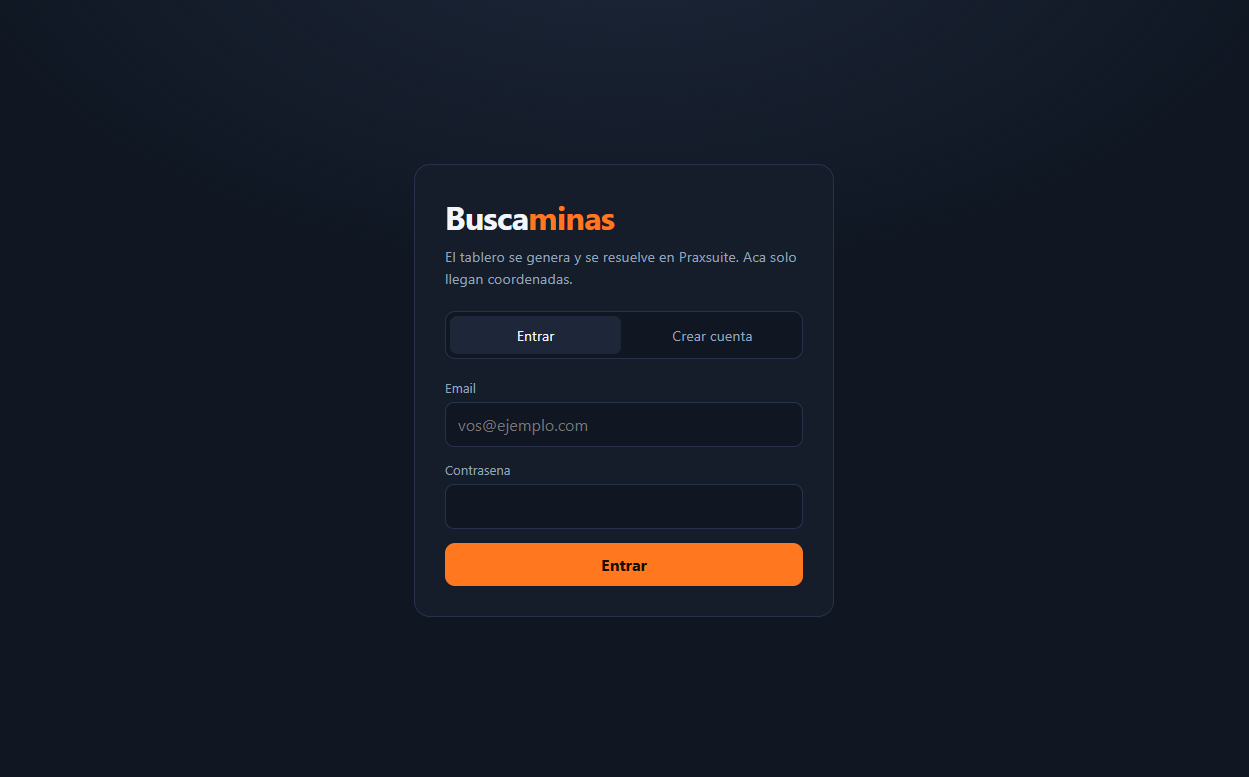
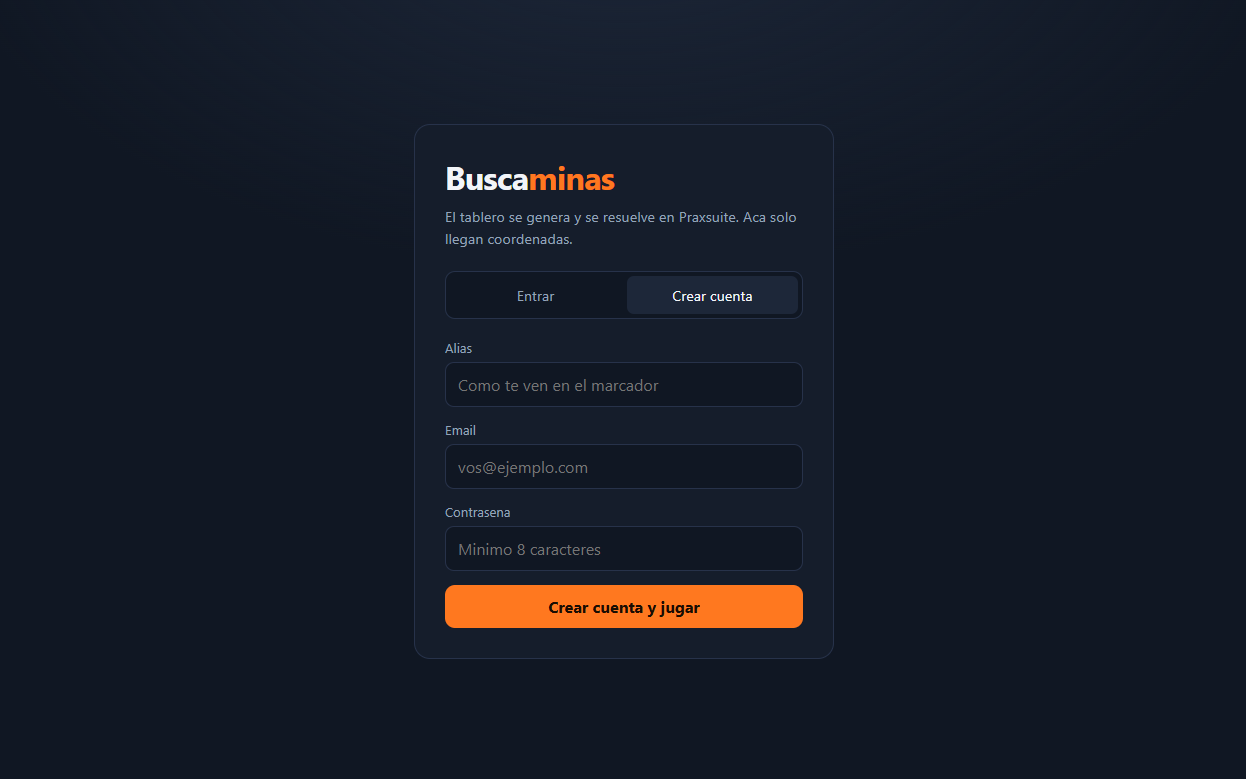
Why the SDK and not the login Automation?
The workspace also has buscaminas-login and buscaminas-registro Automations, and you might reasonably wonder why this app ignores them.
They exist for clients that cannot hold a key. The Roblox server calls that endpoint, and the request to the Auth Gateway leaves from inside the Automation, with the key read from the vault. A browser does not have that problem: the SDK already works with the publishable key, which is public by design.
More importantly, those wrappers deliberately drop the tokens and return only { ok, usuario }. Without a session there is no token to refresh, and no verified sub claim to use as the player id.
Step 10 - Ask the Server for a Board
A new game is one endpoint call. call<T>() posts your payload and returns whatever the Automation responded with, typed as T.
// src/praxsuite/api.ts
import { prax } from './client'
import { ENDPOINTS, MOTOR, SDK } from './config'

export type Dificultad = 'facil' | 'medio' | 'dificil'

export interface RespuestaNuevaPartida {
  ok: boolean
  codigo: string
  filas: number
  columnas: number
  minas: number
  dificultad: Dificultad
  estado: 'En curso' | 'Ganada' | 'Perdida'
  celdasReveladas: number
  puntaje: number
  sembrado: boolean
  vista: string[]
  inicio: string
}

export function nuevaPartida(
  jugador: { jugadorId: string; alias: string },
  dificultad: Dificultad,
): Promise<RespuestaNuevaPartida> {
  return prax.endpoints.call<RespuestaNuevaPartida>(ENDPOINTS.nuevaPartida, {
    alias: jugador.alias,
    jugadorId: jugador.jugadorId,
    dificultad,
    motor: MOTOR,
    sdk: SDK,
  })
}
The response comes back with vista full of ? and sembrado: false, which is exactly what you should expect: the board is reserved but the mines are not placed yet.
!imagen2026-08-31001618996.png
The player id deserves attention. Pass the JWT (JSON Web Token) subject claim, not something the client picked:
const jugador = {
  jugadorId: prax.auth.currentUserId ?? '0',
  alias: prax.auth.currentUser?.displayName ?? 'anonimo',
}
That way the saved game and its leaderboard row are tied to the account that actually played.
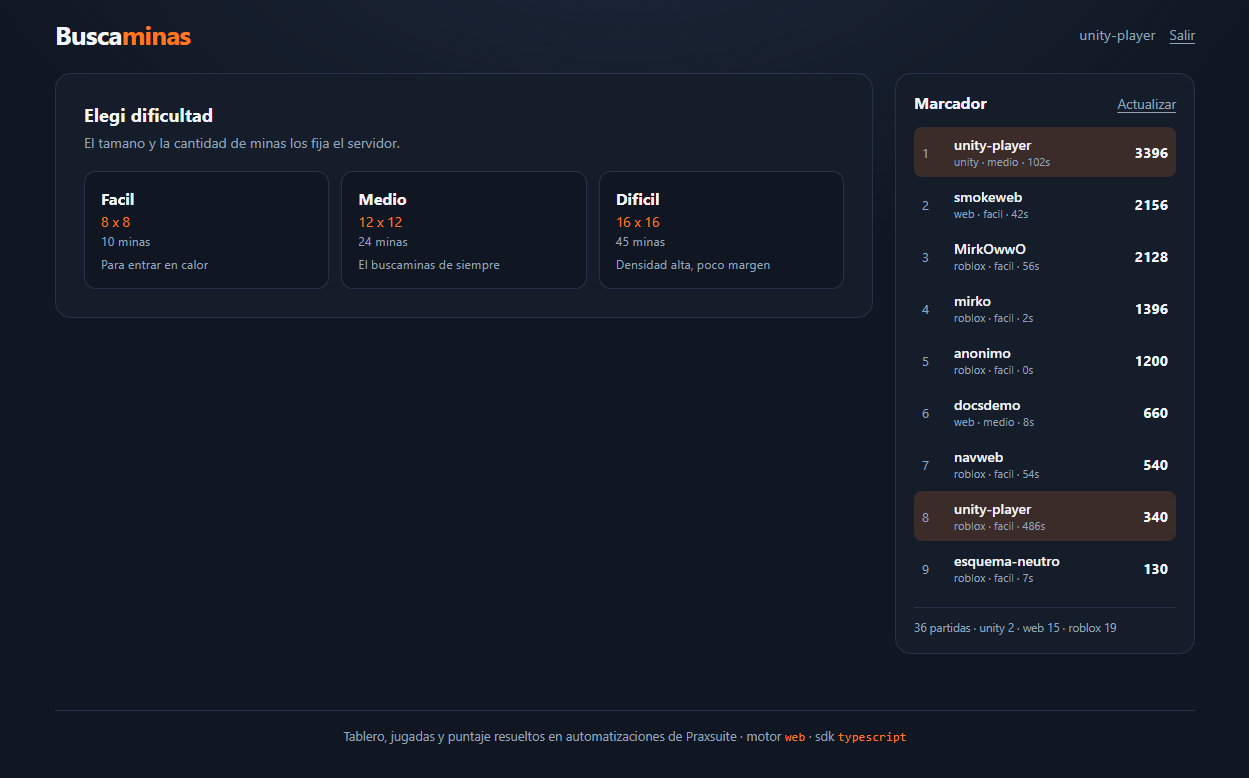
Step 11 - Render the Masked View
The client's entire job with the board is translating strings into cells. It does not deduce, complete or guess anything.
// src/game/tablero.ts
export type Celda =
  | { tipo: 'oculta' }
  | { tipo: 'bandera' }
  | { tipo: 'mina' }
  | { tipo: 'revelada'; vecinas: number }

export function leerCelda(caracter: string): Celda {
  if (caracter === '?') return { tipo: 'oculta' }
  if (caracter === 'F') return { tipo: 'bandera' }
  if (caracter === '*') return { tipo: 'mina' }
  const vecinas = Number(caracter)
  return Number.isFinite(vecinas) ? { tipo: 'revelada', vecinas } : { tipo: 'oculta' }
}

export function leerVista(vista: string[]): Celda[][] {
  return vista.map((fila) => Array.from(fila, leerCelda))
}
Now the grid renders straight from that. Left click reveals, right click flags, and a revealed cell is disabled so it cannot be clicked again.
// src/components/Tablero.tsx
<div
  className="tablero"
  style={{ '--columnas': columnas } as React.CSSProperties}
  onContextMenu={(e) => e.preventDefault()}
>
  {celdas.map((fila, f) =>
    fila.map((celda, c) => (
      <button
        key={`${f}-${c}`}
        type="button"
        disabled={bloqueado || celda.tipo === 'revelada' || celda.tipo === 'mina'}
        onClick={() => onJugada(f, c, 'revelar')}
        onContextMenu={(e) => {
          e.preventDefault()
          if (!bloqueado) onJugada(f, c, 'bandera')
        }}
      >
        {contenido(celda)}
      </button>
    )),
  )}
</div>
That onContextMenu on the container matters: without it, flagging a cell opens the browser's own menu on top of your board.
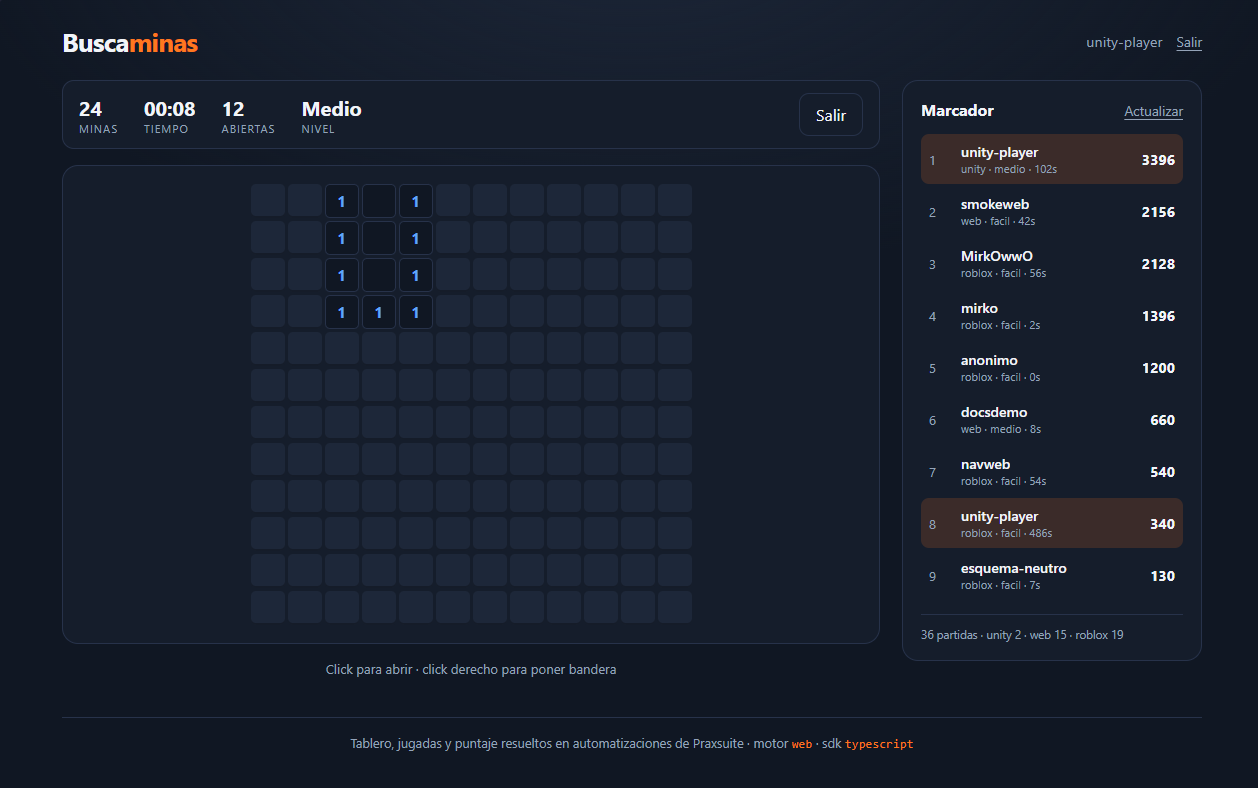
Step 12 - Send a Move
Every move is the same call. The client sends coordinates and gets the resolved board back.
export type Accion = 'revelar' | 'bandera'

export interface RespuestaJugada {
  ok: boolean
  codigo: string
  estado: 'En curso' | 'Ganada' | 'Perdida'
  celdasReveladas: number
  puntaje: number
  segundos: number
  terminada: boolean
  mensaje: string
  vista: string[]
}

export function jugar(
  codigo: string,
  accion: Accion,
  fila: number,
  columna: number,
): Promise<RespuestaJugada> {
  return prax.endpoints.call<RespuestaJugada>(ENDPOINTS.jugar, {
    codigo, accion, fila, columna,
  })
}
The flood fill on an empty cell, the win detection and the score all happen inside the Automation. Your client just replaces its state with what came back.
mensaje is worth surfacing in the interface. It is empty on a normal move, and otherwise explains why nothing happened: "Esa celda tiene bandera", "Ya estaba revelada", "Coordenada fuera del tablero".
Why moves can arrive out of order
For the board to feel responsive, moves are sent without waiting for the previous one to come back. That means responses can arrive out of order, and a late response carrying an older board would visibly reopen cells the player already closed.
The fix is a sequence number. Each request takes one, and only the newest response is ever painted.
const secuencia = useRef(0)
const ultimaPintada = useRef(0)

async function resolver(fila: number, columna: number, accion: Accion) {
  const mia = ++secuencia.current
  const r = await jugar(partida.codigo, accion, fila, columna)
  if (mia < ultimaPintada.current) return   // arrived late, something newer is on screen
  ultimaPintada.current = mia
  setPartida((previa) => previa && { ...previa, ...r })
}
Without those four lines the board flickers backwards under fast clicking, which is exactly the kind of bug that only shows up in front of an audience.
!imagen2026-08-31002035522.png
Step 13 - Show the Leaderboard
The last endpoint returns the top scores, already deduplicated.
export interface EntradaLeaderboard {
  posicion: number
  alias: string
  puntos: number
  motor: string
  sdk: string
  dificultad: string
  segundos: number
  jugadorId: string
}

export function leaderboard(limite = 10, motor?: string) {
  return prax.endpoints.call<{
    ok: boolean
    total: number
    porMotor: Record<string, number>
    top: EntradaLeaderboard[]
  }>(ENDPOINTS.leaderboard, motor ? { limite, motor } : { limite })
}
The Automation keeps the best game per alias + motor, not per alias, and that detail is the whole point of the board. The same backend serves the Roblox game, the Unity demo and this app, so one player can appear once from each and you can compare them. Passing motor filters to a single client when you want the app's own scores only.
Fetch it in an effect, and cancel on unmount so a slow response cannot land on a component that is gone.
useEffect(() => {
  const ctrl = new AbortController()
  leaderboard(10, undefined, ctrl.signal).then(setDatos).catch(() => {})
  return () => ctrl.abort()
}, [recargarToken])
Bump recargarToken when a game finishes, since that is the only moment the Automation writes a new row.
!imagen2026-08-31002011038.png
Complete Code
The full project, with the components, the styles and both test suites, lives in the demo repository under praxsuiteSDKDemo. The shape of it is small:
src/
  praxsuite/
    config.ts     workspace id, endpoint ids, motor and sdk labels
    client.ts     createClient(), one instance for the whole app
    api.ts        the three calls, typed
    types.ts      the shapes the Automations return
  hooks/
    useAuth.ts    session: sign in, register, sign out
    useJuego.ts   current game, moves, clock
  game/
    tablero.ts    from the server's strings to cells
  components/     PanelAuth, Tablero, Hud, Resultado, SelectorDificultad, Leaderboard
Notice what is missing from that tree: there is no solver, no mine generator and no scoring function. Those three files would exist in a client side Minesweeper, and their absence is the design.
Common Errors and How to Avoid Them
Error | Cause | Solution |
| SDK 1.0.1 calls | Upgrade to 1.0.2, or pass |
| Wrong workspace id, or no network | Check the workspace id against the portal. A workspace lives on exactly one tier, and the wrong host returns a 404 |
|
| Check the endpoint id in |
| The | Keep the |
| You tried to reveal a flagged cell. This is a rule, not a bug | Remove the flag first, or disable revealing on flagged cells in the interface |
| A move arrived after the game was won or lost | Block the board when |
The board stays all | The response was received but state was never replaced | Always render from the |
Production Tips
Once the game is ready to publish, keep these in mind:
Never put a `sk_live_` key in client code. The SDK throws if you try. Browsers use the publishable key, which the SDK discovers on its own.
Keep the tables closed to the player role. The client should not be able to write
Buscaminas Partidasdirectly; if it can, the endpoints are decoration.Pass an `AbortSignal` to calls tied to a component, so navigating away cancels them instead of resolving into unmounted state.
Let the server own the clock. Run a local timer for smoothness, then replace it with the
segundosthe server returns when the game closes. That is the number the score is computed from.Use `fire()` instead of `call()` for telemetry. It never throws, so a dropped analytics event cannot surface as an unhandled rejection in the middle of a game.
Test in a real browser, not only in Node. Node's
fetchignores its receiver, so theIllegal invocationbug above is invisible from a console test suite and obvious from a browser.
Next Steps
Now that the loop is closed, some directions to take it further:
Add the cosmetics the workspace already supports:
buscaminas-mis-cosmeticos,buscaminas-canjear-codigoandbuscaminas-equipar-cosmeticoare published and waiting for an interface.Move the engine into the browser to drop the per-click latency, the way this guide's own reference app does: gameplay resolved in
src/game/motor.ts,Buscaminas: Jugarunused, and theValidar Resultadoendpoint you built above revalidating the result once per game.Let a player resume an unfinished game by storing the
codigoand callingjugaragain on load.Filter the leaderboard by
motorand show the three clients side by side, so a player can see their browser score against their Roblox one.Add a chord click, revealing all neighbours of a satisfied number, by resolving it as several moves on the client and letting the server judge each one.
You now have an app where cheating requires breaking the server, not the browser. That is a good place to build from. Good luck.