
Lua SDK Use Case in Roblox
Mirko Franichevic · August 27, 2026
What Are We Going to Build?
A complete Minesweeper in Roblox whose brain lives in Praxsuite. Your game renders a board of 3D cells, the player left-clicks to reveal and right-clicks to flag, and every decision - where the mines are, what a click opens, when you win - is made by an Automation on the server. The client only ever receives a masked view of the board.
By the end of this guide you'll have:
Two Tables and three Automations you built yourself, in your own workspace
A board built from cells the server reveals one at a time
Three difficulties whose sizes are fixed by Praxsuite, not by your client
A leaderboard that mixes Roblox, Unity and browser players
A game where cheating is structurally impossible, not just discouraged
You build both halves. Part 1 is the backend, inside the Praxsuite portal. Part 2 is the Roblox client.
Required level: You have completed the Lua SDK Implementation in Roblox guide. You are comfortable writing Luau, including ServerScriptService and RemoteFunctions. No prior experience with Automations is needed. Repository: https://github.com/TesseractSoftwares/Praxsuite-SDK-Lua
How It Works
The whole project rests on one idea: the client never learns where the mines are. It asks for a board, sends coordinates, and paints whatever the server returns. There is no local solver, because a solver would need to know the mines.
Runs on the client | Runs on Praxsuite |
A difficulty menu and a status label | The mine matrix and the flood fill |
Drawing the masked view that arrives | Deciding what each click opens |
Sending | Detecting win and loss |
Asking for the leaderboard | Scoring the game and saving it |
The matrix stays in a Table called Buscaminas Partidas and never leaves the workspace. What travels to your game is a masked view: an array with one string per row, one character per cell.
Character | Meaning |
| hidden |
| flagged |
| revealed, with the count of neighboring mines |
| a mine - only appears once the game is already lost |
An 8x8 board arrives looking like this, which is exactly what your code has to paint:
["01??????", "01??????", "02?212??", "01?101??", "011102??", "000002??", "011102??", "01?101??"]On Roblox the SDK runs in ServerScriptService, so your server is the trusted party. A player cannot edit it the way they can edit a LocalScript.
What is a masked view? The full picture only the referee keeps, drawn over with sticky notes. Your client receives the sticky notes, never the picture underneath.
Prerequisites
Requirement | Description |
The Implementation guide | You have done it and have |
Your own workspace | You build the backend in it. Part 1 creates everything from scratch, so a brand new workspace works. |
A secret key | An |
Roblox Studio | With HTTP requests enabled for the place. |
Why your own workspace and not a shared demo one? Because calling a workspace requires a key for that workspace, and a key that lets you write is a key you cannot publish in a guide. Building the backend yourself is not a detour around that - it is most of what there is to learn here.
Part 1 - The Backend
Three endpoints expose the game, and each one runs an Automation. A Sync endpoint runs its Automation and returns the result in the same request, which is what Endpoints.Call waits for.
Endpoint | Input | Output |
|
|
|
|
|
|
|
|
|
accion is revelar or bandera.
Step 1 - Create the Two Tables
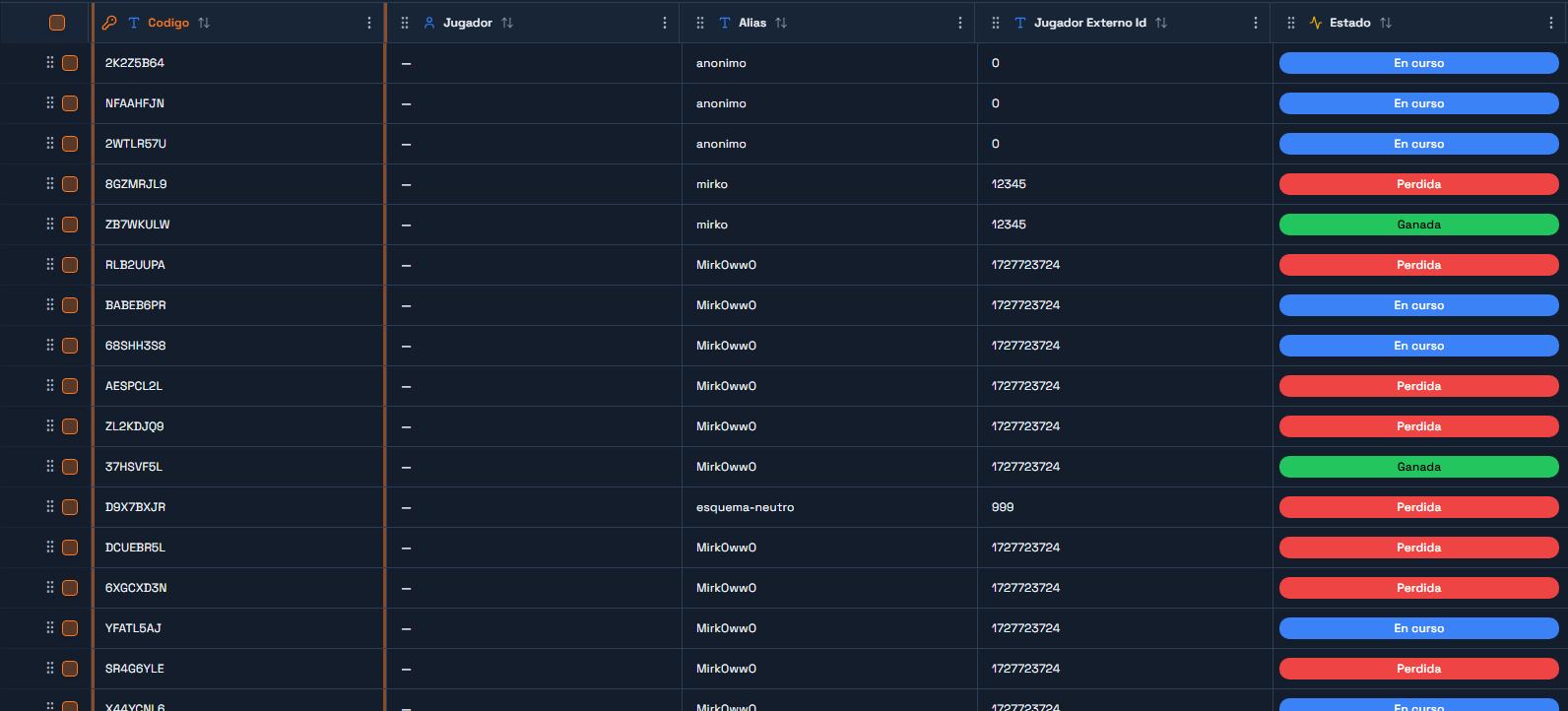
In the portal, go to DataEngine and create a Table named `Buscaminas Partidas`. One row is one game.
Column | Type | What it holds |
| ShortText | The 8-character game code the client sends back on every move |
| ShortText | Display name, used by the leaderboard |
| ShortText | The player's id on whatever platform hosts them - a Roblox UserId here |
| Status |
|
| Integer | Board height |
| Integer | Board width |
| Integer | How many mines the board will have |
| ShortText |
|
| Json | The mine field. This is the secret. |
| Json | Grid of 0/1: which cells are open |
| Json | Grid of 0/1: which cells are flagged |
| Integer | Running count, so the win check is a comparison |
| Integer | Final score, written when the game ends |
| DateTime | When the first move happened |
| DateTime | When the game ended |
| Integer | Duration |
| ShortText |
|
| ShortText |
|
When you create Estado, add exactly three statuses: `En curso`, `Ganada`, `Perdida`. The Automation writes those names as text, so a typo here is a rejected write later.
Why are `Matriz`, `Revelado` and `Banderas` Json and not three tables? Because they are always read and written whole, together, for one game. Splitting a 16x16 grid into 256 rows would buy you nothing and cost you a query per move. A Json column is the right shape when the value has no life of its own outside its row.
Now create a second Table named `Demos Leaderboard`. One row is one finished game.
Column | Type | What it holds |
| ShortText | A human-readable label for the row |
| ShortText | Display name |
| ShortText | Same id as above |
| Integer | The score |
| ShortText | Which preset was played |
| Integer | How long it took |
| ShortText | Always |
| ShortText |
|
| ShortText |
|
Write down both table UUIDs from Gateway → Playground. The Automations need them.
The Player Role, and What It Must NOT Touch
The tables exist now, and a player's role currently reaches neither of them. Decide what it may see before going any further, because the easy answer — grant access to the table and move on — is exactly the one that drains the rest of this guide of meaning.
Under Settings → API Gateway → Roles, create a role called `Buscaminas Jugador` and give it a scope over Buscaminas Partidas:
Row filter:
__SELF__on theJugadorcolumn, so each player reaches only their own games.Default value for the
Jugadorcolumn:{{claim:sub}}, applied to whatever the player writes themselves.Column access, which is where the whole thing lives:
Column | Read | Write |
| No | No |
| Yes | No |
Everything else ( | Yes | No |
`Matriz` is the entire security model. If the player's role can read it, a modified client asks for its own row through the Gateway and knows where every mine is before the first click. If it can also write it, it can rewrite the minefield so that an invented result validates. Automations do not go through these scopes — they run with the workspace's own authority — so closing `Matriz` to the player costs them nothing.
Same reasoning for Demos Leaderboard: the player's role reads it (the game shows the top) and never writes. The only write comes from the Automation that validates the result.
A freshly created end user account starts with whatever default roles the workspace is configured with, and if there are none it has access to nothing: every query comes back empty or 403. Assign Buscaminas Jugador when you register the player, or from an Automation that validates their token.
Quick check: open Gateway → Playground, pick the `Buscaminas Jugador` role and ask for a game's `Matriz` column. It has to fail. If it hands you the grid, the scope is open and any player can read the mines.
Step 2 - Create the Three Endpoints
Under Gateway → Endpoints, create three endpoints, all in Sync mode:
Buscaminas: Nueva PartidaBuscaminas: JugarBuscaminas: Leaderboard
Leave them unlinked for now - you link each one to its Automation as you build it. Copy the three UUIDs; Part 2 puts them in a Luau module.
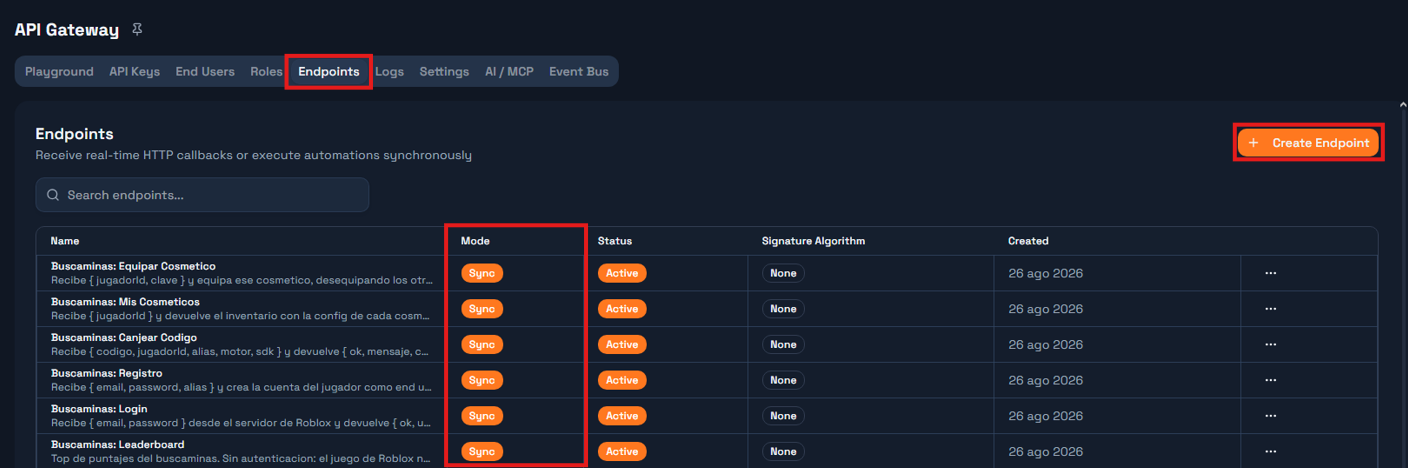
Sync or Async? Sync blocks until the Automation answers and hands you its Response node output. Async accepts the request and returns immediately. A move needs an answer before the next line runs, so all three are Sync.
Step 3 - The `Nueva Partida` Automation
Create an Automation named Buscaminas: Nueva Partida. It is four nodes in a straight line:
Endpoint trigger → Script: generate board → Insert row → ResponseNode 1 - Endpoint trigger. Point it at the Buscaminas: Nueva Partida endpoint. Give it this test payload so you can run the Automation without a game:
{ "alias": "mirko", "jugadorId": "1", "dificultad": "facil", "motor": "roblox", "sdk": "lua" }Node 2 - Script, named generar. One input: payload, sourced from {{context.request.body}}. Language JavaScript.
// Opening a game. This endpoint is engine-agnostic: the Lua (Roblox), C# (Unity)
// and TypeScript SDKs all call it, which is why the body carries `motor` and
// `sdk`. They are stored with the game and travel to the leaderboard.
//
// The mines are NOT seeded here. This only reserves the board: dimensions, how
// many mines it will have, and the revealed/flag grids at zero. The mines are
// seeded on the first move, once we know which cell the player touched and can
// keep it clear.
//
// Seeding here would make the first move a coin flip: on hard there are 45 mines
// in 256 cells, so one game in six would end on the first click before the player
// decided anything. That is not difficulty, it is a coin toss before the start.

const body = payload || {};

const PRESETS = {
  facil:   { filas: 8,  columnas: 8,  minas: 10 },
  medio:   { filas: 12, columnas: 12, minas: 24 },
  dificil: { filas: 16, columnas: 16, minas: 45 }
};

const dificultad = String(body.dificultad || "facil").toLowerCase();
const preset = PRESETS[dificultad] || PRESETS.facil;

const R = Math.max(4, Math.min(20, Number(body.filas)    || preset.filas));
const C = Math.max(4, Math.min(20, Number(body.columnas) || preset.columnas));
const M = Math.max(1, Math.min(R * C - 1, Number(body.minas) || preset.minas));

const revelado = Array.from({ length: R }, () => new Array(C).fill(0));
const banderas = Array.from({ length: R }, () => new Array(C).fill(0));
const vista    = Array.from({ length: R }, () => "?".repeat(C));

const ALFA = "ABCDEFGHJKLMNPQRSTUVWXYZ23456789";
let codigo = "";
for (let i = 0; i < 8; i++) codigo += ALFA[Math.floor(Math.random() * ALFA.length)];

// `Inicio` gets the opening time so the column is never empty, but it is not the
// game clock yet: the Jugar automation overwrites it with the first move's time.
// What gets timed is the game, not the menu.
const inicio = new Date().toISOString();

const alias = String(body.alias || "anonimo");
const jugadorId = String(body.jugadorId || body.robloxUserId || "0");
const motor = String(body.motor || "desconocido").toLowerCase();
const sdk = String(body.sdk || "desconocido").toLowerCase();

const respuesta = {
  ok: true,
  codigo: codigo,
  filas: R,
  columnas: C,
  minas: M,
  dificultad: dificultad,
  motor: motor,
  sdk: sdk,
  estado: "En curso",
  celdasReveladas: 0,
  puntaje: 0,
  sembrado: false,
  vista: vista,
  inicio: inicio
};

return {
  codigo: codigo,
  filas: R,
  columnas: C,
  minas: M,
  dificultad: dificultad,
  matriz: "[]",
  revelado: JSON.stringify(revelado),
  banderas: JSON.stringify(banderas),
  inicio: inicio,
  alias: alias,
  jugadorId: jugadorId,
  motor: motor,
  sdk: sdk,
  respuesta: JSON.stringify(respuesta)
};
Declare the outputs the node returns, so later nodes can reference them: codigo, filas, columnas, minas, dificultad, matriz, revelado, banderas, inicio, alias, jugadorId, motor, sdk and respuesta. All strings except filas, columnas and minas, which are numbers.
Node 3 - Insert Rows, named guardar, pointed at your Buscaminas Partidas table. Map the fields:
Column | Value |
|
|
|
|
|
|
|
|
|
|
|
|
|
|
|
|
|
|
|
|
|
|
|
|
|
|
|
|
|
|
|
|
Node 4 - Response. Status 200, content type application/json, body template {{context.steps.generar.respuesta}}.
Publish the Automation and link it to the Buscaminas: Nueva Partida endpoint.
Why does the Script return both a row and a `respuesta`? Because they are two different audiences. The row keeps everything, including `matriz`. The `respuesta` is what leaves the workspace, and it has no `matriz` in it. Building them separately is what makes the omission deliberate rather than accidental.
Step 4 - The `Jugar` Automation
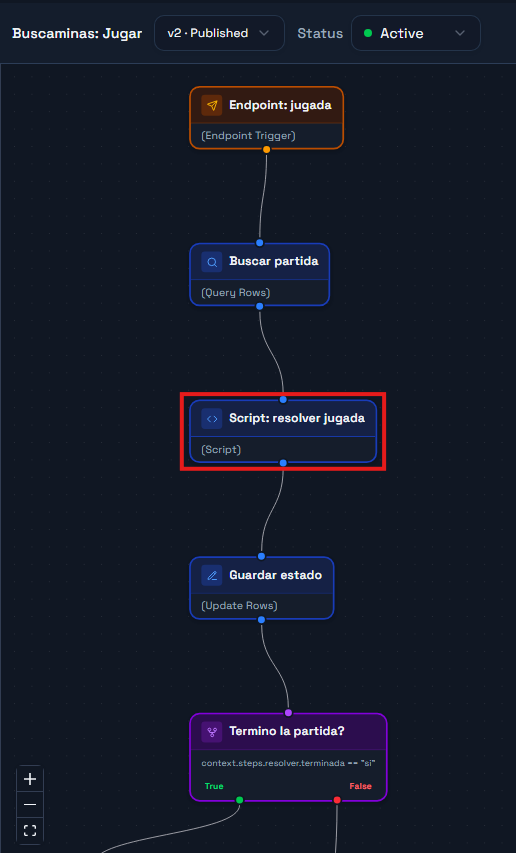
This is the referee. Create an Automation named Buscaminas: Jugar with eight nodes:
Endpoint trigger → Query row → Script: resolve → Update row → If ended?
                                                                 ├─ no  → Response
                                                                 └─ yes → Close game → Leaderboard row → Response
Node 1 - Endpoint trigger, pointed at Buscaminas: Jugar. Test payload:
{ "codigo": "2K2Z5B64", "accion": "revelar", "fila": 0, "columna": 0 }Node 2 - Query Rows, named buscar, on Buscaminas Partidas. One filter: column Codigo, operator eq, value {{context.request.body.codigo}}. Limit 1.
Node 3 - Script, named resolver. Two inputs: payload from {{context.request.body}}, and partida from {{context.steps.buscar.row}}.
// Resolve one move. All the authority lives here: the client only sends
// coordinates and receives a masked view. The mines never travel to the game,
// except on a loss, when it no longer matters.
//
// NOTE: in the step context, column names arrive with underscores
// ('Jugador Externo Id' -> Jugador_Externo_Id).

const body = payload || {};
const p = partida || {};

function parseJ(v, fallback) {
  if (v === null || v === undefined) return fallback;
  if (typeof v === "string") {
    try { return JSON.parse(v); } catch (e) { return fallback; }
  }
  return v;
}

function isoDe(v, porDefecto) {
  if (!v) return porDefecto;
  const t = Date.parse(String(v));
  return Number.isFinite(t) ? new Date(t).toISOString() : porDefecto;
}

let matriz     = parseJ(p.Matriz, []);
const revelado = parseJ(p.Revelado, []);
const banderas = parseJ(p.Banderas, []);

// Dimensions come from the row, NOT from the matrix: until the first move the
// matrix is empty on purpose, and `matriz.length` would be 0.
const R = Number(p.Filas) || 0;
const C = Number(p.Columnas) || 0;
const M = Number(p.Minas) || 0;

const existe = Boolean(p.Codigo) && R > 0 && C > 0;

let sembrado = Array.isArray(matriz) && matriz.length > 0;

// A Status column can arrive as { Id, Name, ... } or as plain text.
let estado = (p.Estado && p.Estado.Name) ? p.Estado.Name : String(p.Estado || "En curso");

const accion = String(body.accion || "revelar").toLowerCase();
const fila = Number(body.fila);
const col  = Number(body.columna);

let mensaje = "";

function dentro(r, c) { return r >= 0 && r < R && c >= 0 && c < C; }

// Seed the mines, keeping the cell the player just touched clear along with its
// eight neighbours where they fit.
//
// Excluding only the touched cell would be enough to avoid losing on the first
// click, but it would leave the player staring at a lone number, still guessing.
// With the 3x3 clear, the touched cell has zero adjacent mines, so the flood fill
// opens a hole and the game starts with information.
function sembrar(rSeguro, cSeguro) {
  const m = Array.from({ length: R }, () => new Array(C).fill(0));

  const prohibidas = {};
  let cuantasProhibidas = 0;
  for (let dr = -1; dr <= 1; dr++) {
    for (let dc = -1; dc <= 1; dc++) {
      const rr = rSeguro + dr, cc = cSeguro + dc;
      if (rr >= 0 && rr < R && cc >= 0 && cc < C && !prohibidas[rr * C + cc]) {
        prohibidas[rr * C + cc] = true;
        cuantasProhibidas++;
      }
    }
  }

  // Small, heavily mined board: if the mines do not fit with the 3x3 clear, the
  // safe zone shrinks to the touched cell. Without this the loop below never ends.
  if (R * C - cuantasProhibidas < M) {
    for (const k in prohibidas) delete prohibidas[k];
    prohibidas[rSeguro * C + cSeguro] = true;
  }

  let puestas = 0;
  while (puestas < M) {
    const r = Math.floor(Math.random() * R);
    const c = Math.floor(Math.random() * C);
    if (prohibidas[r * C + c]) continue;
    if (m[r][c] === -1) continue;
    m[r][c] = -1;
    puestas++;
  }

  for (let r = 0; r < R; r++) {
    for (let c = 0; c < C; c++) {
      if (m[r][c] === -1) continue;
      let n = 0;
      for (let dr = -1; dr <= 1; dr++) {
        for (let dc = -1; dc <= 1; dc++) {
          if (dr === 0 && dc === 0) continue;
          const rr = r + dr, cc = c + dc;
          if (rr >= 0 && rr < R && cc >= 0 && cc < C && m[rr][cc] === -1) n++;
        }
      }
      m[r][c] = n;
    }
  }
  return m;
}

let inicio = isoDe(p.Inicio, new Date().toISOString());

if (!existe) {
  mensaje = "Partida no encontrada";
} else if (estado !== "En curso") {
  mensaje = "La partida ya termino";
} else if (!dentro(fila, col)) {
  mensaje = "Coordenada fuera del tablero";
} else if (accion === "bandera") {
  // Flagging before the first click is legal and seeds nothing.
  if (revelado[fila][col] === 0) {
    banderas[fila][col] = banderas[fila][col] ? 0 : 1;
  }
} else {
  if (banderas[fila][col] === 1) {
    mensaje = "Esa celda tiene bandera";
  } else if (revelado[fila][col] === 1) {
    mensaje = "Ya estaba revelada";
  } else {
    // First valid move: only now do we know which cell to keep clear.
    if (!sembrado) {
      matriz = sembrar(fila, col);
      sembrado = true;
      // The clock starts with the first move, not when the game was opened.
      inicio = new Date().toISOString();
    }

    if (matriz[fila][col] === -1) {
      revelado[fila][col] = 1;
      estado = "Perdida";
      mensaje = "Pisaste una mina";
    } else {
      // Iterative flood fill: opening a 0 opens the whole empty block.
      const pila = [[fila, col]];
      while (pila.length > 0) {
        const par = pila.pop();
        const r = par[0], c = par[1];
        if (!dentro(r, c)) continue;
        if (revelado[r][c] === 1 || banderas[r][c] === 1) continue;
        revelado[r][c] = 1;
        if (matriz[r][c] === 0) {
          for (let dr = -1; dr <= 1; dr++) {
            for (let dc = -1; dc <= 1; dc++) {
              if (dr === 0 && dc === 0) continue;
              pila.push([r + dr, c + dc]);
            }
          }
        }
      }
    }
  }
}

let reveladas = 0;
for (let r = 0; r < R; r++) {
  for (let c = 0; c < C; c++) if (revelado[r] && revelado[r][c] === 1) reveladas++;
}

const seguras = R * C - M;
if (existe && estado === "En curso" && sembrado && reveladas >= seguras) {
  estado = "Ganada";
  mensaje = "Campo despejado";
}

const ahora = Date.now();
const segundos = sembrado
  ? Math.max(0, Math.round((ahora - Date.parse(inicio)) / 1000))
  : 0;

const terminada = existe && estado !== "En curso";
let puntaje = 0;
if (terminada) {
  puntaje = reveladas * 10;
  if (estado === "Ganada") {
    puntaje += M * 50 + Math.max(0, 600 - segundos) * 2;
  }
}

// Masked view: '?' hidden | 'F' flag | '0'-'8' revealed | '*' mine (only on a loss)
const vista = [];
for (let r = 0; r < R; r++) {
  let s = "";
  for (let c = 0; c < C; c++) {
    if (sembrado && estado === "Perdida" && matriz[r][c] === -1) s += "*";
    else if (sembrado && revelado[r][c] === 1) s += String(matriz[r][c]);
    else if (banderas[r][c] === 1) s += "F";
    else s += "?";
  }
  vista.push(s);
}

const motor = String(p.Motor || "desconocido");
const sdk = String(p.SDK || "desconocido");

const respuesta = {
  ok: existe,
  codigo: String(p.Codigo || ""),
  filas: R,
  columnas: C,
  minas: M,
  estado: estado,
  celdasReveladas: reveladas,
  puntaje: puntaje,
  segundos: segundos,
  terminada: terminada,
  sembrado: sembrado,
  mensaje: mensaje,
  motor: motor,
  sdk: sdk,
  vista: vista
};

return {
  rowId: String(p.ID || ""),
  codigo: String(p.Codigo || ""),
  alias: String(p.Alias || "anonimo"),
  jugadorId: String(p.Jugador_Externo_Id || p["Jugador Externo Id"] || "0"),
  motor: motor,
  sdk: sdk,
  dificultad: String(p.Dificultad || "facil"),
  estado: estado,
  matriz: JSON.stringify(matriz),
  revelado: JSON.stringify(revelado),
  banderas: JSON.stringify(banderas),
  inicio: inicio,
  celdasReveladas: String(reveladas),
  puntaje: String(puntaje),
  segundos: String(segundos),
  fin: new Date(ahora).toISOString(),
  terminada: terminada ? "si" : "no",
  respuesta: JSON.stringify(respuesta)
};
Node 4 - Update Rows, named actualizar, on Buscaminas Partidas, with row id {{context.steps.resolver.rowId}}:
Column | Value |
|
|
|
|
|
|
|
|
|
|
|
|
Node 5 - If/Else, named termino. One rule: {{context.steps.resolver.terminada}} == si.
Node 6 - Update Rows on the true branch, named cerrar, same table and row id:
Column | Value |
|
|
|
|
|
|
Node 7 - Insert Rows, named marcador, on Demos Leaderboard:
Column | Value |
|
|
|
|
|
|
|
|
|
|
|
|
|
|
|
|
|
|
Node 8 - Response, reached from both branches. Body template {{context.steps.resolver.respuesta}}.
Publish and link it to the Buscaminas: Jugar endpoint.
Why does the score only exist when the game ends? Because a running score is a number the client could show and the player could chase mid-game. Computing it once, at the end, on the server, keeps it out of every intermediate response.
Step 5 - The `Leaderboard` Automation
Four nodes again:
Endpoint trigger → Query rows → Script: format → ResponseNode 1 - Endpoint trigger, pointed at Buscaminas: Leaderboard. Test payload { "limite": 10 }.
Node 2 - Query Rows, named consultar, on Demos Leaderboard. Filter: Juego eq Buscaminas. Order by Points descending. Limit 50.
Node 3 - Script, named formatear. Two inputs: filas from {{context.steps.consultar.rows}} and payload from {{context.request.body}}. One output: respuesta.
// Takes the raw leaderboard rows and returns a top list ready to paint.
//
// The dedupe key is alias + motor, not alias alone: the point of this board is
// seeing the same player coming in from Roblox, from Unity and from the browser,
// and comparing. Deduping by alias alone would let the best game hide the other two.

const body = payload || {};
const limite = Math.max(1, Math.min(25, Number(body.limite) || 10));
const filtroMotor = body.motor ? String(body.motor).toLowerCase() : null;

const rows = Array.isArray(filas) ? filas : [];

const mejorPorClave = new Map();
let contados = 0;

for (const r of rows) {
  const motor = String(r.Motor || "desconocido").toLowerCase();
  if (filtroMotor && motor !== filtroMotor) continue;
  contados++;

  const alias = String(r.Alias || r.Jugador_Externo_Id || "anonimo");
  const clave = alias + "|" + motor;
  const puntos = Number(r.Points) || 0;

  const previo = mejorPorClave.get(clave);
  if (!previo || puntos > previo.puntos) {
    mejorPorClave.set(clave, {
      alias: alias,
      puntos: puntos,
      motor: motor,
      sdk: String(r.SDK || "desconocido"),
      dificultad: String(r.Dificultad || ""),
      segundos: Number(r.Segundos) || 0,
      jugadorId: String(r.Jugador_Externo_Id || r["Jugador Externo Id"] || "0")
    });
  }
}

const top = Array.from(mejorPorClave.values())
  .sort((a, b) => b.puntos - a.puntos)
  .slice(0, limite)
  .map((e, i) => Object.assign({ posicion: i + 1 }, e));

const porMotor = {};
for (const r of rows) {
  const m = String(r.Motor || "desconocido").toLowerCase();
  if (filtroMotor && m !== filtroMotor) continue;
  porMotor[m] = (porMotor[m] || 0) + 1;
}

return {
  respuesta: JSON.stringify({
    ok: true,
    total: contados,
    porMotor: porMotor,
    top: top
  })
};
Node 4 - Response, body template {{context.steps.formatear.respuesta}}.
Publish, link it, and the backend is done.
Note the field name. Each entry in `top` carries `puntos`, not `puntaje`. `puntaje` is the game's score inside `Jugar`; `puntos` is the leaderboard entry's. Reading the wrong one gives you `nil` in Lua, silently.
The `Validar Resultado` Automation
Up to here the game calls Jugar on every move, and Praxsuite is the authority at all times. The published demos of this game — Roblox, Unity, the web app and the Minecraft plugin — went one step further for latency: they resolve the move on the client and call Praxsuite only twice per game, to open it and to close it. This Automation is the only thing that keeps that shortcut safe.
It does not replay the game: it compares what the client reports against the dimensions and mine count Praxsuite generated when the game was opened, and checks that the reported result is internally consistent with that. If anything fails to add up, nothing is written — neither the game's closing row nor the leaderboard.
Do I need it if I stay with the per-click design? No, and the two coexist happily in the same workspace. But the moment you move the engine to the client it becomes mandatory: without it, "local" means "the client decides and Praxsuite takes notes".
Ten nodes, with one branch:
Trigger → Find game → Current top 3 → Script: validate → Valid?
   ├── true  → Close game → Record on leaderboard → Vault → Publish to bus → Respond
   └── false → Respond
Node 1 - Endpoint Trigger, pointed at Buscaminas: Validar Resultado. Test payload, with a 2×2 board you can check by hand:
{
  "codigo": "2K2Z5B64",
  "estado": "Ganada",
  "matriz": [[0,0],[0,-1]],
  "revelado": [[1,1],[1,0]],
  "banderas": [[0,0],[0,1]],
  "puntaje": 0,
  "segundos": 12,
  "alias": "mirko",
  "jugadorId": "1",
  "motor": "roblox",
  "sdk": "lua"
}
Node 2 - Query Rows, named buscar, over Buscaminas Partidas. Filter Codigo eq {{context.request.body.codigo}}, limit 1. This row is the only source of truth about how many mines the game had.
Node 3 - Query Rows, named top3, over Demos Leaderboard. Filter Juego eq Buscaminas, order by Points descending, limit 3. It is read before inserting this game, so there is a threshold to compare against.
Node 4 - Script, named validar, JavaScript. Three inputs: payload from {{context.request.body}}, partida from {{context.steps.buscar.row}} and top3rows from {{context.steps.top3.rows}}.
// -- Minesweeper: validate the final result -----------------------------------
// Inputs:
//   payload   <- {{context.request.body}}        final result from the local engine
//   partida   <- {{context.steps.buscar.row}}     row from 'Buscaminas Partidas'
//   top3rows  <- {{context.steps.top3.rows}}      current top 3, BEFORE inserting this game
//
// The local engine (Roblox/Unity/web/Minecraft) already played the whole game
// with no network per click. This does not replay it: it uses the rows/columns/
// mines Praxsuite generated in 'Buscaminas: Nueva Partida' -never what the client
// sends- as the single point of comparison, and checks that the reported result
// is internally consistent with that. If anything fails to add up, nothing is
// written: neither the game's closing row nor the leaderboard.

const body = payload || {};
const p = partida || {};

function parseJ(v, fallback) {
  if (v === null || v === undefined) return fallback;
  if (typeof v === "string") {
    try { return JSON.parse(v); } catch (e) { return fallback; }
  }
  return v;
}

const R = Number(p.Filas) || 0;
const C = Number(p.Columnas) || 0;
const M = Number(p.Minas) || 0;
const rowId = String(p.ID || "");
const codigo = String(p.Codigo || "");
const estadoActual = (p.Estado && p.Estado.Name) ? p.Estado.Name : String(p.Estado || "En curso");

const motivos = [];
function fallar(m) { motivos.push(m); }

const existe = Boolean(codigo) && R > 0 && C > 0;
if (!existe) fallar("partida_no_encontrada");
if (existe && estadoActual !== "En curso") fallar("partida_ya_cerrada");

const estadoReportado = String(body.estado || "").trim();
if (estadoReportado !== "Ganada" && estadoReportado !== "Perdida") fallar("estado_invalido");

const matriz = parseJ(body.matriz, null);
const revelado = parseJ(body.revelado, null);
const banderas = parseJ(body.banderas, null);

function formaValida(g) {
  return Array.isArray(g) && g.length === R && g.every(function (fila) {
    return Array.isArray(fila) && fila.length === C;
  });
}

if (existe && motivos.length === 0) {
  if (!formaValida(matriz) || !formaValida(revelado) || !formaValida(banderas)) {
    fallar("forma_de_tablero_invalida");
  }
}

let minasReportadas = 0;
let reveladas = 0;
let minaRevelada = false;
let numerosConsistentes = true;

if (motivos.length === 0) {
  for (let r = 0; r < R; r++) {
    for (let c = 0; c < C; c++) {
      if (matriz[r][c] === -1) minasReportadas++;
    }
  }
  for (let r = 0; r < R; r++) {
    for (let c = 0; c < C; c++) {
      if (matriz[r][c] !== -1) {
        let n = 0;
        for (let dr = -1; dr <= 1; dr++) {
          for (let dc = -1; dc <= 1; dc++) {
            if (dr === 0 && dc === 0) continue;
            const rr = r + dr, cc = c + dc;
            if (rr >= 0 && rr < R && cc >= 0 && cc < C && matriz[rr][cc] === -1) n++;
          }
        }
        if (matriz[r][c] !== n) numerosConsistentes = false;
      }
      if (revelado[r][c] === 1) {
        reveladas++;
        if (matriz[r][c] === -1) minaRevelada = true;
      }
    }
  }

  if (minasReportadas !== M) fallar("cantidad_de_minas_no_coincide");
  if (!numerosConsistentes) fallar("numeros_de_la_matriz_inconsistentes");

  if (estadoReportado === "Ganada") {
    if (minaRevelada) fallar("gano_pero_hay_una_mina_revelada");
    if (reveladas !== R * C - M) fallar("gano_pero_no_revelo_todas_las_celdas_seguras");
  } else if (estadoReportado === "Perdida") {
    if (!minaRevelada) fallar("perdio_pero_ninguna_mina_esta_revelada");
  }
}

const segundos = Math.max(0, Math.min(36000, Number(body.segundos) || 0));

let puntajeEsperado = 0;
if (motivos.length === 0) {
  puntajeEsperado = reveladas * 10;
  if (estadoReportado === "Ganada") {
    puntajeEsperado += M * 50 + Math.max(0, 600 - segundos) * 2;
  }
  if (Number(body.puntaje) !== puntajeEsperado) fallar("puntaje_no_coincide");
}

const valido = motivos.length === 0;

const alias = String(body.alias || p.Alias || "anonimo");
const jugadorId = String(body.jugadorId || p.Jugador_Externo_Id || p["Jugador Externo Id"] || "0");
const motor = String(body.motor || p.Motor || "desconocido");
const sdk = String(body.sdk || p.SDK || "desconocido");
const dificultad = String(p.Dificultad || "facil");

// Top 3 threshold BEFORE inserting this game: while there are fewer than 3 rows,
// any valid score gets in.
const top3 = Array.isArray(top3rows) ? top3rows : [];
const umbral = top3.length >= 3 ? (Number(top3[top3.length - 1].Points) || 0) : -1;
const esTop3 = valido && Number(body.puntaje) > umbral;

const fin = new Date().toISOString();

const respuesta = {
  ok: valido,
  codigo: codigo,
  estado: valido ? estadoReportado : estadoActual,
  puntaje: valido ? Number(body.puntaje) : 0,
  motivos: motivos,
  mensaje: valido ? "Resultado validado" : ("Resultado rechazado: " + motivos.join(", "))
};

return {
  valido: valido ? "si" : "no",
  rowId: rowId,
  codigo: codigo,
  alias: alias,
  jugadorId: jugadorId,
  motor: motor,
  sdk: sdk,
  dificultad: dificultad,
  estado: estadoReportado,
  matriz: JSON.stringify(matriz),
  revelado: JSON.stringify(revelado),
  banderas: JSON.stringify(banderas),
  celdasReveladas: String(reveladas),
  puntaje: String(valido ? Number(body.puntaje) : 0),
  segundos: String(segundos),
  fin: fin,
  esTop3: esTop3 ? "si" : "no",
  respuesta: JSON.stringify(respuesta)
};
Declare the eighteen outputs: valido, rowId, codigo, alias, jugadorId, motor, sdk, dificultad, estado, matriz, revelado, banderas, celdasReveladas, puntaje, segundos, fin, esTop3 and respuesta.
Node 5 - If/Else, named esvalido. One rule: {{context.steps.validar.valido}} == si.
Node 6 - Update Rows (the true branch), named cerrar, over Buscaminas Partidas, with rowId = {{context.steps.validar.rowId}}:
Column | Value |
|
|
|
|
|
|
|
|
|
|
|
|
|
|
|
|
Node 7 - Insert Rows, named marcador, over Demos Leaderboard:
Column | Value |
|
|
|
|
|
|
|
|
|
|
|
|
|
|
|
|
|
|
Node 8 - Vault, named vaultbus. Alias busKey, pointed at the secret holding an API key allowed to publish to the Event Bus.
Node 9 - HTTP Request, named publicartop3. POST to your workspace's bus publish route:
https://gateway.praxsuite.com/api/v1/gateway/<your-workspace-uuid>/bus/leaderboard/buscaminas/publishHeaders x-api-key: {{vault.busKey}} and Content-Type: application/json. Body:
{"event":"game_completed","payload":{"alias":"{{context.steps.validar.alias}}","puntaje":{{context.steps.validar.puntaje}},"estado":"{{context.steps.validar.estado}}","dificultad":"{{context.steps.validar.dificultad}}","motor":"{{context.steps.validar.motor}}","codigo":"{{context.steps.validar.codigo}}","esTop3":"{{context.steps.validar.esTop3}}"}}Turn on `continueOnError` for this node. That is what keeps closing the game and writing the leaderboard from ever depending on the bus being up: the announcement is strictly a bonus on top of a write that already happened.
The event is called `game_completed`, and it fires on every validated game — not only the podium ones. Who made the top travels as the `esTop3` field of the payload, not as the event name. A subscriber that only wants to announce records filters on that field; one that wants to show all activity filters on nothing. If you are coming from an earlier version of these guides that mentioned a `topscore` event, that is the name to fix on the subscriber side.*
Node 10 - Response. Status 200, application/json, body {{context.steps.validar.respuesta}}. Both branches end here: the invalid one answers with ok: false and the list of motivos, having written nothing.
Publish the Automation and bind it to the Buscaminas: Validar Resultado endpoint. You will need that endpoint alongside the other three — create it in Sync mode like the rest.
What does this actually prevent? Not a client that lies about everything — a determined cheater could still invent an internally consistent board. What it does prevent is exactly the "trust the client" failure mode: a bug in the local engine, or a deliberately modified binary, reporting an impossible board (more mines than the game opened with, numbers that do not match the minefield, a score the arithmetic does not support) and having that land silently on a leaderboard where everyone else's real games appear.
Checkpoint - Test the Backend Before Writing Any Lua
Run each Automation from the portal with its test payload. Nueva Partida should return a codigo and a vista of eight strings of eight ? each. Copy that codigo into the Jugar test payload and run it: the first reveal opens a patch, because the mines were seeded around your click.
{ "ok": true, "codigo": "3KQQ9KRN", "filas": 8, "columnas": 8, "minas": 10,
  "estado": "En curso", "celdasReveladas": 37, "sembrado": true, "mensaje": "",
  "vista": ["01??????", "01??????", "02?212??", "01?101??",
            "011102??", "000002??", "011102??", "01?101??"] }
Coordinates start at zero. `fila` and `columna` are `0` to `R-1`. Send `fila = 8` on an 8x8 board and you get `"Coordenada fuera del tablero"`. Luau tables start at 1, so Part 2 has to subtract - this is the single most common thing to get wrong when wiring the client.
Part 2 - The Roblox Client
Step 6 - Configure the SDK and Name the Endpoints
Repository: https://github.com/TesseractSoftwares/Praxsuite-SDK-Lua
Create the config module. It holds no secret value - the name points at the Roblox Secrets Store:
-- ServerScriptService/PraxsuiteConfig  (ModuleScript)
return {
    workspaceId = "your-workspace-uuid",
    apiKeySecret = "PraxsuiteKey",
    baseUrl = "https://gateway.praxsuite.com",
}
Add a secret named PraxsuiteKey under Game Settings → Security → Secrets Store. Its value is the sk_live_... key scoped to your tables.
Now a module that names the endpoints once, so the rest of the code never repeats a UUID:
-- ServerScriptService/BuscaminasEndpoints  (ModuleScript)
return {
    MOTOR = "roblox",
    SDK = "lua",
    NuevaPartida = "paste-your-nueva-partida-endpoint-uuid",
    Jugar = "paste-your-jugar-endpoint-uuid",
    Leaderboard = "paste-your-leaderboard-endpoint-uuid",
}
MOTOR and SDK travel with every request so the shared leaderboard can dedupe the same person per front-end.
Why a module for the endpoints and not string literals? Because an ID is not meaning. `Jugar` says what it does; `c145d99d-...` does not. One module also gives you a single place to change when an endpoint is republished with a new ID.
Step 7 - Create the Remotes First
Everything else depends on these existing, so build them before any script that waits on them:
-- ServerScriptService/BuscaminasRemotes.server.lua  (Script)
local ReplicatedStorage = game:GetService("ReplicatedStorage")

local folder = Instance.new("Folder")
folder.Name = "BuscaminasRemotes"
folder.Parent = ReplicatedStorage

local function remote(nombre)
    local r = Instance.new("RemoteFunction")
    r.Name = nombre
    r.Parent = folder
    return r
end

remote("NuevaPartida")
remote("Leaderboard")
Order matters. Every script below starts with `ReplicatedStorage:WaitForChild("BuscaminasRemotes")`. If the folder is never created, that call yields forever and the script simply never runs - with no error to tell you why.
Step 8 - Start a Game
A game begins when the player picks a difficulty. The server calls Nueva Partida and receives a game code and a masked view:
-- ServerScriptService/BuscaminasServidor  (Script)
local ReplicatedStorage = game:GetService("ReplicatedStorage")

local Praxsuite = require(game.ServerScriptService.PraxsuiteSDK)
local Endpoints = require(game.ServerScriptService.BuscaminasEndpoints)

local remotes = ReplicatedStorage:WaitForChild("BuscaminasRemotes")

local sesiones = {}  -- [UserId] = { codigo = "...", dificultad = "..." }

local function llamar(slug, payload)
    local ok, res = pcall(Praxsuite.Endpoints.Call, slug, payload)
    if not ok then
        warn("[Buscaminas] Endpoint '" .. slug .. "' failed: " .. tostring(res))
        return nil
    end
    return res
end

remotes.NuevaPartida.OnServerInvoke = function(player, dificultad)
    local res = llamar(Endpoints.NuevaPartida, {
        alias = player.Name,
        jugadorId = tostring(player.UserId),
        dificultad = dificultad,
        motor = Endpoints.MOTOR,
        sdk = Endpoints.SDK,
    })

    if not res then
        return { error = "Could not create the game" }
    end

    sesiones[player.UserId] = {
        codigo = res.codigo,
        dificultad = dificultad,
    }

    return res
end
res contains codigo, filas, columnas, minas and a vista array full of ? characters. The mines do not exist yet; they get seeded on the first reveal.
Important: `Endpoints.Call` is synchronous: it blocks the server thread until the Automation responds. That is exactly what you want for a move - the next line needs the result - and exactly what you do not want on a `PlayerAdded` handler that must not stall.
Why does the client send the difficulty, if the server fixes it?
The client sends a choice, not a definition. facil is a key the server looks up; the server decides the board size and mine count. If the client sends dificil it gets 16x16; if it sends nonsense it gets the facil preset. The client never gets to define the board.
Step 9 - Build the Board from the Masked View
The board is 3D geometry in the Workspace, not a GUI. That choice is what removes the client's ability to lie: each cell is a Part, and its ClickDetector events fire on the server - the LocalScript never even gets a move to fake.
Two things about the masked view decide how this code is written, and both are easy to get wrong:
`vista` is an array of strings, one per row - not one long string.
vista[1]is the top row.The server counts rows and columns from zero. Luau tables count from one. Every coordinate you send has to be shifted down by one.
-- ServerScriptService/BuscaminasTablero  (ModuleScript)
local Tablero = {}

local CELDA = 8
local ORIGEN = Vector3.new(80, 0, -60)

local celdas = {}  -- [fila][columna] = Part, both 1-based like every Luau table

local function nuevaCelda(fila, columna)
    local part = Instance.new("Part")
    part.Name = "Celda_" .. fila .. "_" .. columna
    part.Size = Vector3.new(CELDA - 0.5, 3, CELDA - 0.5)
    part.Anchored = true
    part.Position = ORIGEN + Vector3.new(columna * CELDA, 1.5, fila * CELDA)

    local click = Instance.new("ClickDetector")
    click.MaxActivationDistance = 60
    click.Parent = part

    part.Parent = workspace
    return part
end

function Tablero.Construir(datos)
    Tablero.Limpiar()
    for fila = 1, datos.filas do
        celdas[fila] = {}
        for columna = 1, datos.columnas do
            celdas[fila][columna] = nuevaCelda(fila, columna)
        end
    end
    Tablero.Pintar(datos.vista)
end

-- `vista` arrives as an array of strings: one entry per row, one character per
-- column. vista[1] is the top row, and vista[1]:sub(3, 3) is its third cell.
function Tablero.Pintar(vista)
    if typeof(vista) ~= "table" then
        warn("[Buscaminas] Expected an array of rows, got " .. typeof(vista))
        return
    end

    for fila = 1, #celdas do
        local textoFila = vista[fila]
        if textoFila then
            for columna = 1, #celdas[fila] do
                local simbolo = string.sub(textoFila, columna, columna)
                local part = celdas[fila][columna]
                if part then
                    if simbolo == "?" then
                        part.Color = Color3.fromRGB(150, 150, 165)
                        part.Size = Vector3.new(CELDA - 0.5, 3, CELDA - 0.5)
                    elseif simbolo == "F" then
                        part.Color = Color3.fromRGB(240, 120, 120)
                        part.Size = Vector3.new(CELDA - 0.5, 3, CELDA - 0.5)
                    elseif simbolo == "*" then
                        part.Color = Color3.fromRGB(200, 40, 40)
                        part.Size = Vector3.new(CELDA - 0.5, 1, CELDA - 0.5)
                    else
                        part.Color = Color3.fromRGB(90, 90, 100)
                        part.Size = Vector3.new(CELDA - 0.5, 1, CELDA - 0.5)
                    end
                end
            end
        end
    end
end

function Tablero.Limpiar()
    for _, filaCeldas in pairs(celdas) do
        for _, part in pairs(filaCeldas) do
            part:Destroy()
        end
    end
    celdas = {}
end

-- The board is 1-based; the server is 0-based. The subtraction happens here,
-- once, so no caller has to remember it.
function Tablero.Conectar(onJugada)
    for fila, filaCeldas in pairs(celdas) do
        for columna, part in pairs(filaCeldas) do
            part.ClickDetector.MouseClick:Connect(function(player)
                onJugada(player, "revelar", fila - 1, columna - 1)
            end)
            part.ClickDetector.RightMouseClick:Connect(function(player)
                onJugada(player, "bandera", fila - 1, columna - 1)
            end)
        end
    end
end

return Tablero
Hidden cells are tall and light; revealed cells flatten to a low dark slab, and mines turn red once the game is lost. The relief is what lets a player read the board from a distance.
The off-by-one is the bug you will actually hit. Send 1-based coordinates and the server answers `"Coordenada fuera del tablero"` on the last row and column, while the first row becomes unreachable. Nothing crashes - the board just stops responding at the edges, which is much harder to notice than an error. Why 3D geometry and not a ScreenGui? Because a ScreenGui lives on the client, where a modified LocalScript can intercept or invent clicks. A ClickDetector fires on the server with the real `Player`. The client can draw whatever it wants over the board, but it cannot make the server reveal a cell.
Step 10 - Reveal and Flag
Now the move loop: a click on a cell becomes a call to Jugar, and the returned view repaints the board. Add this to BuscaminasServidor:
local Tablero = require(game.ServerScriptService.BuscaminasTablero)

local function jugar(player, accion, fila, columna)
    local sesion = sesiones[player.UserId]
    if not sesion then
        return nil
    end

    local res = llamar(Endpoints.Jugar, {
        codigo = sesion.codigo,
        accion = accion,
        fila = fila,       -- already 0-based: Tablero.Conectar subtracted
        columna = columna,
    })

    if res and res.vista then
        Tablero.Pintar(res.vista)
    end

    if res and res.terminada then
        print("[Buscaminas] " .. tostring(res.estado) .. " - " .. tostring(res.puntaje) .. " pts in " .. tostring(res.segundos) .. "s")
        sesiones[player.UserId] = nil
    end

    return res
end
And replace the NuevaPartida handler from Step 8 with this one, which also builds the board and wires the clicks:
remotes.NuevaPartida.OnServerInvoke = function(player, dificultad)
    local res = llamar(Endpoints.NuevaPartida, {
        alias = player.Name,
        jugadorId = tostring(player.UserId),
        dificultad = dificultad,
        motor = Endpoints.MOTOR,
        sdk = Endpoints.SDK,
    })

    if not res then
        return { error = "Could not create the game" }
    end

    sesiones[player.UserId] = { codigo = res.codigo, dificultad = dificultad }

    Tablero.Construir(res)
    Tablero.Conectar(jugar)

    return res
end
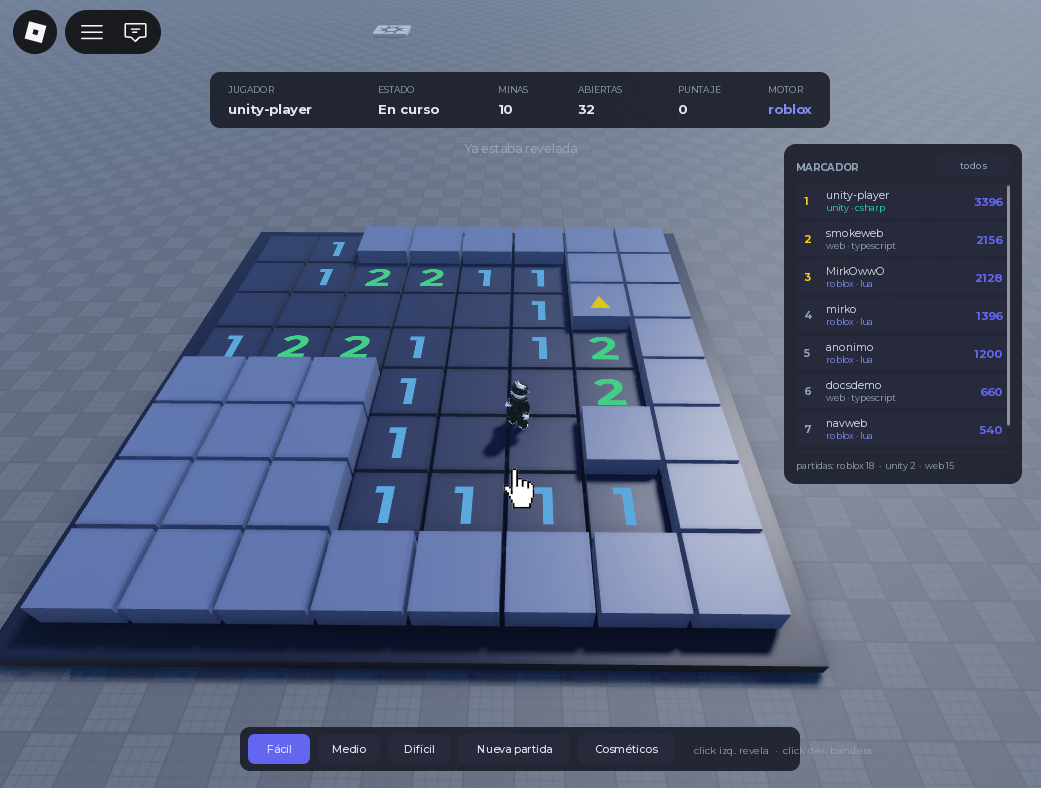
Run it and click a cell. The first click always opens a patch, because the Automation seeds the mines on that first reveal and keeps a 3x3 box around your click clear.
When jugar returns terminada = true, the game is over. If you lost, vista now contains * for the mines - the server shows them to you precisely because the game is already lost.
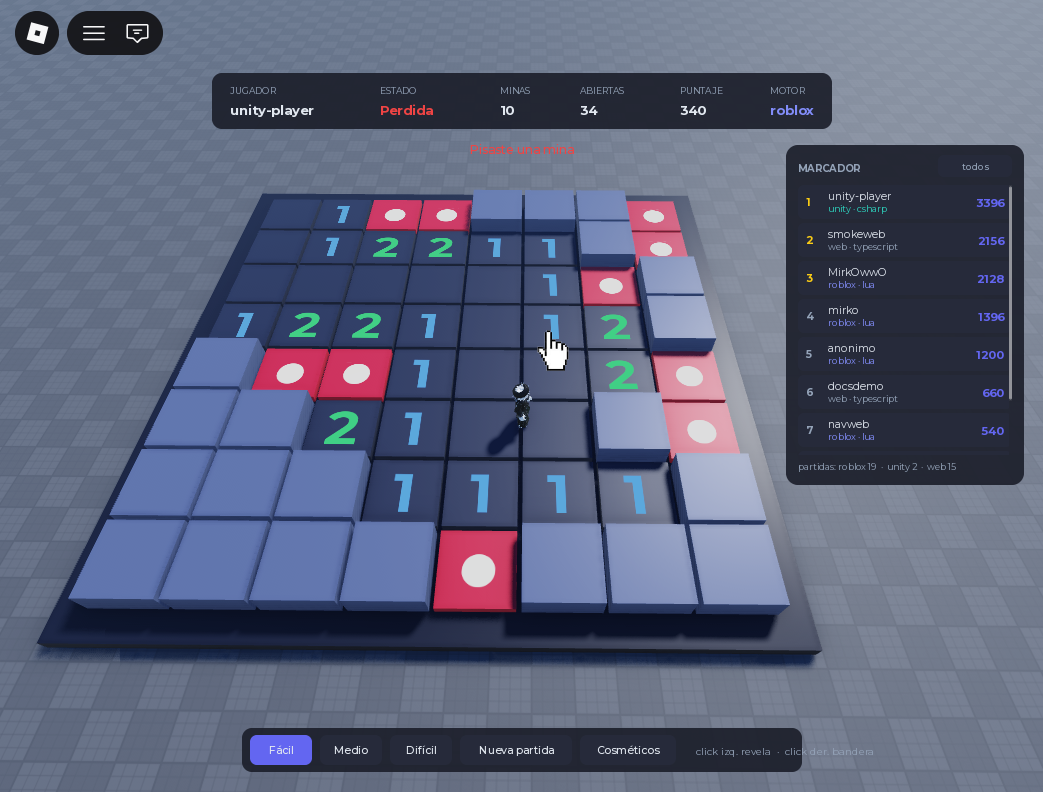
One board per server. `celdas` is a single module-level board, so this build assumes one game at a time. With two players, the second `Construir` destroys the first player's board. Giving each player their own board means keying `celdas` by `UserId` and offsetting `ORIGEN` per player - worth doing, and left as an exercise so the move loop stays readable here.
Why do we not keep the mines in the client?
A local solver - "reveal the neighbors that are safe" - is only possible if the client knows the mines. By keeping the matrix in Praxsuite and sending only the masked view, there is nothing on the player's device that a cheat could read. The most a modified client can do is send moves; it cannot send informed moves.
Step 11 - Read the Leaderboard
The leaderboard is read-only from the game's point of view: the Automation writes the score when a game ends, and the game only asks for the top rows.
remotes.Leaderboard.OnServerInvoke = function(player, limite)
    local res = llamar(Endpoints.Leaderboard, {
        limite = limite or 10,
        motor = Endpoints.MOTOR,
    })

    if not res then
        return {}
    end

    return res.top or {}
end
Passing motor = "roblox" filters to Roblox rows; omit it to fetch every front-end at once.
Each entry looks like this:
{ "posicion": 1, "alias": "MirkOwwO", "puntos": 2128, "motor": "roblox",
  "sdk": "lua", "dificultad": "facil", "segundos": 56, "jugadorId": "11033534760" }
The score field is `puntos` here. Inside a game the score is `puntaje`; in a leaderboard entry it is `puntos`. Reading the wrong one gives you `nil`, and `tostring(nil)` prints `"nil"` into your board without raising anything.
Step 12 - The Client: Menu and HUD
The client only paints what it receives. This LocalScript builds three difficulty buttons and a status line, so the game starts with a click instead of a command-bar call:
-- StarterPlayer/StarterPlayerScripts/BuscaminasCliente  (LocalScript)
local Players = game:GetService("Players")
local ReplicatedStorage = game:GetService("ReplicatedStorage")

local remotes = ReplicatedStorage:WaitForChild("BuscaminasRemotes")
local jugador = Players.LocalPlayer

local gui = Instance.new("ScreenGui")
gui.Name = "BuscaminasHUD"
gui.ResetOnSpawn = false
gui.Parent = jugador:WaitForChild("PlayerGui")

local estado = Instance.new("TextLabel")
estado.Size = UDim2.fromOffset(360, 34)
estado.Position = UDim2.fromOffset(20, 20)
estado.BackgroundColor3 = Color3.fromRGB(28, 31, 43)
estado.TextColor3 = Color3.fromRGB(235, 235, 245)
estado.Font = Enum.Font.GothamMedium
estado.TextSize = 15
estado.Text = "Pick a difficulty"
estado.Parent = gui

local function boton(texto, x, dificultad)
    local b = Instance.new("TextButton")
    b.Size = UDim2.fromOffset(110, 34)
    b.Position = UDim2.fromOffset(x, 62)
    b.BackgroundColor3 = Color3.fromRGB(45, 212, 191)
    b.TextColor3 = Color3.fromRGB(12, 14, 20)
    b.Font = Enum.Font.GothamBold
    b.TextSize = 14
    b.Text = texto
    b.Parent = gui

    b.MouseButton1Click:Connect(function()
        estado.Text = "Starting..."
        local res = remotes.NuevaPartida:InvokeServer(dificultad)
        if not res or res.error then
            estado.Text = "Could not start"
            return
        end
        estado.Text = string.format("%s - %dx%d, %d mines", dificultad, res.filas, res.columnas, res.minas)
    end)

    return b
end

boton("Easy", 20, "facil")
boton("Medium", 140, "medio")
boton("Hard", 260, "dificil")

local marcador = Instance.new("TextButton")
marcador.Size = UDim2.fromOffset(230, 30)
marcador.Position = UDim2.fromOffset(20, 106)
marcador.BackgroundColor3 = Color3.fromRGB(60, 64, 82)
marcador.TextColor3 = Color3.fromRGB(235, 235, 245)
marcador.Font = Enum.Font.GothamMedium
marcador.TextSize = 13
marcador.Text = "Show leaderboard"
marcador.Parent = gui

marcador.MouseButton1Click:Connect(function()
    local top = remotes.Leaderboard:InvokeServer(10)
    print("=== LEADERBOARD ===")
    for _, fila in ipairs(top) do
        print(string.format("%d. %s - %d pts (%s)", fila.posicion, tostring(fila.alias), fila.puntos, tostring(fila.motor)))
    end
end)
Press Play, click Easy, and walk up to the board. Left-click reveals, right-click flags. The board responds because every click is a round trip to Praxsuite and back.
Tip: The move loop has no client-side game logic at all. The LocalScript never holds the `codigo` of the game, never counts mines, and never decides a win. It is a remote control, not a brain.
Part 3 - Accounts and Redeemable Codes
A code like PRAX-LAVA02 unlocks a cosmetic. One code, one use, one owner - forever.
That last word is what forces an account. A cosmetic tied to a Roblox UserId would vanish the moment the same person opened the Unity build or the browser one, and two Praxsuite accounts sharing a machine would share unlocks. So the owner of an inventory is a Praxsuite End User, and the Roblox UserId is stored beside it as informational data only.
Register / Login → end user id → Redeem code → Inventory → EquipThat means Part 3 has an order you cannot shuffle: accounts first, then codes.
Update - the live demo now uses `Auth.LoginPlayer` instead of these two Automations. `Praxsuite.Auth.LoginPlayer(player)` did not exist in the SDK when this pattern was written; `Registro`/`Login` were the only way to get a stable end user id. Building them yourself, as Step 14 does, is still the right call if the same account has to log in from Unity or a browser with the same email and password - `Auth.LoginPlayer` only asserts a Roblox-specific identity, scoped to this platform's provider. But if a stable Praxsuite End User for this platform is all you need, `Auth.LoginPlayer` gets you one with no Automation, no password field, and no `Registrar`/`Login` remote at all - see the Lua SDK Implementation in Roblox guide. The shipped Roblox place switched to it for exactly that reason once the module became available; `Registrar` still exists in its Explorer tree but no longer has a server-side handler.
Step 13 - Three More Tables
`Buscaminas Codigos` - one row is one code.
Column | Type | What it holds |
| ShortText | The code itself, uppercase: |
| ShortText | Which catalog entry it unlocks |
| Bool | Lets you retire a code without deleting it |
| Bool | Burned or not |
| DateTime | When it was burned |
| ShortText | Which end user burned it |
| ShortText | Their display name, for reading the table |
| ShortText |
|
`Buscaminas Cosmeticos` - the catalog. One row is one unlockable thing.
Column | Type | What it holds |
| ShortText | Stable id: |
| ShortText | Display name |
| ShortText | One line for the UI |
| ShortText | Always |
| ShortText | The slot it occupies: |
| Status |
|
| Json | What the cosmetic actually does. You define this. |
| Bool | Lets you pull a cosmetic without breaking inventories |
Config is deliberately open. The backend never reads it - it passes it through to the game, which decides what it means. For a board palette, something like:
{ "oculta": [150, 150, 165], "revelada": [90, 90, 100], "bandera": [240, 120, 120] }`Buscaminas Inventario` - one row is one cosmetic owned by one player.
Column | Type | What it holds |
| ShortText | The Praxsuite end user id. The owner. |
| ShortText | Roblox UserId, informational |
| ShortText | Display name at the time of unlock |
| Table | Link to the catalog row |
| ShortText | Denormalized key, so lookups need no join |
| ShortText | Copied from the catalog: one equipped item per type |
| Bool | Whether it is currently on |
| DateTime | When |
| ShortText | Which code produced it |
| ShortText | Where it was redeemed from |
| ShortText | Which SDK redeemed it |
Why does the inventory store `Cosmetico Clave` when it already links to the catalog row? Because every query in Part 3 filters by key, and a filter on a plain column is one lookup while a filter through a link is a join. The link is there for humans reading the table; the key is there for the Automations.
Step 14 - The `Registro` and `Login` Automations
Both talk to the workspace's own Auth Gateway over HTTP. Neither one stores a password anywhere in Roblox.
Create five more endpoints under Gateway → Endpoints, all Sync: Buscaminas: Registro, Buscaminas: Login, Buscaminas: Canjear Codigo, Buscaminas: Mis Cosmeticos, Buscaminas: Equipar Cosmetico.
Then store your gateway key in the Vault under the alias gatewayKey. The auth routes need a key of their own, and a Vault node is how an Automation reads one without it appearing in the graph.
`Buscaminas: Registro` is six nodes:
Endpoint trigger → Vault → Try/Catch → HTTP: register → Script: build reply → ResponseVault, alias
gatewayKey.Try/Catch with continue on failure enabled. The HTTP node throws on any non-2xx, and a
409(email already registered) is an expected outcome here, not a bug.HTTP Request, inside the Try branch.
POSTtohttps://gateway.praxsuite.com/YOUR-WORKSPACE-ID/auth/register, headersContent-Type: application/jsonandx-api-key: {{vault.gatewayKey}}, body:
{ "email": "{{context.request.body.email}}", "password": "{{context.request.body.password}}", "username": "{{context.request.body.alias}}" }Script, named
armar. Inputs:respuestafrom{{context.steps.crear.body}},detallefrom{{context.steps.intento.error}},payloadfrom{{context.request.body}}.
// Same shape as login, so the client can treat both the same way.
// The HttpRequest sits inside the Try/Catch because it throws on any non-2xx,
// and here a 409 (email already registered) is an expected outcome, not a bug.

const r = respuesta || {};
const d = r.data || {};
const exitoso = (r.isSuccess === true) && Boolean(d.accessToken);

if (!exitoso) {
  const texto = String(detalle || "");
  let mensaje = "No se pudo crear la cuenta";
  if (texto.indexOf("409") >= 0) mensaje = "Ese email ya tiene una cuenta";
  else if (texto.indexOf("400") >= 0) mensaje = "Revisa el email y que la contrasena tenga al menos 8 caracteres";
  else if (r.isSuccess === false && r.message) mensaje = r.message;
  return { salida: JSON.stringify({ ok: false, mensaje: mensaje }) };
}

const u = d.user || {};
const pedido = payload || {};

return {
  salida: JSON.stringify({
    ok: true,
    mensaje: "Cuenta creada",
    usuario: {
      id: String(u.id || ""),
      email: String(u.email || ""),
      alias: String(u.username || pedido.alias || u.firstName || u.email || "jugador")
    }
  })
};Response, body
{{context.steps.armar.salida}}.
`Buscaminas: Login` is the same graph pointed at /auth/login, with a body of just email and password, and this script:
// The HttpRequest node THROWS on any non-2xx: it exposes statusCode on its
// output, but on the error path you never get to read it. Hence the Try/Catch.
//
// And beware of `trySucceeded`: on the finally path it is not written yet. The
// reliable signal is the response itself - if the step threw, it arrives empty.

const r = respuesta || {};
const d = r.data || {};
const exitoso = (r.isSuccess === true) && Boolean(d.accessToken);

if (!exitoso) {
  const texto = String(detalle || "");
  let mensaje = "No se pudo iniciar sesion";
  if (texto.indexOf("401") >= 0) mensaje = "Email o contrasena incorrectos";
  else if (texto.indexOf("404") >= 0) mensaje = "Esa cuenta no existe";
  else if (texto.indexOf("429") >= 0) mensaje = "Demasiados intentos, espera un momento";
  else if (r.isSuccess === false && r.message) mensaje = r.message;
  return { salida: JSON.stringify({ ok: false, mensaje: mensaje }) };
}

// The accessToken and refreshToken are NOT returned to Roblox: the game server
// is already the trusted party, so handing it the token would only widen the
// surface without buying anything.
const u = d.user || {};

return {
  salida: JSON.stringify({
    ok: true,
    mensaje: "Sesion iniciada",
    usuario: {
      id: String(u.id || ""),
      email: String(u.email || ""),
      alias: String(u.username || u.firstName || u.email || "jugador")
    }
  })
};
Both return { ok, mensaje, usuario: { id, email, alias } }. That usuario.id is the end user id every code operation needs.
Why does the token never reach Roblox? Because your game server already authenticates with a secret key - it is the trusted party. Sending it a session token adds a credential to store, refresh and leak, in exchange for a permission it already has.
Step 15 - The `Canjear Codigo` Automation
This is the one that decides whether a code is worth anything. Nine nodes:
Endpoint trigger → Query code → Query cosmetic → Query "already owned?" → Script: validate
                 → Valid? ─ no ──────────────────────────────────────────→ Response
                          └ yes → Burn the code → Add to inventory ───────→ Response
Query Rows
buscarCodigoonBuscaminas Codigos:Codigoeq{{context.request.body.codigo}}, limit 1.Query Rows
buscarCosmeticoonBuscaminas Cosmeticos:Claveeq{{context.steps.buscarCodigo.row.Cosmetico_Clave}}, limit 1.Query Rows
buscarPosesiononBuscaminas Inventario:Jugador Ideq{{context.request.body.jugadorId}}andCosmetico Claveeq{{context.steps.buscarCodigo.row.Cosmetico_Clave}}, limit 1.
Note the underscores in Cosmetico_Clave: inside the step context, column names arrive with spaces replaced by underscores.
Script
validar. Inputs:payload,codigofrombuscarCodigo.row,cosmeticofrombuscarCosmetico.row,posesionfrombuscarPosesion.row.
// One code, one use. All the decision lives here; the database nodes that
// follow only execute what this Script already resolved.
//
// WHO the owner is: `jugadorId` is the Praxsuite END USER id, not the platform
// one. If the inventory hung off the Roblox UserId, two Praxsuite accounts on
// the same machine would share cosmetics, and the same person coming in from
// Unity or the browser would see none of what they unlocked.

const body = payload || {};
const cod = codigo || {};
const cos = cosmetico || {};
const ya = posesion || {};

function nombreDe(v) {
  if (!v) return "";
  if (typeof v === "object" && v.Name) return String(v.Name);
  return String(v);
}

const pedido = String(body.codigo || "").trim().toUpperCase();
const jugadorId = String(body.jugadorId || "").trim();
const alias = String(body.alias || "anonimo");
const ahora = new Date().toISOString();

const existe = Boolean(cod.Codigo);
const clave = String(cod.Cosmetico_Clave || cod["Cosmetico Clave"] || "");

let valido = false;
let mensaje = "";

if (!pedido) {
  mensaje = "Escribi un codigo";
} else if (!jugadorId) {
  mensaje = "Tenes que iniciar sesion para canjear";
} else if (!existe) {
  mensaje = "Ese codigo no existe";
} else if (cod.Activo === false) {
  mensaje = "Ese codigo fue dado de baja";
} else if (cod.Usado === true) {
  mensaje = "Ese codigo ya fue canjeado";
} else if (!cos.Clave) {
  // The code points at a cosmetic that does not exist or was deleted: a data
  // error, not the player's fault. The code is NOT burned.
  mensaje = "El premio de ese codigo no esta disponible";
} else if (cos.Activo === false) {
  mensaje = "Ese cosmetico esta desactivado";
} else if (ya.Cosmetico_Clave || ya["Cosmetico Clave"]) {
  // Also does not burn the code: if you already own it, the code stays alive
  // so you can pass it to someone else.
  mensaje = "Ya tenes " + String(cos.Nombre || clave);
} else {
  valido = true;
  mensaje = "Desbloqueaste " + String(cos.Nombre || clave);
}

const tipo = nombreDe(cos.Tipo_Clave || cos["Tipo Clave"] || cos.Tipo);
const rareza = nombreDe(cos.Rareza);

let config = cos.Config;
if (typeof config === "string") {
  try { config = JSON.parse(config); } catch (e) { config = {}; }
}

const respuesta = {
  ok: valido,
  mensaje: mensaje,
  codigo: pedido,
  cosmetico: valido ? {
    clave: clave,
    nombre: String(cos.Nombre || clave),
    descripcion: String(cos.Descripcion || ""),
    tipo: tipo,
    rareza: rareza,
    config: config || {}
  } : null
};

return {
  valido: valido ? "si" : "no",
  mensaje: mensaje,
  rowIdCodigo: String(cod.ID || ""),
  clave: clave,
  nombre: String(cos.Nombre || clave),
  tipo: tipo,
  rareza: rareza,
  rowIdCosmetico: String(cos.ID || ""),
  referencia: alias + " / " + clave,
  ahora: ahora,
  respuesta: JSON.stringify(respuesta)
};
If/Else
puede:{{context.steps.validar.valido}}==si.Update Rows
quemaronBuscaminas Codigos, row id{{context.steps.validar.rowIdCodigo}}:
Column | Value |
|
|
|
|
|
|
|
|
|
|
Insert Rows
guardaronBuscaminas Inventario:
Column | Value |
|
|
|
|
|
|
|
|
|
|
|
|
|
|
|
|
|
|
|
|
|
|
|
|
Response from both branches, body
{{context.steps.validar.respuesta}}.
The endpoint takes { codigo, jugadorId, plataformaId, alias, motor, sdk } and returns { ok, mensaje, codigo, cosmetico }.
Two failures deliberately do not burn the code. A broken catalog entry is your bug, not the player's. Already owning the cosmetic is not a failure at all - the code stays alive so it can be given away. Burning on every attempt would be simpler to write and worse to play.
Step 16 - `Mis Cosmeticos` and `Equipar Cosmetico`
`Buscaminas: Mis Cosmeticos` - five nodes, read-only:
Endpoint trigger → Query inventory → Query catalog → Script: join → Responseinventario filters Jugador Id eq {{context.request.body.jugadorId}}, limit 200. catalogo filters Juego eq Buscaminas, limit 200. Then:
// The inventory stores only the cosmetic's key. The config (colors, symbols,
// material) lives in the catalog, so a cosmetic can be retouched without
// rewriting the row of every player who owns it.
//
// Joining here rather than in the game has a concrete reason: the client gets
// the config already resolved and never needs to know the catalog exists.

function nombreDe(v) {
  if (!v) return "";
  if (typeof v === "object" && v.Name) return String(v.Name);
  return String(v);
}

function parseJ(v, porDefecto) {
  if (v === null || v === undefined) return porDefecto;
  if (typeof v === "string") {
    try { return JSON.parse(v); } catch (e) { return porDefecto; }
  }
  return v;
}

const porClave = new Map();
for (const c of (Array.isArray(catalogo) ? catalogo : [])) {
  porClave.set(String(c.Clave), c);
}

const items = [];
const equipado = {};

for (const fila of (Array.isArray(mios) ? mios : [])) {
  const clave = String(fila.Cosmetico_Clave || fila["Cosmetico Clave"] || "");
  const c = porClave.get(clave);
  if (!c) continue;                       // deleted from the catalog
  if (c.Activo === false) continue;       // deactivated: not offered

  const tipo = nombreDe(c.Tipo_Clave || c["Tipo Clave"] || c.Tipo);
  const estaEquipado = fila.Equipado === true;

  const item = {
    clave: clave,
    nombre: String(c.Nombre || clave),
    descripcion: String(c.Descripcion || ""),
    tipo: tipo,
    rareza: nombreDe(c.Rareza),
    config: parseJ(c.Config, {}),
    equipado: estaEquipado,
    obtenido: String(fila.Obtenido || ""),
    codigo: String(fila.Codigo_Usado || fila["Codigo Usado"] || "")
  };
  items.push(item);

  if (estaEquipado) equipado[tipo] = item;
}

items.sort(function (a, b) {
  if (a.tipo !== b.tipo) return a.tipo < b.tipo ? -1 : 1;
  return a.nombre < b.nombre ? -1 : 1;
});

return {
  respuesta: JSON.stringify({
    ok: true,
    total: items.length,
    items: items,
    equipado: equipado    // { paleta: {...}, mina: {...} } ready to apply
  })
};
It takes { jugadorId } and returns { ok, total, items[], equipado }.
`Buscaminas: Equipar Cosmetico` - seven nodes:
Endpoint trigger → Query "owned?" → Script: validate → Owned? ─ no ─→ Response
                                                              └ yes → Unequip same type → Equip this → Response
buscarItem filters Jugador Id and Cosmetico Clave, limit 1. Then:
// Equipping is a two-step operation that has to stay consistent: first unequip
// everything of the same type, then mark this one. If the player does not own
// the cosmetic, nothing is touched.
//
// And it is a SWITCH, not a one-way button: tapping a cosmetic that is already
// on takes it off. Without this, a player who unlocks a palette can never go
// back to the default board.

const body = payload || {};
const it = item || {};

const clave = String(body.clave || "").trim();
const jugadorId = String(body.jugadorId || "").trim();
const tipo = String(it.Tipo || "");
const yaPuesto = it.Equipado === true;

// The client can force the direction by sending `equipar: true|false`.
// Without that field it toggles.
let queda;
if (typeof body.equipar === "boolean") {
  queda = body.equipar;
} else {
  queda = !yaPuesto;
}

let valido = false;
let mensaje = "";

if (!jugadorId) {
  mensaje = "Tenes que iniciar sesion";
} else if (!clave) {
  mensaje = "Falta el cosmetico";
} else if (!it.Cosmetico_Clave && !it["Cosmetico Clave"]) {
  mensaje = "No tenes ese cosmetico";
} else if (!tipo) {
  mensaje = "Ese cosmetico no tiene tipo asignado";
} else {
  valido = true;
  mensaje = queda ? "Equipado" : "Guardado";
}

return {
  valido: valido ? "si" : "no",
  mensaje: mensaje,
  rowId: String(it.ID || ""),
  clave: clave,
  tipo: tipo,
  // UpdateRows fields only accept strings, so the boolean travels as "true"/"false".
  nuevoEstado: queda ? "true" : "false",
  accion: queda ? "equipar" : "desequipar",
  respuesta: JSON.stringify({
    ok: valido,
    mensaje: mensaje,
    clave: clave,
    tipo: tipo,
    equipado: valido ? queda : yaPuesto
  })
};
Update Rows
desequipar, filtered byJugador IdandTipo, settingEquipadotofalse.Update Rows
equipar, row id{{context.steps.validar.rowId}}, settingEquipadoto{{context.steps.validar.nuevoEstado}}.Response from both branches.
Step 17 - Seed a Few Codes
Add a couple of rows to Buscaminas Cosmeticos:
|
|
|
|
|
|
| Lava |
|
| true |
|
| Ice |
|
| true |
|
Then a code for each in Buscaminas Codigos, with Activo true and Usado false:
|
|
|
|
|
|
Codes are compared uppercase - the Script upper-cases whatever the player typed - so store them uppercase too.
Step 18 - The Client: Sign In and Redeem
Add the remaining endpoints to the module from Step 6:
-- ServerScriptService/BuscaminasEndpoints  (ModuleScript)
return {
    MOTOR = "roblox",
    SDK = "lua",
    NuevaPartida = "paste-your-nueva-partida-endpoint-uuid",
    Jugar = "paste-your-jugar-endpoint-uuid",
    Leaderboard = "paste-your-leaderboard-endpoint-uuid",
    Registro = "paste-your-registro-endpoint-uuid",
    Login = "paste-your-login-endpoint-uuid",
    Canjear = "paste-your-canjear-endpoint-uuid",
    MisCosmeticos = "paste-your-mis-cosmeticos-endpoint-uuid",
    Equipar = "paste-your-equipar-endpoint-uuid",
}
And five remotes to Step 7's list:
remote("Registrar")
remote("Login")
remote("Canjear")
remote("MisCosmeticos")
remote("Equipar")
Now the server side. The end user id is the one thing the whole of Part 3 hangs on, so it lives in the session table and is never sent to the client as something the client gets to choose:
-- add to ServerScriptService/BuscaminasServidor  (Script)

local cuentas = {}  -- [UserId] = { id = "<end user uuid>", alias = "..." }

remotes.Registrar.OnServerInvoke = function(player, email, password, alias)
    local res = llamar(Endpoints.Registro, {
        email = email,
        password = password,
        alias = alias or player.Name,
    })
    if not res then
        return { ok = false, mensaje = "The server did not answer" }
    end
    if res.ok and res.usuario then
        cuentas[player.UserId] = { id = res.usuario.id, alias = res.usuario.alias }
    end
    -- Only ok and mensaje travel back. The end user id stays on the server.
    return { ok = res.ok, mensaje = res.mensaje }
end

remotes.Login.OnServerInvoke = function(player, email, password)
    local res = llamar(Endpoints.Login, { email = email, password = password })
    if not res then
        return { ok = false, mensaje = "The server did not answer" }
    end
    if res.ok and res.usuario then
        cuentas[player.UserId] = { id = res.usuario.id, alias = res.usuario.alias }
    end
    return { ok = res.ok, mensaje = res.mensaje, alias = res.usuario and res.usuario.alias }
end

remotes.Canjear.OnServerInvoke = function(player, codigo)
    local cuenta = cuentas[player.UserId]
    if not cuenta then
        return { ok = false, mensaje = "Sign in before redeeming" }
    end

    local res = llamar(Endpoints.Canjear, {
        codigo = codigo,
        jugadorId = cuenta.id,                      -- the Praxsuite end user
        plataformaId = tostring(player.UserId),     -- the Roblox id, informational
        alias = cuenta.alias,
        motor = Endpoints.MOTOR,
        sdk = Endpoints.SDK,
    })

    if not res then
        return { ok = false, mensaje = "The server did not answer" }
    end
    return res
end

remotes.MisCosmeticos.OnServerInvoke = function(player)
    local cuenta = cuentas[player.UserId]
    if not cuenta then
        return { ok = false, items = {} }
    end
    return llamar(Endpoints.MisCosmeticos, { jugadorId = cuenta.id }) or { ok = false, items = {} }
end

remotes.Equipar.OnServerInvoke = function(player, clave)
    local cuenta = cuentas[player.UserId]
    if not cuenta then
        return { ok = false, mensaje = "Sign in first" }
    end
    return llamar(Endpoints.Equipar, { jugadorId = cuenta.id, clave = clave })
        or { ok = false, mensaje = "The server did not answer" }
end
The client never sends its own `jugadorId`. It asks to redeem a code, and the server decides on whose behalf. If the client supplied the id, any player could type someone else's end user uuid and redeem into their inventory - or read it back with `MisCosmeticos`. The one place that id comes from is the login response the server itself received.
Now the code box, in the LocalScript from Step 12:
-- add to StarterPlayer/StarterPlayerScripts/BuscaminasCliente  (LocalScript)

local caja = Instance.new("TextBox")
caja.Size = UDim2.fromOffset(230, 30)
caja.Position = UDim2.fromOffset(20, 146)
caja.BackgroundColor3 = Color3.fromRGB(20, 22, 30)
caja.TextColor3 = Color3.fromRGB(235, 235, 245)
caja.PlaceholderText = "Enter a code"
caja.Font = Enum.Font.Gotham
caja.TextSize = 14
caja.ClearTextOnFocus = false
caja.Text = ""
caja.Parent = gui

local canjear = Instance.new("TextButton")
canjear.Size = UDim2.fromOffset(110, 30)
canjear.Position = UDim2.fromOffset(260, 146)
canjear.BackgroundColor3 = Color3.fromRGB(45, 212, 191)
canjear.TextColor3 = Color3.fromRGB(12, 14, 20)
canjear.Font = Enum.Font.GothamBold
canjear.TextSize = 14
canjear.Text = "Redeem"
canjear.Parent = gui

local aviso = Instance.new("TextLabel")
aviso.Size = UDim2.fromOffset(350, 24)
aviso.Position = UDim2.fromOffset(20, 184)
aviso.BackgroundTransparency = 1
aviso.TextXAlignment = Enum.TextXAlignment.Left
aviso.TextColor3 = Color3.fromRGB(200, 205, 220)
aviso.Font = Enum.Font.Gotham
aviso.TextSize = 13
aviso.Text = ""
aviso.Parent = gui

canjear.MouseButton1Click:Connect(function()
    local texto = caja.Text:gsub("%s+", "")
    if texto == "" then
        aviso.Text = "Type a code first"
        return
    end

    canjear.Text = "..."
    local res = remotes.Canjear:InvokeServer(texto:upper())
    canjear.Text = "Redeem"

    if not res then
        aviso.Text = "No answer"
        return
    end

    aviso.Text = tostring(res.mensaje)
    if res.ok then
        caja.Text = ""
        if res.cosmetico then
            -- Equip what was just unlocked, so the reward is visible immediately
            remotes.Equipar:InvokeServer(res.cosmetico.clave)
        end
    end
end)
Type PRAX-LAVA02, press Redeem, and the label answers with whatever the Automation decided: Desbloqueaste Lava the first time, Ese codigo ya fue canjeado the second.
Step 19 - Apply the Cosmetic to the Board
Mis Cosmeticos already returns equipado, keyed by type, with the catalog config resolved. The board only has to read it:
-- add to ServerScriptService/BuscaminasTablero  (ModuleScript)

-- Default palette, used when the player has nothing equipped
local PALETA = {
    oculta   = Color3.fromRGB(150, 150, 165),
    revelada = Color3.fromRGB(90, 90, 100),
    bandera  = Color3.fromRGB(240, 120, 120),
    mina     = Color3.fromRGB(200, 40, 40),
}

local function color(lista, porDefecto)
    if typeof(lista) == "table" and #lista == 3 then
        return Color3.fromRGB(lista[1], lista[2], lista[3])
    end
    return porDefecto
end

-- `config` is the Json column from the catalog, passed through untouched.
function Tablero.AplicarPaleta(config)
    if typeof(config) ~= "table" then
        return
    end
    PALETA.oculta   = color(config.oculta,   PALETA.oculta)
    PALETA.revelada = color(config.revelada, PALETA.revelada)
    PALETA.bandera  = color(config.bandera,  PALETA.bandera)
    PALETA.mina     = color(config.mina,     PALETA.mina)
end
Then use PALETA.oculta, PALETA.revelada, PALETA.bandera and PALETA.mina in Tablero.Pintar instead of the hardcoded Color3.fromRGB(...) calls, and load the player's palette when their game starts:
-- in the NuevaPartida handler, before Tablero.Construir(res)
local cuenta = cuentas[player.UserId]
if cuenta then
    local cos = llamar(Endpoints.MisCosmeticos, { jugadorId = cuenta.id })
    if cos and cos.equipado and cos.equipado.paleta then
        Tablero.AplicarPaleta(cos.equipado.paleta.config)
    end
end
The whole cosmetic system reaches the game as one Json blob the backend never interprets. Adding a new palette means one catalog row and one code - no Automation change, no republish, no new Lua.
Why does the backend not validate `Config`? Because it cannot know what a cosmetic means. `paleta` happens to be three colours today; tomorrow a `mina` type might be a mesh id and a sound. A backend that validated the shape would have to be redeployed for every new kind of reward. Passing it through untouched is what keeps the catalog editable by hand.
Complete Code
Six scripts, in the order they load. PraxsuiteConfig and BuscaminasEndpoints are the modules from Step 6, BuscaminasRemotes from Step 7, BuscaminasTablero from Step 9. Here is the server bridge with everything wired together:
-- ServerScriptService/BuscaminasServidor  (Script)
local ReplicatedStorage = game:GetService("ReplicatedStorage")

local Praxsuite = require(game.ServerScriptService.PraxsuiteSDK)
local Endpoints = require(game.ServerScriptService.BuscaminasEndpoints)
local Tablero = require(game.ServerScriptService.BuscaminasTablero)

local remotes = ReplicatedStorage:WaitForChild("BuscaminasRemotes")

local sesiones = {}  -- [UserId] = { codigo, dificultad }   the current game
local cuentas = {}   -- [UserId] = { id, alias }            the Praxsuite end user

local function llamar(slug, payload)
    local ok, res = pcall(Praxsuite.Endpoints.Call, slug, payload)
    if not ok then
        warn("[Buscaminas] Endpoint '" .. slug .. "' failed: " .. tostring(res))
        return nil
    end
    return res
end

local function jugar(player, accion, fila, columna)
    local sesion = sesiones[player.UserId]
    if not sesion then
        return nil
    end

    local res = llamar(Endpoints.Jugar, {
        codigo = sesion.codigo,
        accion = accion,
        fila = fila,
        columna = columna,
    })

    if res and res.vista then
        Tablero.Pintar(res.vista)
    end

    if res and res.terminada then
        print("[Buscaminas] " .. tostring(res.estado) .. " - " .. tostring(res.puntaje) .. " pts in " .. tostring(res.segundos) .. "s")
        sesiones[player.UserId] = nil
    end

    return res
end

remotes.NuevaPartida.OnServerInvoke = function(player, dificultad)
    local res = llamar(Endpoints.NuevaPartida, {
        alias = player.Name,
        jugadorId = tostring(player.UserId),
        dificultad = dificultad,
        motor = Endpoints.MOTOR,
        sdk = Endpoints.SDK,
    })

    if not res then
        return { error = "Could not create the game" }
    end

    sesiones[player.UserId] = { codigo = res.codigo, dificultad = dificultad }

    local cuenta = cuentas[player.UserId]
    if cuenta then
        local cos = llamar(Endpoints.MisCosmeticos, { jugadorId = cuenta.id })
        if cos and cos.equipado and cos.equipado.paleta then
            Tablero.AplicarPaleta(cos.equipado.paleta.config)
        end
    end

    Tablero.Construir(res)
    Tablero.Conectar(jugar)

    return res
end

remotes.Leaderboard.OnServerInvoke = function(player, limite)
    local res = llamar(Endpoints.Leaderboard, {
        limite = limite or 10,
        motor = Endpoints.MOTOR,
    })
    return res and res.top or {}
end

remotes.Registrar.OnServerInvoke = function(player, email, password, alias)
    local res = llamar(Endpoints.Registro, {
        email = email,
        password = password,
        alias = alias or player.Name,
    })
    if not res then
        return { ok = false, mensaje = "The server did not answer" }
    end
    if res.ok and res.usuario then
        cuentas[player.UserId] = { id = res.usuario.id, alias = res.usuario.alias }
    end
    return { ok = res.ok, mensaje = res.mensaje }
end

remotes.Login.OnServerInvoke = function(player, email, password)
    local res = llamar(Endpoints.Login, { email = email, password = password })
    if not res then
        return { ok = false, mensaje = "The server did not answer" }
    end
    if res.ok and res.usuario then
        cuentas[player.UserId] = { id = res.usuario.id, alias = res.usuario.alias }
    end
    return { ok = res.ok, mensaje = res.mensaje, alias = res.usuario and res.usuario.alias }
end

remotes.Canjear.OnServerInvoke = function(player, codigo)
    local cuenta = cuentas[player.UserId]
    if not cuenta then
        return { ok = false, mensaje = "Sign in before redeeming" }
    end

    local res = llamar(Endpoints.Canjear, {
        codigo = codigo,
        jugadorId = cuenta.id,
        plataformaId = tostring(player.UserId),
        alias = cuenta.alias,
        motor = Endpoints.MOTOR,
        sdk = Endpoints.SDK,
    })

    return res or { ok = false, mensaje = "The server did not answer" }
end

remotes.MisCosmeticos.OnServerInvoke = function(player)
    local cuenta = cuentas[player.UserId]
    if not cuenta then
        return { ok = false, items = {} }
    end
    return llamar(Endpoints.MisCosmeticos, { jugadorId = cuenta.id }) or { ok = false, items = {} }
end

remotes.Equipar.OnServerInvoke = function(player, clave)
    local cuenta = cuentas[player.UserId]
    if not cuenta then
        return { ok = false, mensaje = "Sign in first" }
    end
    return llamar(Endpoints.Equipar, { jugadorId = cuenta.id, clave = clave })
        or { ok = false, mensaje = "The server did not answer" }
end

game:GetService("Players").PlayerRemoving:Connect(function(player)
    sesiones[player.UserId] = nil
    cuentas[player.UserId] = nil
end)
Press Play, sign in, click Easy, and play. When you finish, open Demos Leaderboard in the portal: your row is there, next to the Unity and browser players, with the same alias deduped per front-end.
Tabla "Demos Leaderboard"
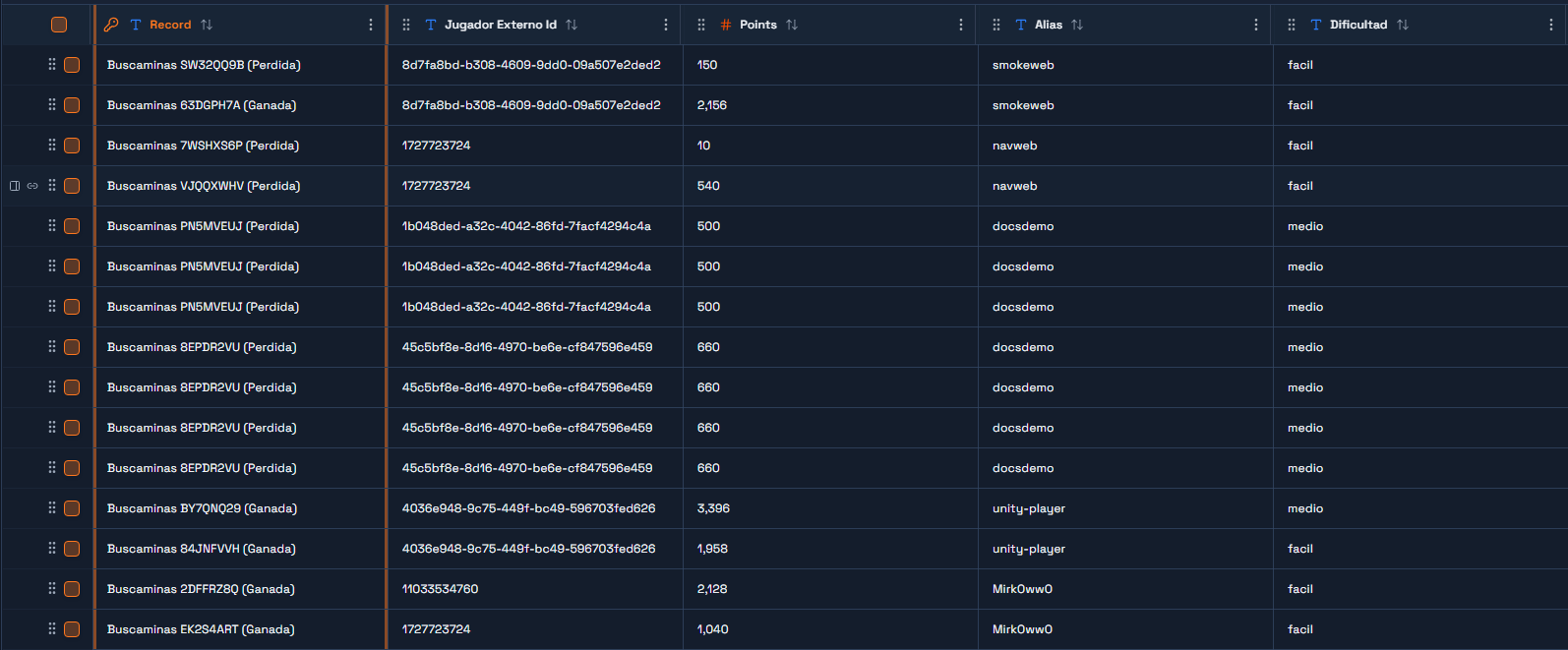
Tabla "Buscaminas Partidas"
Common Errors and How to Avoid Them
Error | Cause | Solution |
|
| Add |
| A script required the SDK before the config module was found. | Make sure |
| The endpoint ID does not exist, or the Automation is not published. | Re-copy the ID from Gateway → Endpoints and confirm the Automation has a published version. |
| The SDK resolves the API key on every request, and the Secrets Store has no | Add the secret under Game Settings → Security → Secrets Store. |
The script never runs and nothing is logged | It is waiting on |
|
|
| Index the row first: |
| 1-based Luau coordinates were sent to a 0-based server. | Subtract one before sending: |
The leaderboard prints | The entry field is | Read |
|
| Check that |
The board does not respond to clicks |
| Raise the distance, or place the board near the spawn. |
| The redeem call arrived with an empty | The player has to sign in first: the end user id comes from the |
A code works once and then reports | Working as intended. One code, one use. | Add another row to |
Tip: Wrap the `OnServerInvoke` bodies in `pcall` too. A RemoteFunction that errors on the server shows the player a misleading error in Studio, which hides the real cause. Return an error table instead of throwing.
Production Tips
Rate-limit the moves. Every click is a synchronous
Endpoints.Call. A burst of clicks is a burst of HTTP requests; a small minimum interval between moves is enough.Keep `MOTOR` and `SDK` labels exact. The leaderboard dedupes by
alias + motor; changing"roblox"breaks that grouping.Store the key in the Secrets Store, never in code. The config module holds only the secret's name.
Never let the client choose a `jugadorId`. It is the one field that decides whose inventory is being touched, and it comes from the login response the server received.
Wrap every network call in `pcall`. A hiccup in a
RemoteFunctionhandler must become a returned error, not a broken join.Keep the matrix in Praxsuite. If a future feature needs the client to know the board, it should receive only the masked view, never the mines.
Production Note: Why Move the Engine to Roblox (and Why Praxsuite Still Validates the Result)
The first tip in the section above already hints at it: every click in this tutorial is a synchronous Endpoints.Call against the Buscaminas: Jugar automation from Step 4 - a full network round trip, Roblox → gateway → automation → database → automation → gateway → Roblox, before the player sees the effect of their click. In a real deployment of this same tutorial, with clicks in quick succession (opening an empty area in a hurry, say) that latency ends up being noticeable, and rate-limiting the moves only hides it, it does not remove it.
The fix that was validated in production was moving the game's algebra - seeding, flood-fill, score calculation - from Step 4 into a local Luau module, BuscaminasMotor.lua, a 1:1 port of the same resolver script you built there, running directly in ServerScriptService. With that, a click resolves inside the same trusted process on the Roblox server, with no call to Praxsuite at all: the same milliseconds any other local computation takes.
That alone, however, opens a gap: with no record on Praxsuite's side, nothing stops a corrupt result - a bug in the local engine, or a hand-manipulated report - from writing any score to the leaderboard shared with Unity and the web. The fix does not bring back the automation per click (the latency problem lived there, not in the whole match); it adds back two calls per game, not per click:
The hybrid pattern: two calls per game
When opening the game, the
buscaminas-nueva-partidaautomation from Step 3 is still called, unchanged: it returns the code, rows, columns and mines, which Praxsuite stores as a row inBuscaminas Partidas- with the matrix still empty, unseeded. Just like in Step 4, the mines are only seeded on the first valid move, both on the local engine's side and on the row's side, so that first move is never a coin flip. This row is the comparison point the final result gets validated against.When closing the game, instead of Roblox writing straight to the leaderboard, a separate automation is called,
buscaminas-validar-resultado— the one you built under The `Validar Resultado` Automation - a Sync endpoint whose Script node recomputes everything from scratch against that row'sFilas/Columnas/Minas, never against what the client sends.
What buscaminas-validar-resultado checks
Before touching the row or the leaderboard, the new endpoint's Script checks, all server-side:
That the game exists and is still
"En curso"- an already-closed row rejects any retry (protection against resending the same game twice).That the reported matrix has exactly the number of mines
Nueva Partidagenerated, and that rows/columns match.That every non-mine number in the matrix is consistent with the reported mine positions, recomputed cell by cell - sending any matrix with the right mine count is not enough.
If the state is
"Ganada"(won): that no revealed cell is a mine, and that every safe cell is revealed (rows × columns − mines).If the state is
"Perdida"(lost): that at least one revealed cell is a mine.That the score, recomputed with the same formula from Step 4 (
revealed × 10, plusmines × 50 + max(0, 600 − seconds) × 2if won), matches the reported one exactly.
If any of these checks fails, the automation touches neither the row nor the leaderboard - the player already saw their local result either way; the only thing lost is that entry in the cross-engine leaderboard.
This same automation also feeds the shared Event Bus. Once a validated result closes the row, `buscaminas-validar-resultado` checks whether the score made the leaderboard's top 3 and, if so, publishes a `gamecompleted
event — the same publish-only mechanism the leaderboard shares across every engine (Unity, the web demo and the Minecraft plugin trigger the identical automation too, not a Roblox-specific copy of it). The event fires on every validated game, and whether the score made the podium travels in the payload'sesTop3field. The publish call runs withcontinueOnError`, so closing the row and writing the leaderboard are never affected by anything happening on the Event Bus side — the bus announcement is strictly additive on top of that.*
Before (Steps 3-5, automation per click) | After (hybrid, local engine + validation) |
Click → | Click → |
The leaderboard was written inside | On finish, |
The Buscaminas: Jugar automation built in Step 4 still exists as-is in the workspace and is still valid - it is engine-agnostic, so Unity or a web client can still call it per click. Roblox simply no longer needs it on the hot path.
Test results (live-tested on 2026-09-09)
A valid result closes the row and writes the leaderboard.
The same code resent is rejected (
partida_ya_cerrada).A hand-altered result - claims a win but leaves a safe cell unrevealed, with a made-up score - is rejected (
gano_pero_no_revelo_todas_las_celdas_seguras) without touching the row.A real Play session in Roblox Studio (8×8, 10 mines, 33 clicks, loss) ran the full flow end to end: the score Roblox computed (330) reached the leaderboard intact after passing validation.
Next Steps
Give each player their own board: key
celdasbyUserIdand offsetORIGEN, so two people can play in the same server.Resume an unfinished game by storing the game
codigoand re-fetching the masked view when the player rejoins.Add a cosmetics panel that lists
MisCosmeticosand lets the player toggle each one - theEquiparendpoint is already a switch.Add new cosmetic types beyond
paleta: aminamesh, a boardmaterial, a victory sound. The backend needs no change; only the game's reading ofconfiggrows.Port the client to Unity or the browser against the same endpoints - the backend needs no change, only
motorandsdkdiffer.