
Lua SDK Implementation in Roblox
Mirko Franichevic · August 27, 2026
What Are We Going to Do?
You are going to connect a Roblox game to a real backend: reading and writing rows in a cloud database, and calling server-side logic your players can never see or tamper with.
By the end of this guide you'll know:
What a Praxsuite workspace is, and where your game fits into it
Which credential to use, and why the wrong one is a security problem
How to install and initialize the SDK (Software Development Kit)
How to identify a player, read and write data, and call a Gateway Endpoint
Required level: You should be comfortable writing Luau in Roblox Studio. No prior experience with APIs or backends is needed.
What is Praxsuite?
Think of Praxsuite as a cloud database your game talks to over the internet, with a programmable layer on top of it.
A Workspace is the large folder that holds everything you build. Two pieces of it matter here: a Table is rows and columns your game reads and writes, and an Endpoint is logic you wrote that your game can only ask for - it cannot see inside it.
That difference is the whole point. Anything a cheater would want to change belongs in an Endpoint.
What is a Gateway? The front door of your workspace: the single HTTPS address every request goes through. It checks your credential, applies rate limits, and passes the request on. Your game never talks to the database directly.
Prerequisites
Requirement | Description |
Roblox Studio | Any recent version. You will use ServerScriptService and Game Settings. |
A Praxsuite workspace | Create one at |
One Table | Create a Table named |
HTTP requests enabled | In Studio: Game Settings → Security → Allow HTTP Requests. Without this every call fails. |
A published place | Only needed for Step 2's production path. Studio alone is fine while you follow along. |
Important: Roblox blocks HTTP from Studio until you turn it on per place. If your first call fails with `Http requests are not enabled`, this is why.
How to Get Your Credentials
Two values identify your game to Praxsuite. You need both.
Your Workspace ID
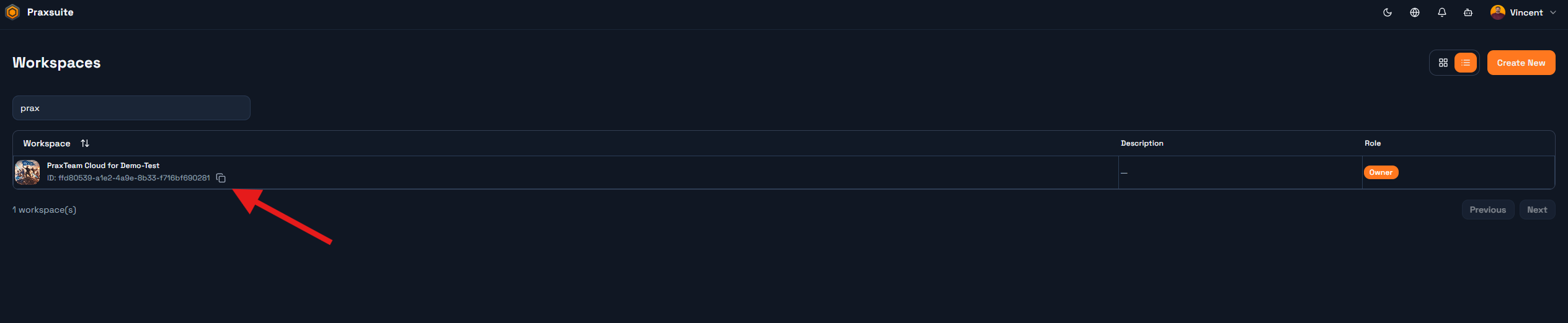
Open your workspace in the portal and look at the address bar. The UUID (Universally Unique Identifier) after /workspace/ is your workspace ID:
https://portal.praxsuite.com/workspace/ffd80539-a1e2-4a9e-8b33-f716bf690281
                                       └────────── this is your workspaceId ────────────┘
If you have not opened the workspace yet, the selector on the portal's main menu lists every workspace you belong to with its UUID beside the name, in either list or grid view.
Your Key: publishable vs secret
The Gateway issues two kinds of key, and they are not interchangeable.
Key | Prefix | Where it may live |
Publishable |
| Anywhere, including code a player can read. Designed to be public. |
Secret |
| Server-side only. Grants whatever the key is scoped to. |
On Roblox the SDK runs in ServerScriptService, which players cannot read, so a secret key is the right choice.
Golden rule: Never put a secret key in a LocalScript, in ReplicatedStorage, or in any Instance that replicates to the client. If a player can see it, it is not a secret any more.
Create it under Gateway → Credentials, and scope it to only the tables this game needs. A key scoped to one table cannot touch the rest of your workspace even if it leaks.

Step 1 - Install the SDK
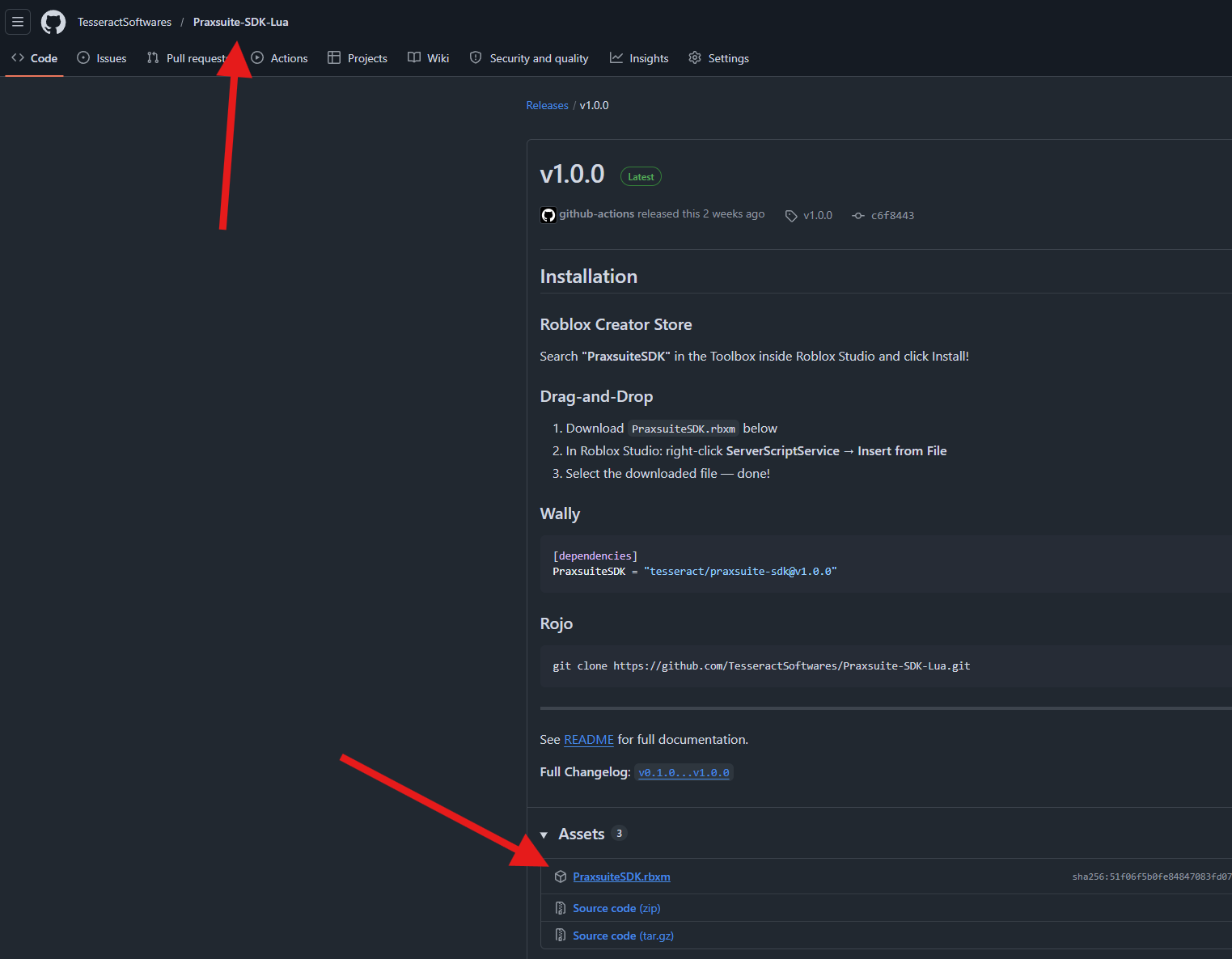
Repository: https://github.com/TesseractSoftwares/Praxsuite-SDK-Lua
Download PraxsuiteSDK.rbxm from the repository's Releases page. In Roblox Studio, right-click ServerScriptService → Insert from File → select the file.
Your Explorer should now look like this:
ServerScriptService
└── PraxsuiteSDK          (ModuleScript)
    ├── Core
    │   ├── Config
    │   ├── Http
    │   └── PraxQL
    ├── Data
    ├── Endpoints
    ├── Players
    └── Schema
If you use Rojo, point it at the repository's src/ folder instead - the result is identical.
Important: The SDK is not published on Wally. An older version of the documentation advertised `tesseract/praxsuite-sdk`; that package never existed. Use the `.rbxm` or Rojo.
Why ServerScriptService and not ReplicatedStorage?
Anything in ReplicatedStorage is copied to every player's device, where they can read it with the developer console. The SDK holds your credential. ServerScriptService never replicates, so a modified client learns nothing.
Step 2 - Create the Client
The SDK is a singleton: you configure it once, and every other script gets the same configured instance just by requiring it.
There are two ways to configure it. Start with the explicit one, in a single boot script:
-- ServerScriptService/Boot.server.lua
local Praxsuite = require(game.ServerScriptService.PraxsuiteSDK)

Praxsuite.Init({
    workspaceId = "your-workspace-uuid",
    apiKey = "sk_live_...",                      -- Studio testing only
    baseUrl = "https://gateway.praxsuite.com",
})

print("Praxsuite ready:", Praxsuite.IsInitialized())
Run the place. The Output window prints Praxsuite ready: true. Nothing has left your machine yet - Init only stores configuration.
`baseUrl` is required, not optional. Praxsuite runs on several independent tiers and your workspace lives on exactly one. The wrong host returns 404 on every call, with nothing in the error explaining why, so the SDK refuses to start rather than let you chase that.
`apiKey` is for Studio only. A published game uses apiKeySecret, which reads the value from the Roblox Secrets Store:
Praxsuite.Init({
    workspaceId = "your-workspace-uuid",
    apiKeySecret = "PraxsuiteKey",               -- name in the Secrets Store
    baseUrl = "https://gateway.praxsuite.com",
})
Add the secret under Game Settings → Security → Secrets Store, named PraxsuiteKey. HttpService:GetSecret() does not work in Studio, only in a published game - which is exactly why the raw apiKey option exists.
Why a config module instead of calling Init?
There is a second way, and for a real project it is the better one. Create a ModuleScript named exactly PraxsuiteConfig in ServerScriptService:
-- ServerScriptService/PraxsuiteConfig  (ModuleScript)
return {
    workspaceId = "your-workspace-uuid",
    apiKeySecret = "PraxsuiteKey",
    baseUrl = "https://gateway.praxsuite.com",
}
Now no script calls Init at all - the first script to use the SDK finds that module and configures it. The advantage is ordering: an explicit Init needs your boot script to run before everything else, and Roblox gives you no such guarantee. With the config module, whichever script gets there first triggers setup.
Step 3 - Sign a User In
On Roblox, most games do not need their own login screen. Roblox has already authenticated the player, and player.UserId is a verified identity your server can trust. The SDK's job is to record that identity in your workspace:
local Players = game:GetService("Players")

Players.PlayerAdded:Connect(function(player)
    Praxsuite.Players.Identify(player, {
        metadata = { accountAge = player.AccountAge },
    })
end)

Players.PlayerRemoving:Connect(function(player)
    Praxsuite.Players.Forget(player)
end)
Identify registers the player in the background, so it never delays their spawn. Forget clears the local cache. Read the cached record with Praxsuite.Players.GetInfo(player).
What is a UserId? Every Roblox account has a unique, permanent number. It is the only reliable way to identify a player - a username can change, a UserId cannot. Store it as text when the column is ShortText: `tostring(player.UserId)`. Important: `Identify` is a label, not a permission. It records who the player is; it does not scope any query.
Does the SDK scope queries per player?
By default, no - and for most games on Roblox that is the right default. The SDK runs on your game server with a server key, which makes your server the trusted party - exactly as it is for a DataStore write. Without any extra option, you enforce per-player rules in your own code, same as always.
Version 1.0.0 removed an asPlayer option that had looked like it did this but did not: it only set two request headers no part of the Gateway ever read, a security boundary that scoped nothing. A later SDK update brought asPlayer back, this time wired to something real, alongside a new Auth module. Praxsuite.Auth.LoginPlayer(player) opens a per-player session from player.UserId - no login screen, no password - and passing { asPlayer = player } to a Data or Endpoints call sends that player's session instead of the server key, so the table's own row filters apply to them instead of to everyone:
Praxsuite.Auth.LoginPlayer(player)  -- e.g. on PlayerAdded

Praxsuite.Data.Query("saves", {
    where = { completed = true },
}, { asPlayer = player })
If you find the old, header-only asPlayer in an example that predates this, delete it - those headers still are not read by anything. This one is different: it carries a real session token, and requires a roblox provider registered and a server key marked for that platform in the portal first.
Auth.LoginPlayer gives you a stable Praxsuite identity scoped to this one Roblox game. If instead you need a shared account - the same email and password logging in from Unity or a browser too - that is a different thing the SDK does not build for you; you call the Gateway's own auth routes yourself, the way Part 3 of the Lua SDK Use Case in Roblox guide does.
Step 4 - Read and Write Data
Every method here talks to a Table by name. Write a row:
local inserted = Praxsuite.Data.Insert("player_profiles", {
    roblox_id = tostring(player.UserId),
    coins = 100,
})

print("New row id:", inserted.Id)
Check the Table in the portal: the row is there, with an Id the database generated. Read it back:
local rows = Praxsuite.Data.Query("player_profiles", {
    where = { roblox_id = tostring(player.UserId) },
    select = { "roblox_id", "coins" },
    orderBy = { "coins", "desc" },
    limit = 10,
})

print("Found", #rows, "profiles")
Query always returns an array, empty if nothing matched - never nil, so #rows is always safe.
Update and delete both require a where. The SDK refuses an unscoped write before sending anything:
Praxsuite.Data.Update("player_profiles", {
    set = { coins = 250 },
    where = { roblox_id = tostring(player.UserId) },
})
Leave out the where and you get Update requires 'where' clause (no unscoped updates) immediately, rather than an empty table.
The where table accepts the thirteen operators the Gateway implements - eq neq gt gte lt lte like ilike in is between contains textsearch - written as { coins = { gt = 100 } }. A bare value means eq. Four more names (isNull, isNotNull, startsWith, endsWith) do not exist server-side and the SDK translates them for you.
There is no notIn. Ask for it and the SDK raises an error telling you to use a positive in instead - because the Gateway's parser rejects it, and failing in your editor beats failing in a live game.
Writing many rows at once
Every SDK call is one HTTPS round trip. Ten rows written in a loop are ten round trips; the same ten rows through InsertMany are one:
local rows = {}
for i = 1, 5 do
    table.insert(rows, {
        roblox_id = tostring(player.UserId),
        coins = math.random(10, 500),
    })
end

local inserted = Praxsuite.Data.InsertMany("player_profiles", rows)
print("Inserted", #inserted, "rows")
Use Insert for one row and InsertMany for more than one. On Roblox this is not a micro-optimisation: a server is capped at 500 HTTP requests per minute, and a loop of single inserts burns through that budget fast.
When the operations differ from one another, Data.Batch sends inserts, updates and deletes together in the same request.
Counting without reading
To find out how many rows match a condition, do not fetch them and count in Lua - ask the Gateway:
local total = Praxsuite.Data.Count("player_profiles")
local rich = Praxsuite.Data.Count("player_profiles", { coins = { gt = 100 } })
The database counts server-side and sends back a number, not the rows.
Paging through results
limit caps how many rows come back; offset says how many to skip. Together they page:
-- page 1
Praxsuite.Data.Query("player_profiles", { orderBy = { "coins", "desc" }, limit = 25, offset = 0 })

-- page 2
Praxsuite.Data.Query("player_profiles", { orderBy = { "coins", "desc" }, limit = 25, offset = 25 })
Always set a limit. Without one, a table that grows past what you expected turns a fast query into a slow one, silently.
The `%` in `like`: it stands for "anything". `{ nickname = { like = "%dragon%" } }` matches any nickname containing `dragon`; `"dragon%"` matches names that start with it. Use `ilike` when capitalisation should not matter. Column names are exact. `coins` and `Coins` are two different columns, and a name written with a space is not the same name written with an underscore. A mismatched name is the most common reason a write appears to succeed and the value reads back `nil`. Copy the names from the portal instead of retyping them.
If a table name is not found
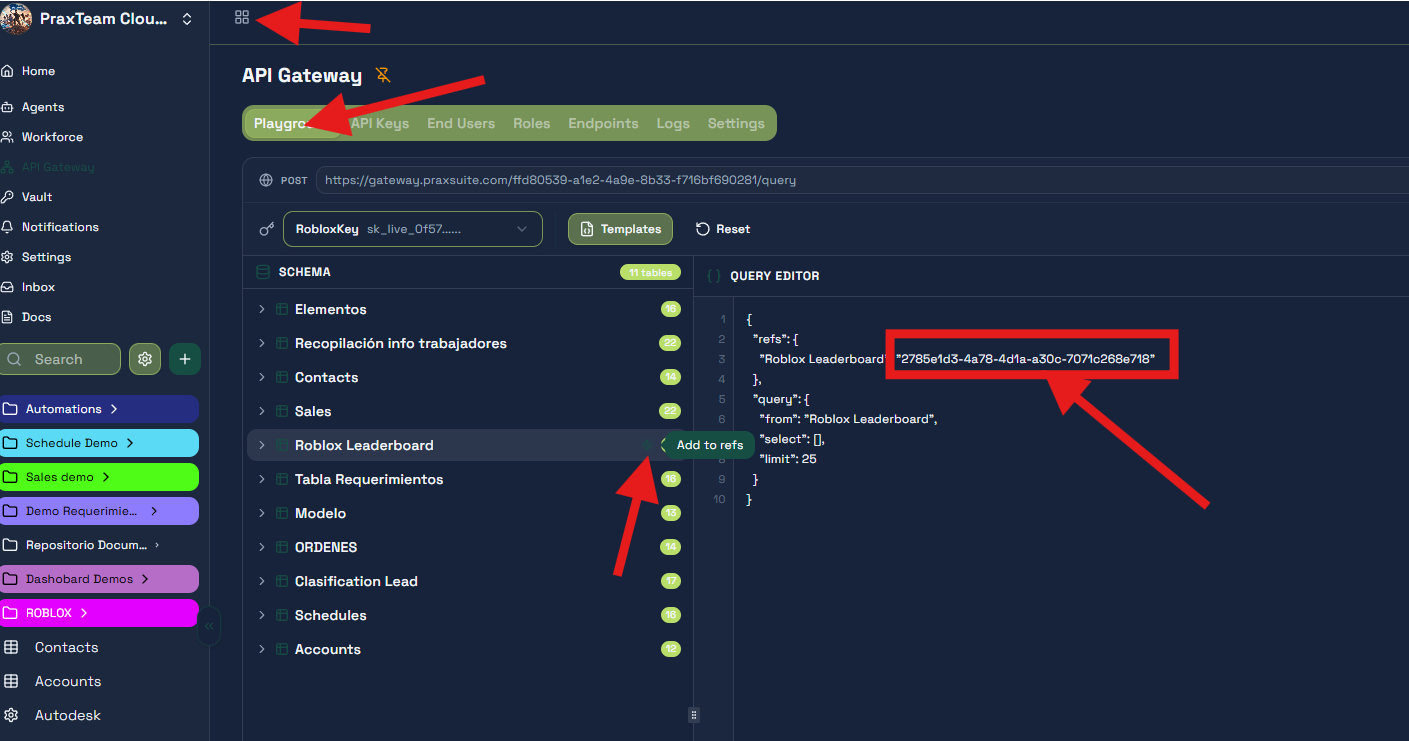
By default the SDK fetches the workspace's table registry on its first call, which is what lets you refer to tables by name. If your key cannot see a table, or you would rather skip that lookup at startup, register the mapping yourself:
Praxsuite.Schema.Register("player_profiles", "2785e1d3-4a78-4d1a-a30c-7071c268e718")The UUID is in the portal under Gateway → Playground: select the table in the side rail and copy the identifier it shows.
Step 5 - Call a Gateway Endpoint
A Table is data; an Endpoint is logic. When a player buys something, the decision of whether they can afford it must not live in your game, because your game runs on a machine the player controls.
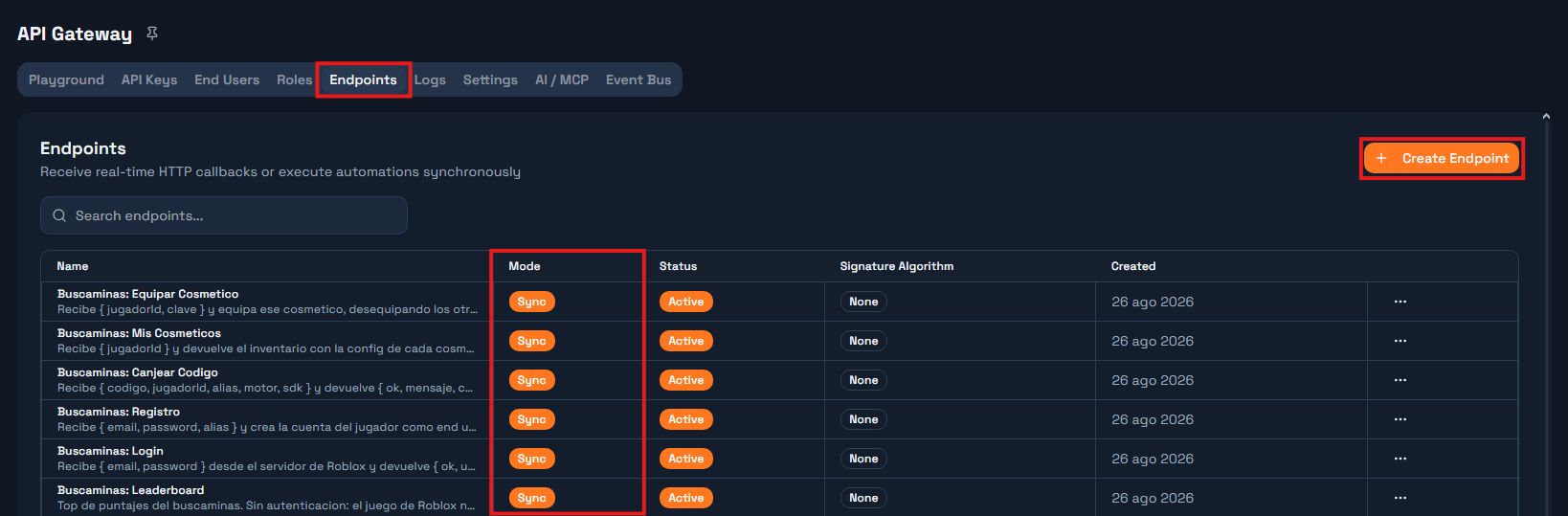
Create a Sync endpoint in the portal, link it to an Automation, and call it:
local result = Praxsuite.Endpoints.Call("validate-purchase", {
    player_id = player.UserId,
    product_id = "sword_of_fire",
})

if result.approved then
    grantItem(player, "sword_of_fire")
end
Call blocks until the Automation finishes and returns whatever its Response node produced, already parsed. The player's client never sees the price, the balance, or the rule.
When you do not need an answer, use Fire instead - it returns true if the Gateway accepted the request and does not wait:
Praxsuite.Endpoints.Fire("on-player-leave", {
    player_id = player.UserId,
    play_duration = os.time() - joinTime,
})
Analytics and logging belong in Fire. Anything the next line depends on belongs in Call.
Complete Example
Everything above, in one server script that runs as written:
-- ServerScriptService/GameBackend.server.lua
local Players = game:GetService("Players")
local Praxsuite = require(game.ServerScriptService.PraxsuiteSDK)

Praxsuite.Init({
    workspaceId = "your-workspace-uuid",
    apiKey = "sk_live_...",                      -- Studio only
    baseUrl = "https://gateway.praxsuite.com",
})

local function loadProfile(player)
    local rows = Praxsuite.Data.Query("player_profiles", {
        where = { roblox_id = tostring(player.UserId) },
        limit = 1,
    })

    if #rows > 0 then
        return rows[1]
    end

    return Praxsuite.Data.Insert("player_profiles", {
        roblox_id = tostring(player.UserId),
        coins = 100,
    })
end

Players.PlayerAdded:Connect(function(player)
    Praxsuite.Players.Identify(player)

    local ok, profile = pcall(loadProfile, player)
    if not ok then
        warn("[Game] Could not load profile:", profile)
        return
    end

    print(player.Name, "has", profile.coins, "coins")
end)

Players.PlayerRemoving:Connect(function(player)
    Praxsuite.Endpoints.Fire("on-player-leave", {
        player_id = player.UserId,
    })
    Praxsuite.Players.Forget(player)
end)
Press Play. The Output prints the player's coin balance and a row appears in your Table. That round trip - Studio to Gateway to database and back - is the whole integration.
Common Errors and How to Avoid Them
Error | Cause | Solution |
|
| Add |
| A script used the SDK before anything configured it, and no | Add the |
| The table name does not exist in the workspace, or the schema fetch failed because the key cannot see it. | Check the spelling, check the key's table scopes, or register it manually with |
| Wrong key, key revoked, or the key is not scoped to that table. | Re-copy the key from Gateway → Credentials and confirm its scopes. |
| An | Add a |
| A | Express it as a positive |
| Roblox itself blocked the call. | Game Settings → Security → Allow HTTP Requests. |
The write succeeds but the value reads back | A key in your Lua table does not match the column name exactly - different capitalisation, a space where there is an underscore. | Copy the column names from the portal. They are case- and space-sensitive. |
Nothing happens at all and the Output window stays silent | The code is in a | Move it to a |
Tip: Every SDK error is a string starting with `[PraxsuiteSDK]`. Wrap calls in `pcall` and the second return value is that string - print it, do not swallow it.
Production Tips
Move the key to the Secrets Store before you publish. Swap
apiKeyforapiKeySecret.Scope the key to the tables the game actually uses. A leaked key that reads one table is an incident; one that writes everything is a disaster.
Respect the 500 requests per minute per server limit. It is a Roblox limit, not ours. Batch related writes with
Data.Batch.Put anything valuable behind an Endpoint. Currency, inventory and scores written straight from the game are only as trustworthy as the game server.
Wrap every call in `pcall`. The SDK throws on failure, and one unhandled hiccup in a
PlayerAddedhandler breaks joining for that player.
Next Steps
Move your purchase validation into an Automation and call it with
Endpoints.Call.Add a leaderboard with
Data.Query,orderByandlimit, refreshed on a timer rather than per request.Collapse a player's end-of-round writes into one
Data.Batchcall.Read the Lua SDK Use Case in Roblox guide, where all of this becomes a complete game with server-side authority.
You now have a game that talks to a real backend. Everything after this is just deciding what belongs on which side of that line.