
The Vault
Vincent Depassier · September 1, 2026
The Vault is where a workspace keeps the values it must never show in a listing: API keys, provider passwords, signing keys, connection strings.
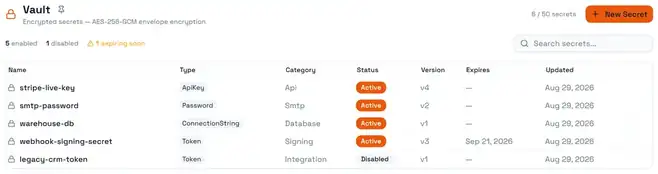
Two things about it are worth knowing before you put anything in.
Reading a secret is an event, not a lookup. Every reveal is recorded — who asked, from where, when, and whether it succeeded. Failed and denied attempts are recorded too. If your process involves someone opening the Vault to copy a value into a spreadsheet, that will be visible forever, which is usually the point.
You never edit a secret's value. You add a new version. The old versions stay, numbered — the version shown in the list is the current one — with the reason you rotated. This is what makes "when did this key change, and what was it before?" an answerable question.
What a secret is made of
A secret is metadata plus a stack of versions. The metadata is safe to list; the versions hold the encrypted values.
Field | What it does |
Name | Unique in the workspace, and the handle you reference it by |
Category | What kind of thing it is — see below |
Type | The shape of the value — see below |
Masking policy | How much of it is shown when it is displayed at all |
Status | Where it is in its life |
Expires at | After this, reveal is refused |
Not before | Until this, reveal is refused |
Tags | Your own labels, as key/value pairs |
A slug is derived from the name automatically, so a secret called "Stripe Live Key" is addressable as stripe-live-key.
Categories
General, Database, Api, Certificate, Token, Signing, Encryption, Smtp, Storage, Integration, Webhook, Custom.
The category does not change behaviour. It exists so a vault with sixty entries stays navigable — filter by Smtp when the mail is broken, rather than reading every name.
Types
Opaque, Structured, ConnectionString, ApiKey, Password, Token, CertificateReference, KeyReference, Json, BinaryReference.
Opaque is the default and means "a string, and the platform makes no claims about it". Choose a more specific type when it helps a reader know what they are looking at.
Masking policies
Policy | Shows |
FullMask | Nothing (default) |
PartialMask | A fragment |
LastFour | The last four characters |
Custom | What you configure |
NoMask | The whole value |
LastFour is the useful middle ground: enough to confirm you are looking at the right key without exposing it. FullMask is the default, and the right choice unless you have a reason.
The life of a secret
Status | Meaning |
Draft | Created, not yet in service |
Active | Normal, revealable |
Disabled | Turned off; reveal is refused, nothing is lost |
Expired | Past its expiry |
Deleted | Soft-deleted, inside its recovery window |
PendingPurge | Scheduled for permanent removal |
Archived | Retained, out of service |
Disabling is the safe move when you suspect a key is compromised but are not yet sure what depends on it. It stops reveals immediately and keeps every version, so you can turn it back on.
Rotation
Rotating means adding a version. The new version becomes current and the previous one stops being current — it is not deleted.
When you add a version you can record a rotation reason and a change summary. Fill them in. Six months later, "rotated because the contractor's laptop was stolen" is the difference between a clear audit trail and a mystery.
A version can carry its own not before and expires at. This is how you stage a rotation: load the new key now, set it to activate at the cutover time. The list shows which secrets have an expiry approaching, so a rotation you scheduled and forgot is visible before it bites.
The trap: a version that is not yet active cannot be revealed, and neither can an expired one. The error says the version is not yet active or has expired — it does not fall back to the previous version. If you stage a rotation and something breaks at midnight, this is the first thing to check.
Deleting, and getting it back
Deleting a secret does not destroy it immediately. It is marked deleted and given a purge date — 30 days out by default — and can be recovered any time before then.
Two things end that:
The window closing. After the purge date the secret is gone and recovery is refused.
The secret not being marked recoverable. Recovery is refused for those regardless of the window.
Deleting is also how you make room: a workspace has a maximum number of secrets, shown in the header against your count, and creating past it is refused with a message naming the limit. Some plans are unlimited.
Reveal
Reveal returns the current version's value, and it is refused when:
The secret is disabled.
The current version is not yet active.
The current version has expired.
Decryption fails — which means something is genuinely wrong, not that you typed something incorrectly.
Every one of those outcomes is written to the secret's audit trail along with the successes.
The audit trail
Each secret carries its own history: who acted, what they did, whether it succeeded, where the request came from, and the reason they gave. It is per-secret, so investigating one key does not mean reading the whole workspace's log.
What the Vault is not
It is not the same as a Secret column in a table. A Secret column stores an encrypted value on a row — one per record, such as each customer's own integration token. The Vault stores the workspace's own credentials, with versions, expiry and an audit trail. Use a column for per-record secrets, the Vault for the ones your workspace operates on.
It is also not a place to put things your app needs to read on every request in bulk. Reveal is deliberately heavyweight and deliberately logged.
Next
Datatypes in Praxsuite
Credentials and Principals
What Are Activity Logs in Praxsuite?
Agent Access and Tools
Utility, Vault and Docs Nodes