
Endpoints
Vincent Depassier · August 30, 2026
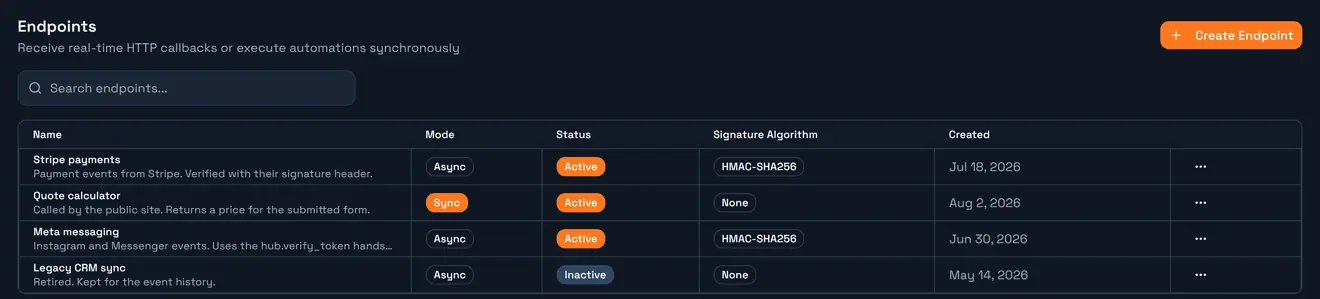
An endpoint is a URL that runs one of your automations when somebody POSTs to it.
That covers the two things every integration eventually needs: receiving events from another service, and letting another service ask you a question and get an answer. They are the same object in Praxsuite, separated by one setting.
You manage them in API Gateway → Endpoints.
The URL
Each endpoint gets its own address, with its id in the path:
POST https://gateway.praxsuite.com/{workspaceId}/endpoint/{endpointId}No API key is involved. This is the one part of the gateway that is not authenticated by a credential — it has to be, because the caller is Stripe or Meta or a form on your website, and none of them will hold one of your keys. Authentication is by signature instead, which is the next page.
The older
/webhook/{endpointId}path still works and means exactly the same thing. Prefer/endpoint/in anything new.
Two modes
The single most important choice, and it is not reversible in the caller's eyes: it changes what they get back.
| Async (webhook) | Sync (endpoint) |
What the caller gets |
| the automation's actual response |
When automations run | after the response, in the background | while the caller waits |
How many automations | any number can subscribe | exactly one, linked here |
Where they are wired | from the Automations view | on the endpoint itself |
If the automation fails | the caller already got their 200 | the caller sees the failure |
Async is for events that happened. A payment succeeded, a message arrived, a shipment moved. The sender does not want your opinion, it wants an acknowledgement — and it will retry if you are slow. Answering instantly and working afterwards is what keeps their retry logic quiet.
Sync is for questions. A price, a validation, a lookup. The caller is waiting for the answer, so the answer is the point.
The failure semantics are the real distinction. In Async mode a broken automation is invisible to the sender: they got their 200 and moved on, and the only trace is in your event history. In Sync mode a broken automation is the caller's problem too. Choose Async when the sender must not be blocked by your bugs; choose Sync when the sender needs to know.
Async: receiving events
Create the endpoint and copy its URL.
Paste it into the other service's webhook configuration.
Configure signature verification — see Endpoint security.
From the Automations view, subscribe one or more automations to it.
Every call is stored as an event before anything runs, with the body, the headers, the status and the duration. That history is what you debug from: a webhook that "did nothing" is either an event that never arrived, or an event that arrived and a subscriber that failed, and the event list tells you which within seconds.
Because subscription is many-to-one, adding a second reaction to an incoming event never means touching the sender's configuration again.
Sync: answering a question
Link exactly one automation, and its Response node is what the caller receives.
   caller ──POST──▶ endpoint ──▶ linked automation ──▶ Response node
                                                            │
   caller ◀────────── body, content type, status ◀──────────┘
Requirements, all three of them:
The automation must be Active.
It must have a published version.
That version must contain a Response node.
Miss any one and the call fails rather than hanging. The Response node's output is returned verbatim with its own content type, so an endpoint can answer JSON, plain text, XML — whatever the caller expects.
Timeout
SyncTimeoutSeconds defaults to 30 and is per endpoint. Exceed it and the caller gets 504 Gateway Timeout.
Set it to what the caller will actually tolerate, not to the maximum. A browser form submission that takes 30 seconds is a broken user experience regardless of what the gateway allows; 5 to 10 seconds is a more honest ceiling, and hitting it tells you the work belongs in Async mode with a callback rather than in a held connection.
Response caching
An endpoint can cache what it returns, so repeated identical calls skip the automation entirely.
Mode | Behaviour |
| Every call runs the automation — the default |
| Reuse a response for |
| Reuse until one of the relevant tables changes |
| Invalidate on writes, with the TTL as a ceiling |
Defaults are a 30-second TTL and 500 entries.
`None` is the only correct setting for an endpoint that writes anything. Caching a side effect means the second caller gets the first caller's answer and their write never happens.
Two details worth knowing:
The request body is always part of the cache key. Two callers who send different payloads never share a cached response — which is what makes caching safe for endpoints that identify their caller in the body, the common shape here.
`CacheVaryHeaders` adds specific request headers to that key. Values are hashed into it, never stored.
For WriteInvalidated and Hybrid, the tables that invalidate the cache are derived from the linked automation's published graph automatically. Set them by hand only to correct a derivation that came out wrong — and remember the TTL is still your safety net for anything the graph cannot see, like an external HTTP read.
Callers that send If-None-Match get 304 Not Modified when they already hold the current body. That is the cheapest possible outcome: no automation run, no payload, just headers.
Payload size
The limit comes from your plan, and an oversized body is rejected with 413 before the automation is reached. The response names the actual limit in megabytes, so you do not have to guess.
Active and inactive
Deactivating an endpoint makes it answer as though it does not exist. The definition, its signature configuration and its whole event history stay — which is what you want for a retired integration you may still need to explain.
Choosing, in one line
Is the caller waiting for an answer? Sync. Is the caller telling you something happened? Async.
Everything else — signature, origins, caching, timeout — follows from that.
Next
Endpoint security — signature verification, the challenge handshake, and origin rules.