
Custom endpoints
Vincent Depassier · September 17, 2026
A custom endpoint is a public URL you define in API Gateway → Endpoints that runs an Automation. It is how an outside system reaches your workspace without holding a Praxsuite credential at all — a payment provider's webhook, a form on a site you do not control, a partner's callback.
https://gateway.praxsuite.com/{workspaceId}/endpoint/{endpointId}/{workspaceId}/webhook/{endpointId} is the older spelling of the same route and still works.
Auth: none of the usual kind. No API key, no JWT. An endpoint authenticates its callers with an HMAC signature you configure on it — or, if you configure none, it is open to anyone who knows the URL.
Two modes
An endpoint is either Async or Sync, chosen when you create it. This is the whole difference in how it behaves.
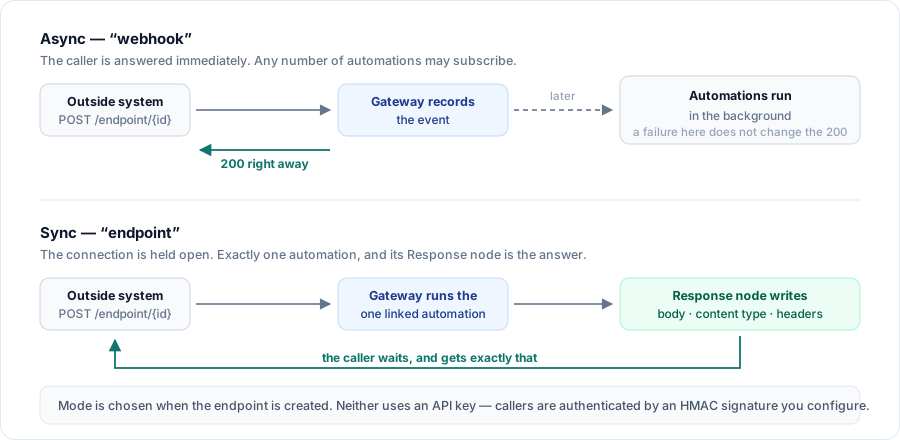
| Async ("webhook") | Sync ("endpoint") |
Answers with |
| Whatever the automation's Response node produced |
Automations | Any number may subscribe | Exactly one, assigned in the Gateway view |
Caller waits for the run | No | Yes |
Use it for | Receiving events | Serving an API of your own |
Send an event
POST /{workspaceId}/endpoint/{endpointId}
Content-Type: application/json
The body reaches the automation as-is. There is no required shape — whatever the sender posts is what the automation sees, at {{request.body}}.
Async answers with the recorded event:
{ "received": true, "eventId": "…" }The automations then run in the background. A failure inside one of them does not change the 200 the caller already got; look in API Gateway → Logs and the automation's own run history.
Sync holds the connection, runs the one linked automation, and returns exactly what its Response node wrote — body, content type and any custom headers. Your automation decides the payload; the gateway does not wrap it.
The request body is capped at 10 MB. Over that is 413.
Signature verification
Configured per endpoint: an algorithm, a secret, the header to read, and a format.
Algorithms: HMAC-SHA256, HMAC-SHA512, or none.
Formats:
Format | What is signed | Header value | Compatible with |
Default | The raw body | Hex, optionally prefixed | GitHub, most generic webhooks |
Timestamp-dot-payload |
|
| Stripe, Slack |
The header name is yours to set, so an endpoint can read X-Hub-Signature-256, Stripe-Signature, or whatever the sender happens to use.
A bad signature is 401. An endpoint configured to verify but missing its secret is 500, not a silent pass.
Challenge-response verification
Several platforms verify a webhook URL before they will send to it, by calling it with a challenge and expecting it echoed back.
GET /{workspaceId}/endpoint/{endpointId}?hub.mode=subscribe&hub.verify_token=…&hub.challenge=…If the endpoint has a verify token configured and it matches, the response is hub.challenge as text/plain. This is the Meta / Facebook / Instagram handshake, and it works for anything that follows the same convention.
Status | Cause |
|
|
| Challenge verification is not enabled on this endpoint, or the token does not match |
| No such endpoint, or it is not active |
Response caching (Sync only)
A Sync endpoint can be given a cache policy, in which case its responses carry:
ETag: "…"
Cache-Control: …
X-Cache: HIT | MISS
Send the ETag back as If-None-Match and a still-valid entry answers 304 Not Modified — no automation run, no body, just headers. That is the cheapest outcome this endpoint has, and it is worth building your client to ask for it.
The validator is sent on a MISS too, so the very first response can be revalidated on the next call rather than only re-run.
A response whose body is a signed file URL is never cached — replaying it later would hand out a link that has already expired.
Errors
The flat shape — { "error": "…" }.
Status | Cause |
| The request could not be accepted as an event |
| Signature verification failed |
| Verify-token mismatch, or challenge verification not enabled |
| No such endpoint in this workspace, or it is inactive |
| Body over 10 MB |
| Signature verification is configured but its secret is missing |
See also
API Gateway → Endpoints in the documentation, for creating one, assigning automations, and the origin rules that apply to browser callers.