
Authentication
Vincent Depassier · September 17, 2026
Every call carries a credential. The gateway decides what you may see from that credential alone — there is no second authorization step in your code, and no way for a client to ask for more than its credential allows.
Sending the credential
Either header works, and they are equivalent:
Authorization: Bearer sk_live_...
x-api-key: sk_live_...
A request with no credential is rejected with 401 and a WWW-Authenticate header pointing at the protected-resource metadata for the route that was called:
WWW-Authenticate: Bearer realm="Praxsuite Gateway", resource_metadata="https://gateway.praxsuite.com/.well-known/oauth-protected-resource/{workspaceId}/mcp"That document (RFC 9728) names the authorization server guarding this resource, which is what lets an MCP client discover where to sign in instead of guessing. See Discovery documents for it and the hop that follows it.
Two kinds of key
Prefix | Name | Where it belongs | Origin checked |
| Server key | Your backend | No |
| Client key | Browser, mobile app, game client | Only if you configure origins |
The difference is not the permissions — both are scoped from the same screen, in the same way. The difference is exposure. A server key is stored as a one-way hash — the key itself cannot be recovered, and it is never shown again after creation — so it is safe only where your users cannot reach it. A client key is meant to ship inside code that anyone can read.
Ship a pk_live_ key in anything a user can open. A server key in a front-end bundle is a full workspace credential handed to every visitor.
Origins are opt-in
This is the part people get wrong. A client key is not restricted by default:
No origin rules configured → the key works from any site. The gateway logs a warning and lets the call through.
One or more origin rules → the request's
Originheader must match one of them, or the call is403. A request with noOriginheader at all is refused, since a browser always sends one.A rule may be an exact origin (
https://app.example.com) or a wildcard subdomain (*.example.com).
A deployment can be configured to refuse rule-less client keys outright, in which case the call is 403 with "This client key has no allowed origins configured." Do not rely on that being on. Add the origins yourself.
A credential's public key is only served by GET /auth/config once someone has explicitly marked it publishable, because publishing it grants that credential's table scopes to anyone who knows the workspace GUID. Scope the credential down before you mark it.
End-user tokens
The keys above identify your application. The end user of your application is a separate identity, and signing them in returns a JWT.
That JWT is accepted on the data routes — /query, /schema — and on /auth/change-password. Everything else under /auth requires an API key, because those routes are how an application proves it may create identities in this workspace at all. Sending a JWT to /auth/login is 401 with "Auth endpoints require a valid API key."
The practical shape of a browser app is a chain of two credentials — a publishable key to get in the door, then a token that belongs to the person:
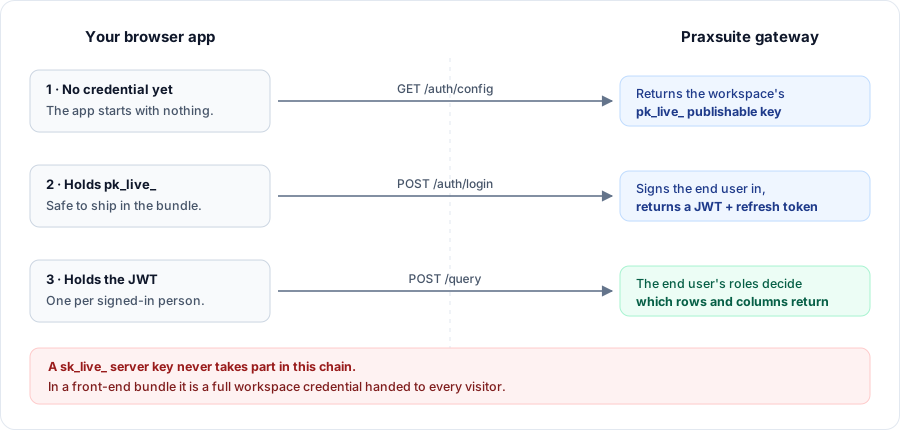
A third token type exists for AI store integrations — an OAuth2 token issued during an authorization-code + PKCE flow. It behaves like a credential rather than like an end user.
Routes that need no credential at all
Route | Why |
| Bootstraps a browser client: returns the publishable key and branding |
| Redirects to the workspace logo, for the sign-in page |
| Public keys for verifying redirect tokens |
| Reached from an email link, which carries no headers |
| A signed file link — the signature is the credential |
| Custom endpoints authenticate with HMAC, not with keys |
| Machine-readable descriptions |
Scopes
A credential grants access table by table, and within a table, column by column.
Naming a table the credential has no scope for is a hard 403 SCOPE_VIOLATION — the message says which alias was refused, and deliberately does not confirm whether the table exists, so a caller cannot map your workspace by probing. Columns behave differently: select: "*" returns only the columns marked readable, so a credential with a narrow column scope sees a narrower row rather than an error.
A table scope also carries three limits worth knowing before you design a query:
Setting | Effect on the request |
Row filter | Silently ANDed into every |
Aggregations allowed | When off, any |
Max limit | Caps |
A column can also carry a masking rule, in which case the column is returned but its value is not the stored one.
A credential with no column scopes defined is open on every column of the tables it can reach. Column scopes are a narrowing, not an allow-list you must fill in.
When a credential change takes effect
Immediately. Revoking a credential, or narrowing its scopes, applies to the very next call — there is no grace period to wait out and nothing to restart.
Why a credential is refused
Status | Cause |
| No key, malformed key, unknown key, or a key from another workspace |
| The credential has an expiry and it has passed |
| The credential is Revoked or Compromised |
| The principal that owns the credential is not Active |
| Client key, origin rules configured, and the |
Next
Errors and limits — what a rejection looks like
End-user authentication — the full
/authsurface