
Java SDK Use Case in Minecraft
What Are We Going to Build?
A complete Minesweeper running inside a Minecraft server, on the same backend — tables, automations, leaderboard — as this game's Roblox, Unity and web versions. The board is a grid of blocks in the world: left click reveals, right click places a flag. When the game ends, the result is checked against rules that live in Praxsuite, not in the plugin's good behaviour.
By the end of this guide you will have:
A Paper server configured, with the plugin loading and its credentials outside the jar
The game's tables, roles, endpoints and automations, built from scratch
A player signed in the moment they connect, with no login screen —
online-mode:trueis the proofA role assigned through an automation that scales to any future platform, rather than a portal checkbox per provider
A board that answers every click instantly, with zero network latency per move
A result Praxsuite recomputes on its own and rejects if anything fails to add up
A live in-game leaderboard, fed by the Event Bus
Level required: you completed the Java SDK Implementation in Minecraft guide. You are comfortable with Bukkit events, the scheduler, and basic block manipulation. You do not need any of the other Minesweeper guides: this one builds its own backend. Already did the Roblox, Unity or TypeScript guide? Then Part 2 is already done in that workspace. Check that the names match the ones here, add the `Validar Resultado` endpoint if you do not have it yet, and carry on from Step 12. One backend serves every platform at once — that is the whole point of a shared leaderboard.
How It Works
The mine matrix lives in a Table called Buscaminas Partidas and never leaves the workspace, except once — the instant a game is lost, and only the mine layout, never before. What travels back and forth is a much smaller set of decisions:
Runs in the plugin (Java) | Runs on Praxsuite |
Opening the board and drawing it as blocks | Reserving the game's row, its dimensions and mine count |
Mine placement, flood fill, win/loss detection, scoring — on every click | Recomputing all of the above from the final report, and refusing to close the game if anything is inconsistent |
Handling clicks with zero network round trip | Owning the leaderboard, and publishing to it |
Assigning a role once the player's own token is verified | Verifying that token — never trusting a raw id the client supplies |
This is a deliberate choice, not the simplest possible one. A server-authoritative design that calls an Automation on every click is easier to reason about and just as secure — it is, in fact, what the Roblox version of this game does today. It is also the round trip that turns into felt latency the moment a player middle-clicks through a board quickly. The section "Why Local, Not Per-Click" near the end of this guide lays out that trade-off in full; the short version is that a Paper plugin has no other input this hot, so it is worth the one place in the whole project where the client is trusted with logic instead of just a viewer.
Prerequisites
Repository: https://github.com/TesseractSoftwares/Praxsuite-SDK-Java
Requirement | Description |
The Java SDK Implementation in Minecraft guide, completed | This guide builds directly on that guide's client and its |
A JDK and Maven | Whichever JDK your Paper build requires (25 for 26.x, 17 for 1.20.x), plus Maven to compile the plugin. |
A Praxsuite workspace | Part 2 creates everything from scratch, so a brand-new workspace works. |
Portal access | You need to be able to create tables, roles, endpoints, automations and Event Bus topics, not just read them. |
That is all. The Minecraft server goes up in Part 1, and the backend in Part 2.
Part 1 - The Minecraft Server
If you already have a Paper server running with your plugin loading on it, skip to Part 2. If not, this takes fifteen minutes and there is exactly one setting that is not optional.
Step 1 — Stand Up a Paper Server
Create an empty folder for the server — never inside the plugin project, because the server writes worlds, logs and caches, and you want none of that in your repository.
Download the Paper jar from papermc.io/downloads and drop it there. The version matters: it has to match the api-version your plugin.yml declares, and it needs the Java version that build asks for (Paper 26.2 runs on Java 25; the 1.20.x line, on Java 17). The reference demo uses paper-26.2-123.jar.
Start the server once, from the folder holding the jar:
java -Xms2G -Xmx2G -jar paper-26.2-123.jar --noguiIt will shut down immediately, and that is expected: it wrote an eula.txt and is waiting for you to accept Minecraft's EULA. Open it and flip its single line:
eula=trueStep 2 — `online-mode=true`, the Setting the Whole Identity Rests On
Start it again. This time the server generates the world and, with it, server.properties. Open it and confirm:
online-mode=true
server-port=25565
online-mode=true is the default, so there is usually nothing to change — but there is something not to change, and it is worth understanding why before running into a forum post that suggests turning it off.
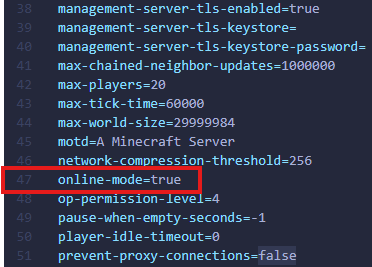
With online-mode=true, Mojang verifies each player's Microsoft account before Bukkit ever hands you the Player object, and player.getUniqueId() is then an identity the player cannot choose. That is exactly what assertPlayer asserts to Praxsuite. With online-mode=false, anyone can connect under any name, the UUID becomes a function of that name, and your server would be opening Praxsuite sessions on behalf of arbitrary players — including the scores that go on to sign the shared leaderboard. The rest of this guide assumes it is true.
What if I want to test without a Minecraft account? Then that test's leaderboard entries are worthless, and it should point at a scratch workspace rather than the one the other platforms share. Turning `online-mode` off is a decision about how much the identity can be trusted, not about developer convenience.
Start the server a third time and let it reach Done. You now have a world/ folder and, the one that matters here, plugins/. Type stop in the console to bring it down cleanly.
Step 3 — Install the Plugin, and the Reload Cycle
Build the plugin with mvn clean package and copy the shaded jar from target/ into the server's plugins/ folder. Three things everyone learns the hard way:
Stop the server before replacing the jar. Windows will not overwrite a file the JVM has open, and the error it gives mentions the server nowhere.
Never leave two jars of the same plugin in `plugins/`. Across a version rename it is easy to end up with
…-1.0-SNAPSHOT.jarand…-1.1.jarside by side; Paper rejects that with Ambiguous plugin name.`/reload` is not enough for this plugin. It opens a WebSocket against the Event Bus and holds per-player sessions; hot-reloading it leaves orphaned connections behind. Restart the server.
Step 4 — Credentials, in `config.yml` and Out of the Jar
The server key from Step 7 does not go in the source. A jar decompiles, and whoever holds that key can open a session as any player in your workspace.
The plugin declares its credentials in src/main/resources/config.yml, committed with all three values empty:
praxsuite:
  workspace-id: ""
  publishable-key: ""
  server-key: ""
and reads them at startup, letting Bukkit copy the template the first time:
@Override
public void onEnable() {
    saveDefaultConfig();
    FileConfiguration config = getConfig();
    String workspaceId = config.getString("praxsuite.workspace-id", "").strip();
    String serverKey = config.getString("praxsuite.server-key", "").strip();

    if (workspaceId.isEmpty() || serverKey.isEmpty()) {
        getLogger().severe("Missing credentials in config.yml — fill in plugins/"
                + getName() + "/config.yml and restart the server.");
        getServer().getPluginManager().disablePlugin(this);
        return;
    }
    // ... build the Praxsuite clients from those values
}
The file holding the real keys lives only in plugins/<PluginName>/config.yml, on the server. Disabling the plugin when a credential is missing is not politeness: without them not one feature of the game can work, and a NullPointerException halfway through a game explains far less than a message at startup.
Part 2 - The Backend
Everything that follows is built once and shared by every platform: if you already did the Roblox, Unity or TypeScript guide against this same workspace, the tables, endpoints and automations exist — check the names and skip to Step 12, which is the first genuinely Minecraft-specific one.
Step 5 — Create the Two Tables
In DataEngine, create a table called `Buscaminas Partidas`. One row is one game.
Column | Type | What it holds |
| ShortText | The 8-character code identifying the game. Mark it as the key column |
| Enduser | The end user who owns the game. This is the column Step 6 applies |
| ShortText | Display name, used by the leaderboard |
| ShortText | The player's id on the hosting platform — here, the Mojang UUID |
| Status | Exactly three states: |
| Integer | Board height |
| Integer | Board width |
| Integer | How many mines it has |
| ShortText |
|
| Json | The minefield. This is the secret |
| Json | 0/1 grid: which cells are open |
| Json | 0/1 grid: which cells are flagged |
| Integer | Running count, so detecting a win is one comparison |
| Integer | Final score, written on close |
| DateTime | When the game opened |
| DateTime | When it closed |
| Integer | Duration |
| ShortText |
|
| ShortText |
|
The three states are written as plain text by the automations, so a typo here is a rejected write later on.
Now create `Demos Leaderboard`. One row is one finished game, and the table is shared with other demos.
Column | Type | What it holds |
| ShortText | A readable label for the row |
| ShortText | Display name |
| ShortText | The same id as above |
| Integer | The score |
| ShortText | Which preset was played |
| Integer | How long it took |
| ShortText | Always |
| ShortText |
|
| ShortText |
|
Note both table UUIDs from Gateway → Playground: the automations need them.
Step 6 — The Player Role, and What It Must NOT Touch
This is the step that decides whether the rest of the guide is worth anything. An account created by assertPlayer is born with no roles, so without this every player query comes back empty or 403 — but the easy answer, granting table access and moving on, is the one that breaks the game.
Under Settings → API Gateway → Roles, create a role called `Buscaminas Jugador`. Give it a scope over Buscaminas Partidas with:
Row filter:
__SELF__on theJugadorcolumn, so each player reaches only their own games.Default value for the
Jugadorcolumn:{{claim:sub}}, applied to whatever the player writes themselves.Column access, and here is the whole thing:
Column | Read | Write |
| No | No |
| Yes | No |
| Yes | No |
`Matriz` is the entire security model. If the player's role can read it, a modified client asks for its own row through the Gateway and knows where every mine is before the first click — and the rest of this guide becomes decorative. If it can also write it, it can rewrite the minefield so an invented result validates. Automations do not go through these scopes: they run with the workspace's own authority, so taking both permissions away from `Matriz` costs them nothing. Mind who fills in `Jugador`. Games are opened by `Nueva Partida`, which runs with the workspace's authority and does not pass through these scopes, so the `Jugador` column stays empty unless that automation writes it. As long as the game only speaks through endpoints — Minecraft's case — that changes nothing. If you also want a client to read its own row straight through the Gateway, add `Jugador` to that automation's field mapping; otherwise that filter will not find any rows to show.
Same reasoning for Demos Leaderboard: the player's role reads it (the game shows the top) and never writes. The only write comes from Validar Resultado, after it recomputes the result.
Quick check: when you finish Part 2, open Gateway → Playground, pick the `Buscaminas Jugador` role and ask for a game's `Matriz`. It has to fail. If it returns the grid, the scope is open.
Step 7 — The `minecraft` Identity Provider and the Server Key
Under Settings → API Gateway → Game Platforms, register a provider (or confirm one exists) with:
Slug:
minecraftHow they sign in: "From inside a game, with no login screen" (
ServerAssertion)Minimum verification: "Server asserted" — the highest an in-game provider can reach
Roles a new account is born with: leave it empty. Step 12 replaces the static default with an automation, which is the more scalable version of the same idea
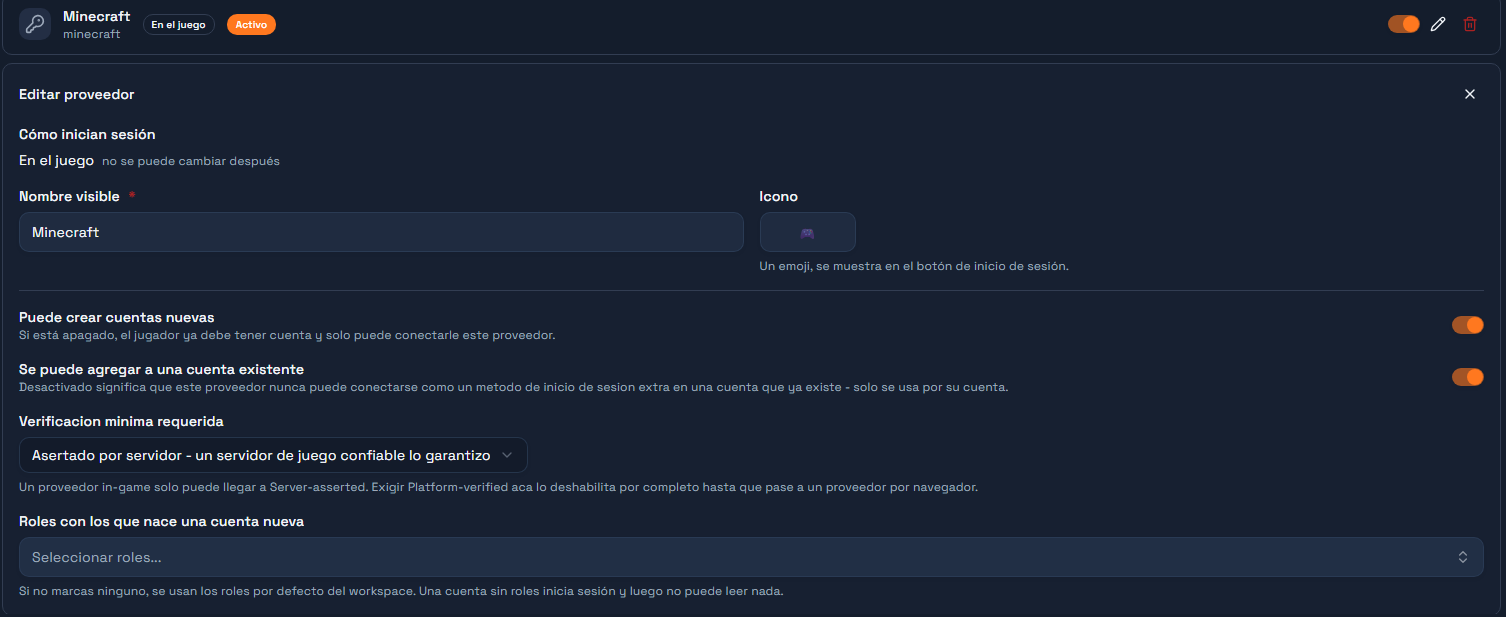
Then create a server key (sk_live_…) and mark it for the minecraft platform on this same screen. This is the credential your plugin uses for assertPlayer and for the game's automations — the one you put in the config.yml back in Step 4.
Why not reuse the Roblox provider? Because the gateway checks that the platform marked on the calling key matches the provider being asserted — a key marked `roblox` cannot open a `minecraft` session, deliberately. That is what stops a leaked key for one platform being reused against another.
Step 8 — Create the Four Endpoints
Under Gateway → Endpoints, create four endpoints, all in Sync mode — each one blocks until its automation answers, which is what endpoints().call expects:
Endpoint | Input | Output |
|
|
|
| the whole finished game |
|
|
|
|
|
| a short confirmation |
Leave them unbound for now: each one gets bound to its automation as you build it. Copy the four UUIDs — those are the constants the plugin uses.
Step 9 — The `Nueva Partida` Automation
Create an Automation named Buscaminas: Nueva Partida. It is four nodes in a straight line:
Endpoint trigger → Script: generate board → Insert row → ResponseNode 1 - Endpoint trigger. Point it at the Buscaminas: Nueva Partida endpoint. Give it this test payload so you can run the Automation without a game:
{ "alias": "mirko", "jugadorId": "1", "dificultad": "facil", "motor": "roblox", "sdk": "lua" }Node 2 - Script, named generar. One input: payload, sourced from {{context.request.body}}. Language JavaScript.
// Opening a game. This endpoint is engine-agnostic: the Lua (Roblox), C# (Unity)
// and TypeScript SDKs all call it, which is why the body carries `motor` and
// `sdk`. They are stored with the game and travel to the leaderboard.
//
// The mines are NOT seeded here. This only reserves the board: dimensions, how
// many mines it will have, and the revealed/flag grids at zero. The mines are
// seeded on the first move, once we know which cell the player touched and can
// keep it clear.
//
// Seeding here would make the first move a coin flip: on hard there are 45 mines
// in 256 cells, so one game in six would end on the first click before the player
// decided anything. That is not difficulty, it is a coin toss before the start.

const body = payload || {};

const PRESETS = {
  facil:   { filas: 8,  columnas: 8,  minas: 10 },
  medio:   { filas: 12, columnas: 12, minas: 24 },
  dificil: { filas: 16, columnas: 16, minas: 45 }
};

const dificultad = String(body.dificultad || "facil").toLowerCase();
const preset = PRESETS[dificultad] || PRESETS.facil;

const R = Math.max(4, Math.min(20, Number(body.filas)    || preset.filas));
const C = Math.max(4, Math.min(20, Number(body.columnas) || preset.columnas));
const M = Math.max(1, Math.min(R * C - 1, Number(body.minas) || preset.minas));

const revelado = Array.from({ length: R }, () => new Array(C).fill(0));
const banderas = Array.from({ length: R }, () => new Array(C).fill(0));
const vista    = Array.from({ length: R }, () => "?".repeat(C));

const ALFA = "ABCDEFGHJKLMNPQRSTUVWXYZ23456789";
let codigo = "";
for (let i = 0; i < 8; i++) codigo += ALFA[Math.floor(Math.random() * ALFA.length)];

// `Inicio` gets the opening time so the column is never empty, but it is not the
// game clock yet: the Jugar automation overwrites it with the first move's time.
// What gets timed is the game, not the menu.
const inicio = new Date().toISOString();

const alias = String(body.alias || "anonimo");
const jugadorId = String(body.jugadorId || body.robloxUserId || "0");
const motor = String(body.motor || "desconocido").toLowerCase();
const sdk = String(body.sdk || "desconocido").toLowerCase();

const respuesta = {
  ok: true,
  codigo: codigo,
  filas: R,
  columnas: C,
  minas: M,
  dificultad: dificultad,
  motor: motor,
  sdk: sdk,
  estado: "En curso",
  celdasReveladas: 0,
  puntaje: 0,
  sembrado: false,
  vista: vista,
  inicio: inicio
};

return {
  codigo: codigo,
  filas: R,
  columnas: C,
  minas: M,
  dificultad: dificultad,
  matriz: "[]",
  revelado: JSON.stringify(revelado),
  banderas: JSON.stringify(banderas),
  inicio: inicio,
  alias: alias,
  jugadorId: jugadorId,
  motor: motor,
  sdk: sdk,
  respuesta: JSON.stringify(respuesta)
};
Declare the outputs the node returns, so later nodes can reference them: codigo, filas, columnas, minas, dificultad, matriz, revelado, banderas, inicio, alias, jugadorId, motor, sdk and respuesta. All strings except filas, columnas and minas, which are numbers.
Node 3 - Insert Rows, named guardar, pointed at your Buscaminas Partidas table. Map the fields:
Column | Value |
|
|
|
|
|
|
|
|
|
|
|
|
|
|
|
|
|
|
|
|
|
|
|
|
|
|
|
|
|
|
|
|
Node 4 - Response. Status 200, content type application/json, body template {{context.steps.generar.respuesta}}.
Publish the Automation and link it to the Buscaminas: Nueva Partida endpoint.
Why does the Script return both a row and a `respuesta`? Because they are two different audiences. The row keeps everything, including `matriz`. The `respuesta` is what leaves the workspace, and it has no `matriz` in it. Building them separately is what makes the omission deliberate rather than accidental.
Step 10 — The `Validar Resultado` Automation
This is the automation the whole design rests on. The local engine already played the game without asking anyone's permission; this is the only thing keeping "local" from meaning "the client decides and Praxsuite takes notes". It does not replay the game: it compares what the client reports against the dimensions and mine count Praxsuite generated when the game was opened, and checks that the reported result is internally consistent with that.
Ten nodes, with one branch:
Trigger → Find game → Current top 3 → Script: validate → Valid?
   ├── true  → Close game → Record on leaderboard → Vault → Publish to bus → Respond
   └── false → Respond
Node 1 - Endpoint Trigger, pointed at Buscaminas: Validar Resultado. Test payload, with a 2×2 board you can check by hand:
{
  "codigo": "2K2Z5B64",
  "estado": "Ganada",
  "matriz": [[0,0],[0,-1]],
  "revelado": [[1,1],[1,0]],
  "banderas": [[0,0],[0,1]],
  "puntaje": 0,
  "segundos": 12,
  "alias": "mirko",
  "jugadorId": "1",
  "motor": "minecraft",
  "sdk": "java"
}
Node 2 - Query Rows, named buscar, over Buscaminas Partidas. Filter Codigo eq {{context.request.body.codigo}}, limit 1. This row is the only source of truth about how many mines the game had.
Node 3 - Query Rows, named top3, over Demos Leaderboard. Filter Juego eq Buscaminas, order by Points descending, limit 3. It is read before inserting this game, so there is a threshold to compare against.
Node 4 - Script, named validar, JavaScript. Three inputs: payload from {{context.request.body}}, partida from {{context.steps.buscar.row}} and top3rows from {{context.steps.top3.rows}}.
// -- Minesweeper: validate the final result -----------------------------------
// Inputs:
//   payload   <- {{context.request.body}}        final result from the local engine
//   partida   <- {{context.steps.buscar.row}}     row from 'Buscaminas Partidas'
//   top3rows  <- {{context.steps.top3.rows}}      current top 3, BEFORE inserting this game
//
// The local engine (Roblox/Unity/web/Minecraft) already played the whole game
// with no network per click. This does not replay it: it uses the rows/columns/
// mines Praxsuite generated in 'Buscaminas: Nueva Partida' -never what the client
// sends- as the single point of comparison, and checks that the reported result
// is internally consistent with that. If anything fails to add up, nothing is
// written: neither the game's closing row nor the leaderboard.

const body = payload || {};
const p = partida || {};

function parseJ(v, fallback) {
  if (v === null || v === undefined) return fallback;
  if (typeof v === "string") {
    try { return JSON.parse(v); } catch (e) { return fallback; }
  }
  return v;
}

const R = Number(p.Filas) || 0;
const C = Number(p.Columnas) || 0;
const M = Number(p.Minas) || 0;
const rowId = String(p.ID || "");
const codigo = String(p.Codigo || "");
const estadoActual = (p.Estado && p.Estado.Name) ? p.Estado.Name : String(p.Estado || "En curso");

const motivos = [];
function fallar(m) { motivos.push(m); }

const existe = Boolean(codigo) && R > 0 && C > 0;
if (!existe) fallar("partida_no_encontrada");
if (existe && estadoActual !== "En curso") fallar("partida_ya_cerrada");

const estadoReportado = String(body.estado || "").trim();
if (estadoReportado !== "Ganada" && estadoReportado !== "Perdida") fallar("estado_invalido");

const matriz = parseJ(body.matriz, null);
const revelado = parseJ(body.revelado, null);
const banderas = parseJ(body.banderas, null);

function formaValida(g) {
  return Array.isArray(g) && g.length === R && g.every(function (fila) {
    return Array.isArray(fila) && fila.length === C;
  });
}

if (existe && motivos.length === 0) {
  if (!formaValida(matriz) || !formaValida(revelado) || !formaValida(banderas)) {
    fallar("forma_de_tablero_invalida");
  }
}

let minasReportadas = 0;
let reveladas = 0;
let minaRevelada = false;
let numerosConsistentes = true;

if (motivos.length === 0) {
  for (let r = 0; r < R; r++) {
    for (let c = 0; c < C; c++) {
      if (matriz[r][c] === -1) minasReportadas++;
    }
  }
  for (let r = 0; r < R; r++) {
    for (let c = 0; c < C; c++) {
      if (matriz[r][c] !== -1) {
        let n = 0;
        for (let dr = -1; dr <= 1; dr++) {
          for (let dc = -1; dc <= 1; dc++) {
            if (dr === 0 && dc === 0) continue;
            const rr = r + dr, cc = c + dc;
            if (rr >= 0 && rr < R && cc >= 0 && cc < C && matriz[rr][cc] === -1) n++;
          }
        }
        if (matriz[r][c] !== n) numerosConsistentes = false;
      }
      if (revelado[r][c] === 1) {
        reveladas++;
        if (matriz[r][c] === -1) minaRevelada = true;
      }
    }
  }

  if (minasReportadas !== M) fallar("cantidad_de_minas_no_coincide");
  if (!numerosConsistentes) fallar("numeros_de_la_matriz_inconsistentes");

  if (estadoReportado === "Ganada") {
    if (minaRevelada) fallar("gano_pero_hay_una_mina_revelada");
    if (reveladas !== R * C - M) fallar("gano_pero_no_revelo_todas_las_celdas_seguras");
  } else if (estadoReportado === "Perdida") {
    if (!minaRevelada) fallar("perdio_pero_ninguna_mina_esta_revelada");
  }
}

const segundos = Math.max(0, Math.min(36000, Number(body.segundos) || 0));

let puntajeEsperado = 0;
if (motivos.length === 0) {
  puntajeEsperado = reveladas * 10;
  if (estadoReportado === "Ganada") {
    puntajeEsperado += M * 50 + Math.max(0, 600 - segundos) * 2;
  }
  if (Number(body.puntaje) !== puntajeEsperado) fallar("puntaje_no_coincide");
}

const valido = motivos.length === 0;

const alias = String(body.alias || p.Alias || "anonimo");
const jugadorId = String(body.jugadorId || p.Jugador_Externo_Id || p["Jugador Externo Id"] || "0");
const motor = String(body.motor || p.Motor || "desconocido");
const sdk = String(body.sdk || p.SDK || "desconocido");
const dificultad = String(p.Dificultad || "facil");

// Top 3 threshold BEFORE inserting this game: while there are fewer than 3 rows,
// any valid score gets in.
const top3 = Array.isArray(top3rows) ? top3rows : [];
const umbral = top3.length >= 3 ? (Number(top3[top3.length - 1].Points) || 0) : -1;
const esTop3 = valido && Number(body.puntaje) > umbral;

const fin = new Date().toISOString();

const respuesta = {
  ok: valido,
  codigo: codigo,
  estado: valido ? estadoReportado : estadoActual,
  puntaje: valido ? Number(body.puntaje) : 0,
  motivos: motivos,
  mensaje: valido ? "Resultado validado" : ("Resultado rechazado: " + motivos.join(", "))
};

return {
  valido: valido ? "si" : "no",
  rowId: rowId,
  codigo: codigo,
  alias: alias,
  jugadorId: jugadorId,
  motor: motor,
  sdk: sdk,
  dificultad: dificultad,
  estado: estadoReportado,
  matriz: JSON.stringify(matriz),
  revelado: JSON.stringify(revelado),
  banderas: JSON.stringify(banderas),
  celdasReveladas: String(reveladas),
  puntaje: String(valido ? Number(body.puntaje) : 0),
  segundos: String(segundos),
  fin: fin,
  esTop3: esTop3 ? "si" : "no",
  respuesta: JSON.stringify(respuesta)
};
Declare the eighteen outputs: valido, rowId, codigo, alias, jugadorId, motor, sdk, dificultad, estado, matriz, revelado, banderas, celdasReveladas, puntaje, segundos, fin, esTop3 and respuesta.
Node 5 - If/Else, named esvalido. One rule: {{context.steps.validar.valido}} == si.
Node 6 - Update Rows (the true branch), named cerrar, over Buscaminas Partidas, with rowId = {{context.steps.validar.rowId}}:
Column | Value |
|
|
|
|
|
|
|
|
|
|
|
|
|
|
|
|
Node 7 - Insert Rows, named marcador, over Demos Leaderboard:
Column | Value |
|
|
|
|
|
|
|
|
|
|
|
|
|
|
|
|
|
|
Node 8 - Vault, named vaultbus. Alias busKey, pointed at the secret holding an API key allowed to publish to the Event Bus.
Node 9 - HTTP Request, named publicartop3. POST to your workspace's bus publish route:
https://gateway.praxsuite.com/api/v1/gateway/<your-workspace-uuid>/bus/leaderboard/buscaminas/publishHeaders x-api-key: {{vault.busKey}} and Content-Type: application/json. Body:
{"event":"game_completed","payload":{"alias":"{{context.steps.validar.alias}}","puntaje":{{context.steps.validar.puntaje}},"estado":"{{context.steps.validar.estado}}","dificultad":"{{context.steps.validar.dificultad}}","motor":"{{context.steps.validar.motor}}","codigo":"{{context.steps.validar.codigo}}","esTop3":"{{context.steps.validar.esTop3}}"}}Turn on `continueOnError` for this node. That is what keeps closing the game and writing the leaderboard from ever depending on the bus being up: the announcement is strictly a bonus on top of a write that already happened.
The event is called `game_completed`, and it fires on every validated game — not only the podium ones. Who made the top travels as the `esTop3` field of the payload, not as the event name. A subscriber that only wants to announce records filters on that field; one that wants to show all activity filters on nothing. If you are coming from an earlier version of these guides that mentioned a `topscore` event, that is the name to fix on the subscriber side.*
Node 10 - Response. Status 200, application/json, body {{context.steps.validar.respuesta}}. Both branches end here: the invalid one answers with ok: false and the list of motivos, having written nothing.
Publish the Automation and bind it to the Buscaminas: Validar Resultado endpoint.
What does this actually prevent? Not a client that lies about everything — a determined cheater could still invent an internally consistent board. What it does prevent is exactly the "trust the client" failure mode: a bug in the local engine, or a deliberately modified binary, reporting an impossible board (more mines than the game opened with, numbers that do not match the minefield, a score the arithmetic does not support) and having that land silently on a leaderboard where everyone else's real games appear.
Step 11 — The `Leaderboard` Automation
Four nodes again:
Endpoint trigger → Query rows → Script: format → ResponseNode 1 - Endpoint trigger, pointed at Buscaminas: Leaderboard. Test payload { "limite": 10 }.
Node 2 - Query Rows, named consultar, on Demos Leaderboard. Filter: Juego eq Buscaminas. Order by Points descending. Limit 50.
Node 3 - Script, named formatear. Two inputs: filas from {{context.steps.consultar.rows}} and payload from {{context.request.body}}. One output: respuesta.
// Takes the raw leaderboard rows and returns a top list ready to paint.
//
// The dedupe key is alias + motor, not alias alone: the point of this board is
// seeing the same player coming in from Roblox, from Unity and from the browser,
// and comparing. Deduping by alias alone would let the best game hide the other two.

const body = payload || {};
const limite = Math.max(1, Math.min(25, Number(body.limite) || 10));
const filtroMotor = body.motor ? String(body.motor).toLowerCase() : null;

const rows = Array.isArray(filas) ? filas : [];

const mejorPorClave = new Map();
let contados = 0;

for (const r of rows) {
  const motor = String(r.Motor || "desconocido").toLowerCase();
  if (filtroMotor && motor !== filtroMotor) continue;
  contados++;

  const alias = String(r.Alias || r.Jugador_Externo_Id || "anonimo");
  const clave = alias + "|" + motor;
  const puntos = Number(r.Points) || 0;

  const previo = mejorPorClave.get(clave);
  if (!previo || puntos > previo.puntos) {
    mejorPorClave.set(clave, {
      alias: alias,
      puntos: puntos,
      motor: motor,
      sdk: String(r.SDK || "desconocido"),
      dificultad: String(r.Dificultad || ""),
      segundos: Number(r.Segundos) || 0,
      jugadorId: String(r.Jugador_Externo_Id || r["Jugador Externo Id"] || "0")
    });
  }
}

const top = Array.from(mejorPorClave.values())
  .sort((a, b) => b.puntos - a.puntos)
  .slice(0, limite)
  .map((e, i) => Object.assign({ posicion: i + 1 }, e));

const porMotor = {};
for (const r of rows) {
  const m = String(r.Motor || "desconocido").toLowerCase();
  if (filtroMotor && m !== filtroMotor) continue;
  porMotor[m] = (porMotor[m] || 0) + 1;
}

return {
  respuesta: JSON.stringify({
    ok: true,
    total: contados,
    porMotor: porMotor,
    top: top
  })
};
Node 4 - Response, body template {{context.steps.formatear.respuesta}}.
Publish, link it, and the backend is done.
Note the field name. Each entry in `top` carries `puntos`, not `puntaje`. `puntaje` is the game's score inside `Jugar`; `puntos` is the leaderboard entry's. Reading the wrong one gives you `nil` in Lua, silently.
Step 12 — The `Asignar Rol Jugador` Automation
The role from Step 6 exists, but nobody hands it to anyone yet. The portal option — "roles a new account is born with", on the provider — works, and it is a single static answer per provider: every platform you add repeats the same manual step. The pattern that does scale is an automation behind a Sync endpoint that any platform calls the same way, right after opening a session.
Four nodes:
Trigger → Validate End User Token → Manage End User Roles → ResponseNode 1 - Endpoint Trigger (Sync), pointed at Buscaminas: Asignar Rol Jugador. Test payload: { "token": "<a test access token>" }.
Node 2 - Validate End User Token, with token = {{context.request.body.token}}. This is the node that makes the whole thing safe: it resolves the caller, already verified, from their own access token, so nothing downstream has to trust an id the client claims to be.
Node 3 - Manage End User Roles, with action: assign, endUserId: {{context.steps.<validation-step>.endUserId}} and roleIds: [<the Buscaminas Jugador role id>].
Node 4 - Response, a short JSON confirmation.
From the plugin, right after assertPlayer:
praxAuth.endpoints().call(ASSIGN_ROLE_ENDPOINT_ID, Map.of("token", session.accessToken()));Because the automation validates the token instead of trusting a parameter, this same endpoint already serves Roblox, Unity or whatever comes next — none of them needs a Minecraft-specific code path, and Minecraft needed none of theirs.
Why not just send the `endUserId`? Because an endpoint does not authenticate its caller on its own: a POST with no credential still reaches the automation. If the id came in the body, anyone could claim the role for any account. The token, on the other hand, is only held by whoever just signed in as that account.
Step 13 — The Event Bus Topic
Under Event Bus, create a topic with the key `leaderboard`. Workspace access is enough: any signed-in end user can join, which is exactly what the bot identity in Step 18 will do.
The topic defines a key pattern of leaderboard:{instance}, and the instance this game uses is buscaminas — that is where the plugin's topic("leaderboard").channel("buscaminas") pair comes from.
One thing is still missing for Node 8 of Validar Resultado: under Vault, store a workspace API key allowed to publish to the bus, and note its id so you can point that node at it.
Nobody has to be listening yet. An automation can publish to a topic with no subscribers for a long time before one shows up — in fact, that is exactly how this topic sat until Minecraft became the first platform to subscribe.
Checkpoint - Test the Backend Before Writing Any Java
All four endpoints exist and answer. Test them now, from Gateway → Playground or with curl, because debugging an automation from inside a Paper plugin is far slower than debugging it on its own:
`Nueva Partida` with
{"alias":"test","jugadorId":"1","dificultad":"facil","motor":"minecraft","sdk":"java"}. It has to return an 8-charactercodigo,filas8,columnas8,minas10 — and nomatrizanywhere in the response. If the matrix leaves the workspace, check Node 4 of that automation.`Validar Resultado` with the test payload from Step 10, swapping
codigofor the one you just got. That 2×2 board against an 8×8 game has to answerok: falsewithforma_de_tablero_invalidaamong themotivos. Being rejected is the correct outcome: it means it really is comparing against the saved row.`Leaderboard` with
{"limite":10}. It will return an empty list or other platforms' games. Either is fine.`Asignar Rol Jugador` with no token. It has to fail. If it assigns the role anyway, Node 2 is not validating anything.
Only once all four behave like that is it worth going back to the plugin.
Part 3 - The Plugin
Step 14 — Open a Game
Nueva Partida reserves the row and hands back the board's dimensions — nothing about the mines yet; those are seeded on the first reveal, so the very first click can never be an unavoidable loss.
Map<String, Object> result = prax.endpoints().call(nuevaPartidaEndpointId, Map.of(
        "jugadorId", player.getUniqueId().toString(),
        "alias", player.getName(),
        "dificultad", "facil",
        "motor", "minecraft",
        "sdk", "java"));

String codigo = String.valueOf(result.get("codigo"));
int filas = ((Number) result.get("filas")).intValue();
int columnas = ((Number) result.get("columnas")).intValue();
int minas = ((Number) result.get("minas")).intValue();
motor and sdk are not decorative — they are what lets the shared leaderboard show which platform a top score came from, and what a future difficulty-specific dashboard would filter on.
Step 15 — Render the Board With Blocks
Each cell is one world block. A hidden cell, a flag, and each revealed number get their own Material:
private static Material materialForCell(char cell) {
    return switch (cell) {
        case 'F' -> Material.TARGET;             // flagged
        case '*' -> Material.TNT;                // a mine, shown only on loss
        case '0' -> Material.WHITE_CONCRETE;
        case '1' -> Material.LIGHT_BLUE_CONCRETE;
        case '2' -> Material.LIME_CONCRETE;
        case '3' -> Material.RED_CONCRETE;
        // ... one color per remaining count, matching classic Minesweeper's palette
        default -> Material.STONE;               // hidden
    };
}
Why blocks and not player heads with number textures? A textured head needs a real base64 texture value sourced from somewhere like minecraft-heads.com per digit. A wrong or unreachable value fails silently — the head just renders blank — so a color-coded block is the version that cannot quietly break. Swapping this one function for textured heads later touches nothing else in the plugin.
Drawing the board is two nested loops writing directly into the world:
World world = origin.getWorld();
for (int row = 0; row < filas; row++) {
    for (int col = 0; col < columnas; col++) {
        world.getBlockAt(origin.getBlockX() + col, origin.getBlockY(), origin.getBlockZ() + row)
                .setType(materialForCell(viewChar(row, col)));
    }
}
Step 16 — Resolve Moves Locally
This is the one piece of real game logic living in the plugin, and it has to produce exactly the same numbers Validar Resultado recomputes in Step 10 — sowing mines around a safe zone on the first click, an iterative flood fill on an empty reveal, and the same scoring formula. Capture clicks with PlayerInteractEvent, not BlockBreakEvent — the board's blocks must never actually break:
@EventHandler
public void onPlayerInteract(PlayerInteractEvent event) {
    if (event.getHand() != EquipmentSlot.HAND) return;
    Action action = event.getAction();
    if (action != Action.LEFT_CLICK_BLOCK && action != Action.RIGHT_CLICK_BLOCK) return;

    Block clicked = event.getClickedBlock();
    // ... resolve which (row, column) of the active game this block is, if any
    event.setCancelled(true); // never actually break or place the real block

    if (action == Action.RIGHT_CLICK_BLOCK) {
        toggleFlag(game, row, col);
    } else {
        reveal(game, row, col); // mine placement, flood fill, win/loss - all in memory
    }
}
Because none of this touches the network, a click is visually instantaneous — the round trip that Roblox's per-click design pays every single time simply does not exist here.
Why do we not keep the mines on Praxsuite the whole time, the way Roblox does? We do, until the very first reveal — `Nueva Partida` deliberately returns no mine layout. From the first click onward, the plugin is trusted with it, the same way a Roblox game server is trusted with the API key. The next step is what keeps that trust from becoming a cheating vector.
Step 17 — Validate the Result When the Game Ends
The instant a game reaches Ganada or Perdida, the plugin reports the entire final board — not just the outcome — to Validar Resultado. The Automation recomputes the mine count, recomputes every cell's number from the matrix's own mine positions, and recomputes the expected score, and refuses to close the game (no leaderboard entry, nothing) if any of those disagree with what was reported:
Map<String, Object> body = new LinkedHashMap<>();
body.put("codigo", codigo);
body.put("estado", estado);                 // "Ganada" or "Perdida"
body.put("matriz", asNestedLists(matriz));  // -1 for a mine, else its neighbor count
body.put("revelado", asNestedLists(revealed));
body.put("banderas", asNestedLists(flags));
body.put("puntaje", score);
body.put("segundos", elapsedSeconds);
body.put("alias", player.getName());
body.put("jugadorId", player.getUniqueId().toString());
body.put("motor", "minecraft");
body.put("sdk", "java");

Map<String, Object> result = prax.endpoints().call(validarResultadoEndpointId, body);
boolean ok = Boolean.TRUE.equals(result.get("ok"));
The score has to be an exact match — revealedCells * 10, plus mines * 50 + max(0, 600 - seconds) * 2 on a win. Get that formula even slightly wrong and every game is quietly rejected: ok comes back false with a mensaje explaining which check failed, and nothing gets written.
What does this actually prevent? Not a client that lies about everything — a determined cheater could still fabricate a self-consistent board. What it prevents is exactly the failure mode of "trust the client": a plugin bug, or a deliberately edited jar, reporting an impossible board (more mines than the game opened with, numbers that don't match the mine layout, a score arithmetic doesn't support) and having it silently accepted into a leaderboard everyone else's real games appear on.
Step 18 — The Event Bus: A Supplementary Live Leaderboard
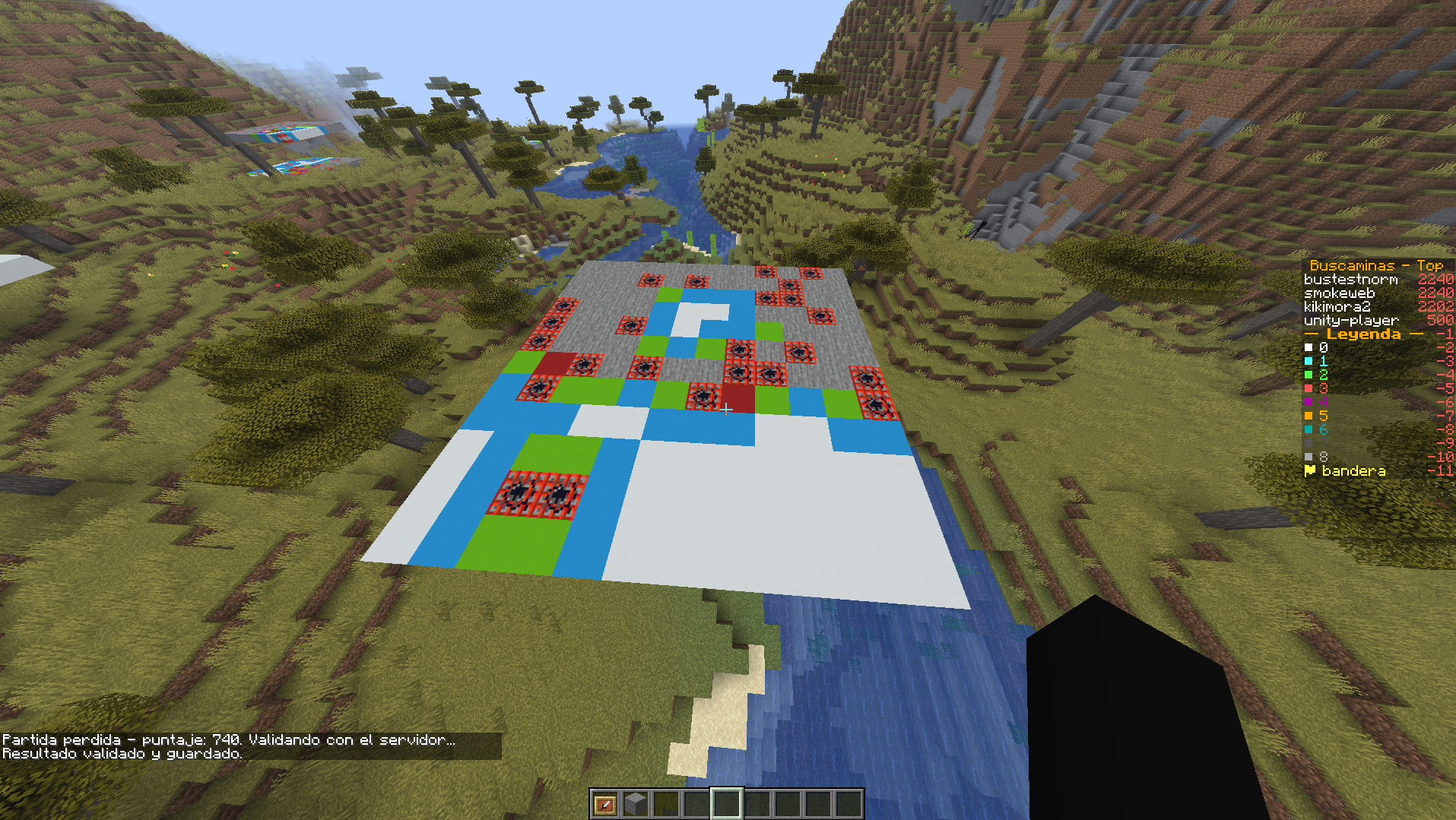
Read this before anything else in this step: Minecraft already has its own real-time multiplayer — every player in the world sees every other player's blocks, chat and presence with no help from Praxsuite. Nothing below is required for the game itself; skip this whole step and Buscaminas still works exactly as described through Step 6. What follows is a bonus integration into the same cross-platform leaderboard/cosmetics system the Roblox, Unity and web versions of this game already share — it was wired up because the pieces already existed, not because Minecraft needed them the way a single-server-per-instance engine without built-in multiplayer would.
Validar Resultado already publishes to the leaderboard:buscaminas bus — you built it in Step 10. The event is called `game_completed` and it fires on every validated game, carrying an esTop3 field in the payload that marks the podium ones. That topic had been publishing to nobody since it was built for the Roblox version; this is where Minecraft becomes the first platform to actually subscribe.
Reliability note: Both shared Automations that publish to the bus (`Validar Resultado` for `gamecompleted
, and the hourlybuscaminas-anunciar-cosmeticofor cosmetic codes) call theEventBusPublishControllerendpoint. Both publish nodes are configured withcontinueOnError: true`, so the leaderboard write and the game's own response are never affected by anything happening on the Event Bus side — a validated result always closes the game and updates the leaderboard regardless. The bus announcement is strictly additive on top of that.*
The requirement that changes how you connect: an ambient session
prax.bus() authenticates by reading client.auth().session() — the same "ambient" session login() installs for a single-user app. assertPlayer deliberately never touches that field (Step 3 of the Implementation guide explains why), so listening to the bus needs a session installed on purpose, with the method built for exactly that:
PraxAuth.Session botSession = praxBus.auth()
        .assertPlayer("minecraft", "buscaminas-server-listener", "Buscaminas Server");
praxBus.auth().adopt(botSession);
adopt(session) installs an already-obtained session as this client's ambient one.
Why this needs its own `Praxsuite` instance
If you called adopt(...) on the same Praxsuite instance your plugin already uses for assertPlayer/endpoints() on real players, every one of those calls would start authenticating as this one bot identity instead of your server key — because the client prefers an ambient session over the configured credential the moment one is installed. That failure is silent and total: not just the bus, everything. The fix is a second, dedicated instance that is never used for anything else:
private Praxsuite praxBus;

private void connectLeaderboard() {
    Bukkit.getScheduler().runTaskAsynchronously(this, () -> {
        praxBus = Praxsuite.builder()
                .workspaceId("your-workspace-uuid")
                .credential("sk_live_...")
                .build();

        PraxAuth.Session botSession = praxBus.auth()
                .assertPlayer("minecraft", "buscaminas-server-listener", "Buscaminas Server");
        praxBus.auth().adopt(botSession);

        PraxChannel channel = praxBus.bus().topic("leaderboard").channel("buscaminas");
        channel.on("game_completed", this::announceGame);
        channel.join();
    });
}
channel.join() throws on a refused join — louder than a refused publish(), deliberately: a dropped publish is one lost message, but a join that silently fails leaves the whole plugin listening to nothing for its entire runtime.
Handlers run on the WebSocket's own thread
private void announceGame(PraxChannel.BusEvent event) {
    if (!(event.payload() instanceof Map<?, ?> payload)) return;
    String alias = String.valueOf(payload.get("alias"));
    Object score = payload.get("puntaje");

    Bukkit.getScheduler().runTask(this, () ->
            Bukkit.broadcastMessage("§6[Buscaminas] §e" + alias + " §7reached the top with §a" + score));
}
Anything that touches Bukkit's API — broadcasting, updating a scoreboard, moving an entity — has to hop back to the main thread first. The payload itself is opaque, unparsed JSON relayed between users; treat it as a hint for display, never as an input to a decision that matters, the same rule that applies to the bus everywhere else in this platform.
A visible leaderboard: the sidebar scoreboard
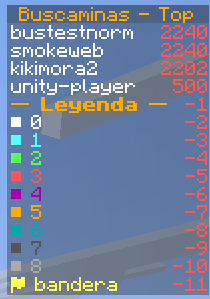
Pair the bus subscription with Bukkit's own sidebar (the panel on the right every player sees) for something players notice without reading chat:
Scoreboard board = Bukkit.getScoreboardManager().getNewScoreboard();
Objective objective = board.registerNewObjective("buscaminas", Criteria.DUMMY, "§6Buscaminas - Top");
objective.setDisplaySlot(DisplaySlot.SIDEBAR);
// assign `board` to every player on join with player.setScoreboard(board)
Populate it once at startup from the (unauthenticated) Leaderboard Endpoint, and repaint it every time announceGame fires — the scoreboard's own numeric score value doubles as the sort key, so setting objective.getScore(alias).setScore(points) for each of the top 10 both displays and orders them correctly with no extra bookkeeping.
A known limitation: token refresh across a long-lived reconnect
The bus reconnects automatically after a network blip, but it rereads whatever session.accessToken() currently holds — it does not refresh it first. A bot identity meant to stay connected for a server's entire uptime should re-assertPlayer and re-adopt on a timer (a BukkitRunnable every few minutes comfortably beats the access token's lifetime), rather than assuming one session survives forever.
Why Local, Not Per-Click Automation Calls
This is the same question the Roblox version of this game answers in its own guide, arriving at a different point on the same trade-off, for a Minecraft-specific reason: a Paper plugin's own tick loop is already low-latency infrastructure that a Roblox RemoteFunction round-trip through the Gateway simply is not competing against on equal footing. The criteria that decide it, generically:
Favors an Automation | Favors local |
Fires rarely (login, opening a game, closing one) | Fires on every player input (a click, a keystroke) |
More than one engine needs the identical result | Only this plugin needs it, or divergence is acceptable for now |
Needs other Praxsuite-side effects in the same transaction (an email, a bus publish, a second table) | The state needed to decide is already complete locally |
You want to change the rule without shipping a new plugin jar | — |
Moving mine placement and flood fill to Java did not remove Praxsuite's authority over the result — Validar Resultado still recomputes everything and can refuse the game outright. What moved is when Praxsuite checks: once, at the end, instead of once per click. That is the whole trade — and it is why Step 6 above is not optional the way it might look; skip it, and "local" quietly becomes "the client just is the authority now."
Common Errors and How to Avoid Them
Error | Cause | Solution |
|
| Call |
Everything else in the plugin starts failing right after the bus connects |
| Use a second, dedicated |
| The local score formula (or the flood fill) diverged from the Automation's script — almost always the score arithmetic. | Diff the Java port against the Automation's Script node line for line; they must produce identical numbers for identical boards. |
| The | Create the topic in the portal under Event Bus, with an access mode that includes any signed-in end user. |
The board draws, but clicking does nothing |
| Filter to |
Production Tips
Reuse the same tables and Automations another platform already built — a shared
Buscaminas Partidasand leaderboard is what makes the cross-platform leaderboard meaningful at all.Assign roles through a token-validating Automation, not a per-provider portal default — it is the version that does not repeat itself for the next platform.
Never let the Event Bus's identity share a
Praxsuiteinstance with anything else.Keep the local game engine a faithful, literal port of the Automation's script. The two are supposed to agree exactly; "close enough" fails silently at
Validar Resultado.Refresh the bus listener's session periodically if it needs to outlive a short access token's lifetime.
The Event Bus leaderboard announcement is a bonus, not a dependency — the core game works exactly the same with or without it, thanks to
continueOnError: trueon the publish nodes.
Next Steps
Add a redeemable-code or cosmetics system the same way the Roblox demo did — as Automations behind Endpoints, reused by every platform.
Extend the Event Bus listener to also relay presence (
onPeerJoined/onPeerLeft) if a cross-platform lobby ever needs it.If some future client cannot have a local engine, build the
Buscaminas: Jugarautomation as well — it resolves one move per call and is documented step by step in the Roblox, Unity and TypeScript guides. It coexists happily with the path this guide takes.
You now have a game whose only trusted client-side logic is exactly the part that had to be, checked against a server that never simply believes it.